
Logging time sounds simple until you factor in the entries filled in from memory, the approvals that stall before payroll, and the corrections that follow.
Multiply that friction across a team, and payroll becomes one of the most time-consuming admin tasks a business runs.
The right timesheet app cuts that overhead significantly. It records hours the moment someone clocks in, applies pay rules automatically, and gives managers a clear view of who has submitted and who hasn’t, before payroll closes.
In this guide, we tested the best timesheet apps in 2026 hands-on, and what follows is an honest breakdown to help you find the one that works for your specific situation.
Best Timesheet Apps Pricing Compared in 2026
|
|||
|---|---|---|---|
| App | Annual Billing | Monthly Billing | What Users Like |
| Jibble | $0.00 (Free Forever for unlimited users) |
|
|
| Connecteam | $29.00 per month for 30 users (additional users at $0.80/user/month) |
$35.00 per month for 30 users (additional users at $1.00/user/month) |
|
| Toggl Track | $9.00 per user per month | $10.00 per user per month* |
|
| Beebole | $9.00 per user per month | $10.00 per user per month |
|
| OnTheClock | ❌ | $4.00 per user per month + $5 base fee |
|
| Tick | ❌ | $19.00 per month for 10 projects, unlimited users |
|
| *Pricing may vary at time of purchase Note: The table shows entry-level rates and may not accurately reflect the overall value of the software. To gauge real value, consider each platform’s features, available monitoring capabilities, reporting tools, user limits, and any additional fees for advanced functionality. |
|||
Jibble – Best Timesheet App for Teams That Need Verified, Fraud-Proof Time Records

Jibble is the best timesheet app that generates timesheets automatically the moment an employee clocks in or out, from mobile, web, desktop, Microsoft Teams, or Slack.
There is nothing to fill in from memory, no manual entry required at the end of the week. Managers can set pay periods, designate approvers, and review or approve timesheets in real time before they go anywhere near payroll.
Where Jibble separates itself from other tools on this list is its accuracy. Its 3D facial recognition blocks photo and video spoofing at clock-in, and its offline mode queues entries locally and syncs when connectivity returns, so field teams don’t produce gaps in their timesheets just because the job site has poor reception.
Timesheets can be filtered, rounded to custom intervals, and exported to payroll tools like QuickBooks, Xero, and Gusto. The free plan covers unlimited users, which is rare at this price point and makes Jibble a serious option for teams of any size.
Pricing:
- Free forever for unlimited users
Can Be Used On:
Desktop, Mobile, Web, Browser Extension, Kiosks
Pros:
- Excellent offline functionality
- Strong and reliable reporting features
- Ability to view everyone’s timesheets in one report
- AI assistant is engaging and helpful
- Free to use
Cons:
- Limited options to customize exports
- Tricky to calculate total hours for specific time periods
“The platform is easy to use, employee management is straightforward, and reporting provides valuable insights. User access controls are simple to manage, and their customer support team is responsive and helpful whenever assistance is needed.” – Maggie W.
(Source: Capterra)
“I would like to be able to run reports for a longer period of time and bulk upload timesheets on occasion.” – Despina P.
(Source: Capterra)
Toggl Track – Best Timesheet App for Agencies and Freelancers Billing by the Hour
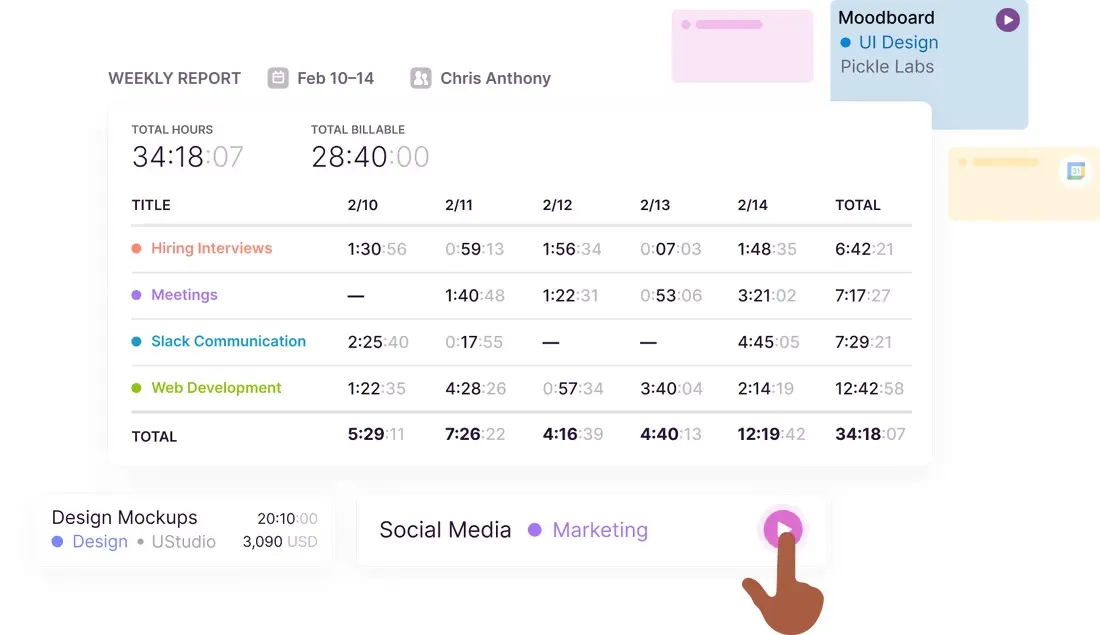
Photo from Toggl Track
Toggl Track is built around the idea that time tracking should create as little friction as possible.
A one-click timer starts logging immediately, and background activity tracking records apps and websites used throughout the day, letting team members review their activity and convert it into timesheet entries without reconstructing their day from memory.
The interface is clean, data is easy to filter by project, client, or team member, and exports go out as PDF, Excel, or CSV.
The approval workflow covers the full cycle: employees submit, managers approve or reject, and entries lock after a set date so no one can retroactively edit a closed billing period.
That said, Toggl Track’s depth beyond core time tracking is limited, and some users find the app becomes clunky after updates. It works best for teams whose primary need is accurate billable hour capture, not workforce management.
Pricing:
- Free for a limited number of users only
- Billed annually: Starts at $9.00 per user per month
- Billed monthly: Starts at $10.00 per user per month. Pricing may vary at the time of purchase.
Can Be Used On:
Mobile, Desktop, Web, Browser Extensions
Pros:
- Well-structured with projects, clients, and tags
- Easy to edit and adjust time entries
- Clean and easy-to-review data for tracking and follow-ups
Cons:
- Limited functionality beyond basic time tracking
- Updates to the app can make it clunky at times
“It’s really easy to use. I love the visualisation of your tracked time and the fact they remind you if you’ve left a timer on for an extended period is really helpful for when 8 forget to turn it off.” – Alexa J.
(Source: Capterra)
“While the time tracking itself works well, it feels somewhat limited beyond that core function. There isn’t a strong way to add detailed context to each entry, so it mainly captures how long was spent rather than what was actually done.” – Chris U J.
(Source: Capterra)
Connecteam – Best Timesheet App for GPS and Geofencing
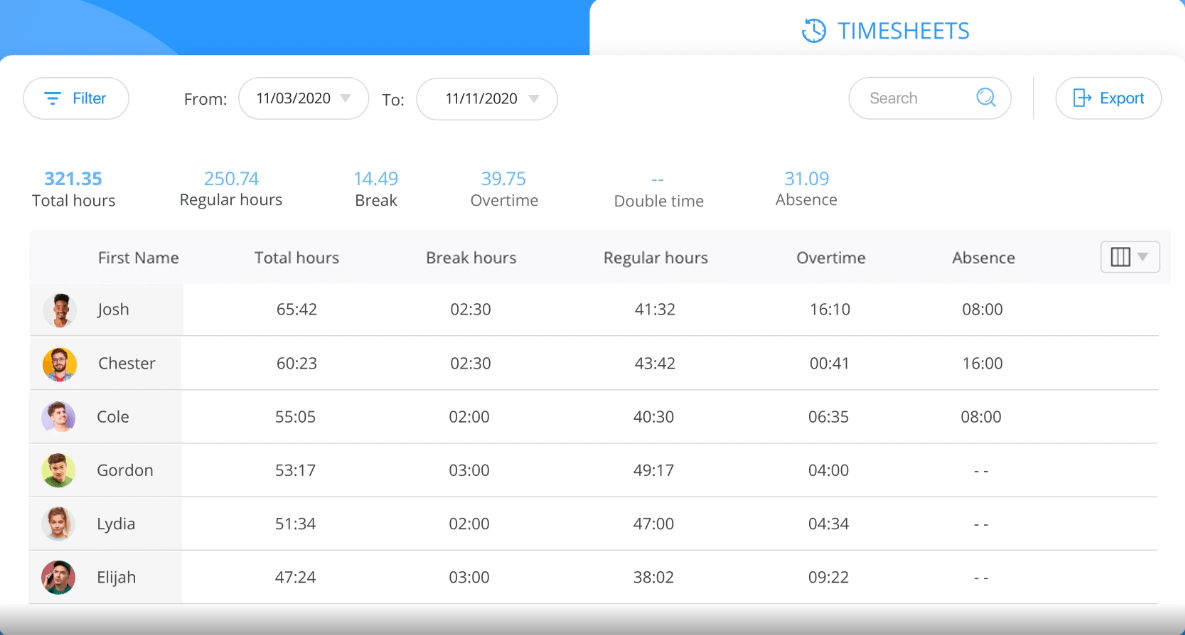
Photo from Connecteam
Connecteam’s core strength is knowing where your employees are when they clock in, and building the timesheet around that certainty.
GPS stamps every clock-in with a verified location, geofencing restricts clock-ins to approved job sites, and breadcrumb tracking records employee routes throughout the shift.
For businesses where time theft and buddy punching are real operational problems, this level of location verification is built into the timesheet by default, not bolted on as an add-on.
Timesheets populate automatically from clock-in data, with pay rules, overtime, and breaks applied without manual calculation.
Approved hours export directly to QuickBooks, Gusto, Paychex, and Xero.
The main caveat is that Connecteam’s GPS-dependent features take a hit in low-reception environments, with some users reporting that breadcrumb tracking and form submissions become unreliable when connectivity is poor.
Pricing:
- Free plan available for up to 10 users
- Billed annually: Starts at $29.00 per month for 30 users. Additional users can be added for $0.8 per month.
- Billed monthly: Starts at $35.00 per user per month for 30 users. Additional users can be added for $1.00 per month.
Can Be Used On:
Mobile, Web, Kiosk
Pros:
- Ability to schedule crew shifts in the app
- Real-time notifications help alert managers when staff are late
- Responsive customer service
Cons:
- Shift swapping process is not straightforward
- Reporting feature can be more robust
“User-friendly platform, we can do a lot of things there, love updates! Love scheduling options for different locations, very easy to use, centralized clock in for all the locations.” – Ksenia S.
(Source: Capterra)
“The app struggles in low‑reception environments, affecting GPS breadcrumbs and form submissions. I wish we had offline capabilities.” – Wilhmenia R.
(Source: Capterra)
Paymo – Best Timesheet App for Project-Based Businesses
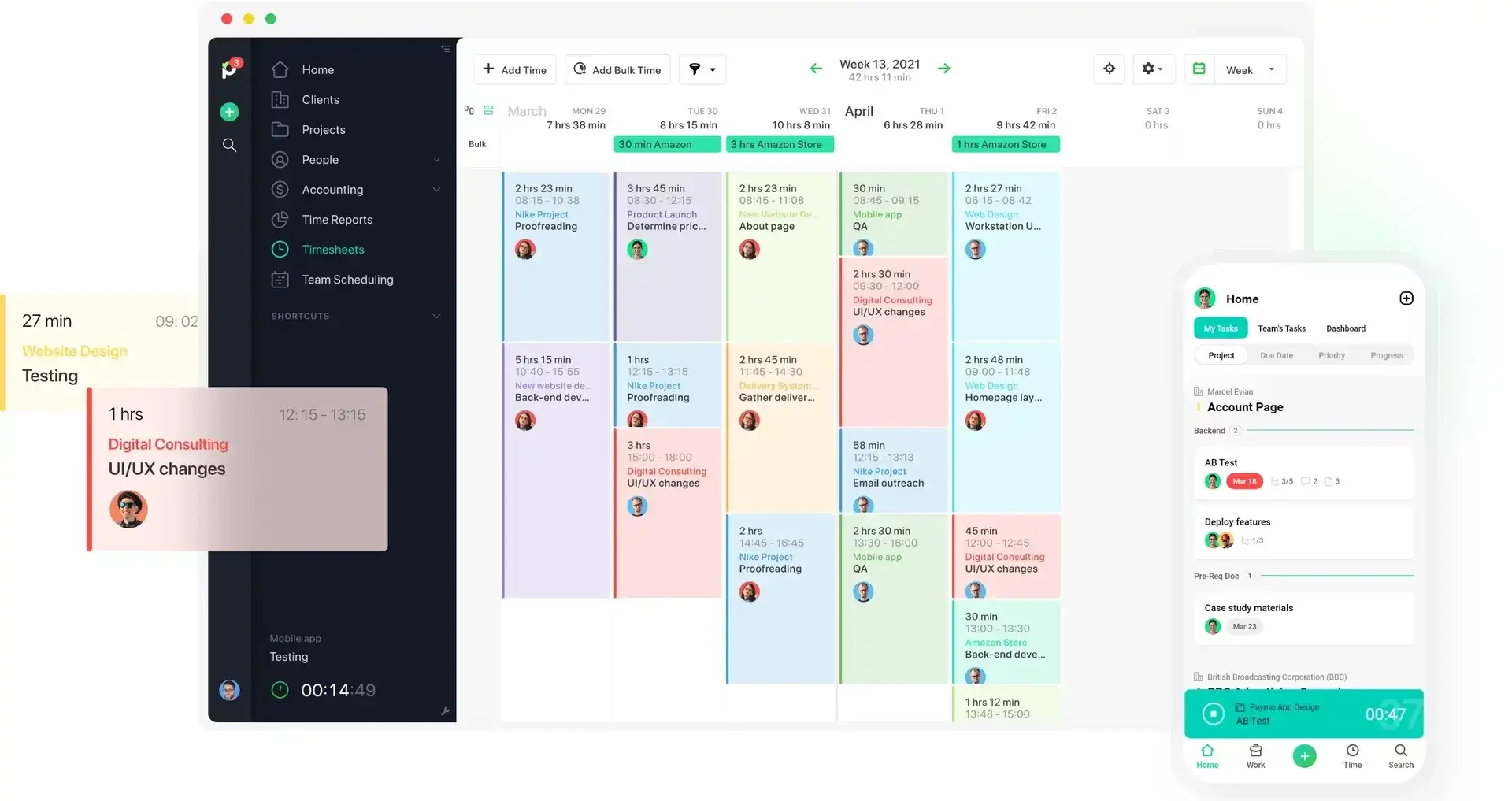
Photo from Paymo
Paymo covers the full project billing cycle in one place. Time entries flow from a web timer, a desktop app, or mobile into timesheets that can be viewed by day, week, month, or agenda layout.
The automatic desktop tracker records every app and browser tab used throughout the day, grouping entries intelligently so you can convert them into timesheet entries without going through a long list line by line.
For anyone who forgets to log time as they go, bulk entry lets you fill in hours for multiple tasks and projects at once.
What makes Paymo stand out in this list is the direct path from timesheet to invoice. Billable hours can be converted into customizable invoices without exporting data into a separate tool, which matters for consultants and agencies billing multiple clients simultaneously.
However, note that timesheet reports are not available on the Solo plan, which is worth checking before committing, and task deletion is permanent with no recovery option for associated time entries.
Pricing:
- Free plan available for 1 user
- Billed annually: Starts at $5.90 for one user per month. For teams with 2 or more users, $10.90 per user per month.
- Billed monthly: Starts at $5.90 for one user per month (increases to $9.90 after 3 months). For teams with 2 or more users, $10.90 per user per month (increases to $15.90 after 3 months).
Can Be Used On:
Desktop, Mobile, Web
Pros:
- Easy to create and manage new projects
- Customizable, well-designed invoices
- Visually appealing interface
Cons:
- No dark mode available
- Timesheet reports not available in the Solo plan
“I like the ease with which I can add a new project, the colour-coding for different clients, the auto-time spent per project calculation, the timesheet layout and, of course, how I can easily create invoices based on the time added to the timesheet.” – Verified User.
(Source: G2)
“If you delete a task by mistake, there is no way to recover it. All previous time entries from that task are gone for good, too.” – Verified User.
(Source: G2)
Tick – Best Timesheet App for Teams With Time Budgets
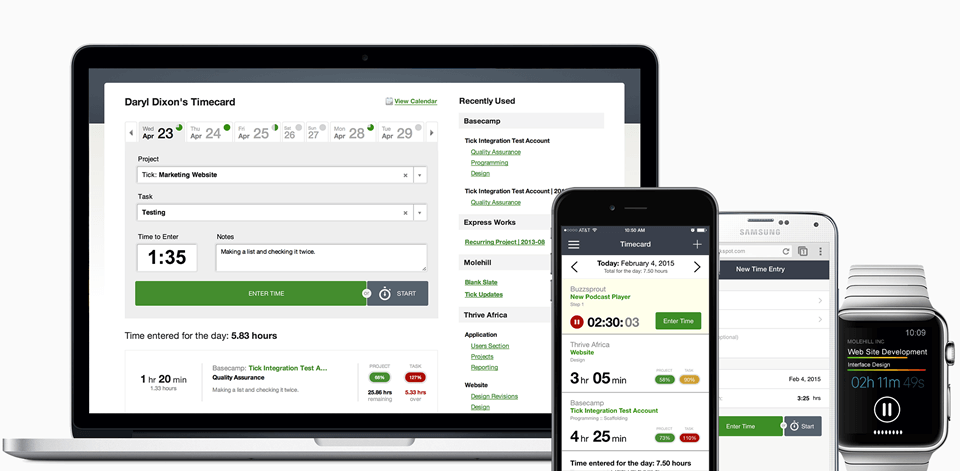
Photo from Tick
Tick approaches timesheets from a profitability angle rather than a pure record-keeping one. Every time entry is submitted against a project and task with a set time budget, and Tick updates the remaining budget in real time so teams know mid-project whether they are on track, not after the fact when it is too late to adjust.
The timecard is intentionally minimal: select a project, select a task, start the timer or enter time manually, and submit.
Reporting runs by person or by client, with the option to drill down without running a separate report, and time data exports to QuickBooks or CSV for invoicing. Tick also integrates natively with Basecamp, which makes it a natural fit for teams already running projects there.
The pricing model charges by active projects rather than per seat, so unlimited users are included on every plan, though that structure can make it expensive for teams running a high volume of concurrent projects.
Pricing:
- Free plan available for one project only for unlimited users
- Billed monthly: Starts at $19.00 per month for 10 projects for unlimited users
Can Be Used On:
Mobile, Apple Watch, Desktop, Web, Browser Extension
Pros:
- Easy to export time entries
- Simplifies invoicing processes
- Integrates easily with other tools
Cons:
- Can be pricey for small teams
- Less reliable for precise time tracking if entries are missed
“A very simple and straightforward software, easy to implement. No more time wasting or unnecessary events, everything is all planned out. With their app, which can be installed on phones made work more easier and effective to provide good results.” – Sammy L.
(Source: Capterra)
“The timer does not let me edit past time records, which is not very important but can be fixed.” – Svetoslav C.
(Source: Capterra)
Beebole – Best Timesheet App for Real-Time Project Cost Visibility
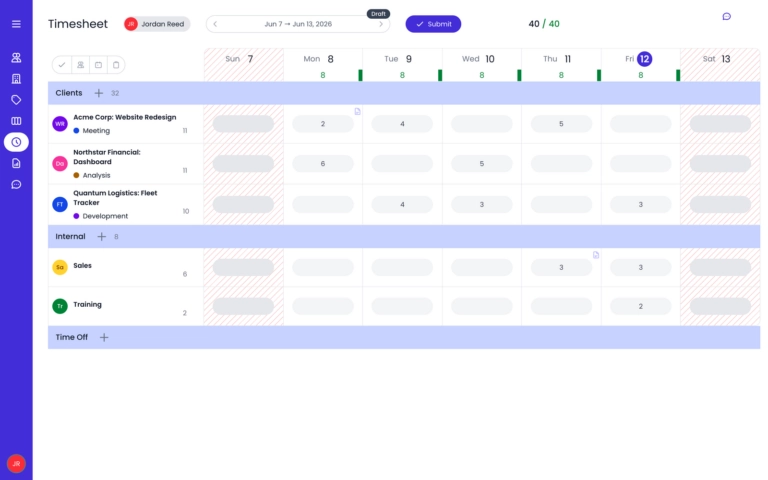
Photo from Beebole
Beebole is a cloud-based timesheet, project time tracking, and resource planning platform. It combines time tracking, resource planning, project financial management, absence management, and multi-stage approval workflows in a single, customizable platform that can be accessed through web browsers on computers and mobile devices.
One of Beebole’s standout features is that it can connect resource planning directly to your timesheets.
Managers can assign work with time estimates to employees in a planning view, and those entries appear pre-populated in each employee’s timesheet. This ensures that deviations between planned and actual hours are visible in real time rather than at month-end.
Beebole allows you to set billing and cost rates at a person, project, task, or tag level. It can also track project expenses against budgets and monitor margins and profitability continuously.
Beebole can turn time-tracking data into customizable reports, which can be exported in CSV, Excel, Google Sheets, and PDF format, as well as push time-tracking data to BI (Business Intelligence) tools for deeper analysis.
It can also integrate with tools like Google Calendar, Microsoft Calendar, Asana, QuickBooks, and BambooHR, while providing API access, compliance features, and a full audit trail on every plan.
However, businesses that need native invoicing may find Beebole less suitable, as it does not include built-in invoicing functionality.
Pricing:
- Free for up to 5 users only
- Billed annually: Starts at $9.00 per user per month
- Billed monthly: Starts at $10.00per user per month
Can Be Used On:
Web
Pros:
- Resource planning in timesheets with real-time visibility into planned vs. actual time usage
- Project financial tracking with customizable cost rates, margins, and profitability monitoring
- Custom roles, unlimited custom fields, and multi-stage approvals
Cons:
- No built-in invoicing
- Free plan limited to five users
“Beebole helps me to see how many hours I spend in different types of work and where time is wasted. It has made project planning and forecasting so much easier and accurate and I have been able to explain my workload needs and resources to my manager more effectively.” – Evgen S.
(Source: Capterra)
“The app has fewer project management capabilities and this calls for advancements of features. The app has a poor mobile functionality and it needs updating.” – Isaac T.
(Source: Capterra)
OnTheClock – Best Timesheet App With Shift Scheduling
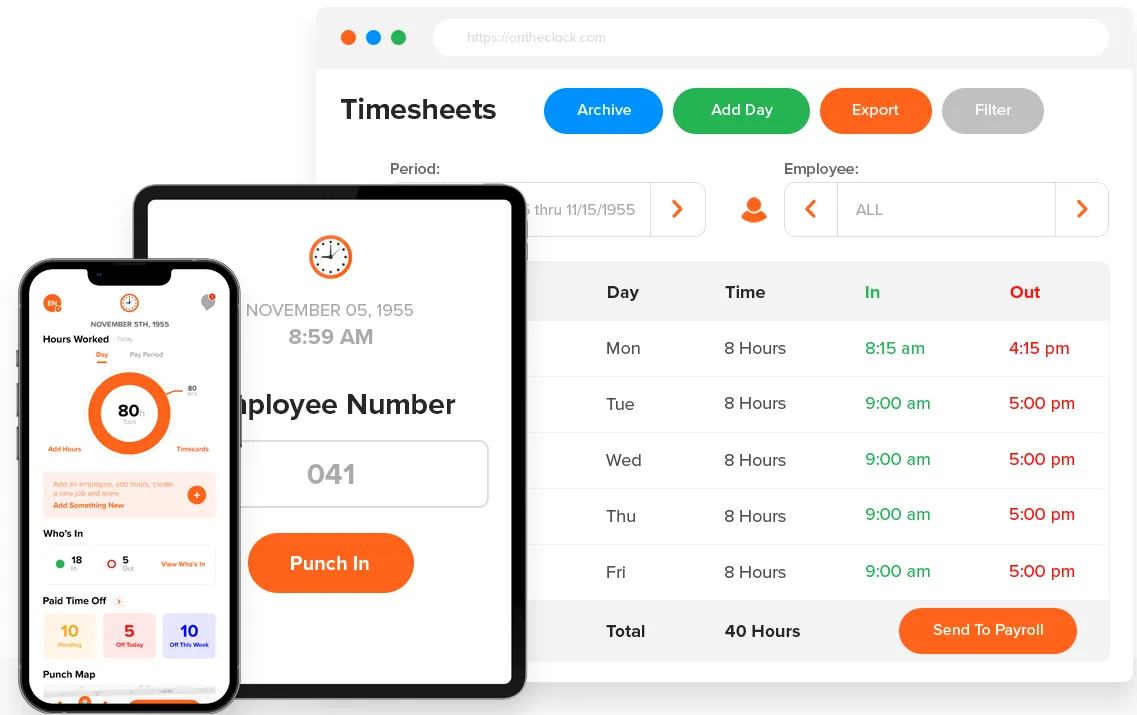
Photo from OnTheClock
OnTheClock is an easy-to-use timesheet app that helps small and mid-sized businesses track work hours with accuracy and ease. Employees can clock in and out from multiple devices, while GPS tracking ensures each entry is verified.
Timesheets update automatically and can be customized into payroll-ready reports, making approvals and processing straightforward.
Beyond core timesheet management, OnTheClock supports shift scheduling, PTO tracking, and automated notifications to remind employees to punch in or out. Approved hours can be exported directly into payroll platforms like QuickBooks, ADP, Gusto, or Paychex, reducing manual work.
While some users mention occasional app crashes and find editing timecards less intuitive, OnTheClock’s functionality may also be limited by the lack of a free plan. Still, it is valuable for its multi-device accessibility and simplicity.
Pricing:
- No free plan, but a 30-day free trial is available
- Billed monthly: Starts at $4.00 per user/month (+$5 base fee)
Can Be Used On:
Desktop, Mobile App, Mobile Browser, Kiosk
Pros:
- Simple clock-ins and clock-outs
- Helpful notifications
- Easy timesheet updates
- Multi-device accessibility
Cons:
- Occasional crashes
- Difficulty logging lunch breaks or adding notes
- Editing or adjusting timecards isn’t always intuitive
“Easy to use, accurate, reliable. Very good program to utilize for timecard management. Would recommend.” – Kai S.
(Source: Capterra)
“It’s too simple at times and it does have a lot of bugs i think because it says to contact support for a lot of the times I use it.” – Anali O.
(Source: Capterra)
What Are the Benefits of a Timesheet App?
- Payroll you can trust: When hours are captured automatically and approved through a structured workflow, the data going into payroll is clean. That means fewer corrections, fewer disputes, and less time spent fixing what should have been right the first time.
- A clearer picture of where time goes: Timesheet data broken down by project, client, or team member shows you exactly where hours are being spent. That visibility is useful for budgeting, staffing decisions, and identifying work that is consistently taking longer than it should.
- Reduced exposure to compliance risk: Accurate, timestamped records with a documented approval trail give businesses the evidence they need if a wage claim or labor audit ever comes up. Spreadsheets and paper timesheets rarely hold up under that kind of scrutiny.
- Less friction at payroll close: When timesheets feed directly into payroll platforms, the end-of-period crunch gets shorter. There is less chasing, less manual data transfer, and less room for the kind of last-minute errors that delay processing.
- Higher adoption across the team: A timesheet app that is genuinely easy to use gets used consistently. Consistent usage means complete records, which means the data is actually reliable rather than a best approximation of what the team got around to logging.
What is the Best Timesheet App in 2026?
Most timesheet apps on this list do the basics well enough. The real differences show up in how they handle edge cases: the field employee with no signal, the manager approving thirty timesheets before payroll closes, the business that needs GPS verification without paying enterprise prices.
That is where a tool either holds up or creates more work than it saves. This is why for most teams, Jibble is the best timesheet app.
The free-forever plan covers unlimited users, time capture is automated, and fraud-prevention features are more robust than anything else available. As a timesheet app, Jibble works reliably across different team sizes, work environments, and payroll setups. It covers more ground than the competition without ever asking you to pay.
If you are unsure where to start, start there.
Looking for the the best time tracking software for your team’s daily operations? Explore the best time tracking solutions of 2026 in our detailed guide.
FAQs
Some frequently asked questions...
A timesheet app is software that records and organizes employee working hours, replacing manual spreadsheets and paper logs. It captures time as employees clock in and out, calculates totals automatically, and produces structured records that feed into payroll, client billing, or project reporting.
Jibble offers the most generous option in this list — it’s free forever for unlimited users, with core time tracking included at no cost. Toggl Track, Connecteam, Tick, and Paymo also offer free plans, though each comes with user, project, or feature limits worth checking before committing.
A time clock records when an employee starts and finishes work. A timesheet app does that and more: it organizes those entries into structured timesheets, applies pay rules and overtime calculations, routes hours through an approval workflow, and exports the data to payroll. Most modern timesheet apps include a time clock as one component of a broader system.
Yes, and this is one of the main reasons businesses switch from spreadsheets to timesheet apps.
Most of the tools in this list have integrations directly with payroll platforms like QuickBooks, Gusto, Xero, ADP, and Paychex, so approved hours transfer without manual re-entry. The strength and reliability of these integrations vary by tool, so it is worth verifying before you commit.
Yes, though the level of support varies by tool. The best timesheet apps for field and deskless workers include mobile clock-in, offline mode, and GPS verification so hours are captured accurately regardless of location or connectivity.
Jibble is the strongest option in this category, with geofencing, kiosk mode, NFC clock-in, and offline tracking that queues entries locally and syncs automatically when connectivity returns, covering teams that work across multiple sites or in areas with unreliable signal.