
Most businesses start tracking vacations with a spreadsheet or a wall calendar.
It works when you have five people. But it falls apart as you grow: someone forgets to update the sheet, two employees book the same week off, HR is doing the same admin on repeat, and nobody knows how many days they actually have left.
A vacation tracker fixes this by automating leave requests, approvals, and balances in one place.
And the market for these tools offers dedicated leave planners, full HR suites with time-off modules bolted on, and time tracking tools that handle PTO as a secondary feature.
Each solves a different problem, and picking the wrong one means paying for features you don’t need or missing the ones you do.
I’ve gone through the best vacation trackers that consistently perform for teams that need a better way to manage time off. These are the 8 worth your attention.
8 Best Vacation Trackers Pricing Compared
|
||
| Software | Pricing | Free Plan |
| Jibble | $0.00 | ✅
FREE FOREVER for unlimited users |
| Timetastic | $1.50 per user per month | ❌ |
|
AttendanceBot |
$4.00 per user per month |
✅ Up to 5 users |
| Deel | $5.00 per user per month | ❌ |
| Buddy Punch | $4.49 per user per month + $19 base fee | ❌ |
|
Time off Manager 365 |
~$1.60 per user per month* |
✅ Up to 5 users |
| Vacation Tracker | $2.00 per user per month (minimum spend $50 required) |
❌ |
| BambooHR | $10.00 per user per month |
❌ |
|
*Based on $79.99 per month for 50 users, billed annually. |
||
Best Vacation Tracking Software by Use Case |
||
| Best Value for | Software | Why It’s a Good Fit |
| Growing teams needing a free scalable vacation tracker | Jibble |
|
| Teams that need built-in HR management | BambooHR |
|
| Teams wanting simple leave management | Vacation Tracker |
|
|
Teams already using Slack or Microsoft Teams |
AttendanceBot |
|
| Small to mid-sized businesses needing PTO + attendance tracking | Buddy Punch |
|
| Teams prioritizing employee well-being | Timetastic |
|
| Global remote teams needing payroll + leave management | Deel |
|
| Microsoft 365-based organizations | Time off Manager 365 |
|
Jibble – Best Vacation Tracker for Growing Teams on a Budget
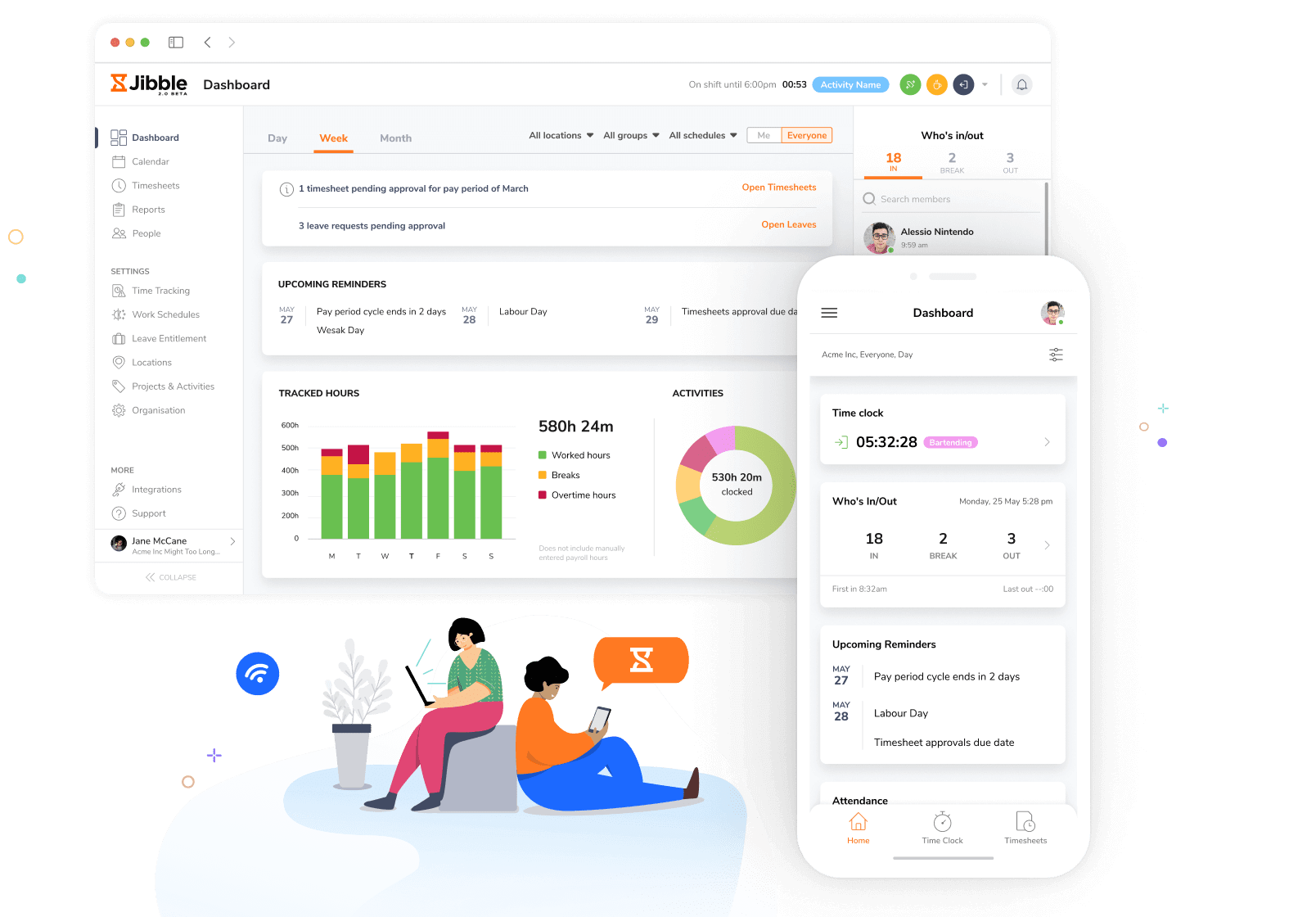
Photo from Jibble
Jibble is a comprehensive vacation tracker that simplifies the process of recording and tracking employee vacations.
With its suite of features and cutting-edge technology, Jibble takes the hassle out of recording and tracking employee time off, making it suitable for companies of all sizes. Employees can clock in and out using their mobile, desktop and tablet devices.
Jibble offers powerful leave management capabilities, streamlining the process of requesting, approving, and tracking employee time off.
Jibble also includes advanced features such as real-time GPS tracking and geolocation monitoring for complete visibility over a mobile workforce.
The face recognition attendance feature adds an extra layer of security and efficiency to the vacation and time tracking process.
The mobile app enables attendance recording from any location, even offline, with subsequent synchronization to the database. Beyond vacation tracking,
Jibble provides dedicated customer support throughout onboarding and beyond, along with flexible pricing options, including a fully functional free edition.
Independently rated as the highest-rated vacation tracker app based on aggregate reviews across Capterra, GetApp, G2, the App Store, and Play Store, Jibble stands out as the best vacation tracker for businesses of all sizes.
Pricing:
- Free Forever for an unlimited number of users
Available on:
Desktop, Mobile, Kiosk, Chrome Extension, Web
Ratings:
- Capterra: 4.8/5
- G2: 4.8/5
- Play Store: 4.7/5
- App Store: 4.8/5
Pros:
- Free forever for unlimited users
- Easy to use
- Feature-rich software
- Excellent customer support
- Accurate time-tracking due to facial recognition and GPS tracking
Cons:
- This unfamiliar and bewildering sensation from the sudden surge in employees’ productivity
“I primarily use Jibble for clocking in and clocking out, tracking my hours worked, and managing time off. I like the ease of use and simplicity, which make it convenient and easy to remember.” – Kyle O.
(Source: G2)
“Sometimes the system is down. It doesn’t happen very often, but when it does, it can be a bit inconvenient.” – Filipe C.
(Source: G2)
BambooHR – Best Vacation Tracker with Built-In HR Management
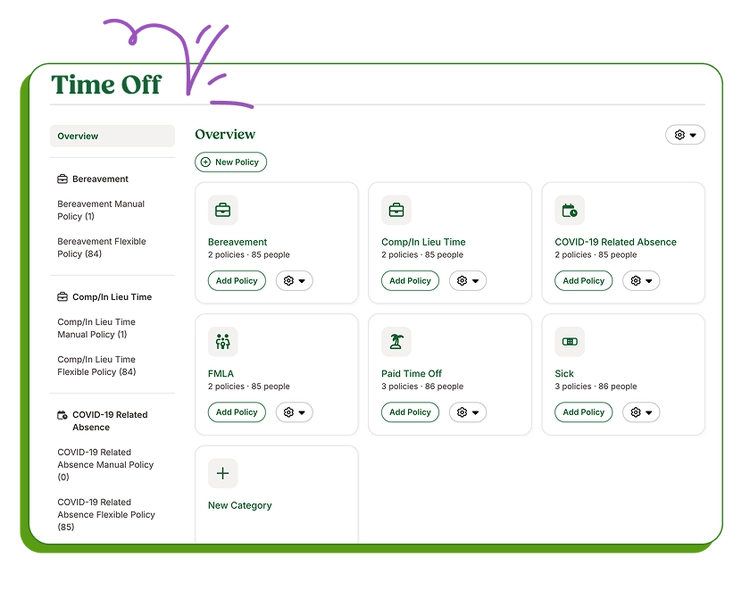
Photo from BambooHR
BambooHR is a vacation tracker designed for businesses that want leave management integrated directly into a broader HR system that also includes time tracking, hiring, onboarding, reporting, payroll, and performance management.
Employees can request vacation, sick leave, holidays, and other types of PTO through the mobile app or the self-service portal. They can also calculate their PTO balances and accruals through the platform’s time-off calculator.
Streamlining the process for managers as well, BambooHR ensures no leave request goes unnoticed. Managers can view and approve all employee requests directly from the mobile app, giving them the flexibility to manage their team from anywhere.
Additionally, BambooHR includes a built-in “Who’s Out” calendar that gives team members visibility into their own and other members’ upcoming leaves and absences, helping avoid scheduling conflicts.
BambooHR also supports custom leave policies for different departments, office locations, leave types, and employee categories (including full-time, part-time, hourly, and salaried workers) making it suitable for businesses with more complex PTO requirements.
The platform generates time-off reports that help teams spot PTO trends and identify potential burnout risks early.
At the end of each month, approved time off automatically syncs with BambooHR Payroll and can also be integrated with payroll and accounting platforms like Deel and Xero, helping reduce manual admin work.
While most of BambooHR’s time-off functionalities are included in its Core plan, many broader HR capabilities can only be acquired as add-ons. Features such as time tracking, payroll management, shift scheduling, and automated approval workflows come at an extra cost, which can make the platform expensive for businesses looking for a fully integrated HR solution.
Pricing:
- Free Plan: No
- Pro Plan: Starts at $10.00 per user/month (Some features require add-on services)
Available on:
Web, Mobile, Kiosk, Physical Time Tracking Devices
Ratings:
- Capterra: 4.6/5
- G2: 4.4/5
- Play Store: 4.7/5
- App Store: 4.8/5
Pros:
- Time off requests automatically route to managers without any follow-up
- Centralizes employee records, PTO, onboarding, and performance management in one place
- Responsive customer support when issues arise
Cons:
- Dashboard doesn’t surface key info like weekly hours, holiday accruals, or pay dates upfront
- Reporting features are limited
“What I like best about BambooHR is how user-friendly and organized the platform is. It makes managing employee information, onboarding, time-off requests, and overall HR processes very straightforward and efficient.” – Elvis Z.
(Source: G2)
““One area where BambooHR could improve is in advanced customization and reporting flexibility. While the platform is very user-friendly, some workflows and reports can feel limiting for organizations with more complex HR processes.” – Muhammad O.
(Source: G2)
Vacation Tracker – Best Vacation Tracker for Simple Leave Management

Photo from Vacation Tracker
Vacation Tracker‘s leave management software brings PTO requests, approvals, balances, and team calendars into one connected system that integrates with the tools teams already use, so time-off data doesn’t get lost across shared spreadsheets or email threads.
With Vacation Tracker, employees can request time off from Slack, Microsoft Teams, Google Workspace, the web app, or iOS and Android mobile apps, with each request routed to the right approver based on rules set at the location or department level.
For each employee, accruals, carryovers, time off in lieu, and brought-forward days are calculated automatically, with rules defined per location to match local policies.
Leave can be tracked in full days, half days, or hours. You can also use Vacation Tracker to configure multiple leave types, such as vacation, sick, parental, or even custom ones, each with its own entitlement and rules.
Once an employee’s leave is approved, the software’s Team Calendar gives managers a live view of who’s away, syncs to Google or Outlook without manual entry, and feeds reports that cover leave history, balances, and audit logs, with optional scheduled delivery to HR or finance.
Vacation Tracker also connects to ADP, Zapier, and AI assistants, so leave data flows into the rest of your workflow without you having to chase it down.
Vacation Tracker is built specifically for leave management, not as a full HRIS. This makes it easy to set up and adopt. But teams looking for payroll or performance management in the same tool will need to pair it with their existing systems.
Pricing:
- Free Plan: No
- Paid Plan: Starts at $2.00 per user per month, billed monthly (minimum $50.00 spend required)
Available on:
Mobile, Web, Slack, Teams
Ratings:
- Capterra: 4.7/5
- G2: 4.4/5
- GetApp: 4.7/5
- Software Advice: 4.7/5
Pros:
- Supports direct leave management between managers and employees
- Handles complex leave policies, including accruals, carryovers, TOIL, and multi-location rules
- Integrates with tools like Slack, Microsoft Teams, and Zapier, as well as AI assistants
Cons:
- Focused on leave management only, so it won’t replace a full HRIS
- The visual interface could feel more modern
“We were looking for a lightweight vacation management solution that could seamlessly integrate with the applications we already use, and Vacation Tracker turned out to be the perfect fit. Overall, a great solution for teams looking for a simple, effective, and well-integrated leave management tool.” – Joel F.
(Source: G2)
“While Vacation Tracker is generally easy to use, some customization options—like setting unique leave policies for different teams or more flexible reporting—could be improved. It would also be helpful to have more detailed notifications or reminders for managers when approvals are pending.” – Rj A.
(Source: G2)
AttendanceBot – Best Vacation Tracker for Slack and Teams Users
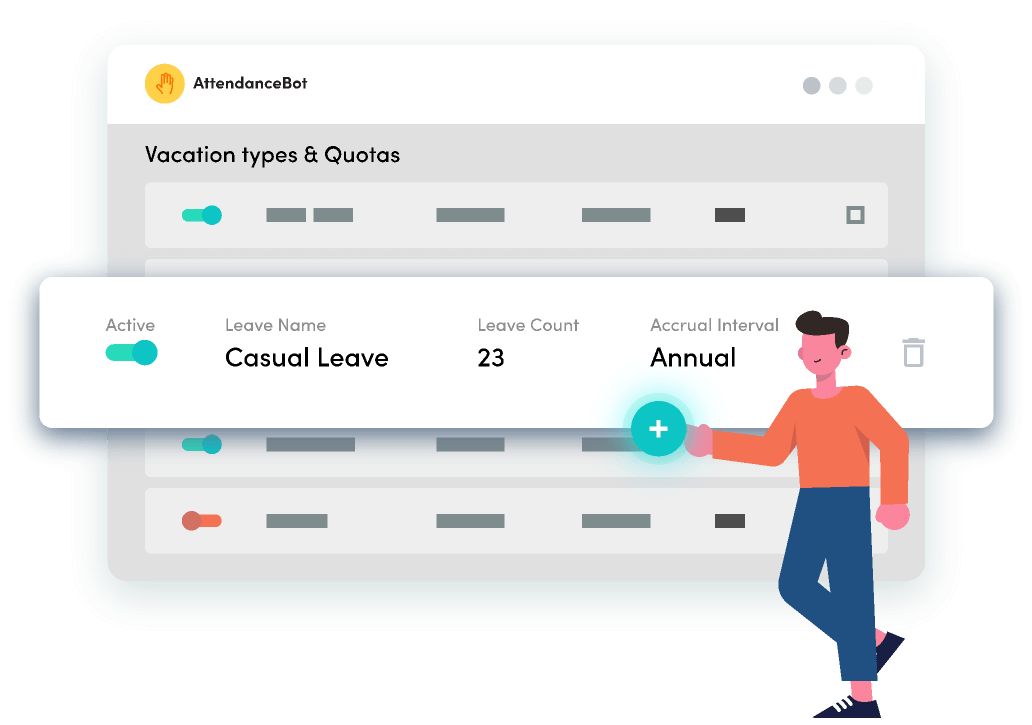
Photo from AttendanceBot
AttendanceBot is an intuitive vacation tracker built for teams that work in Slack or Microsoft Teams.
The software has a clean interface and is fairly easy to set up. With AttendanceBot, HR teams can manage PTO, sick leave, and local holidays across offices, while managers get real-time visibility into balances and upcoming absences through a shared dashboard.
Customizable leave types, accruals, quotas, and multi-level approvals allow users the flexibility to match company policies with ease.
These leaves can all be seamlessly managed right from a team’s daily chat workflows. Employees can simply message “sick today” or “on leave tomorrow,” and managers can approve requests in real time; no separate app or login is required.
Approved time off requests are synced with Google and Outlook calendars, and the software sends daily summaries of who’s out, and keeps everyone updated with instant notifications. The platform can also send out reminders for employees to check-in on time.
AttendanceBot also includes time tracking, timesheets, and shift scheduling, which makes it a solid option for employee attendance management.
Pricing:
- Free Plan: Yes, for up to 5 users
- Paid Plan: Starts at $4.00 per user per month, billed annually
Available on:
Web, Slack, Teams
Ratings:
- Capterra: 4.5/5
- G2: 4.6/5
- GetApp: 4.5/5
- Software Advice: 4.5/5
Pros:
- Clean UI
- Reminders for check-ins
- Quick set up
- Seamless Slack and MS Teams integration
Cons:
- Learning curve for some features
- Limited localization
“AttendanceBot’s integration with Slack is a big strength. Being able to manage leave and see team availability directly within a tool we already use daily makes adoption easy and keeps everything in one place.” – Kylie D.
(Source: G2)
“Reporting and customization could be a bit more advanced, especially for teams with more complex schedules.” – Verified User in Marketing and Advertising
(Source: G2)
Buddy Punch – Best Vacation Tracker for Small to Mid-Sized Businesses
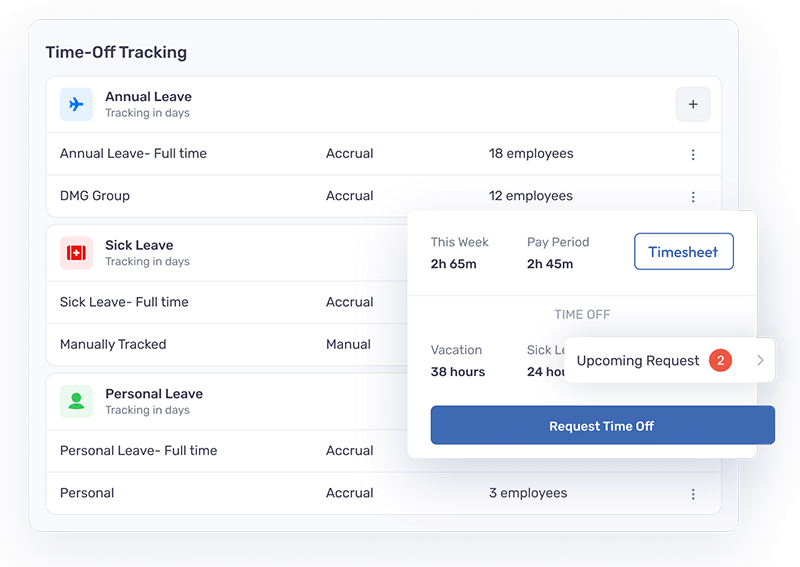
Photo from Buddy Punch
Buddy Punch is a strong vacation tracker for small to mid-sized businesses that need attendance tracking and leave management combined.
Managers can create different leave types like vacation, sick, personal, and holiday leave, configure them to be paid or unpaid, and assign them to teams as needed. Hourly, weekly and annual PTO accrual is also supported based on your custom policies
For busy periods, they can choose specific dates to either block or automatically reject any leave requests.
All scheduled employee leave can be viewed with a shared calendar, which provides a bird’s-eye view of planned leaves and potential scheduling conflicts.
The platform’s PTO reports display carryover balances, total holiday time accrued, PTO used within a given timeframe, and remaining balances, filterable by date and employee.
BuddyPunch also offers drag-and-drop scheduling as well as payroll calculations, including direct deposits and tax filings.
However, users report that the software sometimes presents difficulties on the mobile app.
Pricing:
- Free Plan: No
- Paid Plan: Starts at $4.49 per user per month + $19 monthly base fee
Available on:
Desktop, Mobile, Web, Chromebooks (Dedicated ChromeOS app available)
Ratings:
- Capterra: 4.8/5
- G2: 4.8/5
- GetApp: 4.8/5
- Software Advice: 4.8/5
Pros:
- Facial recognition attendance
- Smooth functioning web version
- Helpful features for on-the-move teams
Cons:
- Mobile app is limited
- Punching out difficulties
- Time cards can be time-consuming
“Easy user interface, Simplifies the time card process especially when you have a lot of employees. Also, very easy to set up and very easy to get employees working with it.” – Emily H.
(Source: G2)
“There aren’t a lot of major downsides, but some features could be more customizable. For example, reports sometimes feel a bit limited if you want very specific data.” – Melvin B.
(Source: G2)
Timetastic – Best Vacation Tracker with Employee Well-Being Features
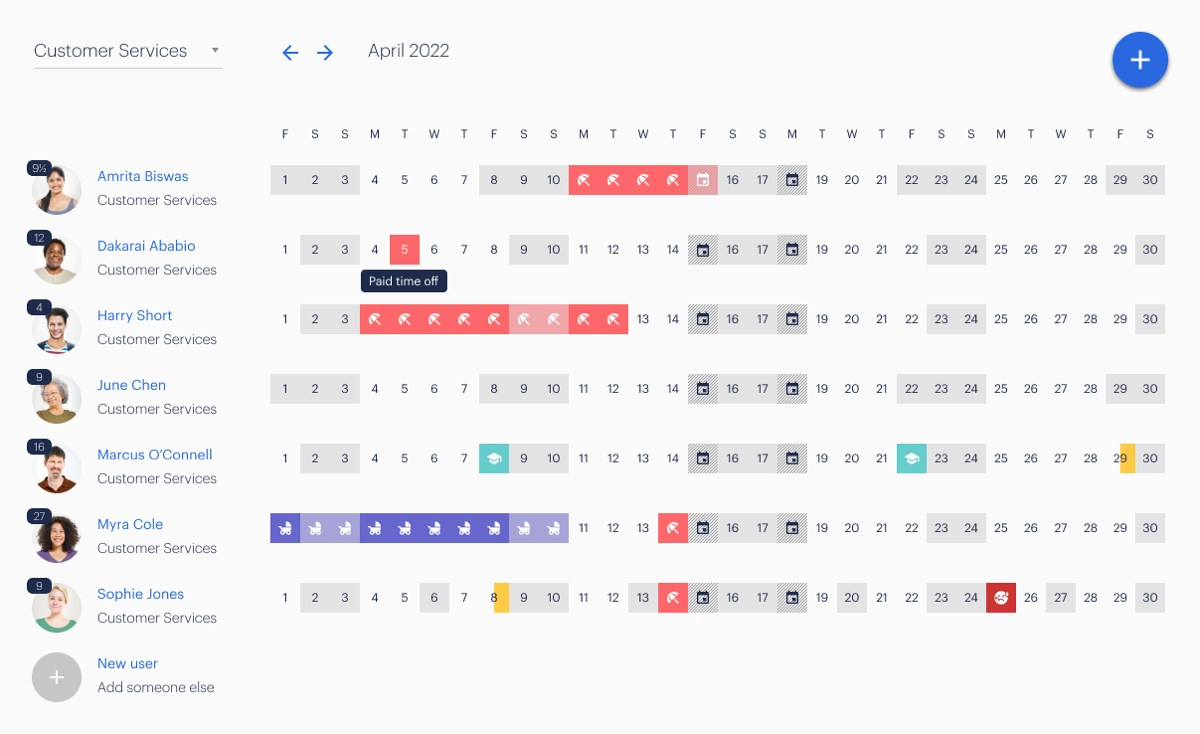
Photo from Timetastic
Timetastic is a UK-based vacation tracker with a centralized system for booking and tracking employee time-off.
With Timetastic, each employee gets their own time off calendar that displays annual leave, real-time balance updates, and visibility into who else is off.
The software integrates with Google Calendar, Outlook, and Slack so all time-off data is updated automatically the moment a leave request is accepted.
Managers receive scheduled daily and weekly mails that show who’s off on a particular day or week, keeping them on top of employee availability without needing to log in.
On the Pro plan, Timetastic offers a Burnout Board, that shows managers which team members are overdue for leave to prevent burnout and promote employee well-being.
That said, some of Timetastic’s reporting features are limited, and the software does not provide much flexibility in its leave approval workflows.
Pricing:
- Free Plan: No
- Paid Plan: Starts at $1.50 per user per month, billed monthly
Available on:
Desktop, Mobile, Web
Ratings:
- Capterra: 4.7/5
- G2: 4.6/5
- Play Store: 4.5/5
- App Store: 4.8/5
Pros:
- Easy to request holidays/time off
- Provides a clear overview of remaining holidays
- Simple and visual interface
Cons:
- Some basic features are locked behind the pro subscription
- Less flexibility in approval workflows
- Reporting features are limited
“I use Timetastic for holiday and sick leave planning. I love the weekly emails you get to inform you of any absence within the team.” – Lisa K.
(Source: G2)
“There’s quite an early cutoff for changing plans on the day. I’d like it to be a bit more flexible so you can change daily plans until 9am.” – Nadia W.
(Source: G2)
Deel – Best Vacation Tracker with Built-in Payroll Processing
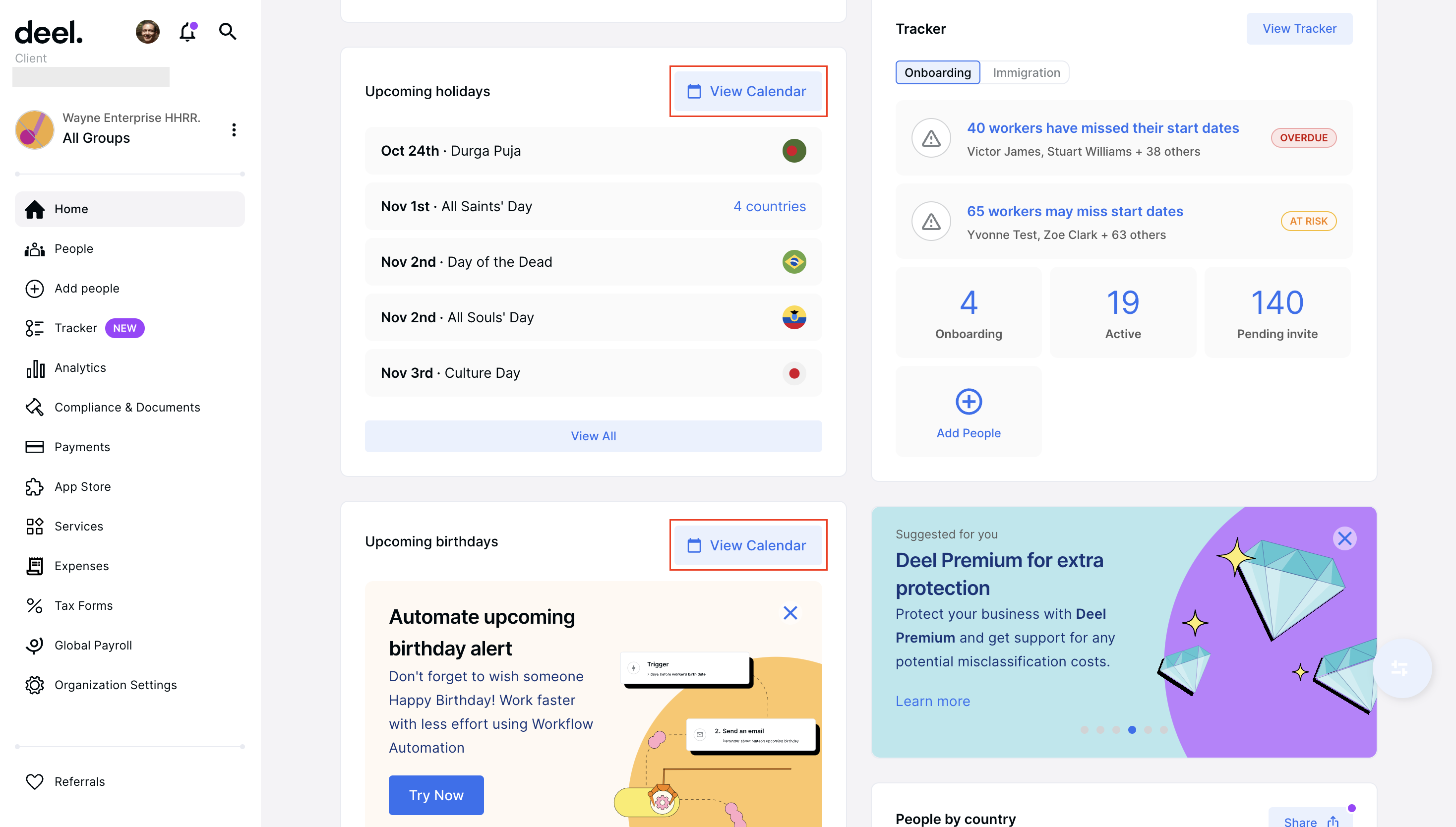
Photo from Deel
Deel is a global HR and payroll platform built for distributed teams with vacation tracking features that are embedded within a broader compliance and contractor management system.
Employees can submit, amend, or cancel time-off requests directly from the Deel platform.
Its PTO plugin also lets employees request leave directly from Slack or Microsoft Teams and automatically updates Slack statuses when someone is away.
Time-off information for employees can be viewed in a glance with Deel’s dashboard, allowing managers to spot potential compliance risks such as outstanding policy violations.
Deel also automatically recognizes weekends and public holidays as per the laws of each country or locality, ensuring those days are not deducted from leave balances.
For payroll processing, Deel can handle compliance, multi-currency payments, and tax filings for over 100 countries. Any local tax rules, statutory requirements, and filings apply automatically before each payroll run.
On the downside, Deel has limited integrations and some users report that the software causes occasional payment delays with slow processing.
Pricing:
- Free Plan: No
- Paid Plan: Starts at $5 per user per month, billed monthly
Available on:
Desktop, Web, Mobile, Slack, Teams
Ratings:
- Capterra: 4.8/5
- G2: 4.7/5
- GetApp: 4.9/5
- Software Advice: 4.9/5
Pros:
- Easy invoice creation for clients
- Simple time-off request management
- Suitable for managing global payroll operations
Cons:
- Document verification process can be slow to start
- Occasional payment delays and slow processing
- Limited integrations
“Great experience and would recommend to others. Easy invoicing, time off, and a great platform for communicating with your clients.” – Sourjesh
(Source: Capterra)
“High costs and complex pricing, slow customer support and platform performance issues, limited customization in certain workflows, and the potential need for third-party integrations for advanced features.” – Brinda
(Source: Capterra)
Time off Manager 365 – Best Vacation Tracker for Microsoft 365 Users
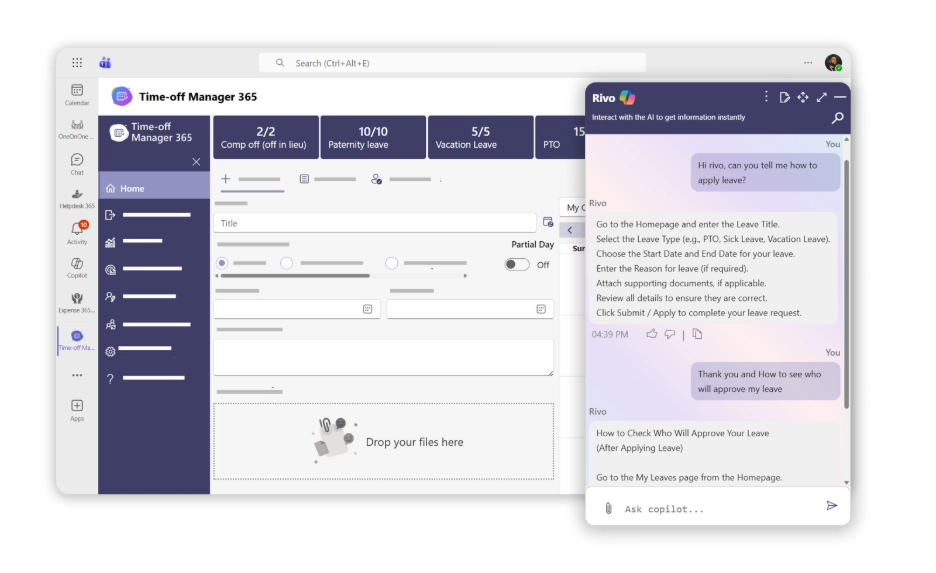
Photo from Time off Manager 365
Time off Manager 365 is a reliable cloud-based leave management software that helps organizations track employee absences with accuracy and transparency.
Built to work within Microsoft 365 and SharePoint, it allows HR teams to manage leave requests, approvals, and balances from one centralized platform. With Microsoft Copilot integration, users can quickly access leave insights, summaries, and updates. Real-time notifications keep employees and managers informed about request updates and leave availability.
The software can be used to plan team availability using shared calendars and simple dashboards that display upcoming leave and absence trends. It also supports customizable leave types and policies, multi-level approval workflows, and detailed reporting. These insights help HR teams monitor employee leave patterns and maintain better workforce planning.
With Time off Manager 365, employees can easily submit leave requests and check their leave balances through a user-friendly web and mobile interface. Managers receive instant alerts to review and approve requests quickly, keeping leave management structured and easy to manage.
Pricing:
- Free Plan: Yes, for up to 5 users
- Paid Plan: Starts at $79.99 per month, billed annually (~$1.60 per user per month)
Available on:
Web, Mobile, Desktop, Tablets
Ratings:
- G2: 4.8/5
- Microsoft Marketplace: 5/5
- Appsource: 5/5
Pros:
- Microsoft 365 and Teams integration
- Easy leave request and approval process
- Clear dashboards and shared calendars
- Real-time notifications and alerts
- Copilot-powered insights and reporting
Cons:
- Fewer report customization options
- Limited localization support across different regions
- Lack of advanced dashboard personalization
What Features Should A Good Vacation Tracker Have?
Here are some features to consider when picking a vacation tracker for your team:
- Leave request and approval workflows: Employees should be able to submit requests digitally and managers should be able to approve or reject them in real time, with a full history of every request on record.
- Automated accruals and balance tracking: The tool should calculate earned leave automatically based on your policy rules and keep balances updated without any manual admin input.
- Public holiday calendars: If your team spans multiple regions, the tracker needs to recognize local public holidays per location and exclude them from leave deductions automatically.
- Calendar and payroll integration: Time-off data should feed directly into the tools your team already uses, keeping availability accurate and ensuring approved leave shows up in timesheets without duplicate entry.
- Reporting and visibility: Managers need a clear view of who is off, when, and for how long, with exportable reports on balances, usage, and trends to stay on top of workforce planning.
So, What is the Best Vacation Tracker in 2026?
Every tool on this list solves the vacation tracking problem, but they do it for different types of teams.
Deel makes sense if you are managing a global workforce and need compliance built in.
Timetastic is a clean, no-fuss option for smaller teams that just need leave planning done right.
Buddy Punch works well when you need time tracking and PTO management under one roof.
However, Jibble is the best vacation tracker that covers the most ground for the widest range of teams: it handles leave management, time tracking, payroll-ready timesheets, and attendance management, while being completely free for unlimited users. For most growing teams, that combination is hard to beat.
That said, the right pick depends on your team size, budget, and how much of your HR stack you want one tool to replace.
Take the time to test a few before committing.
FAQs
Some frequently asked questions...
Vacation tracking software is a specialized tool that simplifies and automates the process of recording and managing employee vacation time and leave requests.
It replaces manual methods like paper forms and spreadsheets and provides a centralized platform for employees to request time off. Managers can review, approve or deny requests, and HR teams get to maintain accurate records.
A vacation tracking software improves efficiency, reduces errors, and improves workforce management.
Tracking employee vacations effectively requires clear policies, reliable tools, and consistent processes.
Start by defining the types of leave your organization recognizes, such as sick leave, annual leave, vacation time, and public holidays, along with rules around entitlements and approvals.
A centralized system keeps everything visible and up to date, eliminating manual spreadsheets and reducing errors.
The best vacation tracking systems allow employees to submit requests digitally, managers to approve them in real time, and both parties to access everything from any device.
Regularly reviewing leave and vacation data also helps identify trends and ensure compliance with company policy.
There sure is! Jibble’s vacation tracking software is 100% free for an unlimited number of users.
Jibble enables you to create multiple time off policies, implement time off approval workflows, and manage employee time off and balances in one place.