
Employee monitoring software often gets associated with micromanagement. But the best tools aren’t designed to track every click for oversight or control.
Instead, they help business owners and supervisors answer practical questions: Are employees overloaded with work? Are projects staying on track? Are field teams where they’re supposed to be, or are there potential security risks that need attention?
As workplaces have become increasingly distributed, employee monitoring software have evolved far beyond basic screenshot and keyboard tracking.
Modern platforms can help businesses monitor employee productivity, track attendance, manage schedules, verify employee locations, analyze workforce performance, and even detect insider threats or compliance issues.
Choosing the right solution for your business depends largely on what kind of visibility your business needs and how you intend to use the information.
So, to help you pick the best employee monitoring software in 2026, I reviewed and compared the top tools based on their monitoring capabilities, time-tracking features, reporting tools, ease of use, pricing, and overall value.
How is Employee Monitoring Different From Micromanagement?
Employee monitoring and micromanagement are not the same thing. The difference between them comes down to how monitoring data collected from an employee monitoring tool is used.
Employee monitoring can help businesses:
- Identify attendance issues and recurring absenteeism
- Understand how employee spend their work hours with task and project time tracking
- Spot productivity bottlenecks and workflow inefficiencies
- Improve workforce planning and resource allocation
- Verify attendance and location data for remote or field employees
- Detect potential compliance, security, or insider risk concerns
However, employee monitoring practices can start to feel like micromanagement when managers:
- Focus excessively on individual screenshots or activity logs
- Question employees about every idle period or productivity fluctuation
- Use monitoring data to control day-to-day behavior rather than to improve outcomes
- Measure success based solely on activity levels instead of work results
- Create an environment where employees feel constantly watched
Employee monitoring shouldn’t tip into micromanagement because its real goal is visibility and accountability, not constant surveillance. Learn more about the pros and cons of employee monitoring before implementing it in your team.
Best Employee Monitoring Software Pricing Compared in 2026 |
||
|---|---|---|
| Software | Pricing | Key Features |
| Jibble | $0.00 (Free Forever) |
|
| WebWork | $3.99 per user per month |
|
| Apploye | $4.50 per user per month |
|
| Hubstaff | $4.99 per user per month |
|
| TMetric | $5.83 per user per month |
|
| Traqq | $6.00 per user per month |
|
| DeskTime | $6.42 per user per month |
|
| Monitask | $6.49 per user per month |
|
| Time Doctor | $6.67 per user per month |
|
| Insightful | $8.00 per user per month |
|
| ActivTrak | $10.00 per user per month |
|
| Teramind | $14.00 per user per month |
|
| Veriato | $18.00 per user per month |
|
| Note: The table shows entry-level rates and may not accurately reflect the overall value of the software. To gauge real value, consider each platform’s features, available monitoring capabilities, reporting tools, user limits, and any additional fees for advanced functionality. | ||
Jibble – Best Employee Monitoring Software for Unlimited Users
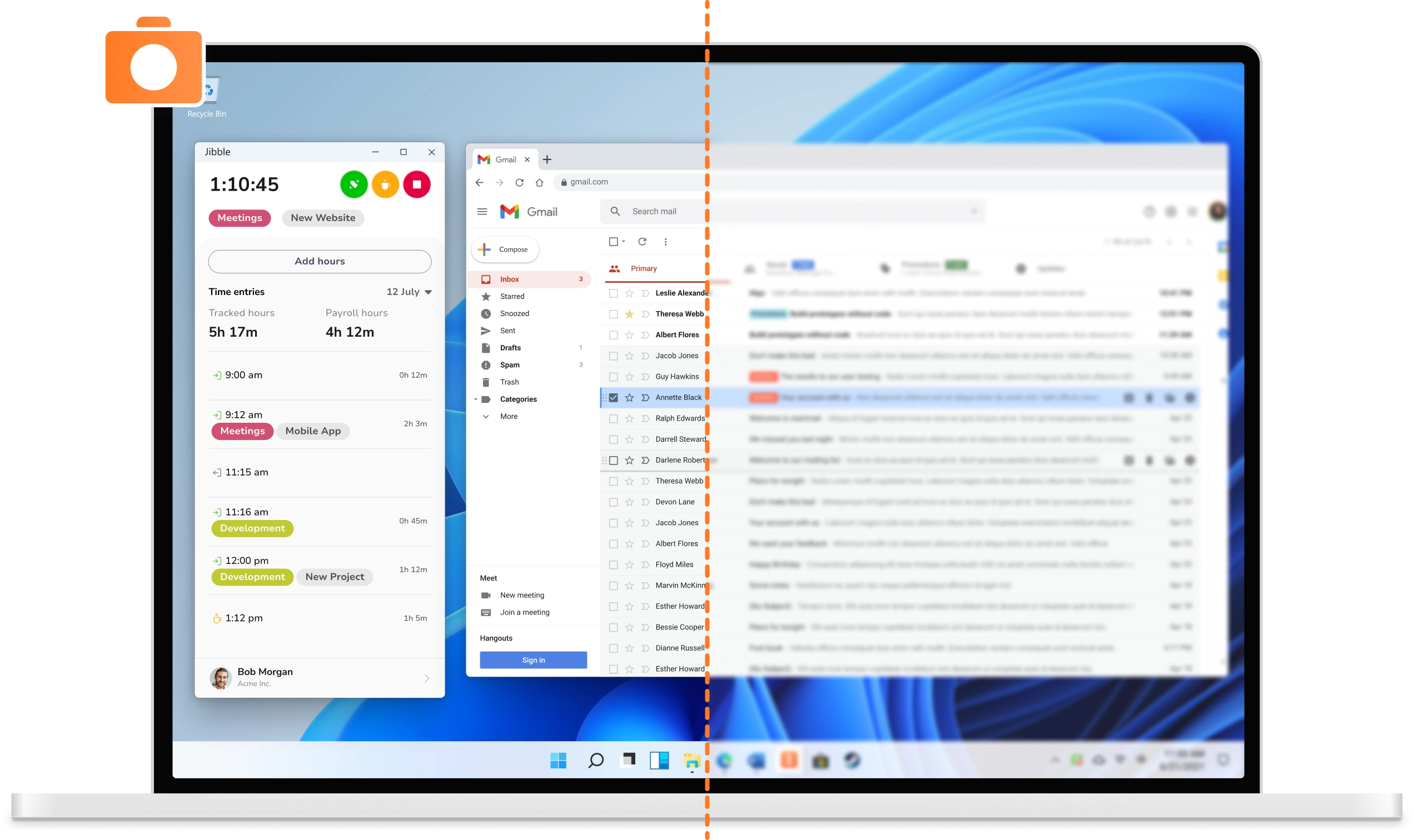
Jibble is the best employee monitoring software for fast-growing teams that want complete visibility into employee attendance, work hours, locations, and screen activity, all without paying a cent.
Jibble’s employee monitoring capabilities focus on time tracking, attendance monitoring, GPS tracking, and optional screen monitoring features, making it suitable for both office-based and field-based teams.
Employees can clock in and out using mobile devices, desktops, or laptops, with support for facial recognition verification when enabled. Time records automatically sync across devices, allowing employees to switch between devices throughout the workday while maintaining accurate attendance records.
The platform also provides real-time visibility into who is currently working, project and activity progress, and total tracked hours through a centralized, visual dashboard.
Businesses can track employee locations through GPS monitoring and create geofences around offices, job sites, or other approved work locations. This ensures employees can only clock in from designated areas, helping improve accountability and attendance accuracy for field teams.
The platform also includes a screen monitoring functionality that can capture screenshots across single or multiple screen set-ups and automatically attach them to timesheets, giving managers visibility into employee activity and project progress.
What sets Jibble apart is its privacy-conscious approach to employee monitoring, as it does not log keystrokes or track keyboard and mouse activity. Screenshots are also blurred by default to help protect sensitive information, and employees can delete screenshots when they need to.
And the best part is, this visibility is free forever for unlimited users. Businesses can keep a clear view of attendance, work hours, and where time goes across projects at no cost.
Pricing:
- Free Forever for an unlimited number of users
Available on:
Web, Mobile, Desktop, Kiosk, Browser Extension
Ratings:
- Capterra: 4.8/5
- G2: 4.8/5
- Play Store: 4.7/5
- App Store: 4.8/5
Pros:
- Clean, responsive interface makes time tracking and attendance management easy
- Flexible device support allows employees to track time from any device
- Attendance reports and salary calculations simplify workforce management
- Free forever for an unlimited number of users
Cons:
- No built-in chat feature for team communication
- Attendance data can occasionally take longer than expected to sync across devices
“Easy to set up a team (quick onboarding). Simple to scale (went from 2 → 5 techs with no issues). Adding and removing employees is fast and painless. Technicians learn it quickly (very user-friendly). Easy clock-in / clock-out process. Geofence feature adds strong accountability. Photo capture at clock-in is a great verification too.” – Teddy S.
(Source: Capterra)
“It has had some problems adjusting hours based on real hours put in and for it being able to track hour very well its reporting of hours tends to be off sometimes by a minute or two nothing crazy.” – seb H.
(Source: Capterra)
WebWork – Best Employee Monitoring Software for Complete Team Management
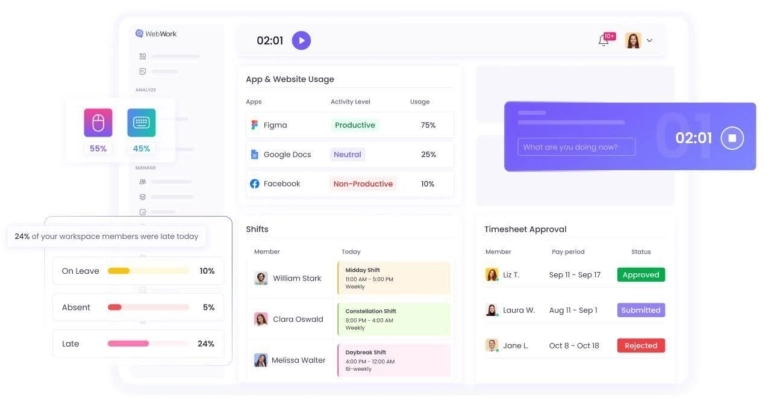
Photo from WebWork
WebWork is a comprehensive platform that brings together the complete team management process. Well-suited for remote, hybrid, and in-office teams, WebWork combines automatic time tracking with productivity insights, detailed reports, and integrated payroll.
One of the platform’s highlights is WebWork AI, which automates areas such as productivity analysis, project and task creation, irregular performance detection, sending emails, and more.
It analyzes tracked activity data to generate clear summaries of daily work, identify productivity patterns, and answer questions about team performance. This helps your team turn raw data into actionable insights without having to sift through complex reports.
WebWork positions itself as a solution for ethical and transparent employee monitoring, offering complete control over what is being monitored and allowing users to enable, limit, or disable features such as screenshots and activity tracking.
Employees have access to the data being collected, which helps promote trust and accountability rather than hidden surveillance.
It also covers project and task control alongside PTO management, rounding out its workforce management capabilities.
This flexible approach makes WebWork ideal for teams seeking visibility into work patterns without invasive monitoring practices.
Pricing:
- Free Plan: No
- Free Trial: Yes
- Paid Plan: Starts at $3.99 per user per month
Available on:
Desktop, Mobile, Web, Browser Extensions
Ratings:
- Capterra: 4.6/5
- G2: 4.6/5
- Software Advice: 4.6/5
- Crozdesk: 4.6/5
Pros:
- Complete set of cost-effective features
- Detailed productivity insights
- Intuitive and easy-to-use interface
- AI assistant that helps managers quickly understand how time was spent
Cons:
- Teams with very specific reporting needs may find the dashboard customization options limited.
- Advanced features may present a learning curve for new users
“I’m very happy with Webwork as an overall app for tracking my hours and my productivity. It feels like an app that keeps my data secured, and that is very important nowadays.” – Fernanda M.
(Source: Capterra)
“The main issue for me was that break hours were not included in the main hours report. When I download the report, it only shows the total tracked hours without separating the hours before break, break time, and payable hours after break. This makes payroll processing less efficient because I need to download a separate report just to view break details.” – Mounika B.
(Source: Capterra)
Time Doctor – Best Employee Monitoring Software with Detailed Analytics
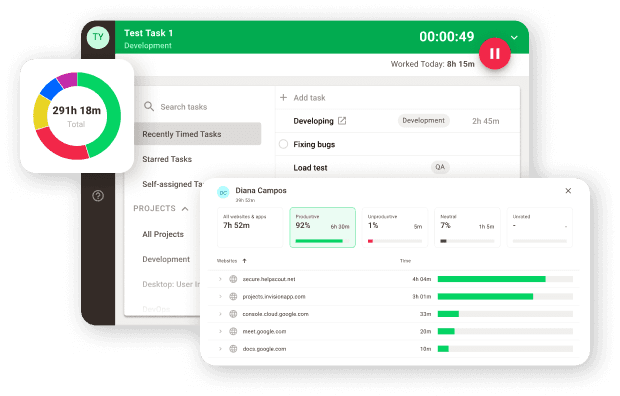
Photo from Time Doctor
Time Doctor is an employee monitoring software that offers features to help teams understand work habits and performance with detailed productivity analytics.
Employees can track time by project, client, or task across desktop, tablet, and mobile devices to understand exactly where time is being spent.
To monitor employee productivity, Time Doctor can record website and application usage history, allowing you to see which tools are being used throughout the workday. You can also use Time Doctor’s screenshot and screen recording functionality to gain additional context on employee activity.
With Time Doctor’s productivity analytics feature, you can analyze employee, project, and task data to help managers identify time-wasting activities, inefficient projects, and potential workload issues. Additionally, meeting analytics show how much time employees spend in meetings and whether those meetings contribute to idle time or productivity losses.
These productivity analytics can also highlight coaching and training opportunities, uncover process bottlenecks, and provide insights into how teams spend their time.
Time Doctor can also present productivity data with different types of dashboards, including team, executive, and user dashboards, that give real-time visibility into work hour trends and attendance data.
Overall, the platform’s ability to generate detailed productivity and activity data is a real strength for managers who need that depth, though smaller teams that only need basic employee monitoring and time tracking may find it more than they actually require.
Pricing:
- Free Plan: No
- Free Trial: Yes
- Paid Plan: Starts at $6.67 per user per month, billed annually
Available on:
Desktop, Mobile, Tablets, Browser Extension, Web
Ratings:
- Capterra: 4.5/5
- G2: 4.4/5
- Play Store: 3.4/5
- App Store: 2.8/5
Pros:
- Dashboard provides clear insights into employee activity, time usage, and productivity trends
- User-friendly interface makes it easy to monitor attendance and daily work activities
- Easy setup and a straightforward interface
Cons:
- Meeting reports can be inaccurate at times
- The activity bar can feel intrusive and makes it easy to lose track of active tracking status
“Managing a team of about 15 people who work remotely is simplified with Time Doctor as it helps me keep track of their daily activities. I can check the screen captures to have an idea of their work activities.” – Irfan K.
(Source: G2)
“Sometimes the software is slow and has syncing errors. These errors are sometimes due to poor internet, and improving overall performance and responsiveness could solve the slowness.” – Abhishek R.
(Source: G2)
TMetric – Best Employee Monitoring Software with Project Tracking

Photo from TMetric
TMetric is an employee monitoring and time tracking platform designed to give managers real visibility into how work time is spent by balancing operational accountability and employee privacy, making it a practical choice for remote, hybrid, and office-based teams.
For employee monitoring, TMetric offers activity tracking, app and website usage reports, and optional screenshot capture.
The desktop app takes randomized screenshots every 10 minutes, each time-stamped and task-linked, with a blur option to mask sensitive on-screen content and the ability to enable or disable capture per individual team member.
Activity levels show keyboard and mouse engagement in real time, helping managers distinguish focused work from idle time.
Along with individual activity monitoring, TMetric gives managers project tracking tools that let users create projects, assign tasks, and follow progress in real time, while a live dashboard combines employee activity data with project metrics to show workload distribution, project profitability, and team capacity.
Tracked hours flow directly into timesheet approval workflows, payroll exports, and client invoices. Managers get a team dashboard showing who is online, what they’re working on, and how workload is distributed across projects.
The Time Off module adds PTO and sick leave tracking with accrual rules and an approval flow, giving HR a complete attendance picture in one place.
All monitoring data is stored encrypted on Azure infrastructure, and employees can view their own activity records, keeping the process transparent. With 50+ integrations covering tools like Jira, Asana, Slack, and QuickBooks, TMetric slots into existing workflows rather than replacing them.
However, TMetric does not offer a dedicated GPS tracking or geofencing feature, so it may not be a good fit for teams working on the move.
Pricing:
- Free Plan: Yes, for up to 2 users
- Free Trial: Yes
- Paid Plan: Starts at $5.83 per user/month, billed annually
Available on:
Desktop, Mobile, Browser Extension, Web
Ratings:
- Capterra: 4.5/5
- G2: 4.6/5
- SoftwareAdvice: 4.5/5
- Crozdesk: 4.5/5
Pros:
- Combines employee monitoring, time tracking, attendance, and project management
- Detailed productivity and activity reporting
- Affordable pricing for growing teams
Cons:
- No GPS or geofencing
- Fewer surveillance-focused features than competitors
- Advanced workforce analytics are limited
“TMetric is easy to use and works seamlessly across platforms. I can start a timer on my PC and close it later on my phone. I no longer have to guess about how long a task or project took me to accomplish, because a quick report gives me a definitive answer. I love this software!” – Michelle L.
(Source: Capterra)
When I forget to turn off the running timer, it offers the option to fix the timer, but often that option doesn’t work, and I have to re-enter. Not a big deal – small bug. – Sara H.
(Source: Capterra)
Insightful – Best Employee Monitoring Software for Workforce Management
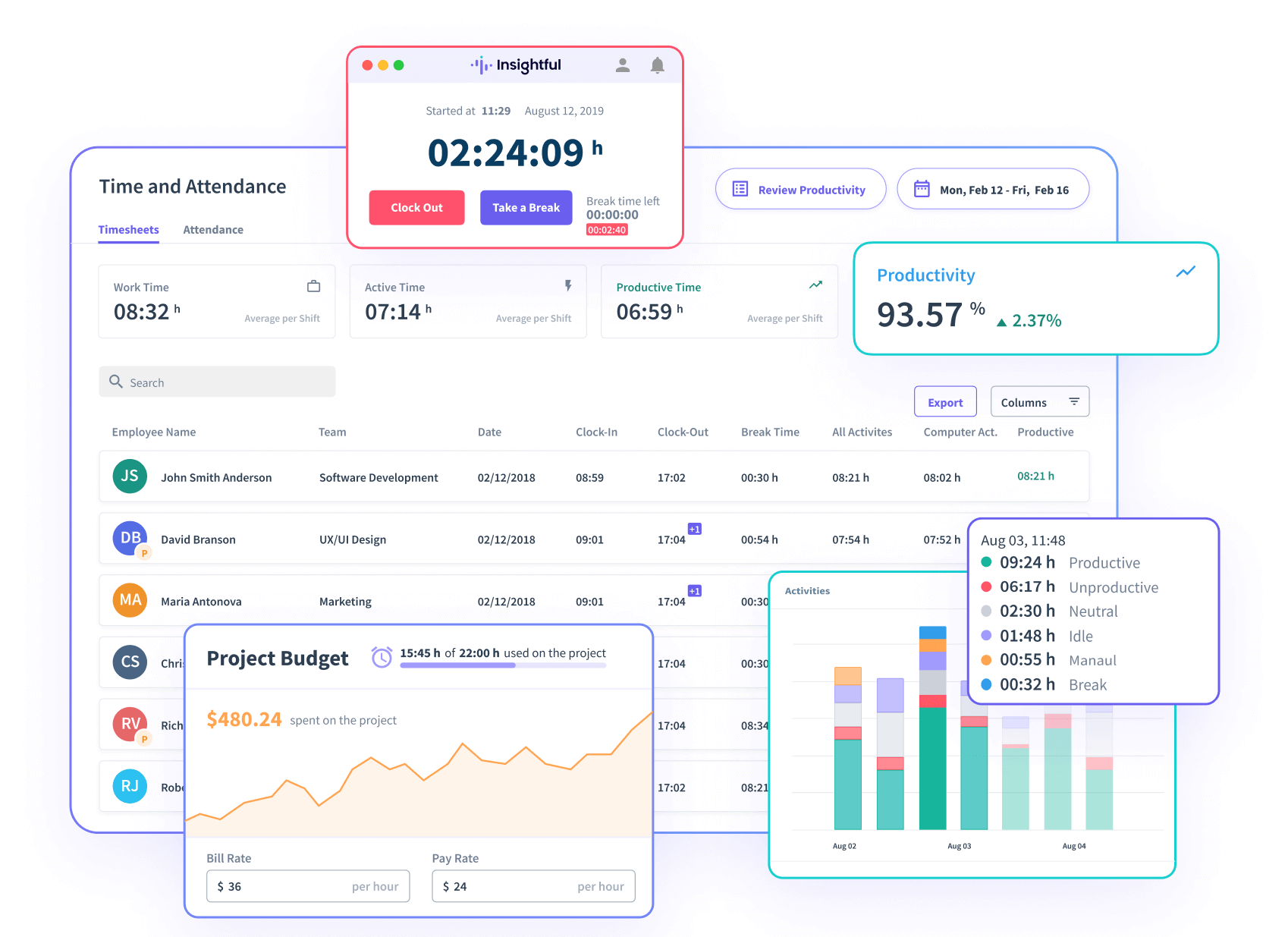
Photo from Insightful
Insightful (formerly Workpuls) is an employee monitoring software that offers features for workforce management and operational insights.
The software’s time tracking feature runs automatically in the background to track time spent across projects and tasks. Managers can monitor application and website usage, review active and idle time, and analyze employee productivity with Insightful’s detailed reports.
The platform can automatically capture screenshots too, which can also be manually triggered if you need additional context into what an employee is working on or automatically triggered when suspicious employee activity is detected.
To help businesses evaluate how performance changes across different work environments, Insightful’s Location Insights feature can compare output across locations, identify where productive time is being lost, analyze how teams are distributed, and monitor performance trends over time.
Insightful also offers a useful productivity labeling feature that allows you to classify applications and websites as productive or unproductive, while utilization metrics can help you increase revenue per employee. All productivity data flows into Insightful’s customizable dashboard, helping managers allocate resources more effectively.
However, Insightful focuses heavily on utilization and workforce analytics, so you may need time to establish meaningful productivity labels and reporting structures before you can get the full value from the platform.
Pricing:
- Free Plan: No
- Free Trial: Yes
- Paid Plan: Starts at $8.00 per user per month, billed annually
Available on:
Desktop, Web
Ratings:
- Capterra: 4.8/5
- G2: 4.6/5
- Software Advice: 4.8/5
- Crozdesk: 4.8/5
Pros:
- Accurate activity tracking across websites, applications, and folders
- Performance dashboards make it easy to track workloads and activity trends
- Visual reports provide a clear overview of productivity
Cons:
- Add-on features cannot be custom-added to individual employees or teams
- No option to overwrite or adjust break time when needed
“What I like most about Insight is how it tracks everything like folders tabs websites and software and it is very accurate and reliable also their pricing is good .” – Kamyar S.
(Source: G2)
“At times, the platform seems sluggish when loading detailed reports, particularly if I try to filter across several time periods simultaneously. Additionally, making manual adjustments to employee roles or account types can be confusing.” – Amro A.
(Source: G2)
Apploye – Best Employee Monitoring Software with Visual Dashboards
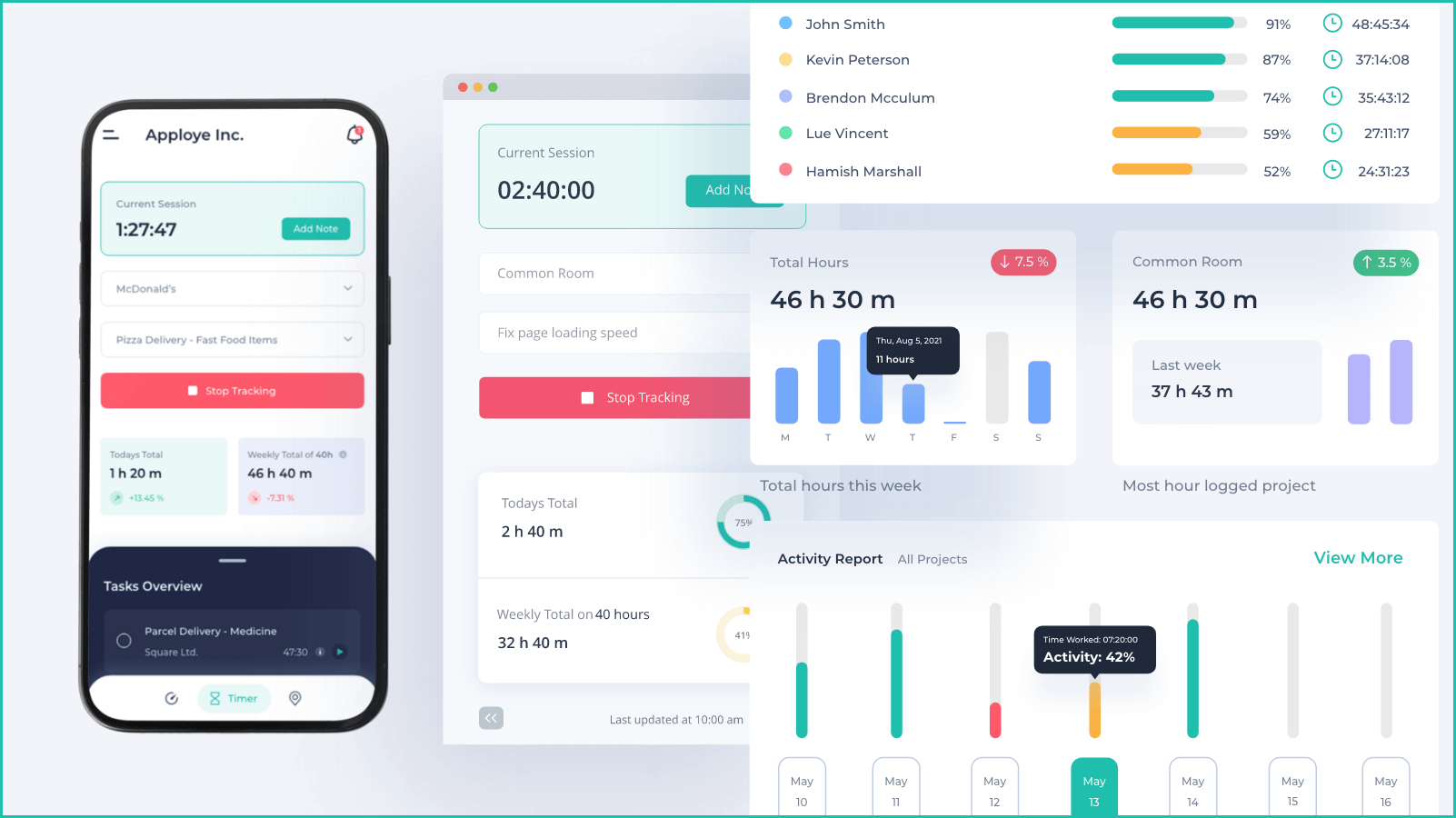
Photo from Apploye
Apploye is an employee monitoring software designed for businesses that want a simple way to track employee time, attendance, and productivity. The platform combines time tracking, employee monitoring, project management, payroll, and invoicing tools in an easy-to-use interface, making it particularly suitable for remote teams and growing businesses.
Employees can track their work hours automatically, with time recorded against projects and tasks. The platform also provides timesheets, attendance tracking, and project tracking tools, helping teams stay organized while maintaining visibility into ongoing work.
Apploye offers screenshot monitoring, idle time detection as well as app and website logs, giving managers a clear sense of what’s happening without feeling overbearing.
The dashboards are straightforward, making timesheets and attendance easy to follow, while project tracking adds structure for teams to organize their tasks and activities.
The free plan is a decent way to test the basics, and if you need more, the paid tiers add depth with better reporting, unlimited history, and integrations. That balance of simplicity upfront and room to grow makes Apploye a practical choice for businesses that want employee monitoring without unnecessary complexity.
Pricing:
- Free Plan: Yes
- Free Trial: Yes
- Paid Plan: Starts at $4.50 per user per month, billed annually
Available on:
Desktop, Mobile, Web, Browser Extension
Ratings:
- Capterra: 4.8/5
- G2: 4.7/5
- Play Store: 4.8/5
- App Store: 4.7/5
Pros:
- Straightforward interface makes time tracking and team onboarding easy
- Automatic time tracking and screenshot monitoring
- Dashboard view for work hours, app usage, and project time monitoring
Cons:
- Desktop app can experience occasional syncing delays during busy periods
- Reporting customization options are limited for larger teams and complex projects
“It is easy to review tracked hours, monitor work activity, and organize timesheets for different projects. The interface is straightforward, and onboarding new team members was relatively simple for our operations team.” – David F.
(Source: G2)
“One thing i like most is the automatic time tracking and screenshot monitoring feature. It gives our operations team better visibility into how tasks are being handled without needing constant manual follow ups.” – Sam W.
(Source: G2)
Hubstaff – Best Employee Monitoring Software with GPS Tracking
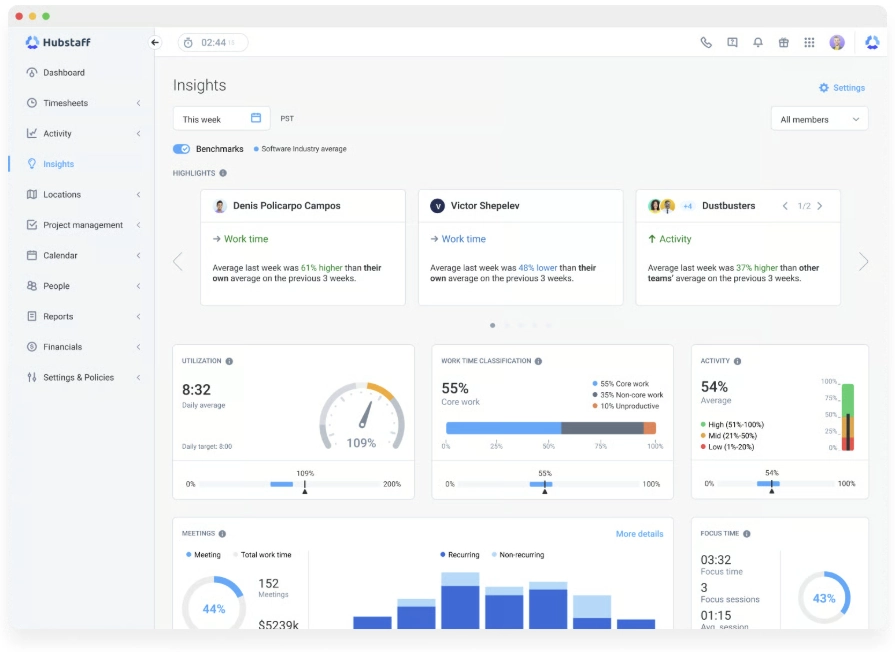
Photo from Hubstaff
Hubstaff ‘s employee monitoring software offers a GPS-based solution that allows managers to review employee activity with location context.
Employees can track time using Hubstaff’s desktop, web, and mobile apps against specific tasks, projects, clients, work orders, or locations, and all entries update to timesheets for reporting.
To help you monitor employee activity, Hubstaff can capture optional screenshots at customizable intervals during work sessions, with options to adjust screenshot frequency and blur sensitive information.
Hubstaff can also measure keyboard and mouse activity levels to give managers insight into employee productivity within the context of their tasks. Low activity during a call, for instance, does not necessarily indicate that an employee was unproductive.
For checking application and website usage, managers can use Hubstaff to see which tools employees use during working hours. Hubstaff also has a dedicated AI tool usage tracker that highlights the usage of platforms such as ChatGPT, Claude, and Gemini.
Additionally, Hubstaff includes idle time detection, helping managers identify periods of inactivity and improve the accuracy of timesheets, payroll calculations, and attendance records. However, users report that this feature can be overly sensitive and may flag for idle time during an active work session.
You may also find Hubstaff’s employee monitoring features to be less extensive than those of dedicated employee activity tracking tools such as Veriato or Teramind.
Pricing:
- Free Plan: No
- Free Trial: Yes
- Paid Plan: Starts at $ 4.99 per user per month, billed annually (minimum 2 seats)
Available on:
Desktop, Mobile, Web, Browser Extensions
Ratings:
- Capterra: 4.5/5
- G2: 4.4/5
- Play Store: 3.1/5
- App Store: 4.5/5
Pros:
- Project tracking, activity monitoring, reports, and productivity insights are all available in one place
- Monitoring features and real-time schedule tracking are useful for remote teams
- Desktop app is lightweight
Cons:
- Idle time detection can be overly sensitive and interrupt active work
- Mobile app performance can be inconsistent, with occasional syncing issues
“The monitoring features and analytics are really helpful for us since our company is made up entirely of remote workers. I also really like the smart notifications, along with the real-time shift and schedule tracking.” – Kate.
(Source: G2)
“The idle time detection can sometimes be too sensitive. When I’m focused on reading complex project instructions or analyzing data without moving my mouse, it may trigger an idle alert even though I’m actively working.” – Rajasekharreddy B.
(Source: G2)
ActivTrak – Best Employee Monitoring Software with Productivity Dashboards
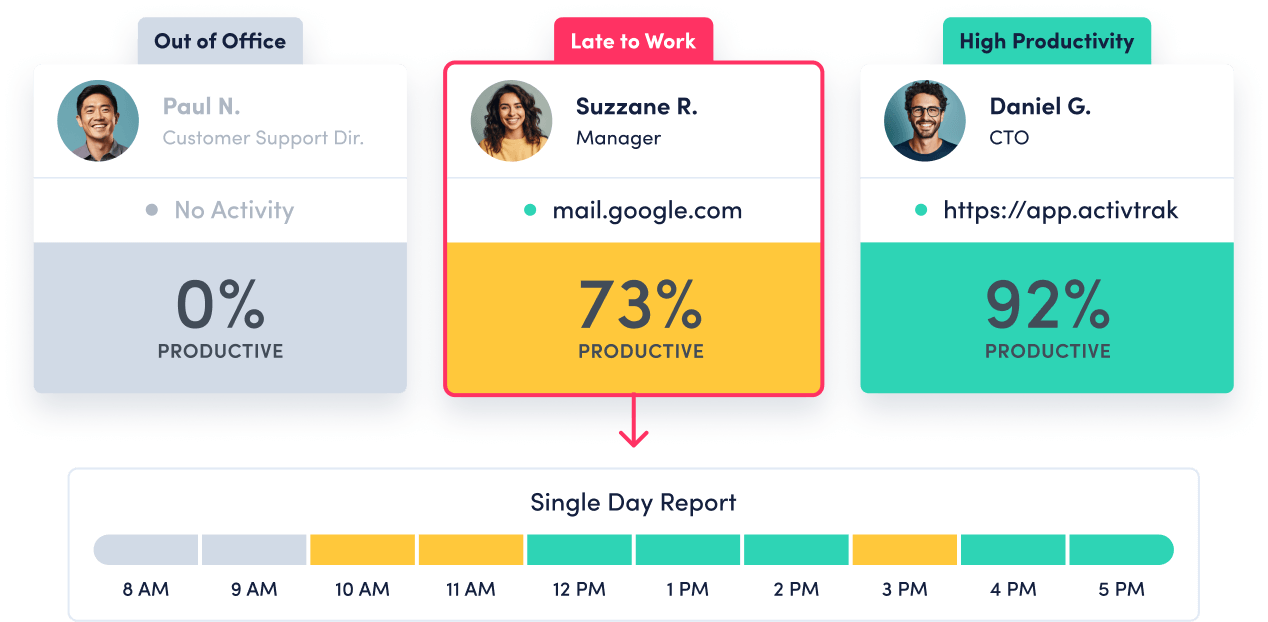
Photo from ActivTrak
ActivTrak is an employee monitoring software with productivity dashboards that can be useful for teams that want deeper visibility into workload distribution and workforce performance.
The platform tracks employee activity throughout the workday by monitoring website usage, application usage, active time, and idle time.
ActivTrak’s employee monitoring capabilities focus on activity and behavior analysis. Managers can categorize websites, applications, and activities as productive or unproductive, allowing ActivTrak to measure how employee time is being spent and generate productivity insights for individuals and teams.
In addition to tracking websites and applications, the platform monitors mouse and keyboard activity without recording keystrokes to provide a clearer picture of employee engagement.
The platform also provides specialized dashboards with detailed analytics that help managers analyze productivity, workload balance, staffing challenges, and technology usage across their team. Side-by-side dashboard comparisons make it easier to identify high-performing employees and teams, uncover coaching opportunities, and set future productivity goals based on historical performance data, helping businesses make more informed decisions.
While ActivTrak provides powerful productivity reports and analytics as well as workforce visibility, businesses may need time to properly classify websites, applications, and activities before the platform’s productivity measurements can deliver meaningful insights.
Pricing:
- Free Plan: Yes
- Free Trial: No
- Paid Plan: Starts at $10.00 per user per month, billed annually
Available on:
Web, Desktop, Chrome Extension
Ratings:
- Capterra: 4.5/5
- G2: 4.3/5
- Play Store: 4.5/5
- App Store: 4.5/5
Pros:
- Weekly email reports make it easy to spot changes in team activity and productivity trends
- Easy-to-understand visualizations show how work gets done
- Snapshot view provides clear insights into website usage and employee productivity
Cons:
- Backend can be confusing, especially when switching devices or managing reports
- Offline time tracking can be unreliable and may fail to record hours worked
“Provides timely access to productivity numbers and gives information that allows you to be both proactive and reactive.” – Verified User.
(Source: G2)
“UI is cluttered, it’s not easy to understand what’s going on.” – Verified user.
(Source: G2)
Traqq – Best Employee Monitoring Software for Desktop Teams
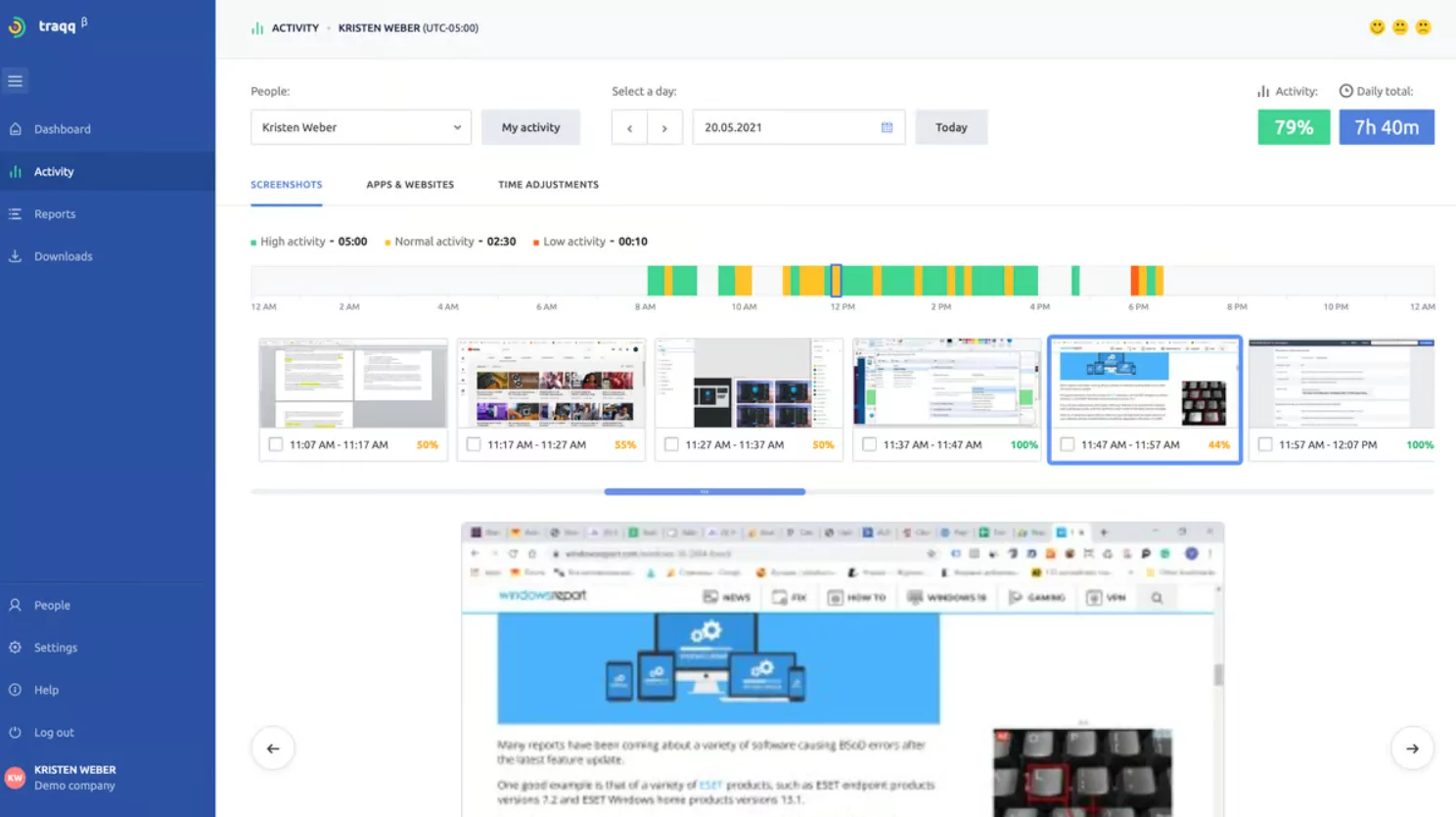
Photo from Traqq
Traqq is an employee monitoring software suitable for desk-based teams that need to track billable hours and automatically generate timesheets.
Traqq links productivity and performance data directly to tracked work hours, helping you better understand how time is being spent throughout the workday.
Traqq’s employee monitoring capabilities are non-invasive and include application and website tracking and activity monitoring.
You can review which applications and websites employees use during work hours, while activity tracking measures keyboard and mouse activity levels to help identify periods of focus or inactivity. More importantly, Traqq does not record keystrokes or track the specific content employees view within websites or applications.
Time-tracking, productivity, and activity data are consolidated into detailed reports and weekly summaries that can be exported as PDF or CSV files. These reports provide visibility into how teams spend their time and allow managers to analyze productivity trends at both a high level and in greater detail.
Note that Traqq is built primarily for desktop devices, so it lacks a mobile time tracking app, making it less suitable for businesses with field employees or teams that frequently work away from their computers.
Pricing:
- Free Plan: Yes, for up to 3 users
- Free Trial: Yes
- Paid Plan: Starts at $6.00 per user per month, billed annually (minimum 4 users required)
Available on:
Desktop
Ratings:
- Capterra: 4.9/5
- G2: 4.8/5
- Play Store: 4.9/5
- App Store: 4.8/5
Pros:
- Automatic background tracking creates timesheets
- Color-coded productivity timelines make it easy to identify work patterns and activity
- Activity analytics and report exports
Cons:
- Limited integrations with project management and communication tools
- Meetings can be incorrectly marked as low-productivity time
“It works great both for creative and tech teams in our company because it’s easy to use and doesn’t feel intrusive. I like that it can automatically track time in the background. The timesheets basically build themselves, which saves a lot of manual reporting at the end of the week.” – Kazi M.
(Source: G2)
“Reports could be more customizable, in my opinion. for example, there could be more types of charts for reports on used apps and websites.” – Rizwan A.
(Source: G2)
Teramind – Best Employee Monitoring Software with Insider Threat Detection
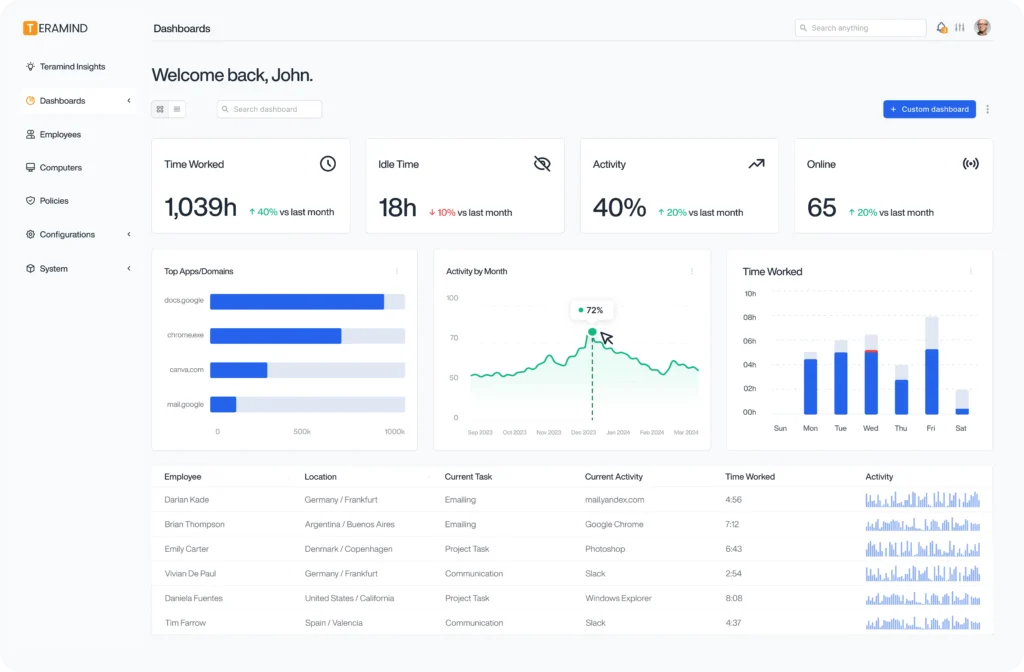
Photo from Teramind
Teramind is an employee monitoring software that combines insider threat detection, behavioral analytics, and compliance-focused monitoring tools to provide businesses with visibility into employee activity while also protecting sensitive data.
With Teramind, employees can track time manually with its revealed monitoring agent, automatically with its hidden monitoring agent, or through a web kiosk. You can choose between hidden and revealed monitoring modes depending on your company’s policies and compliance requirements.
Tracked time spent on projects and tasks can be sorted as productive, unproductive, or as per your custom classification tags to gain clearer insights into how employees spend their time.
Teramind can also monitor application usage, website visits, emails, chats, keystrokes, file operations, printing activity, clipboard activity, and terminal commands to provide detailed records of employee behavior.
The software’s live screen viewing and historical playback make it easier to review employee activity when needed. In addition to monitoring employee activity, Teramind can analyze employee behavior patterns to identify unusual actions that may indicate security risks, policy violations, or potential data theft.
Monitoring and productivity data can be viewed with Teramind’s dashboards, and managers can create customized reports to view the data they need specifically.
Overall, Teramind’s extensive monitoring capabilities provide deep visibility into employee activity, but you might find it to be complex if you’re looking for a simpler employee monitoring solution.
Pricing:
- Free Plan: No
- Free Trial: No
- Paid Plan: Starts at $14.00 per user per month, billed annually (minimum 5 seats required)
Available on:
Web, Desktop
Ratings:
- Capterra: 4.7/5
- G2: 4.6/5
- Play Store: 4.7/5
- App Store: 4.5/5
Pros:
- Pricing is good for the range of features offered
- Initial setup is user-friendly as long as you have a good internet connection
- Employee monitoring feels non-intrusive
Cons:
- User interface can be confusing for non-technical users
- Integrations with Mac systems can cause issues at times
“It is very useful for managing remote work teams. It has very useful tools, its performance is very good, and the price is also quite beneficial, because it is not burdensome to cover for everything it offers.” – César M.
(Source: G2)
“There are some features missing, as I’ve already submitted a ticket for additional feature requests. For example, there are apps for emails that are not being tracked on the Teramind activity.” – ren
(Source: G2)
DeskTime – Best Employee Monitoring Software for Hybrid Teams
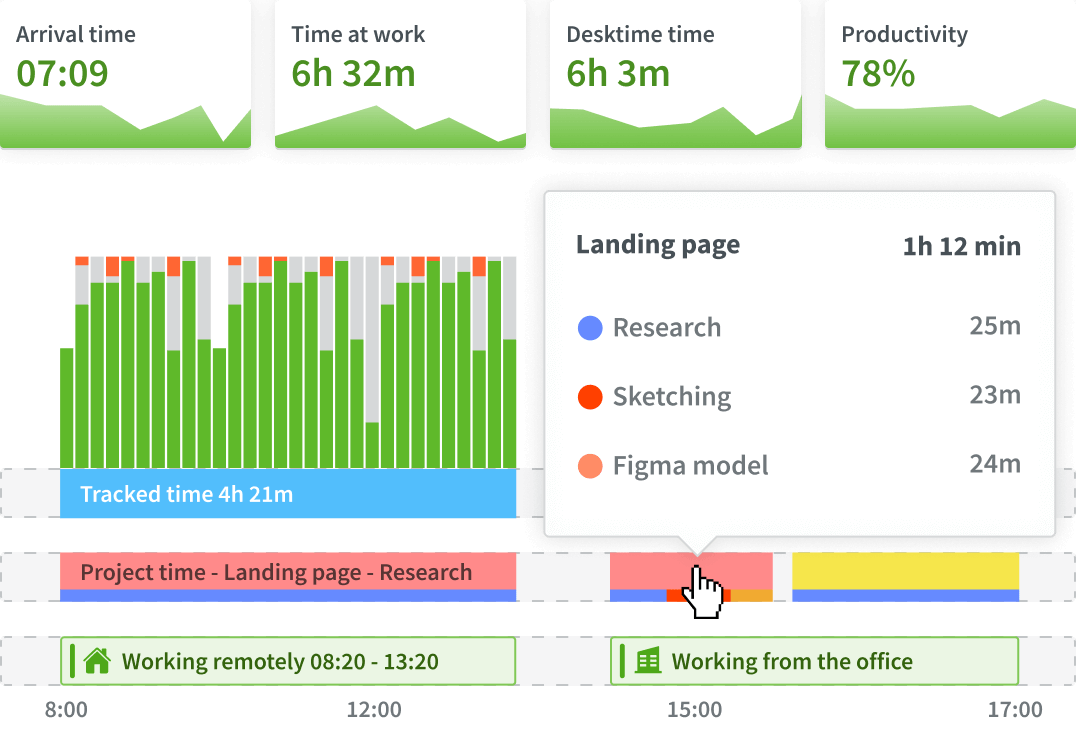
Photo from DeskTime
DeskTime is an employee monitoring software that offers automatic time tracking, productivity calculations, scheduling, and reporting tools to monitor hybrid team performance.
The software’s desktop app automatically starts and stops tracking time in the background as soon as your computer turns on or off. Employees can also log time manually with Desktime’s web app or track time on the go with its mobile app.
DeskTime allows you to monitor time spent on specific projects and tasks, check website and application usage, track document titles and email subject lines, and use IP location tracking to understand where employees are working from.
You can also enable screenshots to record proof of work when additional context is needed and use productivity calculations to create a standardized way for evaluating employee performance.
Managers can use Desktime’s admin dashboard, which provides real-time data to compare performance across teams and departments and export reports for further analysis. DeskTime also has individual user dashboards, which provide detailed information about each employee’s workday.
DeskTime’s productivity tracking tools can give you a clear picture of how employees spend their time on tasks. But if your team workflows are heavily dependent on meetings or collaboration, the metrics captured by these features may not fully reflect the value of your kind of work.
Pricing:
- Free Plan: 1 month free available only with annual plans
- Free Trial: Yes
- Paid Plan: Starts at around $6.42 per user per month, billed annually
Available on:
Desktop, Mobile, Web
Ratings:
- Capterra: 4.5/5
- G2: 4.5/5
- Play Store: 3.0/5
- App Store: 2.1/5
Pros:
- Supports custom groups and schedule creation for productivity tracking
- Screenshot monitoring works across multiple monitors
- Intuitive dashboard provides useful productivity reports
Cons:
- Interface can feel clunky
- Continues taking screenshots and tracks applications when idle unless you enable private time
“What I like the most about DeskTime is its accuracy in tracking time and monitoring employee productivity based on the parameters we, as administrators, define.” – Verified User.
(Source: G2)
“The automatic tracking feature is helpful, but pricing a bit high, especially for smaller teams or individual professionals. A more flexible pricing structure could make it more accessible.” – Dev R.
(Source: G2)
Monitask – Best Employee Monitoring Software for Small Businesses

Photo from Monitask
Monitask’s employee monitoring software offers time tracking, productivity monitoring, attendance tracking, and reporting tools that are best suited to small businesses.
Employees can track their time with a one-click timer or with automatic activity capture. Tracked time can be linked to specific projects to compare actual work hours against original time estimates and track budgets, and the platform’s online employee status board provides real-time visibility into who is currently working, clocked in, or available.
Using Monitask’s productivity monitoring features, you can capture screenshots based on settings of your choice to have visual proof of ongoing tasks. Monitask also offers multi-screen monitoring and optional stealth monitoring capabilities for managers who need discrete oversight of team activity.
Monitask’s mouse jiggler detection capabilities can analyze activity patterns, identify idle time, and flag suspicious behavior that may artificially inflate productivity metrics.
Employee activity can be viewed with live dashboards, daily timelines, as well as application and website reports that provide an overview of time spent on projects, tasks, and clients.
Managers can also generate reports for estimating project costs and evaluating employee output. Employees can also create their own reports to review work hours and support invoicing processes.
Although Monitask makes employee monitoring easy to implement, some users report that its mobile app has limited functionality for admin use and its offline time tracking mode is unreliable in areas with spotty internet.
Pricing:
- Free Plan: No
- Free Trial: Yes
- Paid Plan: Starts at $6.49 per user per month, billed annually
Available on:
Desktop, Mobile, Chromebook, Web
Ratings:
- Capterra: 4.8/5
- G2: 4.8/5
- Software Advice: 4.8/5
- Crozdesk: 4.8/5
Pros:
- Smart Blur keeps sensitive information hidden in screenshots
- Live Dashboard provides a clear overview of team activity across different locations
- Automated reporting shows how work hours are spent
Cons:
- CRM integration options are limited, especially for technical sales workflows
- Mobile app has limited functionality for managers
“What I like best about Monitask is its centralized visibility, especially across different time zones. As a Regional Manager, I obviously cannot be everywhere at once, but Monitasks Live Dashboard is like having my eyes on the ground.” – Jason B.
(Source: G2)
“One thing that I would like to see is more integration with Figma and GitHub. Since our projects exist at the nexus of design and code, it would be a total game-changer if Monitask time logs could automatically sync with specific GitHub pull requests or Figma files.” – Victoria R.
(Source: G2)
Veriato – Best Employee Monitoring Software for Risk Management
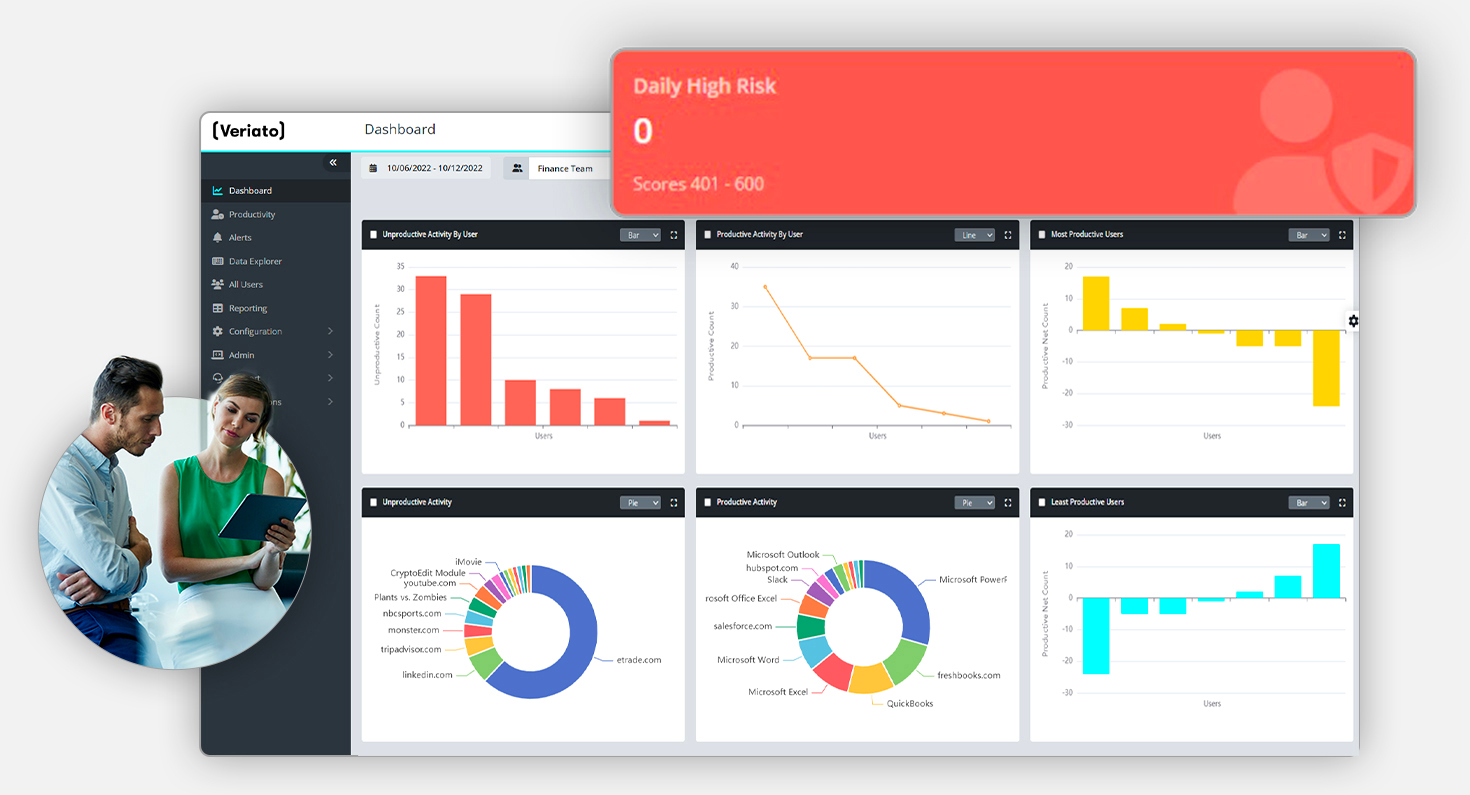
Photo from Veriato
Veriato is an employee monitoring software that specializes in collecting, analyzing, and preserving employee activity data for policy violation investigations and compliance breaches.
The platform can continuously monitor employee activity across devices and applications, including website and application usage, email and chat activity, file transfers, document access, screenshots, and network activity.
Veriato can also record active and idle time based on user activity, categorize websites and application use as productive or unproductive, and generate productivity scores to help businesses identify employee disengagement.
These features can also be helpful in detecting workflow inefficiencies, burnout risks, and signs of quiet quitting.
Veriato converts tracked data into detailed audit trails and digital records of employee activity that can be used during workplace investigations for policy violations, fraud, data misuse, harassment claims, or other workplace incidents.
It also includes Insider Risk Management capabilities that use behavioral intelligence, sentiment analysis, anomaly detection, and risk scoring features to identify potential business problems before they escalate.
Unlike the other employee monitoring software on this list, Veriato does not offer dedicated time tracking, scheduling, or workforce management features.
Instead, its capabilities are geared toward investigations, compliance, behavioral monitoring, and evidence collection, making it a better fit for you if you need risk management rather than day-to-day workforce administration.
Pricing:
- Free Plan: No
- Free Trial: No
- Paid Plan: Starts at $18.00 per user per month, billed annually (minimum 5 users required)
Available on:
Desktop, Chrome, Mobile (Android only)
Ratings:
- Capterra: 4.2/5
- G2: 4.3/5
- Software Advice: 4.2/5
Pros:
- Tracks app usage, file access, and user activity in detail
- AI-driven analytics help identify unusual behavior and risks
- Customizable dashboards and reporting
Cons:
- Complex to configure and manage
- Can feel like a heavy-duty solution for some organizations
“Veriato offers strong visibility into employee activity by tracking behaviors like app usage, file access, and even keystrokes, then turning that data into detailed reports and risk scores. Its AI-driven analytics can flag unusual patterns early, making it useful for detecting insider threats and supporting compliance or investigations.” – Rich W.
(Source: Capterra)
“It would be nice if you could download and archive events and screenshots locally instead of having to pay to access more online storage.” – Mark P.
(Source: Capterra)
What are the Best Practices for Employee Monitoring?
When implemented thoughtfully, employee monitoring software can help businesses make better decisions while maintaining employee trust.
In many cases, it helps businesses improve accountability, identify productivity bottlenecks, and better understand how work gets done. The key is using monitoring data responsibly.
Here are a few best practices:
- Be transparent about monitoring: Clearly communicate what is being tracked, why it is being tracked, and who can access the data.
- Focus on trends, not individual screenshots: Monitoring data is most valuable when used to identify broader patterns, such as workload imbalances, attendance issues, project delays, or productivity bottlenecks.
- Avoid monitoring more than necessary: Choose tools and settings that align with your business needs rather than collecting every available data point.
- Measure outcomes, not just activity. Productivity should be evaluated alongside factors such as project completion, collaboration, meetings, training, and job responsibilities.
- Use monitoring to support employees, not punish them: Monitoring data can help identify coaching opportunities, workload concerns, and process improvements before they become larger problems.
- Respect employee privacy. Many modern employee monitoring tools include privacy-focused features such as screenshot blurring, customizable monitoring settings, and employee-accessible records.
- Choose the right level of monitoring. Not every business needs the same level of oversight. For example, tools such as Jibble and Traqq focus on attendance, productivity, and activity visibility, while platforms such as Teramind and Veriato provide much deeper monitoring for security, compliance, and investigation purposes.
What is the Best Employee Monitoring Software in 2026?
Most of the tools on this list will make you pick and choose between deep monitoring or easy setup, strong features or fair pricing, good for small teams or built for scale. Hubstaff is a solid pick for field-heavy operations, and Time Doctor works well enough if productivity analytics are your main priority.
Teramind and Veriato serve teams that are focused on investigation-grade monitoring for compliance and security.
But Jibble is the best employee monitoring software that doesn’t force any trade-off. You get facial recognition, GPS tracking, geofencing, screen monitoring, attendance management, and reporting in a single platform that doesn’t take a week to configure and can work for a 10-person startup and a 10,000-person enterprise without any additional costs.
For most businesses, that combination is hard to argue with.
Looking for the best time and attendance software for your team? Explore the best tools of 2026 in our detailed guide.
FAQs
Some frequently asked questions...
Employee monitoring software is a tool that helps businesses track employee activity, attendance, productivity, work hours, and computer usage.
Modern employee monitoring platforms go beyond simple activity tracking by providing features such as time tracking, attendance management, GPS location tracking, application and website monitoring, productivity analytics, reporting, and workforce insights.
These software help improve visibility into how work is performed, identify workflow bottlenecks, manage remote and hybrid teams, verify attendance, and optimize resource allocation.
Businesses use employee monitoring software to gain visibility into workforce productivity, attendance, project progress, and operational efficiency. These tools help managers understand how employee time is allocated, identify inefficiencies, improve workload distribution, and ensure employees are working from approved locations when necessary.
Employee monitoring software is generally legal when used in compliance with local labor laws, privacy regulations, and company policies.
In many jurisdictions, employers can monitor company-owned devices and work-related activities if employees are informed about the monitoring practices.
However, legal requirements vary by country and region. Businesses should establish clear monitoring policies, obtain any required consent, and ensure monitoring practices comply with applicable employment and privacy regulations.
Learn more about employee monitoring in the US.
Time tracking software primarily records employee work hours, attendance, and project time. Employee monitoring software includes time tracking but also provides deeper visibility into employee activities, productivity trends, application usage, website usage, attendance patterns, and workforce performance.
While time tracking focuses on when employees work, employee monitoring software helps businesses understand how work is being performed and where improvements can be made.
Jibble is the best free employee monitoring software available, giving unlimited users 100% free access to time tracking, attendance management, team reporting, and more.
Other platforms may offer free plans or limited trials, but many cap the number of users or lock the most useful features behind a paid tier.
Many employee monitoring software platforms offer screenshot monitoring features. Tools such as Jibble, Hubstaff, Monitask, Time Doctor, and DeskTime can capture screenshots during work sessions to provide managers with visibility into employee activities.
Some platforms include privacy-focused settings such as screenshot blurring, customizable capture intervals, or employee notification options to help balance monitoring needs with privacy concerns.