
The Best Free Toggl Alternative
Jibble gives you the time tracking Toggl is known for, then goes further with GPS, facial recognition and a shared kiosk, free for unlimited users with no 3-user ceiling.
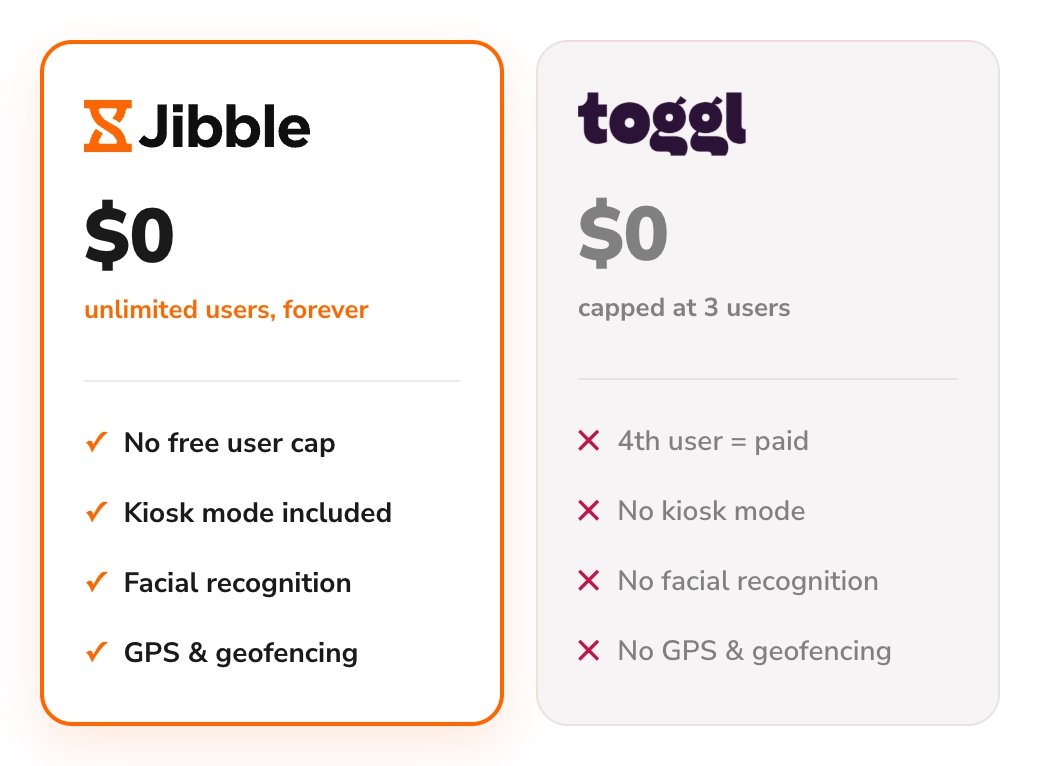






What are the main differences between Jibble and Toggl?
A feature-by-feature comparison of where Jibble gives you more, for free.
| Feature | Jibble | Toggl |
|---|---|---|
| Free forever | Unlimited users | Up to 3 users |
| Time tracking (web, desktop, mobile) | ||
| Automated timesheets | ||
| Overtime tracking | ||
| Project time tracking | ||
| Time clock kiosk | ||
| Facial recognition | ||
| GPS & geofencing | ||
| Reports & analytics | ||
| Leave & time off management | ||
| Real cost for a full setup | $0, always | $9–$16/user/month |
More than just time tracking
From GPS-verified clock-ins to overtime, time off and approvals, Jibble has everything your team needs to manage time and attendance in one place.
Explore more of Jibble's featuresWhy choose Jibble as a Toggl alternative?
A look at the gaps teams hit with Toggl, and how Jibble fills them.
Free forever, for your whole team
Toggl's free plan stops at three users. Add a fourth, and everyone moves to a paid plan, from $9 per user per month billed annually or $12 monthly. Jibble is free forever for unlimited users, so your fourth hire costs the same as your first: $0.
See the full Jibble vs. Toggl comparison →
Know exactly who clocked in
Toggl records how long work took, but not who was actually doing it. Jibble matches each person's face to their profile at clock-in, on their own phone or a shared device. The hours on every timesheet belong to the person who worked them, and buddy punching stops before it starts.
Face recognition attendance system → Built for teams where location matters
Toggl doesn't record location, by design, which makes sense for agencies and consultants working from anywhere. If your team clocks in at job sites or stores, you need to know they're actually there. Jibble adds GPS on every clock-in, and geofences around your locations, both free for unlimited users.
Employee GPS tracking → One clock-in point for the whole shift
Toggl assumes everyone tracks their own time on a laptop or phone. That doesn't work on a factory floor, in a busy kitchen or at a site gate. With Jibble, you can set up a single shared device at the entrance, where staff clock in with their face, tap an NFC tag, scan a QR code or enter a PIN to start their shift in seconds.
Online kiosk → Time off without buying an add-on
Toggl's paid plans track PTO and public holidays, but approving leave requests and managing balances costs extra through Time Off Pro. ibble keeps time off right alongside clock-ins and timesheets, with no extra purchase and no second tool.
PTO tracking software → Is Jibble the right Toggl alternative for you?
Still weighing options? See how Jibble ranks against every time tracker.
- You want free time tracking for your whole team, not just the first three
- Your team works on site and you need GPS and geofenced clock-ins
- You want one shared kiosk where staff clock in
- You need to confirm who's clocking in on every shift
Still weighing your options?
See how Jibble ranks against every other time tracker.
See the best time tracking software →Ready to switch from Toggl to Jibble?
Export your data
Download your projects, clients and time entries from Toggl.
Import into Jibble
Transfer your Toggl data to Jibble in just a few clicks.
Invite your team
Add your team and get everyone set up in minutes.
Start tracking
Jibble picks up where Toggl left off, free forever.
Don't just take our word for it
★★★★★
4.9 out of 5
★★★★★
5.0 out of 5
★★★★★
4.9 out of 5
★★★★★
4.8 out of 5
★★★★★
4.8 out of 5
★★★★★
4.7 out of 5
Useful for off-site tracking
Since we are in the construction business and mostly work in different site locations, Jibble's mobile time clock is very useful for tracking employees during off-site work.
Jibble is AWESOME!
The attendance app is really helpful for tracking multiple employees and the customer support is top notch. It's an awesome experience overall.
Very simple to set up
It's a very easy to use tool which gives you peace of mind that your employees are on-site and it logs employee hours for payroll.
Hassle-free work hour tracking!
I am very happy with Jibble because of its functionality and ease-of-use. My employees can record their work hours hassle-free with accurate timesheets. I will definitely recommend Jibble to my friends and colleagues as it is very helpful and easy to use.
Great for tracking work hours, overtime and PTO
I can easily monitor daily activities with Jibble's time tracking. I can track remote workers' hours as well as overtime, and also set the calendar according to my region to assign holidays and weekends accordingly.
Perfect for payroll
This is exactly what I needed to automatically track employee hours and enter them in our payroll processing system! It's great for multiple employees, easy to manage, and has a straightforward interface. Employees seem to like the mobile app for check in/check out.
Your questions about Toggl, answered
Everything people ask before switching from Toggl to Jibble.