
Connecting Jibble to Gemini
Connect Jibble to Gemini to track time and view timesheets using natural language
With Gemini time tracking, you can handle your time tracking and attendance tasks right from your Gemini conversations. Simply use natural language to clock in and out, review timesheets, request time off, manage projects, and generate reports using your Jibble account.
To learn how the connection works behind the scenes, read how Jibble’s time tracking MCP works.
This article covers:
Requirements and availability
Jibble MCP is available to all Jibble users. What you can see and do in Gemini depends on your role in Jibble:
- Members can track their time, view their timesheets, and manage their own leave.
- Managers can access team information and take additional actions for the people they manage.
- Admins and Owners have broader access to organization and team data and can manage organization settings.
Before you begin, you need:
- An active Jibble account. If you don’t have one yet, sign up for free.
- A Google account with access to Gemini on the web or in the Gemini desktop app.
Note:
- No API keys or tokens are needed. Setup uses OAuth, so you sign in with your Jibble credentials.
- As of November 2026, custom connectors are being rolled out gradually, so not every Gemini account may have the option yet.
Connecting Jibble to Gemini
You add Jibble once from your Gemini settings, then sign in to Jibble to authorize the connection.
- Open Gemini on the web or in the Gemini desktop app, and sign in with your Google account.
- Click Customise in the left sidebar and open the Connectors tab. You can also get there from Settings (gear icon) > Connected apps.
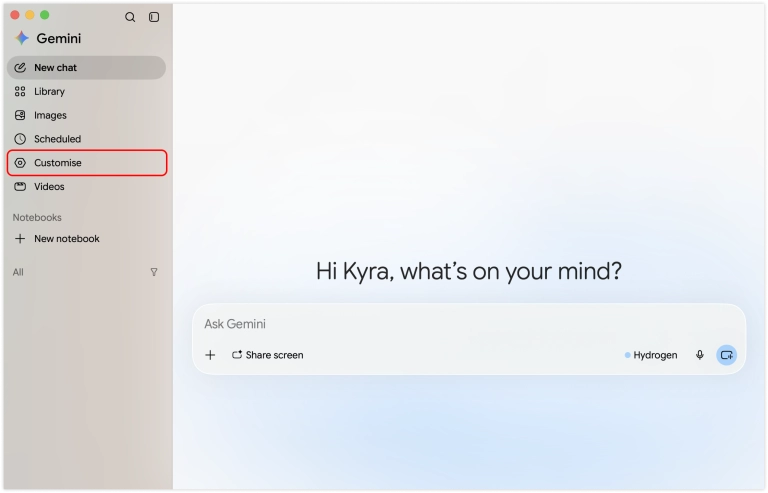
- Click + Custom.

- Input the custom app link: https://mcp.jibble.io
- Leave Advanced settings (Client ID and Client secret) empty as Jibble doesn’t require it.
- Click Next.
- Sign in to Jibble and authorize access.
- You’re now connected! Start a new chat, type @ and select Jibble, then try a prompt such as “Clock me in”.
Using Jibble in Gemini after connecting
Once Jibble is connected, you can work with your Jibble data in plain language from any Gemini chat.
| Category | Example prompts |
| Time tracking |
|
| Timesheets & reports |
|
| Leave management |
|
| Workspace info |
|
| Managers & admins (role-restricted) |
|
Note: Gemini can only show data and take actions your Jibble role allows. Manager and admin actions aren’t available to Members.