
The Best Free Timely Alternative
Get more than project timesheets. Jibble combines time tracking, attendance verification, and scheduling for every team, free forever for unlimited users.
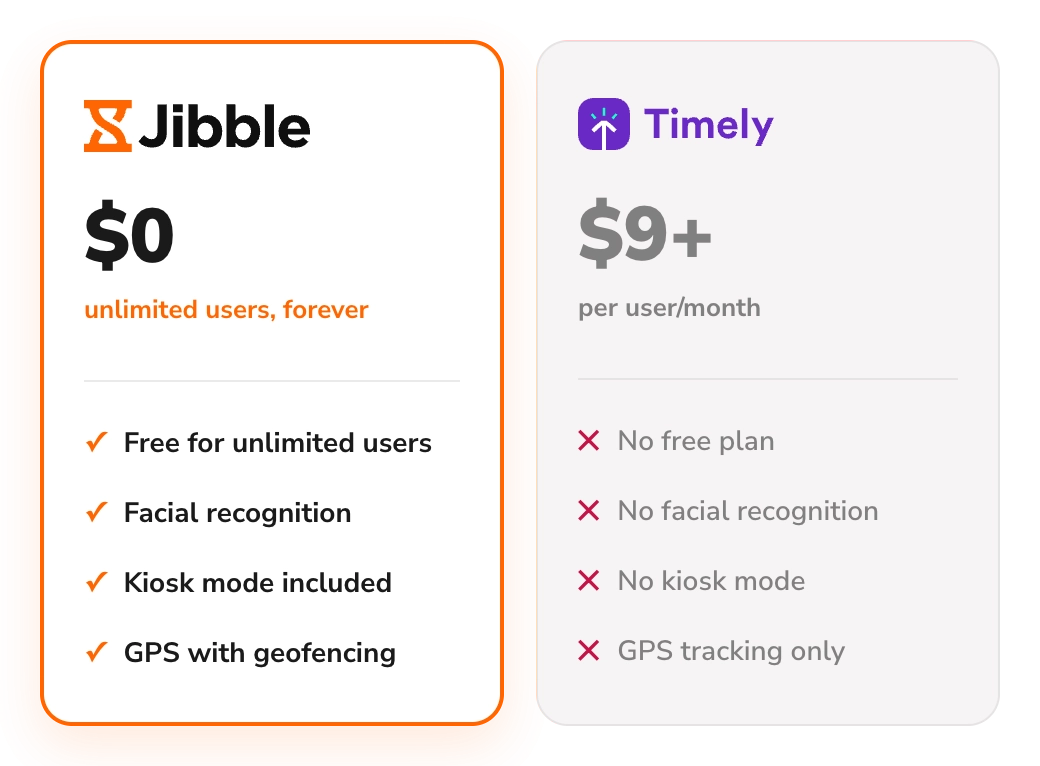






What are the main differences between Jibble and Timely?
A feature-by-feature comparison of where Jibble gives you more, for free.
| Feature | Jibble | Timely |
|---|---|---|
| Free forever | Unlimited users | No free plan |
| Time tracking (web, desktop, mobile) | ||
| Automated timesheets | ||
| Time clock kiosk | ||
| QR code, PIN or NFC clock-ins | ||
| Facial recognition | ||
| GPS tracking | ||
| Geofencing | ||
| Project time tracking | ||
| PTO & leave management | ||
| Real cost for a full setup | $0, always | $9–$22/user/month + add-ons |
Built for every way your team works
From face recognition and geofencing to scheduling and timesheets, Jibble has everything your team needs to track time and attendance.
Explore more of Jibble's featuresWhy choose Jibble as a Timely alternative?
The limits teams run into with Timely, and how Jibble handles each one.
Free forever, not from $9 a user
Timely has no free plan. After a 14-day trial, prices start at $9 per user per month with annual billing, and rise to $22 on the Unlimited plan. Jibble is free forever for unlimited users, so your whole team can track time without a per-seat bill.
See our full Timely review →
One new hire shouldn't double your bill
Timely's Starter plan caps out at five users and 20 projects. Add a sixth person or a 21st project, and your whole team moves to Premium, taking your annual-billed cost from $45 to $96 a month. Jibble has no user or project caps, so growing your team or your client list never changes your bill.
Facial recognition to stop buddy punching
Timely tracks what people work on, not who is actually doing the work. Jibble verifies each person with facial recognition at clock-in, whether they use their own phone or a shared kiosk, so no one can punch in for a colleague.
Face recognition attendance software → Geofencing, so clock-ins happen on site
Timely can show where time was tracked, but it can't control where work starts. Jibble lets you draw geofences around your sites, offices and job locations, so your team can only clock in when they're actually there, not from home or the car park.
Time tracking software with geofencing → A shared time clock kiosk, included
Timely is built for people tracking their own hours on their own devices, with no shared clock-in station. Jibble turns any tablet or phone into a time clock kiosk, so on-site teams can clock in with a PIN, a QR code or an NFC tag, without needing a device of their own.
Time clock kiosk → Is Jibble the right Timely alternative for you?
Still weighing options? See how Jibble ranks against every time tracker.
- You want free time tracking for your whole team
- You're close to five users and don't want one new hire to double your bill
- You need proof the right person clocked in at the right place
- You run a shop floor, warehouse or front desk and want one shared kiosk for everyone to clock in
Still weighing your options?
See how Jibble ranks against every other time tracker.
See the best time tracking software →Ready to make the switch from Timely?
Export your data
Download your time data from Timely's export tool.
Import into Jibble
Transfer your Timely data to Jibble in just a few clicks.
Invite your team
Add your team and get everyone set up in minutes.
Start tracking
Pick up where you left off, free forever.
See why thousands of teams choose Jibble
★★★★★
4.9 out of 5
★★★★★
5.0 out of 5
★★★★★
4.9 out of 5
★★★★★
4.8 out of 5
★★★★★
4.8 out of 5
★★★★★
4.7 out of 5
The best face attendance system
The best face attendance system. It reports to my outlook account all mismatches that happen and there is an option to see separate pictures with geolocation which is extremely precise. I am satisfied with it.
Great for tracking work hours, overtime and PTO
I can easily monitor daily activities with Jibble's time tracking. I can track remote workers' hours as well as overtime, and also set the calendar according to my region to assign holidays and weekends accordingly.
Hassle-free work hour tracking!
I am very happy with Jibble because of its functionality and ease-of-use. My employees can record their work hours hassle-free with accurate timesheets. I will definitely recommend Jibble to my friends and colleagues as it is very helpful and easy to use.
The BEST for tracking time
The mobile app with features like activity tracking and geofencing made me marvel at the solution. My team was able to easily transition to Jibble.
Very simple to set up
It's a very easy to use tool which gives you peace of mind that your employees are on-site and it logs employee hours for payroll.
Functional and practical
Jibble makes it very easy to track your time spent on different projects. There is also an app that can be used on your phone if you are on the move.
Your questions about Timely, answered
Everything people ask before switching from Timely to Jibble.