
If you’re here, you already know that Harvest has become significantly more expensive after its 2026 pricing model overhaul. The changes have reportedly left customers facing dramatic price hikes, prompting businesses to rethink whether Harvest is still a viable option for them.
What Changed with Harvest’s Pricing?
Harvest has replaced its simpler per-seat pricing with a model that adds usage-based charges for projects, clients, tasks, and invoices.
For some customers, the impact has been substantial. Users on Reddit report increases ranging from 29 percent to over 2000 percent.
If you’re weighing a switch from Harvest’s time and project tracking, profitability reporting, and invoicing features, we’ve compiled five alternatives worth considering.
For the full story behind Harvest’s pricing structure overhaul.
5 Best Harvest Alternatives at a Glance
Alternative |
Why consider it? |
Rating |
Free option |
Price |
|---|---|---|---|---|
| Jibble | Time tracking, attendance, project tracking, and invoicing for free | ⭐ 4.8/5 | Free forever for unlimited users | |
| TimeCamp | Detailed project reporting | ⭐ 4.7/5 | Yes | Starts at $3.99/user/month (billed annually) |
| My Hours | Simple billable time tracking for small teams | ⭐ 4.8/5 | Yes, for 5 users | Starts at $4/user/month (billed annually) |
| Timely |
Automatic project-based tracking with AI | ⭐ 4.7/5 | No | Starts at $9/user/month (billed annually) |
| Paymo |
All-in-one project management | ⭐ 4.7/5 | Yes, for 1 user | Starts at $5.90/month for 1 user; $10.90/user/month for 1+ users (billed annually) |
How Much Can You Save by Switching to Jibble?
Jibble is free forever for unlimited users, while Harvest’s Teams plan starts at $9 per user per month when billed annually, with additional usage-based fees for projects, clients, tasks, and invoices.
| Team size | Harvest (annual)* | Jibble (annual) | Potential annual savings |
|---|---|---|---|
| 5 users | $540/year + usage fees | $0/year | $540/year + usage fees |
| 10 users | $1,080/year + usage fees | $0/year | $1,080/year + usage fees |
| 25 users | $2,700/year + usage fees | $0/year | $2,700/year + usage fees |
| 50 users | $5,400/year + usage fees | $0/year | $5,400/year + usage fees |
| * Harvest pricing is based on the lowest-priced paid plan available, billed annually, and reflects the plan and features relevant to this comparison. Actual costs may vary depending on the plan, features, billing cycle, and number of users selected. |
|||
Selfie clock-in, GPS, geofencing and the kiosk app are free forever.
5 Best Harvest Alternatives: Full Breakdown
1. Jibble – Best Free Harvest alternative for enterprise teams
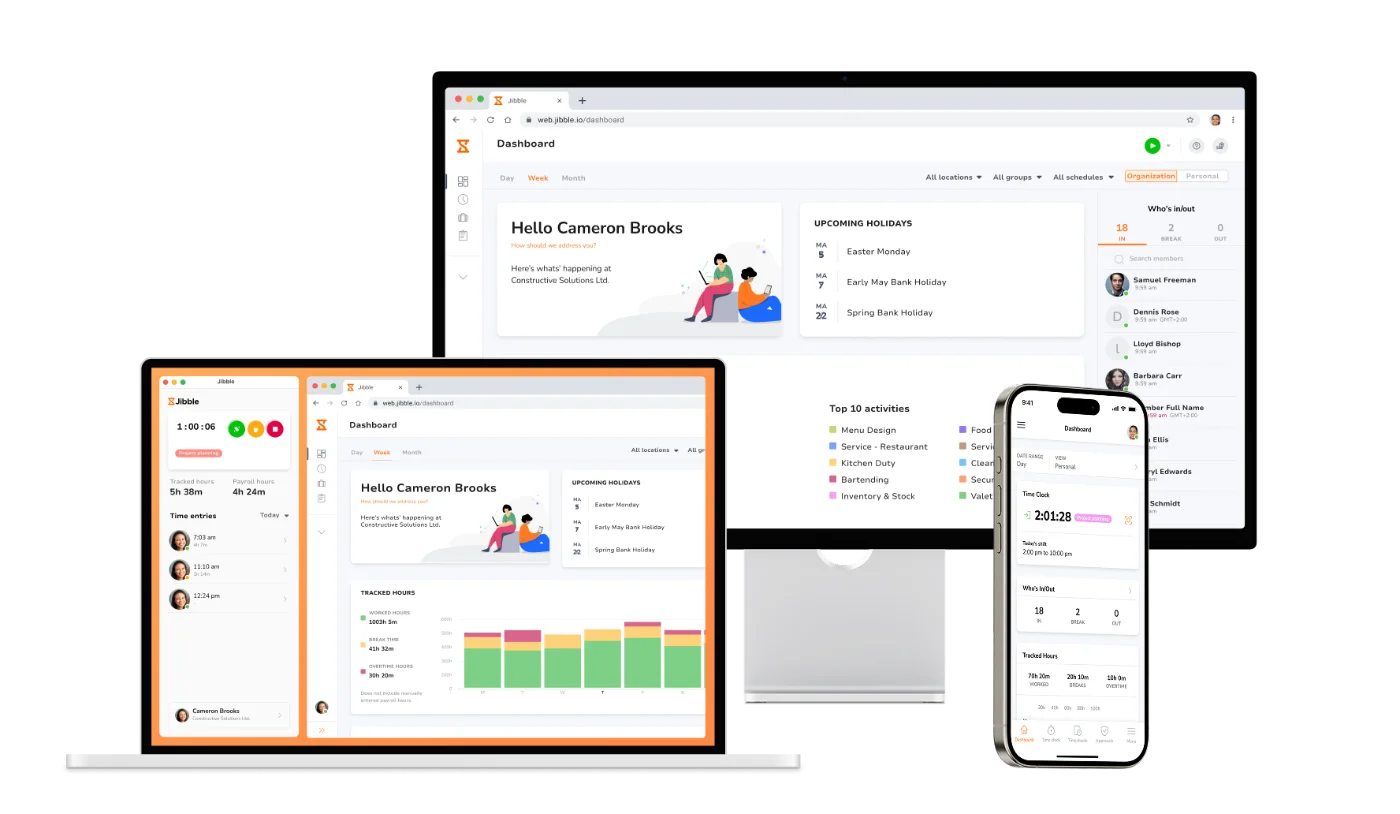
Jibble is the best Harvest alternative that combines time tracking, attendance verification, and project tracking to help enterprise teams manage workforce hours and projects at scale.
It helps teams record billable hours, monitor project progress, and turn tracked time into payroll-ready timesheets and client invoices. Jibble’s core features are accessible to an unlimited number of users for free, making it a cost-effective alternative for growing organizations.
Why choose Jibble over Harvest?
| Jibble stands out for | Why it matters |
|---|---|
| Free forever access for unlimited users | Unlike Harvest’s usage-based plans in addition to its per-user pricing, Jibble lets unlimited users track project time for free. |
| Flexible tracking | Track project time across web, desktop, mobile, a shared kiosk, Slack, and Microsoft Teams, with offline tracking included. |
| Project visibility |
Live dashboards show who’s working on what and how projects are progressing. |
| Attendance verification for field teams | Verify attendance with facial recognition, GPS, and geofencing. |
| Budget and billing control | Set employee-based billing rates, spot overtime, approve timesheets, and turn tracked time into client-ready invoices. |
| Reporting |
Filter and analyze hours by project, client, activity, team member, or date, then export reports in Excel or CSV. |
Things to consider before choosing Jibble:
- Advanced technology for free: Jibble offers features like facial recognition, GPS tracking, offline tracking, and QR code, NFC, and RFID clock-ins for free to unlimited users.
- Easy to use: Reviewers consistently praise Jibble’s simple, intuitive interface, making it easy for employees to start tracking time with minimal training.
- Reliable mobile accessibility: The mobile app makes it convenient for employees to clock in and out whether they’re working remotely, in the office, or across different locations.
- Advanced reporting: Some reviewers find the available reporting features limiting for more complex reporting needs.
Pricing:
| PRICING | COST |
|---|---|
| Free | $0 forever |
2. TimeCamp – Best Harvest alternative for detailed reporting
TimeCamp is a time tracking and productivity tool suited for teams that want multiple report types, customizable reporting, and resource planning tools.
It combines automatic activity tracking across websites and apps with project reporting and productivity insights, helping businesses understand where time goes, monitor team capacity, and make better decisions about budgets and resources.
Why choose TimeCamp over Harvest?
| TimeCamp stands out for | Why it matters |
|---|---|
| Detailed project reporting | Over 20 types of reports that show activities by day, week or month. Reports can also be customized. |
| Automatic time tracking | The desktop app automatically detects activity across websites and apps and assigns time to projects based on predefined keywords. |
| Resource planning | The planner can show employee availability and team capacity in one view, with color-coded statuses and filters by person or project. |
| Productivity insights | Customizable productivity goals can be set, then progress can be tracked with automated monitoring so you can see how your team performs against them. |
| Invoicing integrations | Tracked data can be exported to invoicing tools like Xero to reduce manual work and errors. |
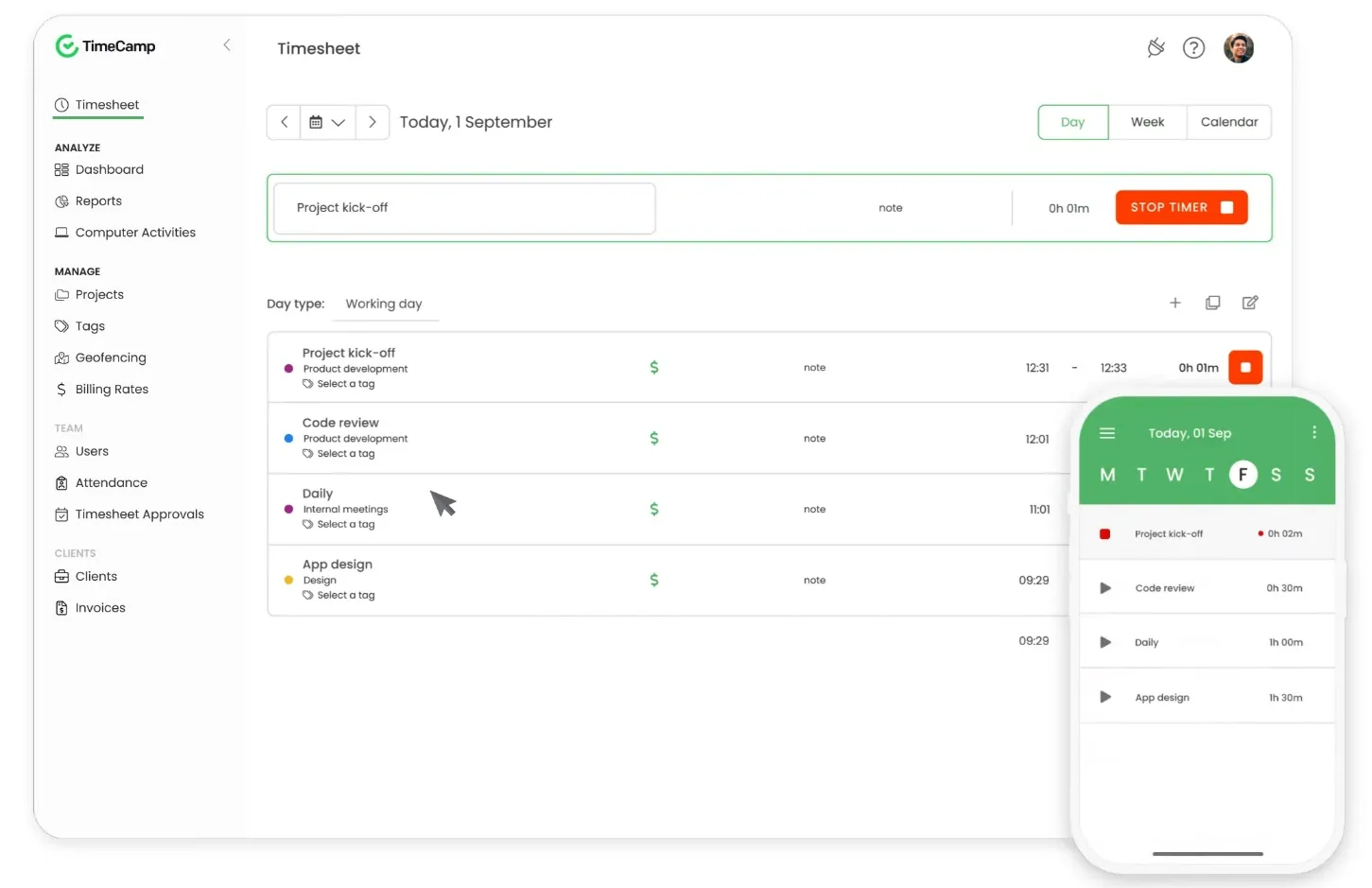
Photo from TimeCamp
Things to consider before choosing TimeCamp:
- Manage complex workloads: Its resource planning capabilities can help managers balance workloads and make better staffing decisions.
- Great dashboard and reporting: Reviewers appreciate the clear dashboard and reporting tools, which make it easier to see tracked time, understand how hours are distributed, and identify areas for improving efficiency.
- Difficult setup: Some reviewers find that TimeCamp takes time to configure initially, can feel less intuitive to use, and may be better suited to larger or more complex teams than to small businesses.
Pricing plans:
| PLAN | PRICE |
|---|---|
| Free | $0 |
| Starter | $3.99/user/month, billed annually |
| Premium | $6.99/user/month, billed annually |
| Ultimate | $9.99/user/month, billed annually |
| Enterprise | Price on request |
3. My Hours – Best Harvest alternative for freelancers and small teams
My Hours is a time tracking software that helps users track billable hours, manage projects, monitor budgets, and keep client work organized.
The software’s straightforward approach to time tracking and project management makes it well suited to small teams looking for an easy-to-adopt solution.
Why choose My Hours over Harvest?
| My Hours stands out for | Why it matters |
|---|---|
| Flexible billable time tracking | Time can be tracked by project, task, or client with support for custom hourly rates, monthly retainers, and fixed fees for billing. |
| Project profitability analysis | Compares labor costs and expenses against project budgets to calculate profitability and identify which projects are worth prioritizing. |
| Expense tracking | Project expenses can be recorded, receipts and files can be attached, and invoices can be generated and retained. |
| Project budget tracking | Allows for the setup of project and task budgets and monitors billable amounts in real time. |
| Detailed dashboard & reporting | Analyzes hours by project, client, task, or team member, schedules reports, and exports them in PDF or Excel. |
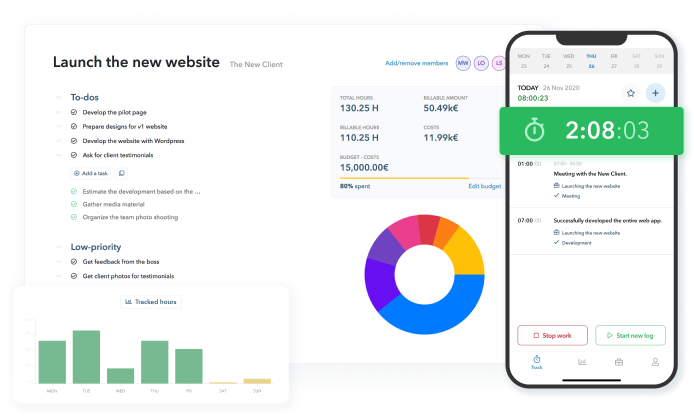
Photo from My Hours
Things to consider before choosing My Hours:
- Easy project management: Reviewers appreciate being able to set up projects, allocate tasks to team members, and track different project phases, helping with labor allocation and more accurate estimates for future projects.
- Flexible billing options: My Hours supports hourly rates, retainers, and fixed-fee projects, making it easier to manage different client billing models.
Pricing plans:
| PLAN | PRICE |
|---|---|
| Free | $0 for up to 5 users |
| Basic | $4/user/month, billed annually |
| Pro | $8/user/month, billed annually |
| Enterprise | Custom pricing |
4. Timely – Best Harvest alternative for AI-powered project tracking
Timely is a time tracking and project management software suited for teams that want to record hours automatically while keeping visibility into project capacity and workload.
Its AI-powered tracking captures work activity in the background and turns it into timesheets, while capacity planning and real-time budget tracking help teams manage resources and project costs more effectively.
Why choose Timely over Harvest?
| Timely stands out for | Why it matters |
|---|---|
| AI-powered timesheets | Automatically captures work in the background and turns it into AI-generated timesheets. |
| Capacity planning | Monitors workload, compares planned and actual capacity, and supports informed resourcing decisions. |
| Real-time budget visibility | Tracks total hours, budget usage, and unbilled time while monitoring budget milestones. |
| Customizable work tags | Categorizes work by project phase, activity, or location using customizable tags. |
| Accurate invoicing | Converts tracked hours and project budgets into invoices. |
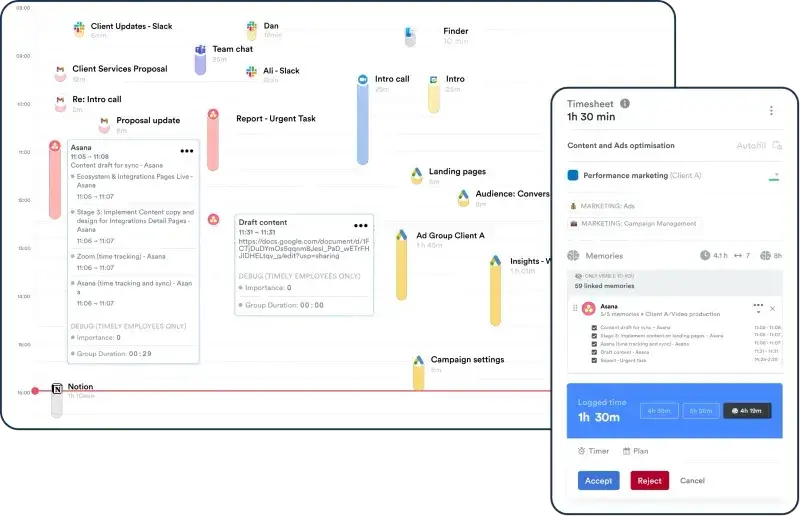
Photo from Timely
Things to consider before choosing Timely:
- Add-on pricing: Timely’s paid plans cover core time tracking and project monitoring, but task management costs an additional $5 per person.
- Hands-off time tracking: Reviewers appreciate Timely’s ability to track apps, files, and websites in the background, reducing manual time entry and making it easier to capture a complete workday. One thing to note, however, is that some reviewers report occasional AI misclassification of activities, so entries may need to be reviewed and corrected.
- Easy setup and use: Reviewers describe Timely as easy to set up and use, with a clean, user-friendly interface that makes organizing projects straightforward.
Pricing plans:
| PLAN* | PRICE |
|---|---|
| Starter | $9/user/month, billed annually (max 5 users) |
| Premium | $16/user/month, billed annually (max 50 users) |
| Unlimited | $22/user/month, billed annually (unlimited users) |
| Enterprise | Custom pricing |
| * Tasks are an add-on charged at $5 per person to any of the plans. |
|
5. Paymo – Best Harvest alternative with built-in client collaboration
Paymo combines project management, time tracking, as well as team and client communication in one platform.
Its client-facing tools let teams share project updates, gather feedback, and keep clients involved alongside day-to-day project planning and execution.
Why choose Paymo over Harvest?
| Paymo stands out for | Why it matters |
|---|---|
| Client and team collaboration | Supports collaboration through project activity streams, real-time discussions, comments, and notifications, while providing clients with guest access to project updates through customizable sharing and permissions. |
| Visual project planning | Supports project planning and management through Kanban boards and Gantt charts, helping identify project bottlenecks early. |
| Financial management | Supports project budgets, expense tracking, estimated and actual cost comparisons, and fixed-price or hourly billing rates. |
| Flexible time tracking | Offers live timers and bulk entries, while automatically recording computer activity and linking it to tasks. Time entries are also available in a calendar view. |
| End-to-end invoicing | Enables estimate creation, invoice conversion, recurring billing, online payments, and invoice exports to accounting tools. |
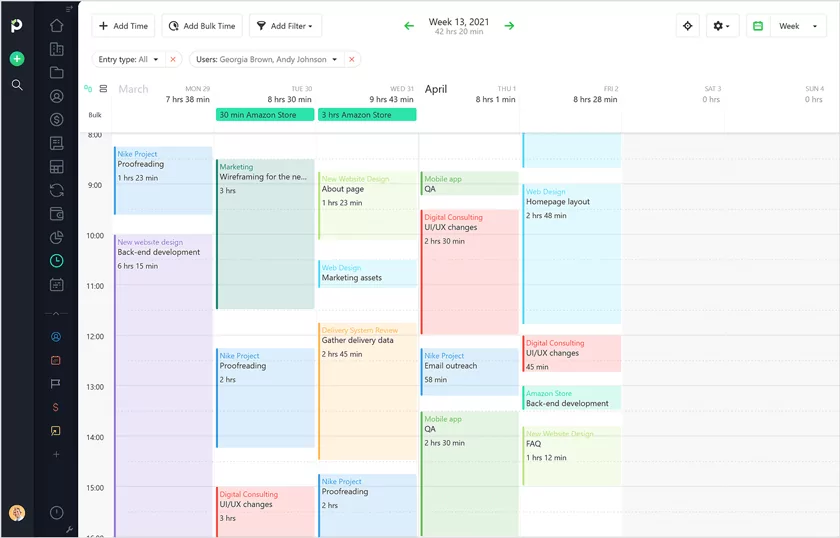
Photo from Paymo
Things to consider before choosing Paymo:
- Great for client-focused teams: Paymo combines project planning, client communication, time tracking, budgeting, expenses, and billing in one platform, making it a good fit for teams that want to manage client work in one place.
- Higher pricing: Paymo’s $5.90/month Solo plan is limited to one user. For teams, pricing starts at $10.90/user/month, making it the most expensive starting price among the alternatives on this list.
- Strong invoicing capabilities: Reviewers appreciate how easily Paymo turns tracked time into invoices, with customizable invoice layouts that can be tailored to their billing needs.
- Poor customer support: Some reviewers stated that Paymo’s customer support was slow to respond or failed to provide useful solutions, workarounds, or follow-ups when they encountered billing, functionality, or account issues.
Pricing plans:
| PLAN | PRICE |
|---|---|
| Free | $0/month, limited to 1 user |
| Solo | $5.90/month, limited to 1 user |
| Plus | $10.90/user/month |
| Pro | $16.90/user/month |
Harvest Alternatives: Which Should You Choose?
Each alternative takes a different approach to replacing Harvest:
- If you want free time tracking, attendance verification, and project-based tracking for unlimited users → Jibble.
- If you want deeper insights into project costs and profitability → TimeCamp.
- If you’re a freelancer or a small team and need to track client work and billable hours → My Hours.
- If you want to reduce manual time entry and automate time capture → Timely.
- If you want to communicate with teams and clients inside your project workspace → Paymo.
Final Thoughts
Harvest’s pricing changes have given businesses a good reason to rethink their time tracking stack, but switching doesn’t mean giving up the features that made Harvest useful.
Whether you want a free solution, simpler billable-hour tracking, deeper project insights, automated time capture, or an all-in-one project workspace, there’s an alternative that can fit the way you work.
And if keeping Harvest’s most useful capabilities without the escalating costs is the priority, Jibble stands out with free time tracking, project management, reporting, invoicing, and more for an unlimited number of users.
The best alternative ultimately comes down to what your team needs and how much you’re willing to pay for it.
FAQs
Some frequently asked questions...
What are some good alternatives to Harvest?
Good Harvest alternatives include Jibble, TimeCamp, My Hours, Timely, and Paymo.
Jibble stands out for teams that want core time tracking, project-based tracking, reporting, and invoicing capabilities for free.
Is there a free version of Harvest?
Yes, Harvest offers a free option, but it’s limited to one user.
If you need time tracking for a larger team without per-user or usage-based costs, Jibble is free forever with access to core time tracking and project management for unlimited users.
What is the best time tracking tool for freelancers?
Jibble is a strong choice for freelancers who want simple, capable time tracking for free.
It offers billable time tracking, project-based tracking, attendance verification, reporting and invoicing at no cost.
Why are people looking for alternatives to Harvest?
Harvest’s 2026 pricing model overhaul introduced usage-based charges for projects, clients, tasks, and invoices alongside its per-seat pricing.
For businesses facing higher costs, alternatives such as Jibble offer a way to gain core time tracking and project management capabilities for free forever for unlimited users.