
If you’re running a business in Canada, there’s no shortage of time trackers on the market for you to choose from.
But I’ve noticed that most roundups are for American businesses and retrofitted for Canada with a currency conversion and a vague mention of “compliance.”
That’s not good enough.
If you’re running a team across Ontario, Alberta, and BC, overtime rules, statutory holidays, and payroll obligations differ by province.
A tool built around a flat 40-hour federal workweek will cost you money and expose you to compliance risks you won’t see coming.
With a good time tracker, Canadian businesses can verify employee location, enforce geofencing for field teams, support biometric clock-in, and automate overtime calculations with customizable policies that actually reflect provincial labour law, not a flat US federal threshold.
To help you, I’ve evaluated the six best time trackers for Canadian businesses on ease of use, pricing, mobile experience, payroll integrations, and compliance fit. Here’s what held up.
What Canadian Labour Law Requires From A Time Tracker
This is where most global tools quietly fail, and where Canadian businesses unknowingly take on compliance risk.
Canada labour law has no single national standard for overtime, statutory holidays, or leave entitlements. Employment law is primarily provincial, which means a tool that works fine for your Toronto office can create payroll errors the moment you hire in Calgary or Vancouver.
Overtime thresholds vary by province
Ontario sets the threshold at 44 hours per week. Alberta calculates overtime at 8 hours per day or 44 hours per week, whichever triggers first. British Columbia applies both a daily threshold (8 hours) and a weekly one (40 hours), with different rates for each.
A time tracker that applies a flat weekly cutoff will miscalculate overtime for a significant portion of your workforce.
Statutory holidays are not uniform across Canada
Family Day, for example, is observed in Ontario, Alberta, and British Columbia, but not in Quebec, where different holidays apply under provincial law.
A tool with a static holiday calendar, or one that defaults to US federal holidays, will require constant manual correction.
Quebec operates under distinct rules
Bill 96 and Law 25 together create language and data privacy obligations that go beyond what most US-built SaaS tools account for.
If you have employees in Quebec, your time tracker needs a bilingual interface and a clear answer on where employee data is stored and processed.
Federal employers have their own obligations
Businesses under federal jurisdiction, including banks, telecoms, airlines, and interprovincial transport, are governed by the Canada Labour Code rather than provincial employment standards.
The Canada Labour Code sets its own overtime threshold (40 hours per week), requires specific rest periods, and mandates detailed record-keeping that must be retained for 36 months after an employee’s departure.
Payroll records must be audit-ready
Under both federal and provincial standards, employers are required to maintain accurate records of hours worked, overtime, and vacation entitlements.
Editable timesheets without an immutable audit log are a liability, not a feature. If a record can be changed without a trace, it cannot be relied on in a dispute.
Best Time Trackers for Canadian Businesses
|
||
| Software | Pricing | French Interface |
| Jibble | $0.00 (Free Forever) | ✅ |
| 7shifts | $39.99 CAD for 30 employees (in a single location) |
✅ |
| MakeShift* | $3.75 per user per month (+$2.00 Time and Attendance module) |
❌ |
| Harvest | $11.00 per seat per month (plus usage fees for additional invoices, projects, clients, and tasks) |
❌ |
| QuickBooks Time* | $8.00 per user per month (+$10.00 base fee per month) |
❌ |
| Collage HR | $14.00 per user per month | ✅ |
|
*billed monthly, not annually |
||
Jibble — Best Time Tracker for Growing Canadian Businesses
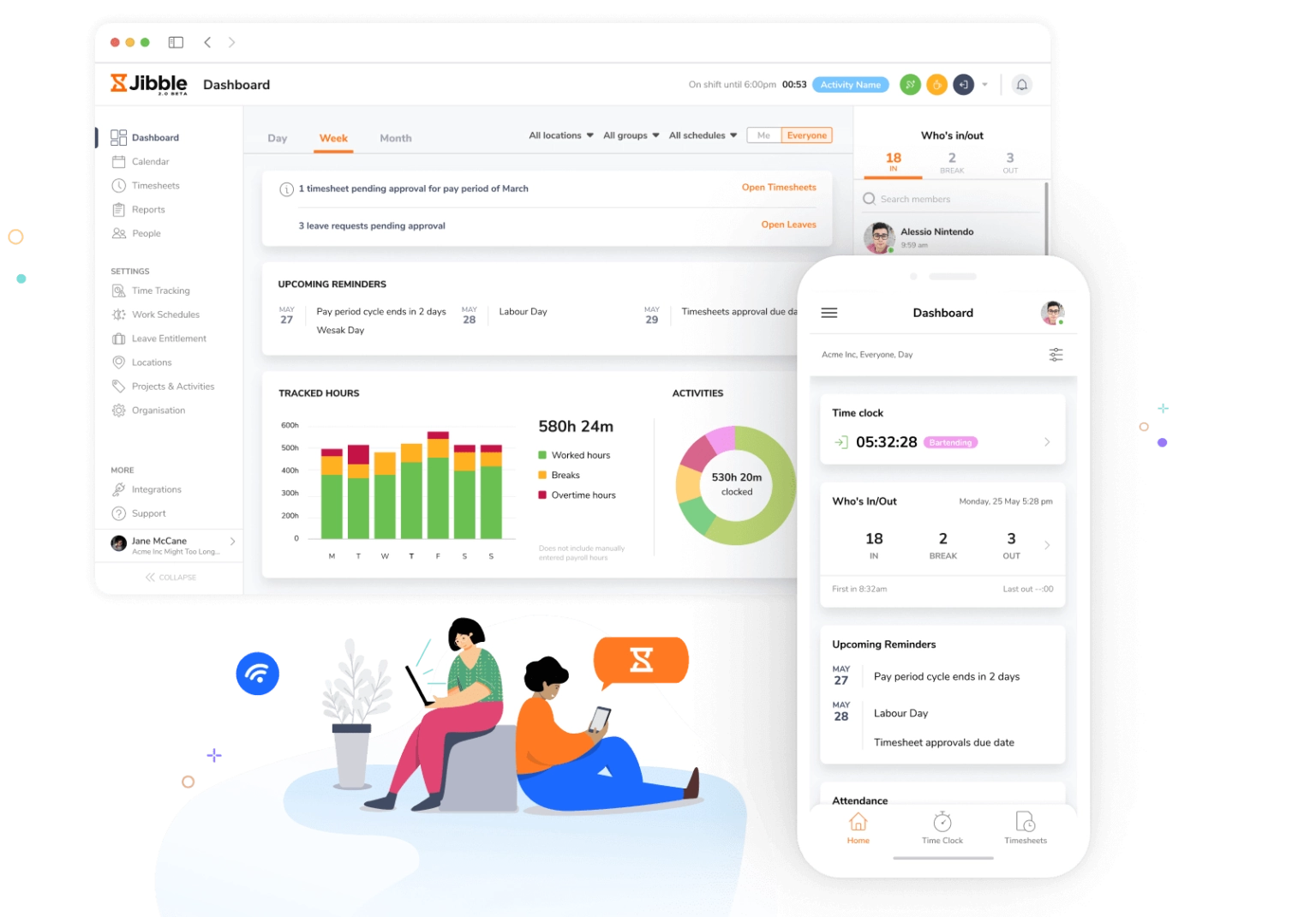
Most time trackers make you choose between affordability and capability. Jibble doesn’t.
It’s completely free for unlimited users, requires almost no training to get running, and covers every feature a growing Canadian business is likely to need before it outgrows them.
Jibble’s clock-in experience is flexible to work across any team setup. Employees can track time from a phone, desktop, Slack, or Microsoft Teams, clock in on a shared kiosk, or tap in with NFC.
For field teams or multi-site operations, GPS stamps location data on every entry, and geofencing restricts clock-ins to approved locations.
AI-powered facial recognition with selfie capture blocks buddy punching and photo spoofing, which matters more as your headcount grows and you can no longer personally verify who’s on-site.
Jibble’s timesheets are automated, tamper-proof once the pay period closes, and exportable as XLS or CSV for payroll. Its audit trail is also complete, which keeps you compliant with Canadian wage and hour requirements without any extra admin work.
Additionally, time off, leave accruals, project tracking, and client invoicing are all built in.
However, some users comment that Jibble’s reporting is functional rather than sophisticated, and clock-in status can occasionally lag before updating.
Neither is a dealbreaker for most teams, but if you’re running complex payroll analytics, you’ll hit the ceiling on the free plan’s reporting depth.
But for a growing Canadian business that needs a reliable, full-featured time tracker without a per-seat price tag attached, Jibble is the most complete option on this list.
Pricing:
- Free Forever for an unlimited number of users
Available on:
Desktop, Mobile, Kiosk, Chrome Extension, and Web
Ratings:
- Capterra: 4.8/5
- G2: 4.8/5
- Play Store: 4.7/5
- App Store: 4.8/5
Pros:
- Simple and easy-to-understand interface
- Works across multiple devices for on-the-go time tracking
- Requires little to no training
- Maintains accurate work-hour records
- Generates clear and organized reports
- Supports facial recognition for attendance verification
- Completely free to use with no hidden costs
Cons:
- Reporting formats are basic for complex analysis
- Clock-in/clock-out status may not update immediately
- Tracks time so precisely you’ll start wondering if it logs your thoughts of taking a break
“Jibble provides both a web-based platform and a desktop application, offering excellent flexibility for users. The subscription pricing is very reasonable on a per-user, per-month basis when billed annually. The interface is well-designed and user-friendly, making daily operations smooth and efficient.” – Syneffo S.
(Source: Capterra)
“Sometimes the clock-in or clock-out status doesn’t update immediately, which can create small inconveniences when tracking time accurately. If the syncing speed improves, the overall experience would be perfect.” – Rushi S.
(Source: G2)
QuickBooks Time — Best Time Tracker for QuickBooks Payroll Users
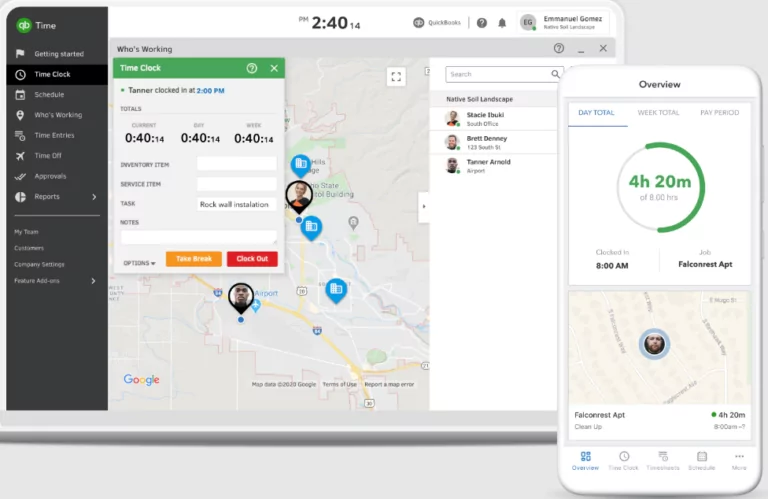
Photo from QuickBooks Time
If your Canadian business already runs on QuickBooks, QuickBooks Time is the natural add-on.
Employees clock in from their phones with or without Wi-Fi and submit timesheets from the same app.
GPS tracking shows who’s on-site and who’s on the road, geofencing alerts you to unexpected overtime or missed arrivals, and time off is managed in the same place as scheduling.
For project-based businesses, you can track budgeted hours against actuals in real time.
Approved timesheets flow directly into QuickBooks Payroll without manual exports or reconciliation, which saves meaningful time every pay cycle for small teams wearing multiple hats.
Employees can also access pay stubs, deductions, and year-to-date earnings directly in the QuickBooks Workforce app, which reduces the routine payroll questions that eat into a manager’s day.
However, QuickBooks Time has certain downsides worth noting. Time entry edits can be glitchy, and new users tend to need a settling-in period.
It’s also a tool built tightly around the QuickBooks ecosystem, so if you’re not already a QuickBooks customer, a standalone time tracker will serve you better.
Pricing:
- Free Plan: No
- Paid Plan: Starts at $8.00 per user per month + $10.00 base fee per month, billed monthly
Available on:
Web, Mobile, and Kiosk
Ratings:
- Capterra: 4.7/5
- G2: 4.5/5
- Play Store: 4.7/5
- App Store: 4.6/5
Pros:
- Easy to keep track of sick and vacation days
- Simplifies time tracking and scheduling for teams
- Saves time on payroll and administrative tasks
Cons:
- Can be glitchy when updating time entries
- May present a learning curve to new users
“Very straightforward software, makes it easy to track time and edit with supervisor permission. It is also nice that I am able to put in notes when I forget to clock back in after lunch.” – MacKenzie C.
(Source: Capterra)
“The cost is a little high and continually rising. The representatives for customer support can be hard to understand at times.” – Natalie Y.
(Source: Capterra)
7shifts — Best Time Tracker for Canadian Restaurants and Food Service Teams
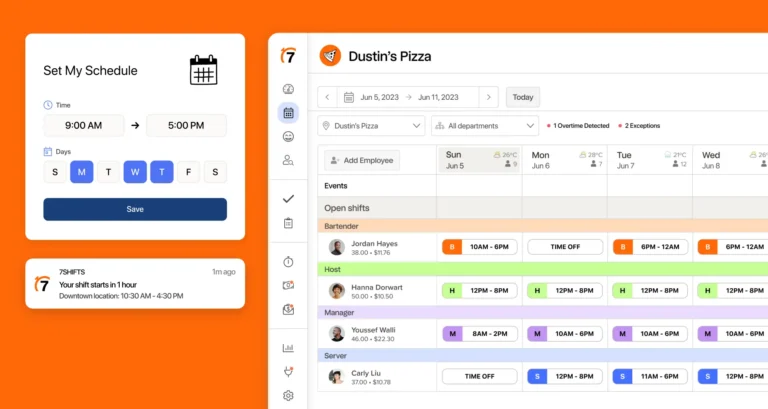
Photo from 7shifts
7shifts is a scheduling and time tracking platform built specifically for restaurants that you can use to build schedules by dragging and dropping shifts onto a calendar.
As you do, 7shifts shows you who’s available, who has time off, and whether anyone is heading into overtime.
It also flags any labor law violations before you hit publish, so you’re not accidentally scheduling a minor for too many hours or missing a required break.
The labor forecasting tool looks at your past sales data and tells you how many staff you actually need per shift. That means fewer situations where you’re overstaffed on a slow Tuesday or short-handed on a busy Friday.
Employees clock in through a separate app called 7punches or directly through your POS system.
They can request shift swaps and submit time off from their phones, and managers approve everything before it goes through.
Time off and PTO tracking live in the same place as scheduling, and when payday comes, the data syncs straight to your payroll provider.
That said, 7shifts’ schedule view is limited to one week at a time, and sales data can occasionally take a moment to update. Neither is a dealbreaker, but worth knowing if you’re used to seeing the full month at a glance.
Pricing:
- Free Plan: Yes, for up to 15 employees in a single location
- Paid Plan: Starts at $39.99 CAD for 30 employees in a single location
Available on:
Mobile, Tablet, and Web
Ratings:
- Capterra: 4.7/5
- G2: 4.5/5
- Play Store: 4.7/5
- App Store: 4.8/5
Pros:
- Intuitive and easy to navigate
- Responsive and helpful customer support
- Helps with labor cost forecasting
Cons:
- Schedule view limited to one week at a time
- Time and sales data may not always update correctly
“The efficiency when it comes to clocking someone’s hours is very reliable. It seems as if this company has mastered the art of getting hours in accurate calculations for payment down to a Science.” – Nathaniel W.
(Source: Capterra)
“The only challenge we had with 7Shifts is intermittent syncing with our POS system. Prior to running payroll I frequently have to resync time clock entries and sales don’t always update accurately or all.” – Brent S.
(Source: G2)
Collage HR — Best Time Tracker for Canada Labour Law Compliance
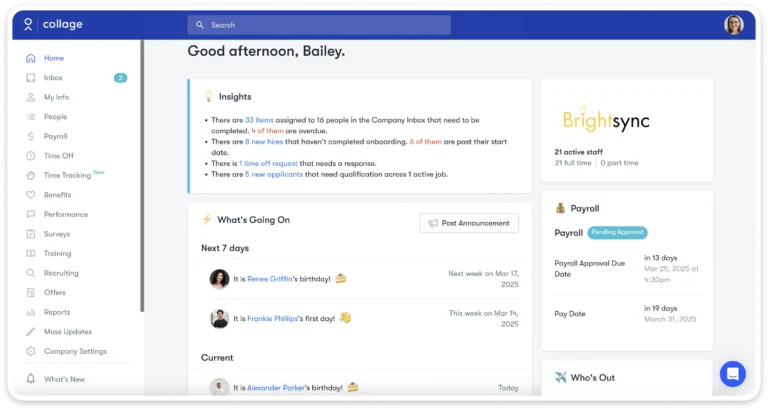
Photo from Collage HR
If you’re looking for a time tracking solution tailored to Canadian businesses, Collage HR is a strong option. Collage combines timesheets, time clock, PTO, payroll, and HR tools into one centralized platform designed for small and mid-sized teams.
Employees can clock in and out from desktop or mobile, while built-in geofencing helps businesses verify on-site work locations without adding unnecessary complexity. Managers can review hours, approve timesheets, and track overtime from a single dashboard, making payroll significantly easier.
What makes Collage stand out is how tightly connected everything feels. Approved hours flow directly into payroll, time off balances automatically sync, and overtime calculations align with Canadian provincial rules. That reduces manual admin work and helps prevent payroll errors before they happen.
The platform is also designed to stay approachable for smaller HR teams that want functionality without the learning curve of enterprise software.
That said, businesses operating in Canada that are looking for highly advanced workforce planning or international payroll functionality may find the platform more focused on Canadian operational needs than global enterprise complexity.
Pricing:
- Free Plan: No
- Paid Plan: Starts at $14.00 per user per month, billed monthly. Volume discounts available.
Available on:
Mobile and Web
Ratings:
- Capterra: 4.2/5
- G2: 4.2/5
- Software Advice: 4.2/5
Pros:
- Built specifically for Canadian businesses
- Fully connected payroll, PTO, and time tracking
- Easy-to-use interface for managers and employees
- Built-in geofencing and overtime tracking
Cons:
- Less suited for international payroll processing
- Limited advanced workforce planning features as compared to enterprise-focused platforms
“What I love most is that it puts everything HR-related in one single place. I can easily set up each employee’s full profile, store all their personnel documents, and keep their employment and leave history all in one spot.” – Elisa C.
(Source: G2)
“I don’t like the limited user role customization in Collage HR. The permission tiers are too rigid, which forces HR admins to either retain too much control or give managers overly broad access.” – Una D.
(Source: G2)
MakeShift — Best Time Tracker for Healthcare Workers
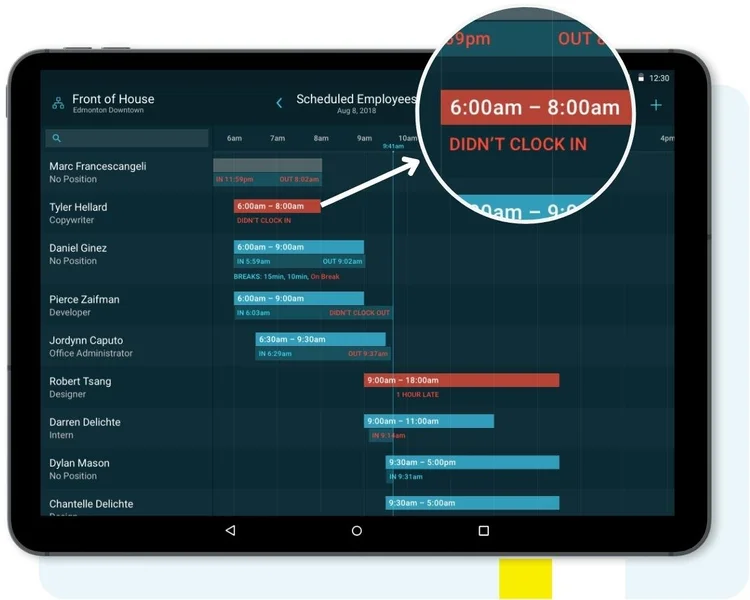
Photo from MakeShift
MakeShift is a Canadian-built time tracker with scheduling that does its best work in healthcare operations.
MakeShift’s mobile experience is clean and easy for staff to adopt. Its drag-and-drop scheduler handles the complexity of shift-based healthcare rosters well.
You can build schedules around availability, skills, and position requirements, create templates for recurring patterns, and view assignments across multiple facilities in one place.
Labor budgeting tools let you set cost limits in hours or dollars and flag you immediately when a schedule pushes past them.
For tracking time, MakeShift allows staff to clock in via mobile app or an on-site kiosk, with photo verification to prevent buddy punching and geofencing to confirm location.
Custom overtime and pay rules can be configured to match your collective agreement or provincial standards, and approved timesheet data flows directly into your payroll system.
One area where MakeShift shows its limits is scale. Large rosters mean a lot of scrolling, and the schedule view offers little in the way of visual customization.
Another thing worth knowing before you commit is that its time and attendance features are a paid add-on at $2.00 per employee per month on top of the base plan, so factor that into your budget early if time tracking is the primary reason you’re planning to use it.
Pricing:
- Free Plan: No
- Paid Plan: Starts at $3.75 per user per month, billed monthly (+$2.00 Time and Attendance add-on)
Available on:
Mobile, Web, and Kiosk
Ratings:
- Capterra: 4.5/5
- G2: 4.3/5
- Play Store: 3.7/5
- App Store: 2.7/5
Pros:
- Easy to view work schedule on mobile
- Dashboard provides helpful notifications
- Displays available shifts in one place
Cons:
- Limited customization of shift display/visual organization
- Requires a lot of scrolling when managing large teams/schedules
“It is easy to use and has a reporting feature that is useful. I like that the schedule is easy to produce and reproduce. The app is user friendly for staff to input their availability. The computer version is easy to use for supervisors and managers. I use Makeshift daily.” – Verified User.
(Source: G2)
“You can’t add your availability by choosing multiple dates at the same time. You have to manually select every date to add your availability as a shift worker.” – Chitranzan C.
(Source: Capterra)
Harvest — Best Time Tracker for Hourly Billing Agencies

Photo from Harvest
For Canadian agencies and consulting firms billing clients by the hour, Harvest is the most purpose-built option on this list.
Where most time trackers treat invoicing as an afterthought, Harvest builds the entire workflow around it: track time, approve timesheets, generate invoices, and collect payment without switching tools.
Timers run in the background while you work, calendar integration pulls in meetings as time entries, and custom reminders keep your team’s timesheet submissions on schedule.
Project budgets are monitored in real time with alerts before a project goes over, and profitability reports show exactly how time and costs affect margin across every client and project.
For invoicing, billable hours convert to invoices, expenses and receipt photos attach directly, and Stripe and PayPal integration means clients can pay immediately.
It also connects cleanly with Xero, which many Canadian agencies already run for accounting.
However, Harvest’s reporting and invoice customization are fairly rigid, and per-seat pricing means costs grow with your headcount. On top of that, paid plans add usage-based fees for additional invoices, projects, clients, and tasks, so for agencies juggling multiple clients and sending frequent invoices, costs can climb even without adding a single seat.
Pricing:
- Free Plan: Yes, for one user
- Paid Plan: Starts at $9.00 per user per month, billed annually (plus additional fees apply based on usage)
Available on:
Web, Desktop, Mobile, Browser Extension
Ratings:
- Capterra: 4.6/5
- G2: 4.3/5
- Play Store: 4.2/5
- App Store: 4.5/5
Pros:
- Effective for project time management
- Integrates well with Xero accounting software
- Ability to add categories and subcategories to time entries
Cons:
- Limited customization options, especially in reports and invoices
- Pricing isn’t fixed: it scales with team size and usage, making costs hard to predict as the business grows
“Harvest is a useful and versatile work system that facilitates business collaboration and digital support for all your operations and work projects in real time, giving you control over the development of all your team’s activities.” – Martin P.
(Source: G2)
“The number one thing is the recent private equity acquisition of Harvest increased the price by 600%. It increased 6x overnight for us without warning. The minimum to use the product now with “unlimited” usage of the app is $1,500 per month, plus $14/mo/user. So unless you’re ready to spent $20k+ per year on time tracking and invoicing, look elsewhere” – Timothy D.
(Source: G2)
So, What is the Best Time Tracker for Canadian Businesses in 2026?
Every tool on this list earns its place for a specific use case.
QuickBooks Time is the natural fit if your business already runs on the QuickBooks ecosystem.
7shifts is built specifically for Canadian restaurants and does that job well, whereas Collage HR helps Canadian businesses stay compliant with local labour laws.
MakeShift handles the complexity of unionized and shift-heavy workforces.
And Harvest is the cleanest option for agencies and consultants billing by the hour, though its per-seat-plus-usage pricing means costs scale with both headcount and activity.
For most Canadian businesses, though, Jibble is the best time tracker.
It’s the highest-rated time tracker on Capterra, G2, and GetApp, covers the compliance requirements Canadian employers actually face, and it’s free forever for unlimited users.
It delivers enterprise-grade time tracking at no cost, and for most Canadian teams, that translates directly to fewer payroll headaches and tighter compliance.
FAQs
Some frequently asked questions...
A good time tracker for Canadian employers should handle provincial overtime rules, track statutory holidays correctly by province, support bilingual interfaces for Quebec-based teams, and produce audit-ready payroll records. Most global tools don’t account for these requirements out of the box.
Yes. Jibble is completely free forever for unlimited users, and Canadian businesses get GPS tracking, geofencing, automated timesheets, and payroll exports without paying a per-seat fee.
That makes it the only genuinely free time tracking software available to Canadian teams.
Yes. Most tools on this list support remote clock-in via mobile or desktop. Jibble is the strongest option for remote teams specifically, offering GPS tracking, live location monitoring, and integrations with Slack and Microsoft Teams so employees can clock in without switching apps.