
Whether you’re a freelancer, a small team, or a large enterprise, timesheet software has become essential for managing work efficiently and keeping projects on track.
At their core, these tools record time spent on tasks, projects, or client work. But, modern timesheet apps are jam-packed with much more advanced features that can help you organize daily work, improve accountability, help teams spot inefficiencies, and make better business decisions using real data.
So, to help you figure out which timesheet apps are genuinely worth using in 2026, I tested 16 popular platforms myself, putting them through everyday work scenarios rather than relying on marketing claims.
Out of those, 9 tools stood out for being easy to use, intuitive, and reliable in daily operations. I’ve also included 7 additional options that may be a better fit for specific needs, such as deep productivity tracking or detailed project cost control.
What to Look for When Choosing a Timesheet App
To pick the right tool for your team, keep these key factors in mind:
- Ease of Use: Can your team start tracking time without frustration or long onboarding?
- Integration Capabilities: Does it connect with your project management, accounting, or communication tools?
- Insightful Reporting: Does it provide actionable insights beyond just hours worked?
- Team Fit: Is it suitable for freelancers, small teams, or enterprise workflows?
- Value for Money: Are the features worth the subscription or enterprise cost?
|
Best Timesheet Software Compared |
|||
|
Software |
Starting Price |
Free Plan |
Highlights |
|
Jibble |
$0.00 |
✅ FREE forever for unlimited users |
|
| Toggl Track | $9.00 per user/month | ✅
Up to 5 users |
|
| My Hours | $8.00 per user/month | ✅
Up to 5 users |
|
| Harvest | $9.00 per user/month | ✅
1 user |
|
| Time Doctor | $6.70 per user/month | ❌ |
|
| Apploye | $4.50 per user/month | ✅
Up to 10 users |
|
| Camelo | $29.00 per month for the first 30 users | ✅ |
|
| Productive | $9.00 per user/month (min 3 users) | ❌ |
|
| TMetric | $5.83 per user/month | ✅
Up to 2 users |
|
|
✅ : Has Free Plan ❌ : No Free Plan Note: The table shows entry-level rates and may not accurately reflect the overall value of the software. To gauge real value, consider each platform’s features, base fees, and any limits on the number of users. |
|||
Jibble – Best Timesheet Software for Teams of All Sizes
Free for unlimited users
User-friendly UI Interface
Project and client-based time tracking for billable hour tracking
GPS-based and face recognition attendance verification
Real-time productivity dashboards
Fewer comprehensive invoicing features than dedicated invoicing software
Limited advanced project planning
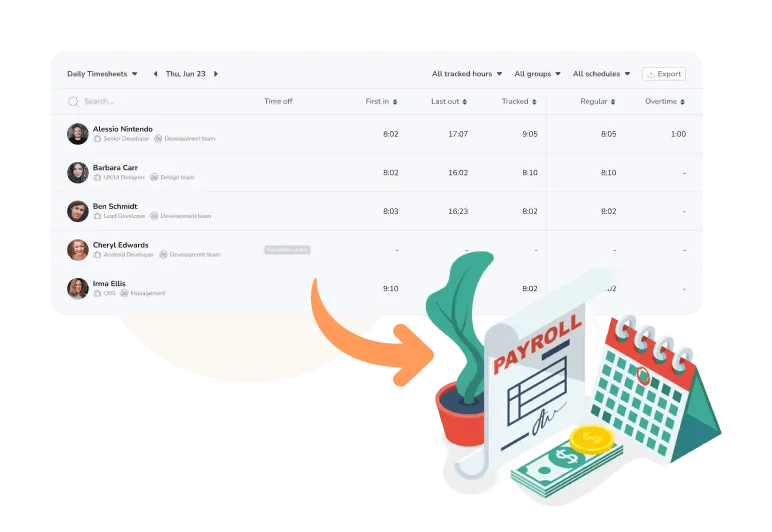
Jibble’s timesheet software is designed to be both powerful and simple. Every clock-in and clock-out is tracked accurately across smartphones, tablets, and computers, even offline, making it flexible for any workforce.
Hours can be tagged by project and activity, giving managers real-time visibility into resource allocation and project progress. Overtime is captured automatically, and approvals are just a click away, keeping payroll accurate and on schedule.
Moreover, Jibble’s reporting tools are built to give actionable insights. You can filter by employee, project, or group to focus on the data that matters, while real-time dashboards provide a clear view of productivity and project allocations without unnecessary clutter. And integrations with Xero, QuickBooks, and Deel make exporting timesheets and processing payroll seamless.
Listen, Jibble has consistently earned outstanding ratings on platforms like Capterra and GetApp, averaging around 4.9/5. With a generous free plan that offers full timesheet functionality, it gives businesses everything they need to track time accurately, setting a new standard for what the best timesheet software should be.
Pricing:
- Free forever for unlimited users
Available on:
Desktop, Mobile, Kiosk, Chrome Extension, Web
Ratings:
- Capterra: 4.9/5
- G2: 4.7/5
- Play Store: 4.5/5
- App Store: 4.8/5
Toggl Track – Best Minimal Timesheet Software
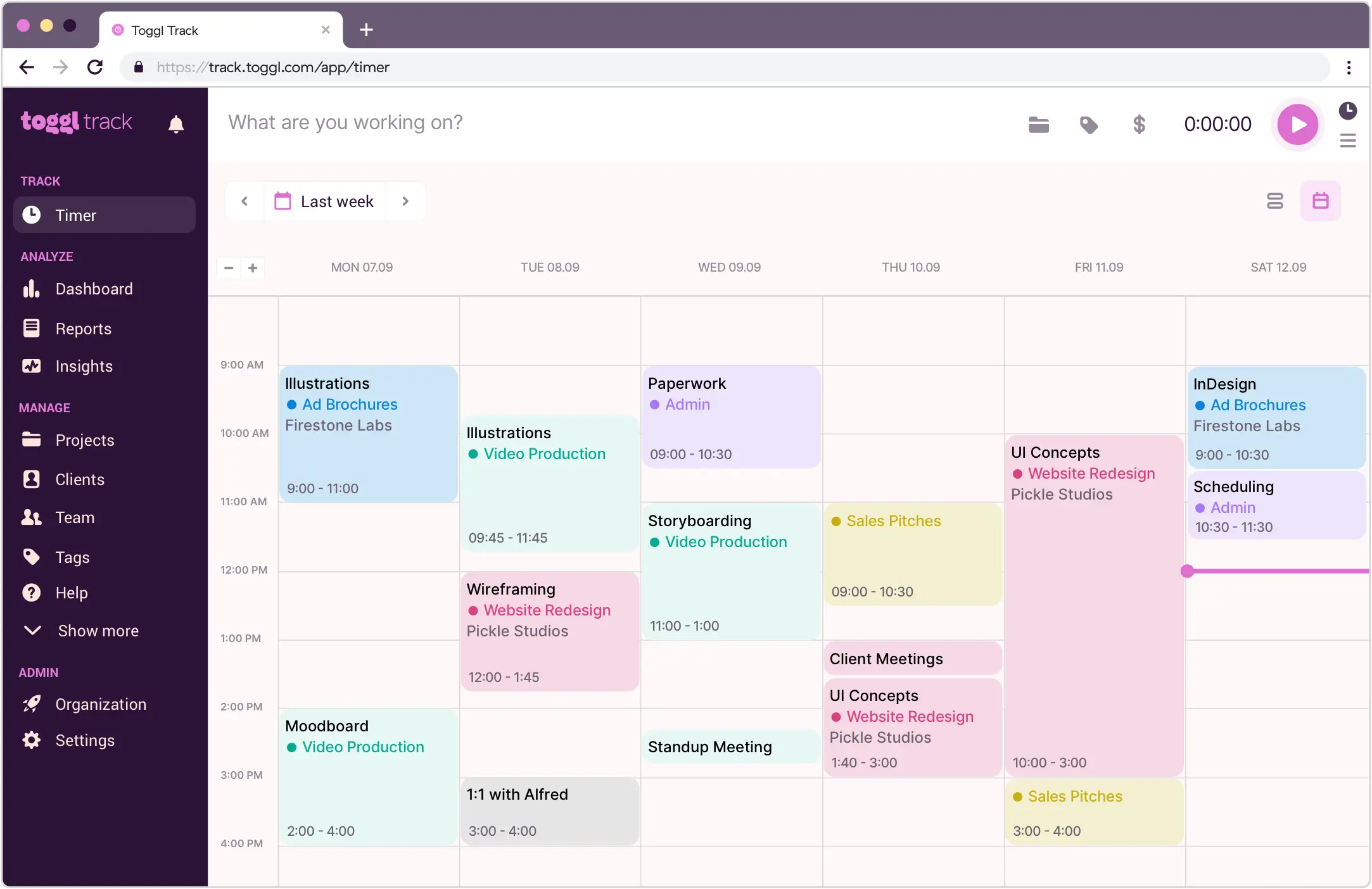
Photo from Toggl Track
Clear work hour summaries
Initial setup is easy
Clean interface
Lacks project management features for complex tasks
Can be a bit pricey
Toggl Track excels as a minimal timesheet solution for freelancers, small teams, and businesses. Tracking time is simple across web, desktop, and mobile, and I like that offline entries sync automatically when I’m back online. The app generates clean, easy-to-read timesheets that I can review, approve, and export for payroll or invoicing.
I could also organize time by project, client, or team member, and export reports in PDF or CSV for a quick overview of where hours are going.
The interface is intuitive, so getting started was straightforward and there’s no steep learning curve. I especially appreciate the clear work hour summaries and how easy it is to set up. The clean design keeps everything simple and focused.
But while Toggl Track is easy to set up and use, it is a bit on the pricey side. Users have also noted that its reporting feature is limited and mobile app can be buggy at times.
Pricing:
- Free Plan: Yes, for up to 5 users
- Pro Plan: Starts at $9.00 per user per month, billed annually
Available on:
Web, Desktop, Tablet, Mobile, Browser Extension
Ratings:
- Capterra: 4.7/5
- G2: 4.6/5
- Play Store: 4.7/5
- App Store: 3/5
My Hours – Best Timesheet Software for Billable Work
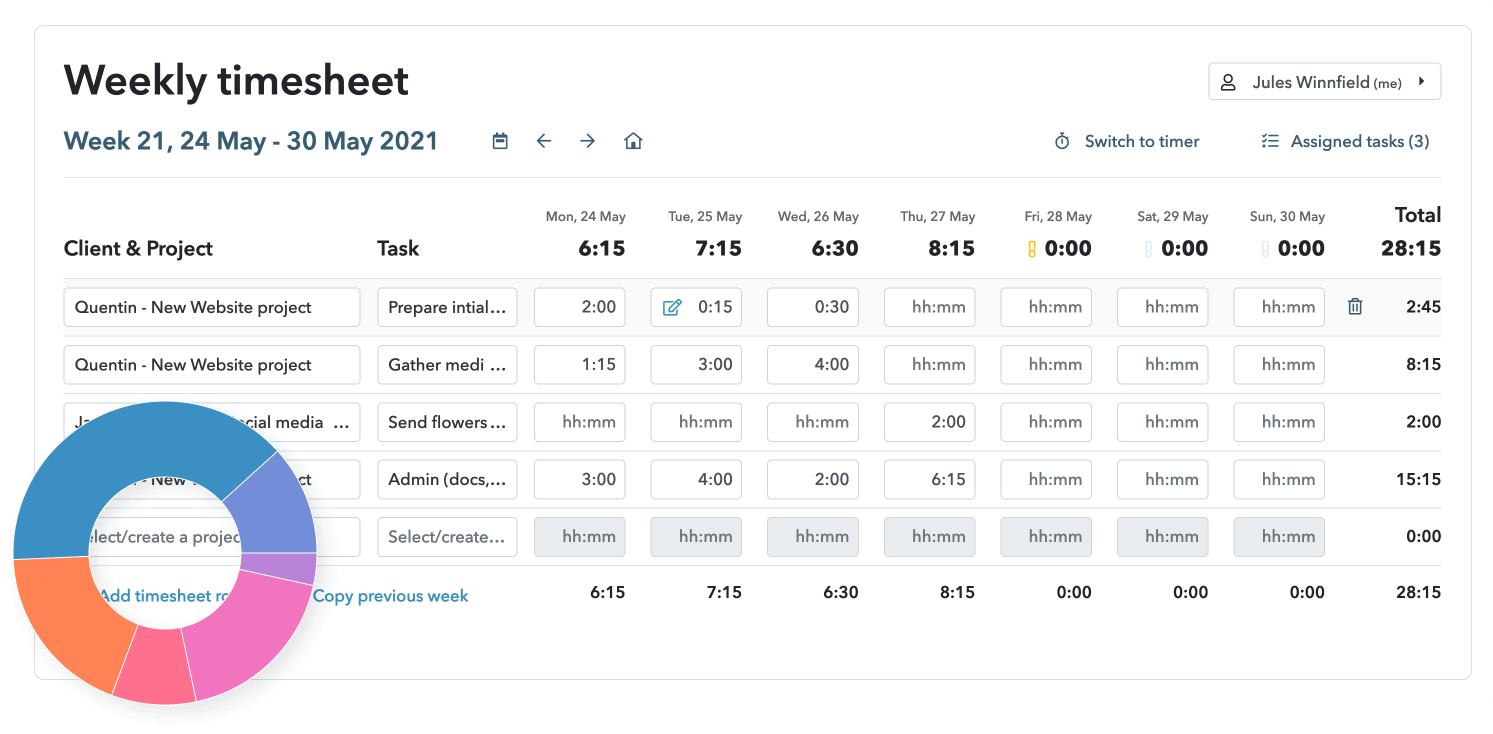
Photo from My Hours
Robust reporting feature
Easy to use and navigate
Responsive customer support
Time tracking with integrations sometimes does not work
Invoicing and billing features are basic
My Hours is a great timesheet software for anyone focused on billable work. The platform makes logging hours really easy with either the timer or weekly timesheet, and I can track time by project, task, or client, which ensures every billable minute is accounted for.
I like that you can assign custom hourly rates or fixed budgets at the project, task, or team member level, and it calculates billable amounts automatically in real time. Generating professional invoices directly from timesheets is simple, and exporting reports in PDF or Excel makes sharing data with clients or reviewing internally straightforward.
The reporting features are also robust: My Hours lets me group time by project, client, task, or team member, and even schedule reports to go out periodically. Approving timesheets and setting reminders for the team helps keep everyone on track, and role settings make sure each user sees only what’s relevant.
The app is easy to use and navigate, and works well across web and mobile, although I noticed that its time tracking integrations can sometimes be buggy, and invoicing features are fairly basic.
Pricing:
- Free Plan: Yes, for up to 5 users
- Paid Plan: Starts at $8.00 per user per month, billed annually
Available on:
Desktop, Mobile, Web
Ratings:
- Capterra: 4.8/5
- G2: 4.6/5
- Play Store: 3.6/5
- App Store: 5.0/5
Harvest – Best Timesheet Software with Invoicing

Photo from Harvest
One-click timer on desktop, browser, or mobile
Generates detailed cost reports on billable and non-billable hours
Integrates well with other expense management systems
Lacks advanced project management tools
Does not offer a strong offline tracking functionality
Pricier than most, particularly with the addition of usage fees
Harvest is a practical choice for organizations that need reliable timesheet management paired with integrated invoicing.
Its clean interface and intuitive time tracker automatically populate weekly timesheets with billable hours, while the Calendar integration allows for seamless logging directly within the app. Custom reminders and notifications help ensure timesheets are submitted on schedule, and tracked hours can be categorized as billable or non-billable.
The approval feature ensures all time is accurate before invoicing clients or making decisions based on reports on both billable and non-billable hours. Harvest also simplifies billing processes. I can quickly see which invoices are open, paid, or overdue, set recurring billing for regular clients, and integrate with QuickBooks Online or Xero to keep accounting in sync. Expenses, receipts, and invoice line items are all managed in one place, saving a lot of back-and-forth. Worth noting: paid plans charge a usage-based fee for each additional invoice beyond what’s included, so teams billing clients frequently will want to factor that into the cost.
Harvest integrates well with other expense management systems, though it lacks advanced project management tools and offline tracking can be limited.
Pricing:
- Free Plan: Yes, for one user
- Paid Plan: Starts at $9.00 per user per month, billed annually (plus usage fees for additional invoices, projects, clients, and tasks)
Available on:
Web, Desktop, Mobile
Ratings:
- Capterra: 4.6/5
- G2: 4.3/5
- Play Store: 4.2/5
- App Store: 4.5/5
Time Doctor – Best Timesheet Software for Productivity Insights
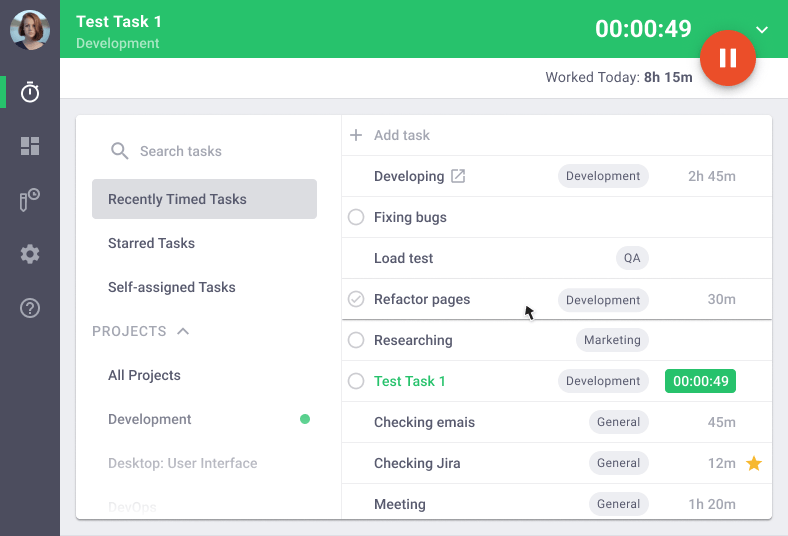
Photo from Time Doctor
Easy to set up
Reliable time and activity tracking
Streamlines project costings and payroll
Mobile app doesn’t offer a good user experience
No free version
Time Doctor is a timesheet software that can give you visibility into how time is spent, capturing work hours, tasks, projects, and activity levels so you always know what’s driving work and where improvements are needed.
The platform’s time tracking features are straightforward; however, its real value comes from the productivity analytics. Web and app usage reports show which tools and sites your team uses and how that time is categorized in terms of productivity.
You get automatic daily and weekly reports, detailed activity summaries, and real‑time dashboards that help pinpoint distractions, idle periods, and efficiency gaps.
Time Doctor’s timesheets include insights into schedule adherence and idle time alerts that help boost focus. However, the software does not offer a free plan, making it less ideal for businesses on a budget. Users also report that its mobile app is buggy.
Pricing:
- Free Plan: No
- Paid Plan: Starts at $6.70 per user per month, billed annually
Available on:
Desktop, Mobile, Web, Chrome
Ratings:
- Capterra: 4.5/5
- G2: 4.4/5
- Play Store: 2.4/5
- App Store: 2.8/5
Apploye – Best Timesheet Software for Workforce Monitoring
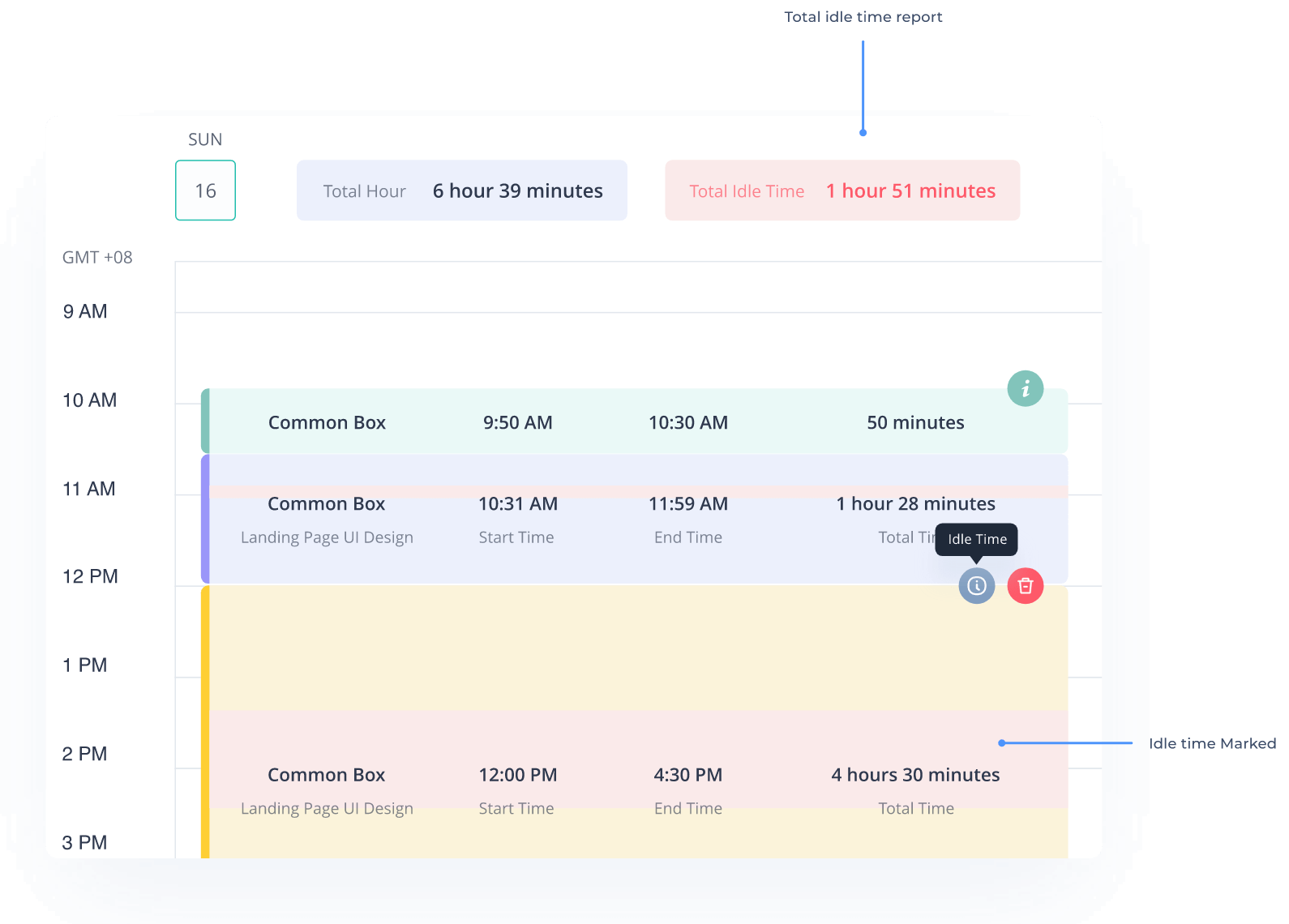
Photo from Apploye
User-friendly dashboard
Reliable employee activity tracking features
Good customer service
Advanced reporting lacks flexibility
Screenshot and monitoring features can feel intrusive
Apploye stands out as a timesheet software designed to give businesses complete visibility into employee time, productivity, and performance.
Apploye supports time tracking with automatic timers or manual entries, and its online timesheets make it easy to see daily, weekly, or monthly work hours.
I also found Apploye’s task and project tracking helpful because every hour gets tied to real work, and the reporting tools make it easy to export insights to PDF or Excel. Its optional employee monitoring features are solid, too: screenshots, live feeds, app usage, and URL tracking give a clear picture of how time is spent. However, these features can seem intrusive to some users.
Apploye’s timesheets also display productivity data collected through keystrokes and mouse clicks, marking active and idle periods in the reports.
Pricing:
- Free Plan: Yes, for up to 10 users
- Paid Plan: Starts at $4.50 per month per user, billed annually
Available on:
Desktop, Mobile, Web
Ratings:
- Capterra: 4.8/5
- G2: 4.6/5
- Play Store: 4.8/5
- App Store: 3.7/5
Camelo – Best Timesheet Software for Shift-Based Teams
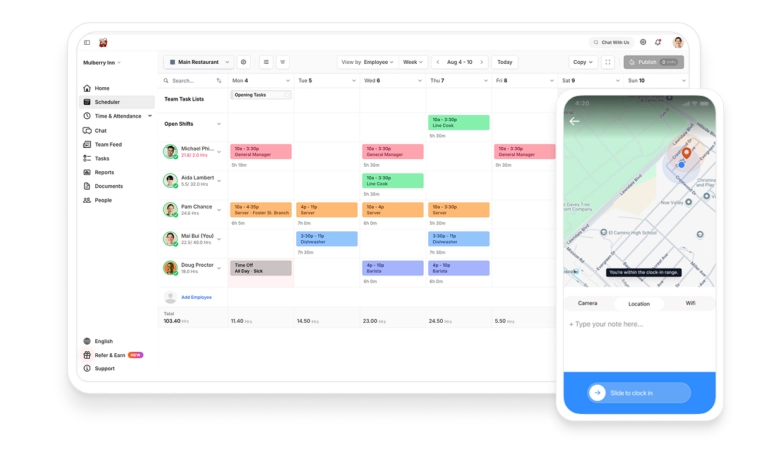
Photo from Camelo
Easy shift scheduling and notifications
Chat feature to communicate
Aesthetically pleasing, clean interface
Limited integrations available as compared to larger platforms
Mobile app is occasionally slow
Camelo is an all-in-one timesheet software designed for shift-based teams in hospitality, retail, healthcare, field services, and other industries. It brings together drag-and-drop scheduling, time tracking, tasking, team chat, and client management so managers and staff can stay organized without juggling multiple tools.
Camelo mobile time clock is clean and intuitive, making it easy for employees to clock in and out from their phones with photo, GPS, or WiFi verification. Camelo also creates automatic timesheets, supports payroll-ready exports, and offers shift swapping that helps reduce admin time for managers and confusion for teams.
Camelo also supports geofencing, time off requests, PTO tracking, and has an Open API.
However, some users report that Camelo should improve its range of integrations. While it covers core team management features well, the number of available integrations is still limited compared to larger platforms. Expanding this would help data flow more smoothly for teams using multiple systems.
Pricing:
- Free Plan: Yes, for up to 10 users
- Paid Plan: Starts at $29.00 per month, billed monthly, for the first 30 users. Additional users can be added for $3.50 per user/month
Available on:
Mobile, Web, Kiosk
Ratings:
- Capterra: 4.8/5
- G2: 4.7/5
- Play Store: 4.7/5
- App Store: 4.6/5
Productive – Best Timesheet Software for Agencies
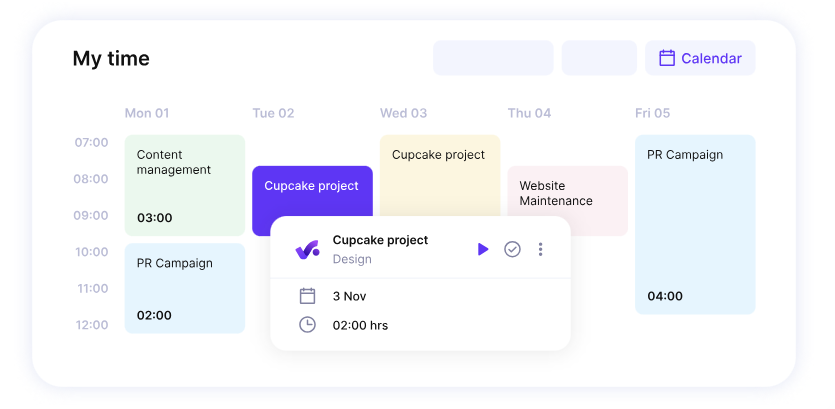
Photo from Productive
Intuitive interface
Well-structured project and budget management
Integrations with HR applications for detailed timesheets
Reporting and analytics could be more customisable
Can be buggy at times
Productive is a timesheet software built for agencies that want a solution deeply embedded in project and financial workflows, rather than just a standalone time tracker.
Logging hours with Productive is easy. You can track time through timers, add time in calendar or list views, or even log hours directly from scheduled work.
To help streamline business financials, timesheet data feeds directly into invoicing, revenue recognition, forecasting, purchase orders, and scenario planning, so you can see exactly how time impacts budgets and bottom-line results.
Productive also lets agencies manage projects with Gantt charts, track workloads, store documents, and even integrate sales CRM activities. You can even experiment with scenarios using the Scenario Builder to see how shifting resources or budgets affects results, making it a hub for agencies that want time, projects, and finances all aligned.
However, some users report that Productive’s reporting and analytics could be more customizable, and some users find that the platform can be buggy at times.
Pricing:
- Free Plan: No
- Paid Plan: Starts at $9.00 per month per user, billed annually (minimum three users required)
Available on:
Desktop, Mobile
Ratings:
- Capterra: 4.6/5
- G2: 4.6/5
- Play Store: 2.6/5
- App Store: 5.0/5
TMetric – Best Timesheet Software for Project Tracking
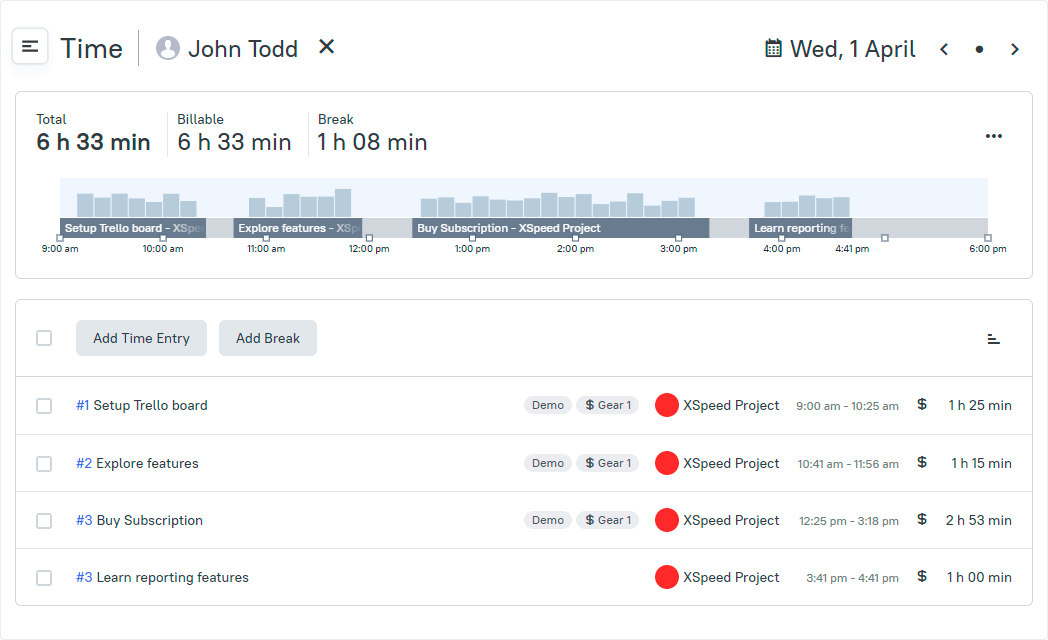
Photo from TMetric
Project and client-based timesheets
User-friendly interface
Supports expense tracking and budget control
Mobile app has limited features
Dashboard layouts are not very customizable
TMetric is a solid timesheet software for teams that want project-driven timesheets. Its user-friendly interface makes it easy to track time using timers or manual entries, with all tracked data automatically rolling up into weekly project- and client-based timesheets.
What sets TMetric apart for project tracking is its ability to help you manage project budgets, billable rates, and cost limits, with alerts that keep you from overshooting your planned spend.
And because of this tight link between timesheets and project data, you’ll get clearer insight into how every hour contributes to a project’s progress, which is ideal for teams managing multiple clients, deadlines, and deliverables. TMetric also supports automated notifications and approvals to keep timesheet submissions consistent and timely.
Aside from its core timesheet functionality, TMetric supports project tracking with built-in task management, allowing teams to create, assign, and monitor tasks with deadlines and time estimates. Its daily, weekly, and monthly reports help identify workload imbalances, track performance trends, and spot bottlenecks early.
However, TMetric isn’t without limitations. The mobile app offers fewer features compared to the desktop and web versions, and dashboard layouts aren’t highly customizable, which may frustrate teams that want more control over how data is visualized.
Pricing:
- Free Plan: Yes, for up to 2 users
- Paid Plan: Starts at $5.83 per month per user, billed annually
Available on:
Desktop, Mobile, Web, Browser Extensions
Ratings:
- Capterra: 4.5/5
- G2: 4.6/5
- Play Store: 3.0/5
- App Store: 3.5/5
7 More Timesheet Software Worth Considering
TimeTrex— Best timesheet software for complete workforce management
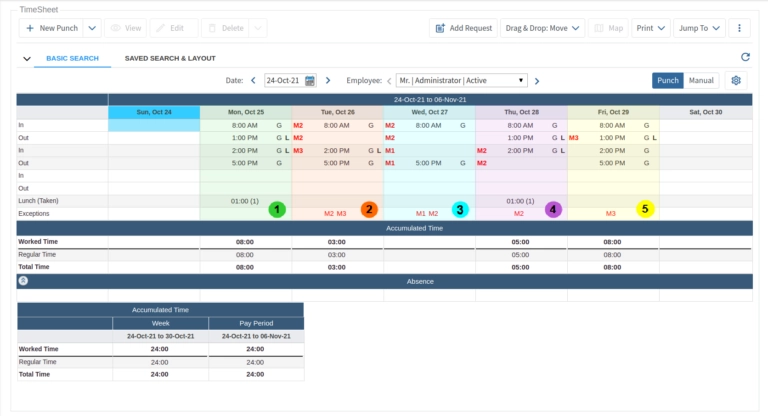
Photo from TimeTrex
Easy to use
Generates flexible time reports
Great customer service
Requires developer support to create custom features or reports
Community version lacks easy customization options for non-technical users
TimeTrex is a full workforce management system designed for companies that want more than just a digital punch clock.
The software offers a capable timesheet functionality, with options to track hours through web browsers and mobile devices.
Once set up, it does a solid job of pulling time entries together into timesheets managers can review, approve, and use for payroll. Timesheet data can also be used to generate detailed reports related to labor costs and employee productivity.
Time entries can be verified with features such as GPS tracking and geofencing.
TimeTrex also offers integrated scheduling and leave tracking for employees as well as tools for measuring job performance and supporting career development. For businesses, it includes integrated payroll processing and tax management.
However, since TimeTrex covers so many aspects of workforce management, it can feel complex to configure at first, and its interface isn’t as modern or intuitive as some competitors. Still, once it’s tailored to a company’s setup, it becomes a reliable all-in-one system for managing timesheets and beyond.
Pricing:
- Free Plan: Yes, with an open-source community edition
- Paid Plan: Starts at $50.00/month
Available on:
Desktop, Mobile, Web
Connecteam — Best timesheet software for mobile and deskless workforces
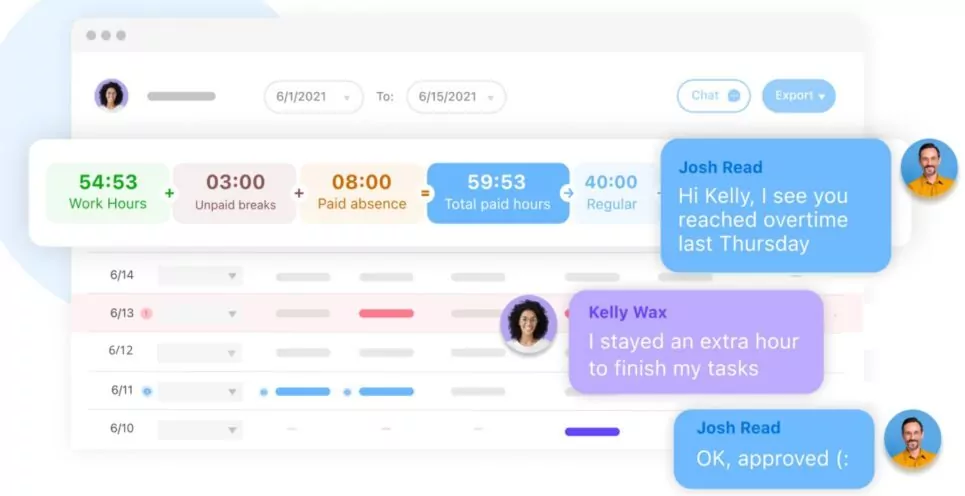
Photo from Connecteam
Mobile‑first design built for deskless/remote teams
GPS time clock, geofencing, and robust scheduling tools
All‑in‑one platform with communication, tasks, training & reporting
Pricing structure and add‑on hubs can be confusing or expensive
Interface and setup have a learning curve for some users
Connecteam is a mobile‑first timesheet and workforce management platform built for deskless and field teams. It simplifies time tracking with GPS‑enabled clock-in/out, geofencing, and job codes, while also handling scheduling, payroll exports, and team communication.
Connecteam lets you customize break, overtime, PTO, and absence rules. You can also set different pay rates for team members based on their roles. Users note that Connecteam’s timesheet management is efficient and reduces payroll work, with employees able to edit and approve their hours directly from the app before processing.
Connecteam is generally easy to use across web and mobile, though some users mention occasional slow load times, glitches, or a cluttered interface, and pricing can feel complex or pricey as you scale past the free tier or add premium hubs.
Pricing:
- Free Plan: Yes, for up to 10 users
- Paid Plan: Starts from $29.00 per month for 30 users
Available on:
Desktop, Mobile, Web
OfficeClip Timesheet — Best timesheet software for project management
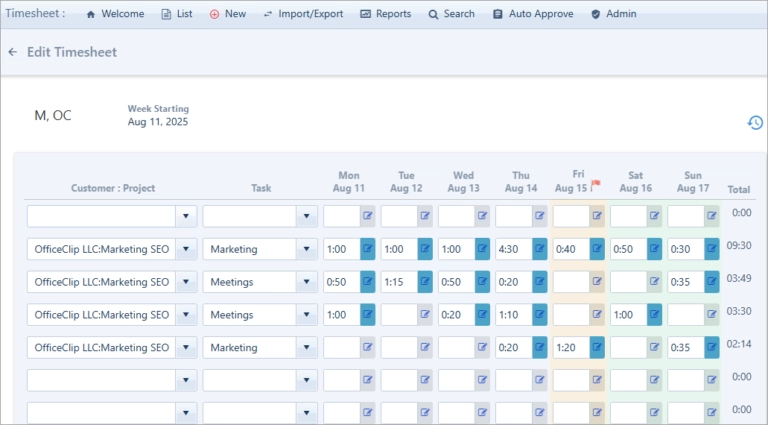
Photo from OfficeClip
Time-off and expense management
User-friendly interface
Low cost
Easy timesheet submissions
No offline access
Limited advanced project visualization tools like Kanban boards
OfficeClip Timesheet is a comprehensive solution designed to streamline time tracking and management for businesses of all sizes.
With its built-in timer and intuitive interface, employees can effortlessly record their work hours, even from a mobile app, while managers gain real-time visibility into project progress and resource allocation with built-in customizable reports.
The software’s automated approval workflow and detailed reporting capabilities help organizations maintain accuracy and compliance, reducing errors involved in manual timesheet processing. Its timesheet approval process can involve up to three people.
In addition to core time tracking, OfficeClip offers integrated modules for invoicing, time-off management, and expenses, making it a unified platform for handling all aspects of workforce and project management.
OfficeClip Timesheet is also DCAA (Defense Contract Audit Agency) compliant and includes payroll integrations with QuickBooks and ADP.
These features make OfficeClip Timesheet particularly useful for industries such as consulting, IT services, healthcare, construction, and accounting firms, ensuring that organizations can efficiently manage time, costs, and compliance across diverse project environments.
Pricing:
- Free Plan: Yes
- Paid Plan: Starts from $3.00 per user per month
Available on:
Desktop, Mobile, Web, Tablets
Calamari — Best timesheet software for flexible attendance tracking
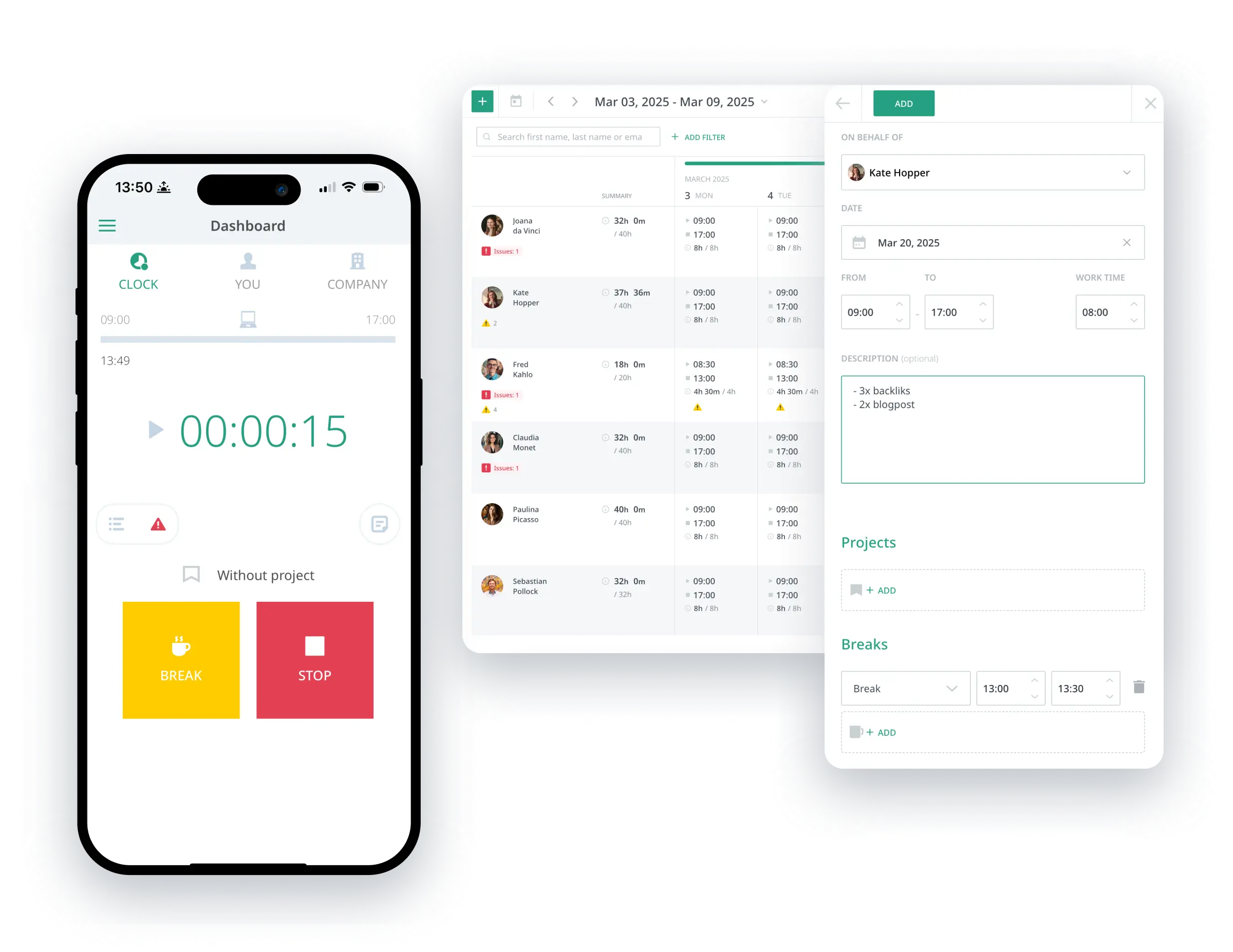
Photo from Calamari
Flexible clock-in and out options
Strong Calendar, Slack and Microsoft 365 integrations
Modular pricing
Interface and reporting can feel confusing or slower at times
Advanced configurations (e.g., complex accruals) are less intuitive without support
Calamari is a timesheet software designed for teams that need flexible time tracking modes across different work styles and locations.
It supports multiple time-tracking methods, including mobile app time tracking, browser check-ins, QR code clock-ins, GPS tracking, and clock-ins through Slack and Microsoft Teams integrations, making it easy for employees to log time accurately.
Calamari lets teams customize attendance rules, work schedules, and approval workflows, and its modular setup means you only pay for the features you need, such as time tracking or leave management.
The software is easy to set up, and many users praise its flexible clock-in options and how well it fits remote or hybrid teams with varied schedules.
On the downside, some reviewers mention that reporting and advanced configurations can feel less intuitive at first, and it doesn’t offer deeper project management or full HR functionality compared to more comprehensive workforce platforms.
Pricing:
- Free Plan: No
- Paid Plan: Starts at $2.50 per user per month for the Time & Attendance module
Available on:
Web, Mobile
Kantata — Best timesheet software for professional services
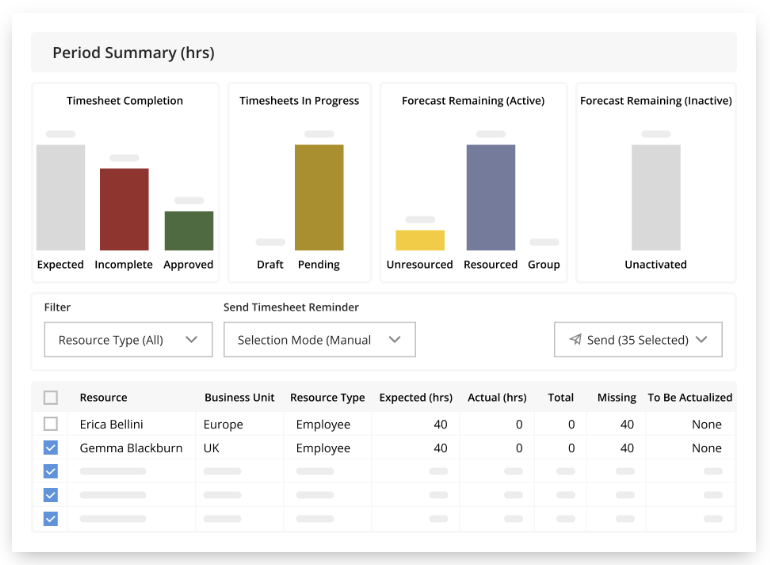
Photo from Kantata
Integrated time, project, and financial tracking
Strong visibility into resource utilization, budgets, and forecasts
Timesheet and expense capture are tied directly into billing and reporting workflows
Can feel complex for new users
Pricing is not publicly listed and typically requires vendor contact
Kantata (previously Mavenlink) is a timesheet software built for teams that need to track time in the context of projects, budgets, and resources.
It allows consultants and service teams to log billable hours against specific tasks, submit timesheets for approval, and clearly see how time tracking connects to project progress and financial performance.
I like that Kantata’s time tracking and timesheets are closely tied to resource planning, utilization, and forecasting, which makes it easier to understand whether projects are on track and profitable.
The software displays billable and non-billable hours directly alongside budgets and project timelines, especially for consulting and IT services teams managing multiple clients.
But some reviewers mention that the platform can feel overwhelming at first and comes with a learning curve for new users. Others note that pricing is not transparent since plans require contacting sales, which may not be ideal for smaller teams looking for a simpler timesheet solution.
Pricing:
- Free Plan: No
- Paid Plan: Available on request
Available on:
Web, Mobile
Deputy — Best timesheet software for shift planning & compliance
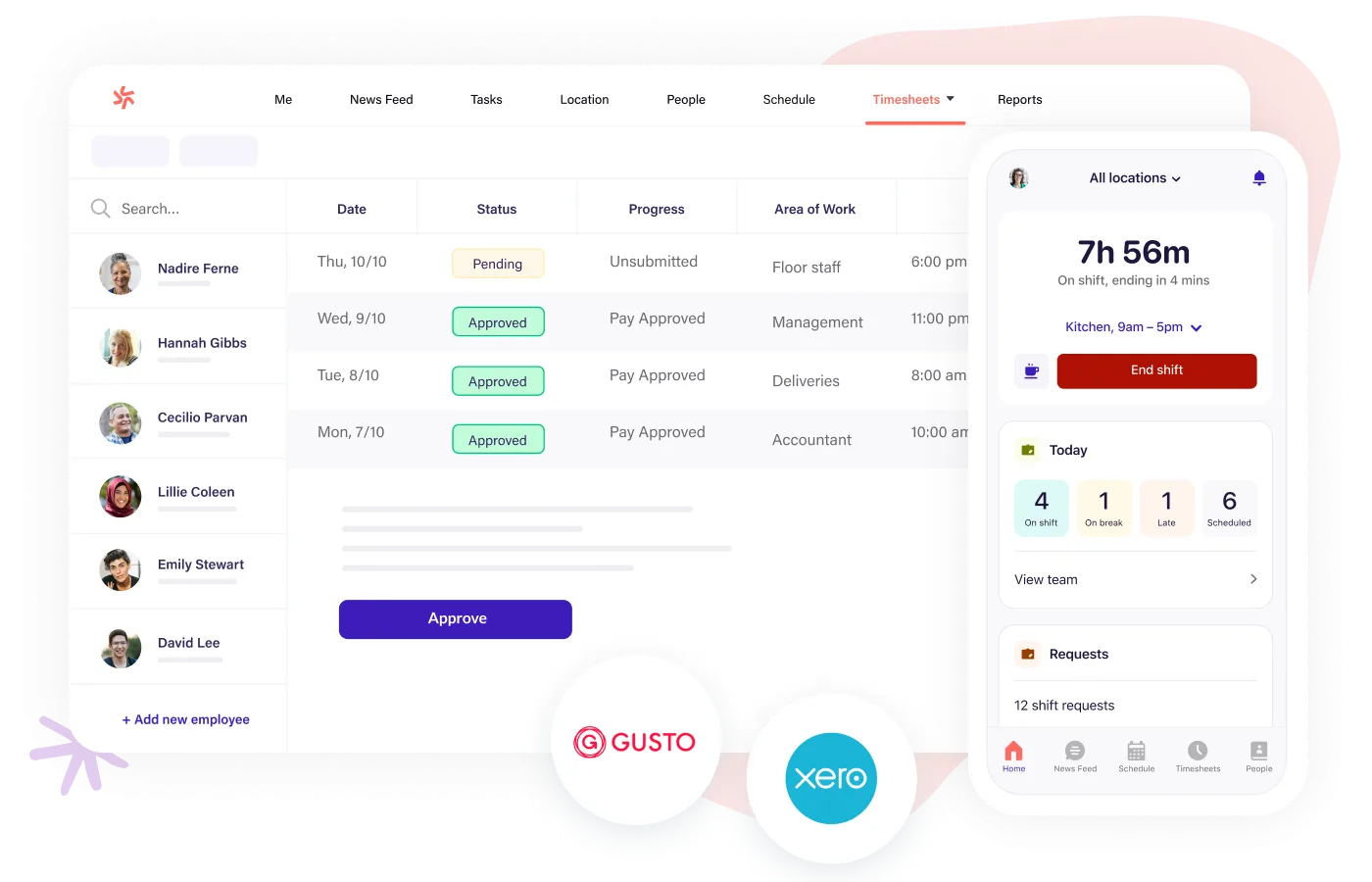
Photo from Deputy
Easy drag-and-drop shift scheduling
Accurate time clocks with mobile and geolocation
Built-in compliance tools for breaks, overtime, and wage rules
Mobile app performance can lag or delay clock-ins
Pricing can add up for larger teams
Deputy is a timesheet software designed for hourly and shift-based teams that combines shift scheduling, time tracking, and labor compliance in a single interface.
Deputy’s time clock captures employee hours for accurate timesheets that feed directly into payroll. Managers can build and adjust rosters with a drag-and-drop functionality, while built-in alerts and labor rule enforcement help ensure compliance with breaks, overtime, and wage requirements.
Employees can also use Deputy to manage their availability, swap shifts, and clock in and out from their phones or tablets, which saves managers a lot of time each week and reduces errors.
Deputy’s scheduling interface is easy to use and streamlines planning, even during busy weeks. Mobile access also helps staff stay updated with shifts and timesheet approvals, keeping the team coordinated.
That said, some reviewers point out that the mobile app can occasionally lag or delay GPS clock-ins. Additionally, pricing and support experiences differ depending on the plan and region, which may be worth considering for a smaller team.
Pricing:
- Free Plan: No
- Paid Plan: Starts at $5.00 per user per month
Available on:
Desktop, Mobile, Web
Timely — Best automatic timesheet software
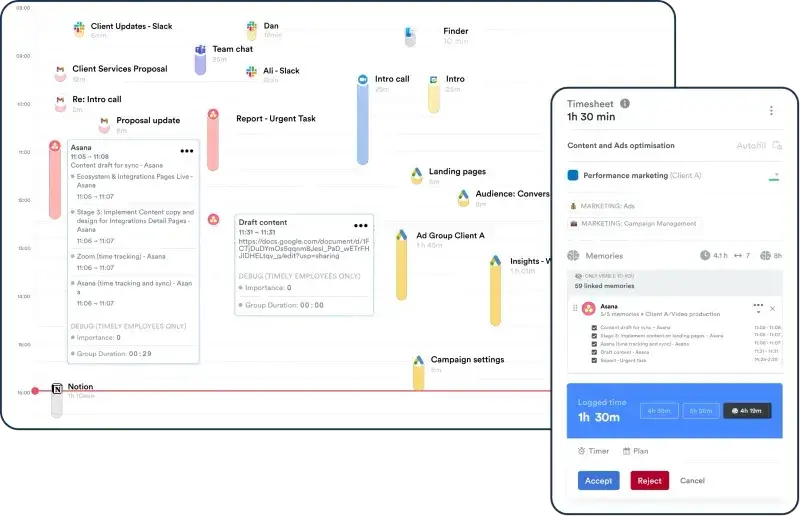
Photo from Timely
Automatic time tracking with AI-assisted timesheets
Clean, intuitive interface
Detailed reporting and timeline views
AI-generated tracking sometimes needs manual adjustments, especially for short or ambiguous tasks
Pricing can feel high for small teams or individual users
Timely is an AI‑powered timesheet software that automatically captures work activity across apps and calendars to generate accurate timesheets.
Timely makes timesheet management almost effortless by using AI to draft entries based on actual work habits, reducing the need for manual timers or guesswork, which helps teams stay organized and focus on work rather than admin.
The platform streamlines billable and non‑billable hours tracking too and makes it easy to view and adjust entries before submission. Its reporting tools and integrations that bring time data into broader project planning workflows are also valuable.
However, users note that automatic tracking may miss very short activities or require tweaks for accuracy, and that pricing can be on the higher side for freelancers or small teams compared with simpler trackers.
Pricing:
- Free Plan: No
- Paid Plan: Starts at $9.00 per user per month
Available on:
Desktop, Mobile, Web
My Selection Process for the Best Timesheet Software of 2026
Choosing the right timesheet software goes beyond comparing features on a pricing page. What really matters is how well a tool fits into everyday workflows and whether teams will actually use it consistently. Here’s how I evaluated each timesheet solution in this comparison.
- Hands-on, real-world testing: Every tool in this list was tested in real scenarios, tracking daily work hours, assigning time to projects or clients, approving timesheets, and exporting reports for payroll or billing. This made it easy to separate tools that work well in practice from those that only look good on paper.
- Free vs paid plan evaluation: I explored both free and paid plans to understand long-term value. Tools like Jibble, Toggl Track, and My Hours offer generous free tiers that are genuinely useful, while others, such as Harvest, Productive, and Time Doctor, require paid plans to unlock their full potential. This helped determine which tools scale well as teams grow, both in features and in cost.
- Usability and learning curve: Ease of use was a major factor. Timesheet software should be simple enough for daily use without constant training. Jibble, Toggl Track, and My Hours stood out for their clean interfaces and quick setup, while more advanced platforms like Productive offered deeper functionality at the cost of a steeper learning curve.
- Accuracy, controls, and visibility: I paid close attention to how accurately time is captured and reviewed. Features such as approvals, overtime tracking, idle time detection, and real-time dashboards were assessed to see how well managers can maintain oversight without micromanaging. Tools like Jibble, Apploye, and Time Doctor performed particularly well in this area.
- Verified user feedback: To validate my findings, I reviewed feedback from platforms like Capterra, G2, and app stores. User reviews helped confirm strengths and weaknesses around reliability, support quality, and long-term usability, especially for tools like Harvest and Apploye.
To sum it up…
The best timesheet software is the one your team will actually use every day.
Jibble continues to stand out as the best timesheet software, combining accuracy and powerful features that work for teams of any size, all free forever for unlimited users.
That said, Toggl Track is ideal for minimal tracking. My Hours and Harvest shine for billable work, Apploye and Time Doctor offer deeper productivity insights, Productive fits agency workflows, and TMetric supports project-driven teams.
Choose the app that best matches your team’s needs and helps you track time more accurately, manage work more efficiently, and make informed decisions to improve how your team operates every day. Good luck!
FAQs
Some frequently asked questions...
A timesheet software is a digital tool that helps individuals and teams record, manage, and analyze how time is spent at work. It allows users to track hours worked on tasks, projects, or clients and turns that data into organized timesheets for payroll, billing, productivity analysis, and project management.
For small businesses, the best timesheet software options include:
- Jibble: Best free forever option for unlimited users and scalability
- Toggl Track: Ideal for simple, minimal time tracking
- My Hours: Great for client billing and billable rates
These tools are easy to set up and don’t require complex onboarding.
The best timesheet software for remote teams includes Jibble, Time Doctor, and Timely.
- Jibble offers real-time dashboards, attendance verification, and is free forever for unlimited users
- Time Doctor provides productivity and activity insights
- Timely automatically tracks work using AI, reducing manual input
Each option supports distributed teams with different levels of visibility and automation.
Time tracking software focuses on capturing time in real-time using timers or activity tracking.
Timesheet software goes a step further by:
- Organizing time into weekly or monthly timesheets
- Supporting approvals
- Exporting data for payroll or invoicing
Most modern platforms like Jibble, Harvest, and TimeCamp combine both features.
Timesheet software like Jibble can significantly improve team productivity by making work patterns more visible and measurable.
Accurate timesheets can help reduce time leakage caused by untracked work, distractions, or inefficient processes. This data also highlights workload imbalances, allowing managers to redistribute tasks before burnout or bottlenecks occur. And with clear historical data, teams can plan projects more realistically and forecast future workloads with greater accuracy.