
When you’ve spent years managing construction crews on job sites, you learn pretty quickly that time is one of the biggest cost drivers in the industry.
On fast-moving sites, paper timesheets and spreadsheets don’t hold up. A few missed punches might not seem like a big deal, but they add up fast. Before long, you’re dealing with errors, follow-ups, and payroll issues that take more time than they should.
That’s where construction time tracking software helps. By capturing hours as work happens and tying them to job sites or tasks, these tools make time data more consistent and easier to manage across crews and locations.
In this article, I’ve reviewed 10 of the best constrtuction time tracking software, based on real job-site use and feedback from people working in the industry.
What to Look For in Construction Time Tracking Software
When I tested the best construction time tracking apps, I focused on the features that actually make life easier for teams on a construction site:
- Mobile clock-in/out: To help employees log hours from any device, on-site or off.
- GPS & geofencing: To confirm workers are on location and prevent incorrect time entries.
- Payroll integration: To transfer work hours to payroll systems automatically.
- Breaks & overtime: To calculate breaks and overtime according to set rules.
- Reports & insights: To provide data on task durations and overall productivity.
- User-friendly interface: To make navigation simple and reduce errors.
- Customizable policies: To allow adjustments to work hours, roles, and pay settings.
Best Construction Time Tracking Software Compared |
||
| Software | Pricing | Platforms |
| Jibble | $0.00 (Free Forever) | Desktop, Mobile, Kiosk, Web |
| Buddy Punch | Starts at $4.99/user/mo + $19 base | Web, Kiosk, iOS, Android, ChromeOS |
| Clockify | Starts at $3.99/user/mo | Desktop, Mobile, Web |
| Connecteam | Starts at $29.00/mo (30 users) | Web, iOS, Android |
| Procore | Custom pricing | Web, iOS, Android |
| monday.com | Starts at $9.00/seat/mo | Web, Desktop, iOS, Android |
| Workyard | Starts at $6.00/user/mo + $50 base | Web, iOS, Android |
| Timeero | Starts at $4.00/user/mo | Kiosk, iOS, Android |
| FieldPulse | Custom pricing | Web, iOS, Android |
| Buildertrend | Custom pricing | Web, iOS, Android |
Which Construction Time Tracking Software Fits Your Budget and Team Size?
|
Budget Level |
1–10 Users | 11–100 Users | 101–1000 Users |
| No Budget (Free Forever) | Jibble | Jibble | Jibble |
| Entry / Low Budget | Jibble, Clockify, Buddy Punch, Connecteam, Workyard, Timeero | Jibble, Clockify, Buddy Punch, Workyard, Timeero | Jibble, Clockify, Workyard |
| Medium Budget | Jibble, Buddy Punch, Workyard, Connecteam, Timeero, FieldPulse | Jibble, Buddy Punch, Workyard, FieldPulse | Jibble, Buddy Punch, Workyard |
| Full / Unlimited Budget | Jibble, Procore, monday.com, Buildertrend | Jibble, Procore, monday.com, Buildertrend | Jibble, Procore, monday.com, Buildertrend |
Jibble – Best Construction Time Tracking Software
If your construction time tracking software isn’t easy to use, doesn’t sync well with timesheets, or calculates hours incorrectly, you’ll feel the pain quickly, usually when staff or subcontractors start flagging pay issues.
That’s why a tool like Jibble is essential for modern construction sites.
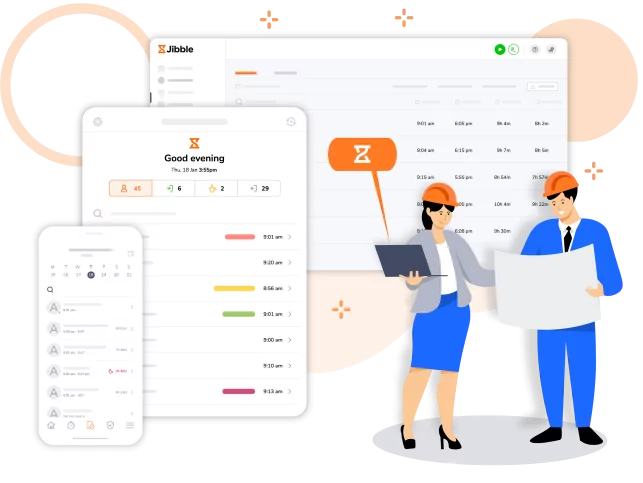
I’ve used Jibble across different types of teams, and it truly makes it easy to track time from anywhere. With timesheets accessible on mobile, desktop, and tablet, crews can punch in from the site office, from their vehicle, or directly on the job.
On fast-moving sites where workers shift tasks or locations throughout the day, that flexibility is invaluable.
Jibble’s AI-powered facial recognition attendance remains one of the most reliable features. It’s quick, accurate, and pushes accurate attendance data straight into each timesheet, eliminating the manual fixes that slow down payroll.
Jibble also calculates regular hours and overtime according to custom pay rates by the end of each pay period
Geofencing is another feature crucial for accurate construction crew management. On multi-site operations, that accuracy ensures you’re paying only for time worked where the job actually is. Real-time GPS tracking on the mobile app are helpful for saving time spent in countless check-ins and coordination calls.
Jibble also offers customizable break settings, automated clock-in reminders, and offline punching all help keep hours accurate even on remote sites with spotty connectivity.
Additionally, the software’s detailed reporting offers daily, weekly, and monthly insights into how long specific tasks or phases are taking, which is extremely useful for planning future projects more effectively.
The biggest advantage is that Jibble is completely free for an unlimited number of users, no matter how many employees or subcontractors you have. For construction companies managing large crews, that’s a significant cost saver.
Pricing:
- Free Forever for an unlimited number of users
Available on:
Desktop, Mobile, Kiosk, Chrome Extension, Web
Ratings:
- Capterra: 4.9/5
- G2: 4.7/5
- Play Store: 4.5/5
- App Store: 4.8/5
Pros:
- Free to use for unlimited users
- One-click timers
- Detailed time and attendance reports
- Track time by project or activity to manage billable hours
- GPS tracking and geofencing across work sites
- Verify attendance with facial recognition
- Real-time project insights with intuitive dashboards
- Automated billing calculations
Cons:
- Fewer comprehensive invoicing features than dedicated invoicing software
- Limited advanced project planning
“What I like most about Jibble is how simple and intuitive it is. It takes seconds to clock in and out, and everything is recorded automatically. The reports are clear, the design is clean, and I can easily see how much time I’ve spent on each project or client. It just works — no learning curve, no confusion.” – Fábio V.
(Source: Capterra)
“There were experiences where the system apparently went down for a while, but with a little patience the system was running effectively again. I also believe that with time some recommendation can be made to improve the functionality of the software.” – Joel G.
(Source: Capterra)
Buddy Punch – Best for Reducing Labor Costs
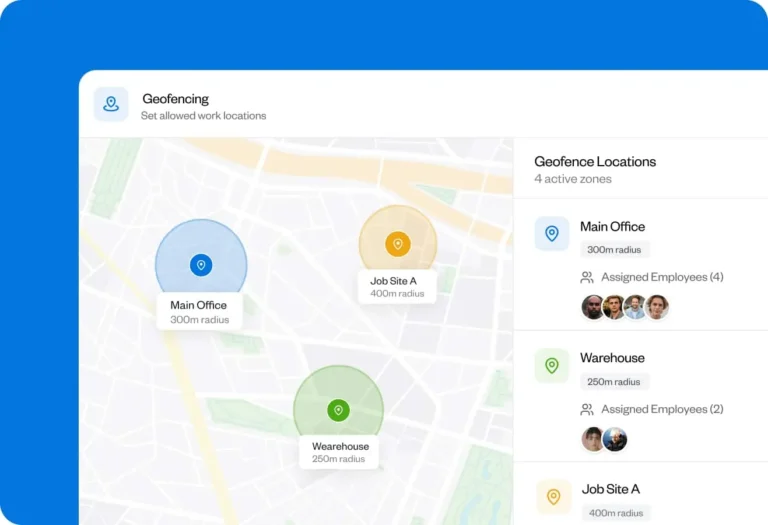
Photo from Buddy Punch
Buddy Punch is another construction time tracking software that offers multiple ways for clocking in and out of work.
Employees can use the mobile app (available in English and Spanish), a shared tablet at the job site, or, for crews on the same schedule, have a site foreman clock in the entire team.
Buddy Punch’s strength lies in helping reduce labor costs, prevent time theft, and keep your project costs accurate.
The software allows you to set up geofences to prevent offsite punches, then connect your geofences to job codes to ensure employees are logging time to the correct project.
GPS tracking shows you where employees were while they were working, helpful if you think they selected the wrong job code.
When tracking time or scheduling employees, Buddy Punch allows you to automatically remove unpaid breaks from employee timesheets, prevent employees from clocking in before their shift starts, or automatically clock them out at the end of their shifts.
If timesheets contain errors, managers and admins can edit them as needed, and you can have site foremen review and approve all of their crew members’ timesheets before you run payroll to catch any errors.
I like that notifications keep you informed of any issues when employees are working in the field, with real-time alerts when employees clock in late, clock out early, or get close to hitting overtime.
You can also download reports for payroll, set up an integration with about 20 providers, or use Buddy Punch itself for payroll.
But Buddy Punch has its share of weaknesses. There is no free plan or offline mode, which can be a drawback for small businesses or teams working in areas with unreliable internet access.
Pricing:
- Free Plan: No
- Paid Plan: Starts at $4.99 per user per month + base fee of $19.00 per month, billed annually
Available on:
Web browser, iOS, Android, or ChromeOS
Ratings:
- Capterra: 4.8/5
- G2: 4.8/5
- Play Store: 4.5/5
- App Store: 4.9/5
Pros:
- Easy to use
- Flexible clock-in options
- Built-in payroll
Cons:
- No free plan
- No mileage tracking
- No offline mode
“Hours are tracked automatically, employee schedules are easy to manage, and the software organizes all the data in a way that’s clear and accurate. Running payroll is now stress-free, saving both time and headaches.” – Mario H.
(Source: Capterra)
“Sometimes it doesn’t fully log me out and I have to go in a change my log out time which can be frustrating especially if I don’t remember my exact time of leaving work as my schedule is flexible.” – Ashley B.
(Source: Capterra)
Clockify – Best for Simple On-Site Time Tracking
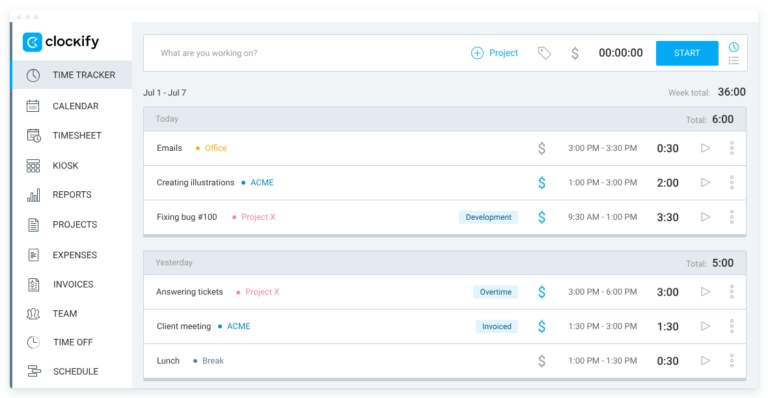
Photo from Clockify
Clockify stands out in construction time tracking for its simplicity.
The interface is clean and intuitive, and I appreciate how customizable it is. You can keep things as basic as a daily timesheet or build out projects, tasks, and cost codes if you want more detail.
Workers can track hours with a single tap using the timer, or they can manually enter their hours into the online timesheet when needed. Given how often field crews forget to jot down their hours, the ability to capture time with one click is particularly useful.
Task and project tracking is another strong point. You can assign workers to tasks, set estimates, and visually monitor progress. If a project starts creeping over budget, Clockify sends an alert so you can course-correct early.
Billable hours are calculated automatically based on your hourly rates, and labor costs can be broken down by cost codes using tasks, tags, or custom fields. Reports make it easy to see who’s working on what, and everything exports neatly into PDF, CSV, or Excel.
However, Clockify isn’t perfect. I do wish it had built-in features like auto-scheduling or shift swapping, which would make crew planning smoother.
And while the desktop experience is clean, the mobile interface can feel a bit crowded, especially for workers who prefer something ultra-minimal. I’ve also noticed it needs frequent updates to fix small glitches.
For teams requiring robust GPS tracking or activity monitoring across multiple sites, Buddy Punch, Jibble or Workyard may be more effective.
Pricing:
- Free Plan: Yes, for 5 users
- Pro Plan: Starts at $3.99 per user per month, billed annually
Available on:
Desktop, Android, iOS, Web browser
Ratings:
- Capterra: 4.8/5
- G2: 4.5/5
- Play Store: 4.2/5
- App Store: 4.2/5
Pros:
- Simple interface
- Customizable set of features
- Easy task and project time tracking
Cons:
- Lacks auto-scheduling and shift-swapping features
- Mobile interface is overwhelming
“We love it! We transitioned from paper timesheets to digital and even through the transition, the guys have found it easy to navigate for the most part. We love how customizable it is as well!” – Paige S.
(Source: Capterra)
“The mobile interface feels a little bit too much, if I may say it needs a cleaner more easily accessible interface. The constant bug is also an issue which Ofcourse requires frequent updates.” – Odukunle A.
(Source: Capterra)
Connecteam – Best for On-Site Scheduling and Communications
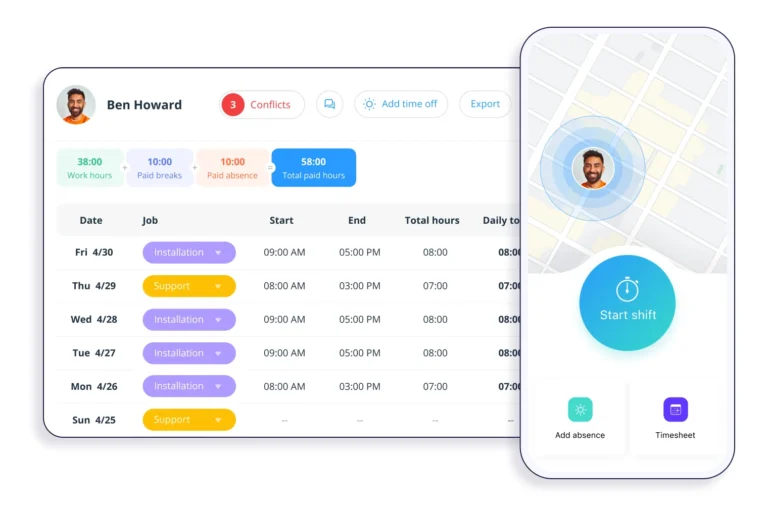
Photo from Connecteam
If scheduling and communication are top priorities for your construction crew, Connecteam delivers a strong construction time tracker that keeps teams aligned and projects moving.
Crews clock in with a tap through the app or an on-site kiosk, and features like GPS geofencing, auto clock-out, and per-project hour tracking keep everyone accountable.
The real strength of Connecteam is its ability to show, in real time, who’s on-site and exactly what they’re working on. Being able to see hours per project, phase, or task keeps jobs on budget and helps flag issues early.
Add in auto-filled timesheets, break-rule enforcement, overtime alerts, and one-tap approvals, and compliance practically takes care of itself.
Connecteam also shines on the communication side. The in-app chat makes it easy to share safety updates, coordinate deliveries, or send last-minute schedule changes without relying on group texts.
That said, I’ve run into a few drawbacks. The app can lag at times, especially when loading schedules, and those delays can disrupt the workflow when you’re trying to move fast.
Its pricing structure is a bit more complicated than I’d like, and integrations are more limited compared to some competitors. The mobile scheduling interface also feels cramped when making detailed edits.
Connecteam is great for scheduling, communication, and keeping teams aligned across multiple projects. However, if your priority is precise GPS-based time tracking or offline functionality, Jibble or Buddy Punch could provide more reliability in the field.
Check out our picks for the best rugged mobile phones for construction workers.
Pricing:
- Free Plan: Yes, up to 10 users
- Paid Plan: $29 per month (for the first 30 users)
Available on:
Web browser, iOS, or Android
Ratings:
- Capterra: 4.6/5
- G2: 4.6/5
- Play Store: 4.9/5
- App Store: 4.9/5
Pros:
- Great customer support
- Easy to set up
- Flexible time entry and schedule edits
- Smooth in-app communication
Cons:
- Limited integrations
- Lags at times which can disrupt workflow
- Complicated pricing structure
“We started using Connecteam as a way to schedule staff and track hours because it easily integrates with Google Calendar. I love the additional features like shift tasks and team chats. Overall, a great experience and exactly what we needed!” – Krystal C.
(Source: Capterra)
“It does lag at times and takes a bit to load certain windows. I create the shifts for our employees and working in job scheduling on the app is a little cumbersome. Def not my favorite to be creating and editing shifts in the app.” – Rachael W.
(Source: Capterra)
Procore – Best for Large Construction Teams
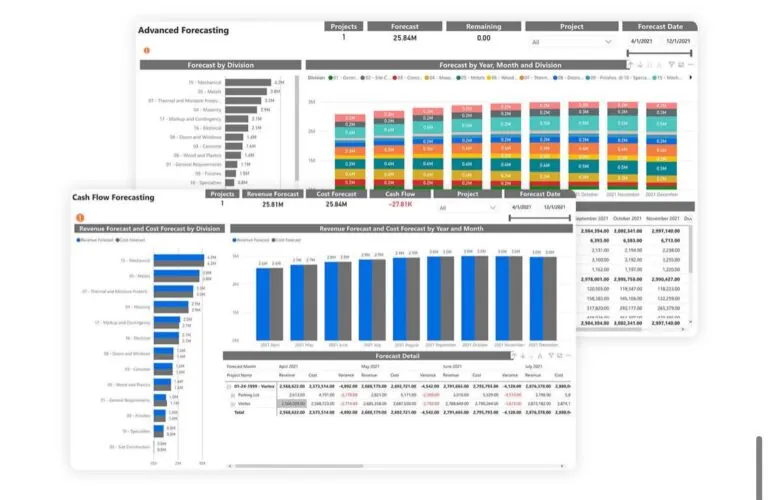
Photo from Procore
Procore is a full-scale construction management platform. But when it comes to tracking crew hours and managing on-site productivity, it does stand out in a few key ways.
I really liked how integrated everything feels. You can log employee and crew hours directly from mobile or web, and the data flows automatically into project reports and cost summaries.
For bigger construction projects, that level of integration helps keep everyone aligned on timelines and budgets.
The platform’s timesheets are detailed and flexible, allowing supervisors to track labor hours across multiple job sites, review entries, and approve them quickly.
Beyond time tracking, Procore also offers tools for scheduling, safety tracking, quality assurance, and project documentation.
That said, Procore isn’t without its drawbacks. The pricing can be steep, especially for smaller construction businesses that only need basic time tracking and scheduling. The system can also feel complex and heavy, with a learning curve that might be overkill for smaller teams.
Procore excels for large-scale construction projects that need integrated time tracking with comprehensive project management and cost control. But for smaller crews or teams needing simpler, faster time entry, Jibble or Clockify may be a more practical choice.
Pricing:
- Free Plan: No
- Paid Plan: Pricing only available upon request
Available on:
Web browser, iOS, Android
Ratings:
- Capterra: 4.5/5
- G2: 4.6/5
- Play Store: 4.0/5
- App Store: 4.7/5
Pros:
- Clear dashboards for project progress
- Comprehensive project management features
- Easy file documentation
Cons:
- Steep learning curve
- Very buggy on mobile
- Limited form customization
“Procore is great for managing Subcontractors and tracking in real time with photo upload. Because the inspection checklists can help keep teams compliant with local building codes.” – Ben T.
(Source: Capterra)
“Training is required in order to get all parties in alignment and that can be challenging, especially for subcontractors new to digital tools. The cost is also a factor if you’ve only got a few modules in your application.” – Moath A.
(Source: Capterra)
monday.com – Best for Visual Construction Project Management
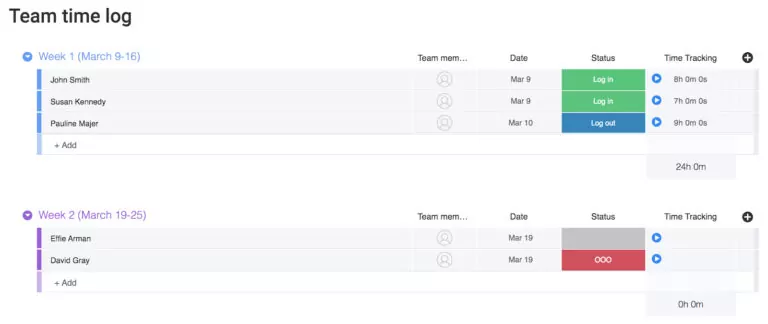
Photo from monday.com
monday.com is a productivity platform that is great for keeping construction projects on track, especially if you’re managing multiple job sites.
You can record exact work hours by starting a timer or entering hours manually on desktop, web or mobile app, which is practical for field teams to log time on the go.
Assigning task owners, setting priorities, and marking due dates helps tie those hours directly to specific jobs or phases, making labor tracking more transparent.
What I liked most is are monday.com’s automated workflows, which can take out a lot of friction when co-ordinating construction crews. You can set up code-free automations to move tasks between boards, like shifting a job from “In Progress” to “Awaiting Materials” when a crew logs a supply delay, keeping everyone aligned without long check-ins or endless message threads.
monday.com is also very customizable. You can build dashboards that show real-time updates on project progress, track who’s working on what, and visualize workflows using Gantt charts or Kanban boards, all on a colorful layout. It’s great for keeping everyone, from office staff to on-site crews, on the same page.
But with such a high level of customization, there is an initial learning curve. Things can feel disjointed until you build a structure that fits your workflow. Some users do report an occasional lag in the platform when handling large pools of data.
monday.com’s pricing plans are not that flexible either. So if you need to pay for 6 seats, you’ll end up paying for 10. Additionally, for construction crews focused on straightforward on-site time tracking with GPS verification, Jibble or Workyard may be a better fit.
Pricing:
- Free Plan: Yes, for up to 2 seats
- Paid Plan: $9 per seat per month, billed monthly
Available on:
Web browser, iOS, Android, Desktop
Ratings:
- Capterra: 4.6/5
- G2: 4.7/5
- Play Store: 4.8/5
- App Store: 4.8/5
Pros:
- Colorful user interface
- Great features for managing project progress
- Can make automations without code
Cons:
- Pricing could be more flexible
- Too many features can feel overwhelming
- Slow and laggy at times with large data groups
“Monday.com is super organized! It’s easy to have multiple projects going at once. Their automation features make items hard to forget. Since my company has a ton of locations, it’s nice to have separate boards for everything.” – Katie V.
(Source: Capterra)
“Can be unwieldy and overly complicated in some areas. Scheduling system is clunky and pricing can get high.” – Steve P.
(Source: Capterra)
Workyard – Best for GPS Tracking on Construction Sites
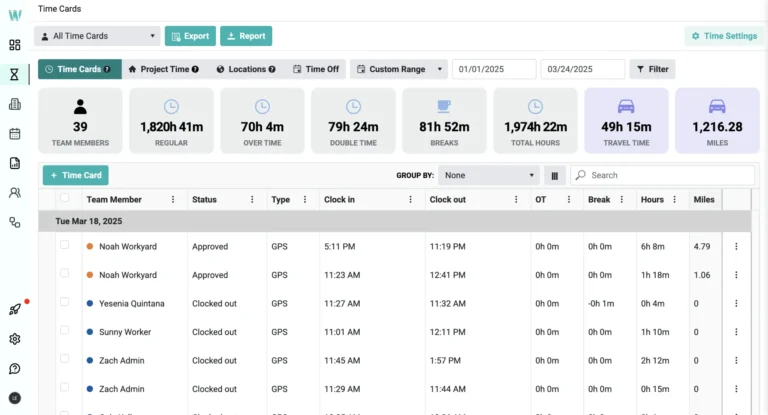
Photo from Workyard
After using Workyard, I found it to be suitable for field crews that need a dedicated GPS tracking platform.
Clocking in is straightforward, with unique PINs and facial recognition to prevent buddy punching, and time card sign-offs ensure that safety and compliance questions are addressed at every clock-out.
I could also clock in the entire crew with a single push of a button, manage breaks, and adjust individual time cards directly from the mobile app, which is pretty convenient.
The GPS and geofencing features let me see exactly who’s on site, monitor task progress, and capture real-time labor costs, which is helpful too identify potential overruns before they became a problem.
Although the software’s GPS tracking is fairly accurate, occasional GPS syncing delays in low-signal areas can happen unfortunately.
Workyard also makes managing multiple crews and job sites much easier with its scheduling and project visibility tools. I could see updates from the field without constant calls or check-ins, keeping projects on track and on budget.
An interesting feature is Workyard’s AI-generated smart forms, which provide a paperless way to create checklists, reports, and field logs using a drag-and-drop builder. These forms can be completed directly on-site and are automatically organized and timestamped. They can be set to appear at clock-in and clock-out, and supervisors receive alerts whenever a document is submitted.
That said, Workyard’s reports can be hard to customize, and the software can be a bit pricey for teams looking for a more budget-friendly solution. Also, while Workyard has an extensive suite of time tracking tools, it’s not the best fit for dispatch-heavy teams unlike FieldPulse or Timeero.
Pricing:
- Free Plan: No
- Paid Plan: $6 per mo per user + $50 per month company base (billed annually)
Available on:
Web browser, iOS, or Android
Ratings:
- Capterra: 4.7/5
- G2: 4.8/5
- Play Store: 3.8/5
- App Store: 4.2/5
Pros:
- Great support with easy onboarding
- GPS and geofencing features
- Easy to add job sites
Cons:
- GPS syncing delays in low signal areas
- Paid plan is a bit pricey
- Reports can be hard to customize
“The system is easy to use for both myself as well as employees. Accurately tracks job costing. I really like the ability to upload time sheets into my accounting software. No more time sheets rounded up by employees.” – Curt H.
(Source: Capterra)
“Occasionally, GPS pings experience minor delays when in remote locations, and it usually takes new hires a day or two to become comfortable with the app.” – Laura A.
(Source: G2)
Timeero – Best for Mileage Tracking on Construction Sites
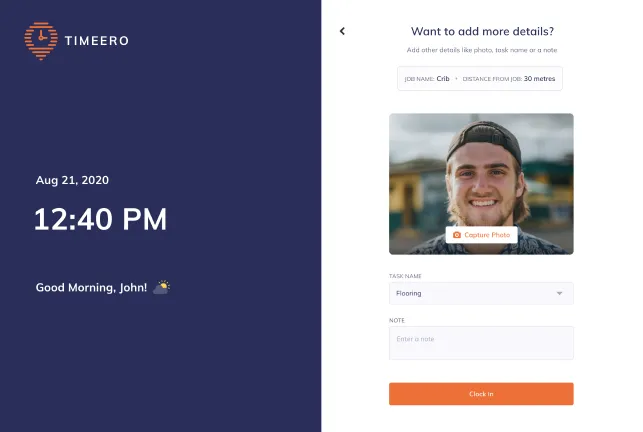
Photo from Timeero
Timeero’s mobile-first design makes it ideal for mileage tracking. The software can verify where each worker clocked in and track mileage automatically as crews travel between sites, giving construction managers a clear picture of travel time, site activity and overall productivity.
Its face-recognition time clock adds another layer of security by preventing buddy punching and alerting supervisors when someone other than the assigned worker tries to clock in.
Combined with GPS breadcrumb trails and segmented tracking, managers can review a clean, visual timeline of exactly where crews were throughout the day and how much time was spent on each project. They can even monitor travel speed and replay routes taken to ensure employees are paid only for mileage actually covered.
However, teams that need project-based visibility can use Workyard or Jibble for more comprehensive insights.
The mobile app features a simple, user-friendly interface with clear reports for payroll and mileage reimbursement that are easy to export. It also supports PTO tracking and employee scheduling, including tools for communicating schedule changes, sending alerts for no-shows, and allowing employees to accept or decline shifts.
However, Timeero isn’t without its drawbacks. Its integrations aren’t as smooth or extensive as some contractors may need, which can be limiting if your team relies on multiple apps to manage construction projects and payroll.
Appointment scheduling on Timeero is also straightforward, but I noted that setting up recurring or irregular monthly schedules can be frustrating.
Pricing:
- Free Plan: No
- Paid Plan: Starts at $4 per user/month
Available on:
Kiosk (iOS only), iOS, or Android
Ratings:
- Capterra: 4.4/5
- G2: 4.8/5
- Play Store: 3.1/5
Pros:
- Customer support is excellent
- App design is simple
- Easy appointment scheduling and mileage tracking
Cons:
- Setting up recurring schedules can be difficult
- Learning curve with payroll integrations
“The efficiency and accuracy in time tracking. Tracking location also makes it easy. I also talked to customer support and was very helpful.” – John Alfred C.
(Source: Capterra)
“Recurring schedules are difficult to input in their system. They don’t allow for appointments that are irregular (i.e. the first Tuesday of the month) so I have to input that as a new appointment each month. This causes more error for me.” – Verified User in Hospital & Health Care
(Source: G2)
FieldPulse – Best for Dispatch-Heavy Construction Teams
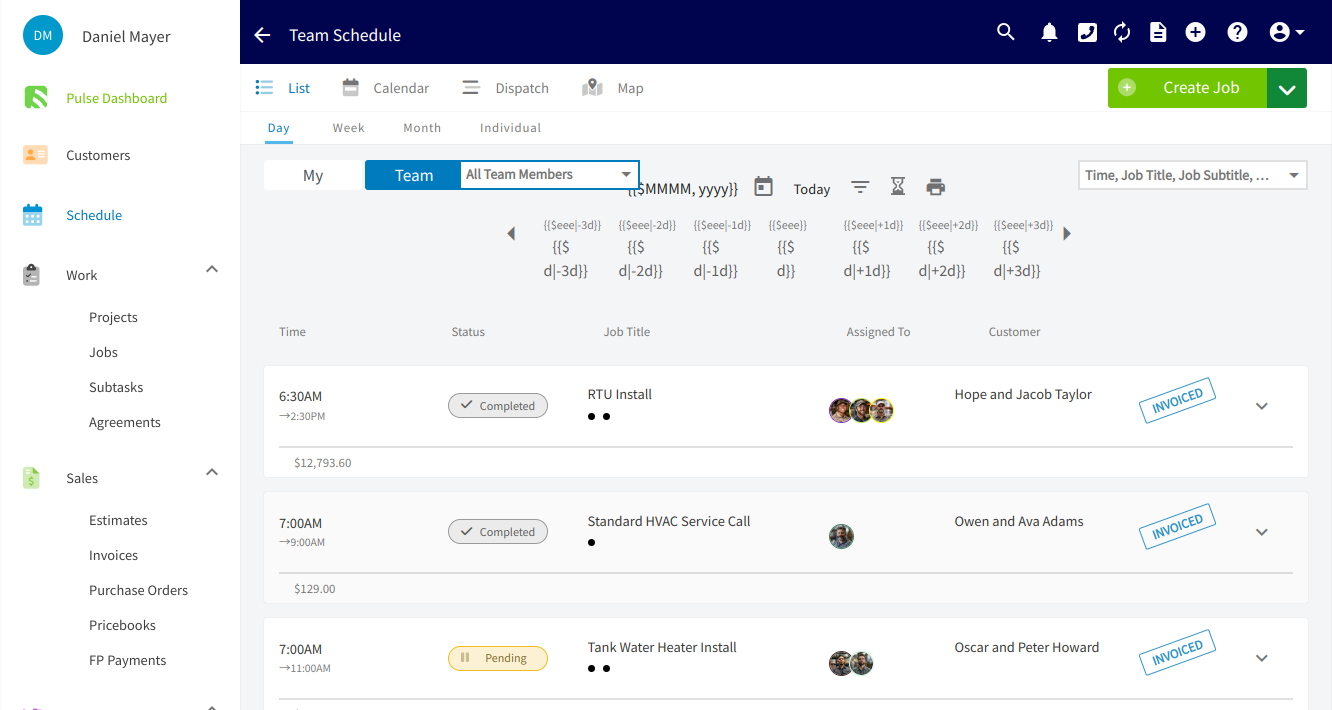
Photo from FieldPulse
FieldPulse is useful for dispatch-heavy field service teams that need clear visibility into where their workers are and how labor is being used.
The interface is generally easy to use and navigate, allowing crew members to clock in and out from their mobile app, with each entry automatically geotagged so supervisors can verify that hours are being logged from the correct jobsite.
Managers can review timesheets by day, week or month, dive into individual logs and make adjustments when needed; a practical setup for keeping labor records accurate across multiple projects.
While I do think the system is solid overall, some users have noted that processing timesheets can feel laggy and certain page loads can be slow at times.
FieldPulse really stands out for its scheduling and technician tracking tools. Drag-and-drop scheduling, real-time updates and multi-team views simplify coordinating crews across different locations.
The software also offers robust reporting tools that help construction and service contractors understand technician performance, job costing and overall profitability.
Customizable dashboards and financial tracking let you monitor labor, materials and overhead in real time, giving a clearer picture of which jobs are efficient and which ones are eating into margins. That said, project views aren’t as flexible as some firms might want, especially when managing multiple overlapping projects.
For teams that require robust project-wide GPS tracking as well as offline tracking capabilities, Buddy Punch or Jibble may be more reliable in the field.
Pricing:
- Free Plan: No
- Paid Plan: Pricing only available upon request
Available on:
Web browser, iOS, or Android
Ratings:
- Capterra: 4.6/5
- G2: 4.7/5
- Play Store: 3.3/5
- App Store: 3.7/5
Pros:
- Easy to use and navigate
- Strong job scheduling tools
- Good integration with QuickBooks
Cons:
- Limited flexibility with project views
- Processing timesheets can be laggy at times
- Can be slow at times while loading
“FieldPulse makes it easy to schedule new task and super easy to review previous ones. A favorite feature is the group collaboration on task for every single person involved adds notes for all to review.” – Michael S.
(Source: Capterra)
“There are bugs. If I am on a call I will get kicked off when a new call is coming in and the hold doesn’t work. The schedule updates. I can put something on the schedule and it doesn’t show up . there is a huge lag.” – Jillian S.
(Source: Capterra)
Buildertrend – Best for Builders, Remodelers, and Contractors
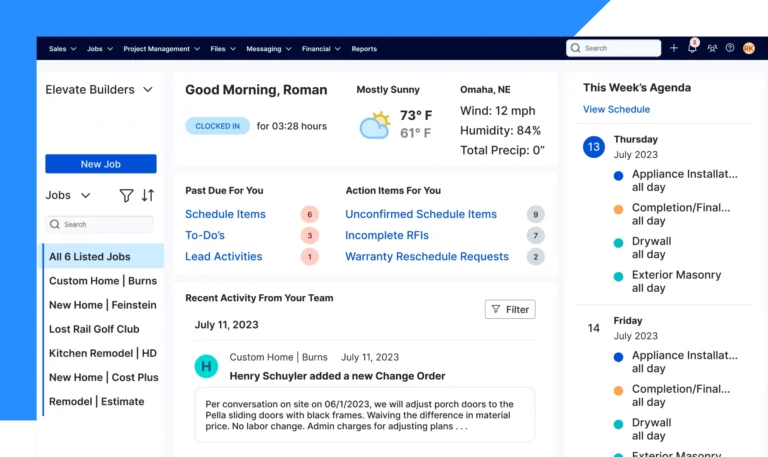
Photo from Buildertrend
Buildertrend’s time tracking and project management tools are built for the day-to-day activities of builders, remodelers, and contractors who want everything, from schedules to timesheets, in one platform.
The platform’s time clock app lets construction teams log hours directly in the app, even on jobsites with no connectivity, and everything syncs automatically once they’re back online. Location tracking helps verify that workers are clocking in at the correct site, which keeps labor records accurate across multiple projects.
The system also ties work hours directly to the project budgets, making it easier to see which phase of the build labor is being applied to.
In addition to construction time tracking, Buildertrend’s daily logs are a pretty strong feature. Crews, subs and clients can be logged as they arrive; photos, videos and progress updates document work as it happens; and delays, safety notes, site conditions and material usage are captured in one place for easy reference.
Combined with the software’s built-in chat and messaging feature as well as client portal, teams and clients can use Buildertrend to stay on the same page, easily track project progress to keep them moving.
Customer support is also easy to access, which helps when teams are trying to solve issues without delaying a job.
However, when using Buildertrend, its interface can feel cluttered, especially for teams that don’t have time for a steep learning curve in the middle of active projects.
And while the platform delivers strong construction-specific features, it can be pricey for smaller firms. Smaller teams or crews who need simpler time tracking and easier onboarding may prefer Jibble or Clockify.
Pricing:
- Free Plan: No
- Paid Plan: Pricing only available upon request
Available on:
Web browser, iOS, or Android
Ratings:
- Capterra: 4.5/5
- G2: 4.3/5
- Play Store: 4.9/5
Pros:
- Simplifies project costing and payments
- Support is easily accessible
- Daily logs and reports for keeping track of work progress
Cons:
- Interface can feel a bit cluttered
- Limited inter-project connectivity
- Can be pricey
“Buildertrend made it extremely simple to make payments of large sums to my contractor. It was easy to manage the payments item by item.” – Alison O.
(Source: Capterra)
“The product user experience is absolutely awful. It’s a hard product to learn how to use, and there is like 10x more clicking that there needs to be. Very frustrating to use on either desktop or mobile.” – Ryan B.
(Source: Capterra)
My Selection Process for the Best Construction Time Tracking Software of 2026
Picking a construction time tracking software is about finding a tool that actually holds up on real job sites. Here’s how I evaluated the top platforms for this list:
- Real-world jobsite testing: I didn’t rely on marketing claims. I tested each tool the same way crews and supervisors would use it: clocking in on-site, reviewing GPS data, running payroll, managing shifts, and stress-testing features in low-signal areas. This helped me see how each platform performs under typical construction workloads.
- Free vs. paid plans: I explored both free and paid versions of every software to understand where limitations begin and what upgrades genuinely add value. Some tools shine only after unlocking advanced features, while others stay strong even on entry plans.
- Industry user feedback: Beyond my own hands-on experience, I looked at reviews on Capterra, G2, and other trusted platforms to understand long-term reliability. Construction teams are brutally honest when tech slows them down, and those patterns helped confirm which tools consistently deliver.
- Independent recommendations: No vendor influenced these rankings. Every tool on this list is here because it performed well, solved real construction challenges, and is something I’d trust on an actual job site.
What is the Best Construction Time Tracking Software?
After thoroughly testing these platforms, one thing became clear: the “best” construction time tracking software depends heavily on your team’s size, workflow, and daily challenges.
If your priority is accurate GPS tracking, Workyard stands out with its precision and job-costing insights. If you need mileage tracking, Timeero’s breadcrumb trails and route replay give you visibility that most apps don’t offer. For busy dispatch teams, FieldPulse provides structure and scheduling power.
Companies needing full project management may lean toward Procore or Buildertrend, while monday.com is ideal if visual workflows and automation matter most.
But for construction teams that simply want a tool crews will actually use, one that’s fast, reliable, eliminates time theft, works offline, and doesn’t punish you for growing your workforce, Jibble is the best construction time tracking software. And with an unlimited free plan that still delivers core time tracking features, it ends up being the option that fits the widest range of teams with the least friction.
FAQs
Some frequently asked questions...
Time tracking helps ensure accurate payroll and prevents time theft or buddy punching.
It also allows managers to monitor labor costs, track overtime, and analyze how much time is spent on each project or task. This data is crucial for planning budgets, improving efficiency, and keeping projects on schedule.
Construction teams often use mobile apps, web portals, kiosks, or biometric devices to clock in and out. Many tools also include GPS tracking and geofencing, which ensures workers are logging hours at the correct job sites. Some systems even allow offline tracking, syncing data automatically when connectivity is restored.
Yes, several tools offer free plans suitable for construction teams. For example, Clockify provides a free plan but limits it to just 5 users, which can be restrictive for larger crews. In contrast, Jibble is truly free-forever for unlimited users, enabling teams of any size to track hours across mobile, desktop, and web platforms while generating timesheets and reports.
A good solution should be mobile-friendly, support GPS tracking and geofencing, and allow offline clock-ins for remote sites. It should also track breaks and overtime, generate project-based reports, and integrate with payroll or accounting systems.
Usability, reliability, and accurate reporting are key to keeping both crews and managers aligned.