
This Review Covers:
- Overview
- What Do Users Like About Bitrix24?
- What Don’t Users Like About Bitrix24?
- What Pricing Plans Does Bitrix24 Offer?
- What are the Standout Features of Bitrix24?
- Selected Positive User Feedback
- Selected Negative User Feedback
- What are Bitrix24’s Ratings from Review Sites?
- What’s My Final Verdict on Bitrix24?
Overview
Bitrix24 is an all-in-one business platform that offers Customer Relationship Management (CRM), project management, team communication, and HR automation tools.
After spending some time testing the platform, I realized how extensive its feature set is. Bitrix can definitely do a lot, but there are some features that stand out more than others.
Bitrix24’sCRM features stood out right away. It lets you manage deals from start to finish. The built-in AI can also help predict repeat sales and automate follow-ups, which is genuinely useful for staying on top of customer relationships.
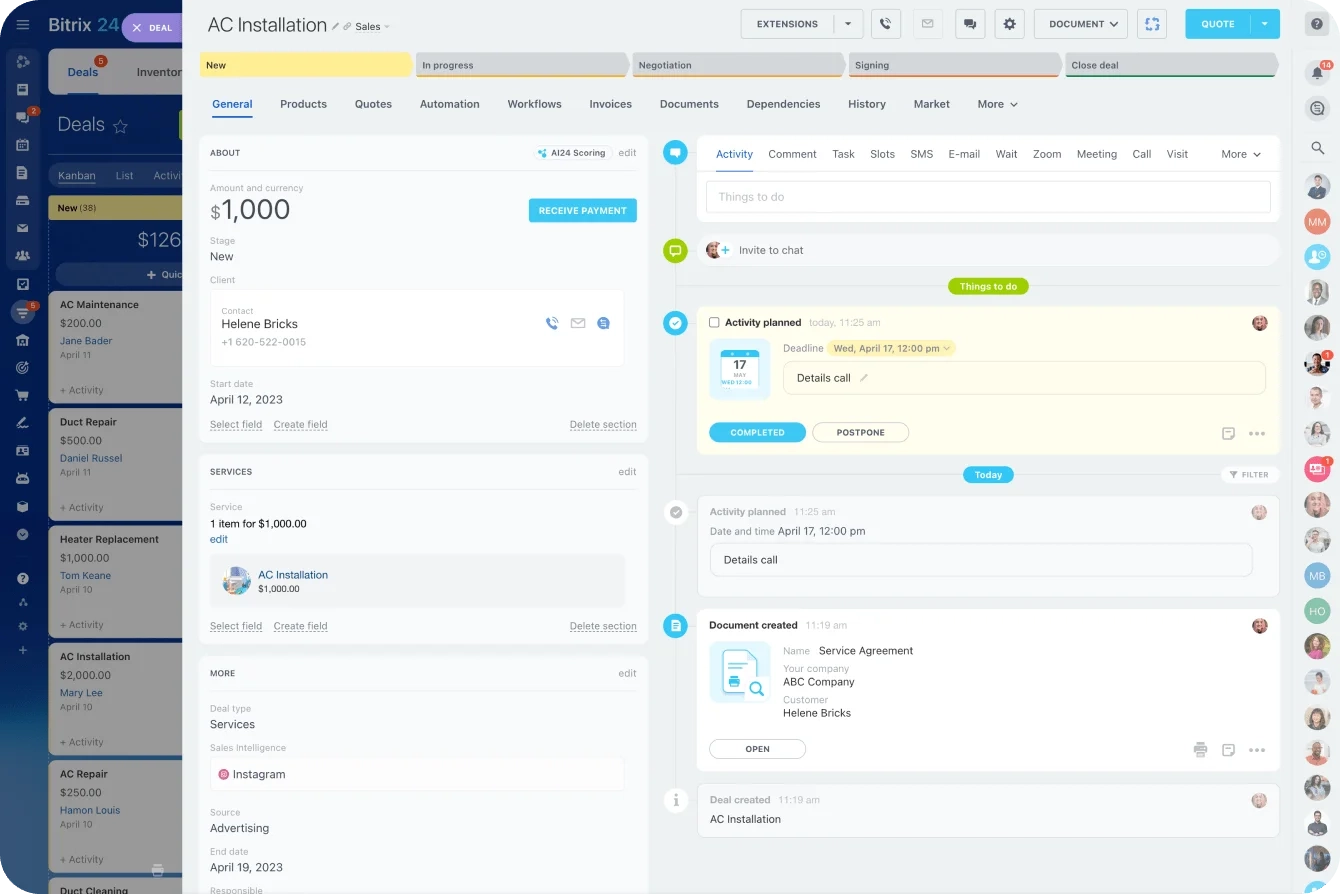
Photo from Bitrix24
Bitrix24 is great for collaboration, with built-in chat, video calls, and file sharing that make team communication easy. Bitrix24’s time tracking and task management tools are also straightforward You can start, pause, or add time manually while working. It records how long each task takes, helping you compare planned versus actual time. It works fine for basic tracking, but it’s not as polished or dedicated as other time-tracking tools I’ve reviewed.
When it comes to HR, Bitrix24 lets you handle leave requests, approvals, and document signing automatically, based on your preset rules. Having everyone’s info centralized makes it easy to manage access permissions or update employee details without hopping between platforms.
I found Bitrix24’s new feature — CoPilot — to be impressive. . It’s essentially an AI assistant that helps automate daily tasks. It can write or edit posts, create checklists, summarize discussions, and transcribe customer calls. It also records and summarizes meetings with its Follow-Up tool. While it needs clear prompts to work best, CoPilot is a useful time-saver that makes Bitrix24 more efficient.
Bitrix24’s feature set is great, but the trade-off with having such a wide toolset is complexity. Bitrix24 can feel overwhelming at first. Some features are buried in menus, and the interface isn’t the most intuitive. So definitely brace yourself for a steep learning curve.
What Do Users Like About Bitrix24?
- Customizable interface
- All-in-one tool for CRM, tasks, chat, projects
- Clear, visual dashboards
What Don't Users Like About Bitrix24?
- Difficult to set up
- Support takes a long time to resolve issues and requests
- Frequent, disruptive updates
What Pricing Plans Does Bitrix24 Offer?
Bitrix24 offers four main pricing tiers: Free, Basic, Standard, Professional, and Enterprise, designed to scale with different business needs.

Photo from Bitrix24
The Free plan is quite generous, allowing unlimited user access to core tools for CRM as well as task and project management. Some features have limited functionality, such as a lack of role based permissions or employee reports. Also only 5GB of file storage is available.
Paid plans start at $49 per organization per month, going up to $399 for enterprises. As you move up, you gain access to more advanced capabilities, including robust CRM automation, project and document management, HR tools, marketing integrations, and expanded cloud storage.
When broken down, the entry-level plan, which goes for $49 for 5 users, averages around $9.80 per user, which actually makes Bitrix24 more cost-effective than most competitors.
Feature-wise, the paid plans offer solid value, especially for businesses that need an all-in-one platform for collaboration, sales, and operations.
And although the flat per-organization pricing can be cost-effective for larger teams, it really reduces the plan’s flexibility. You might end up paying for more seats than you actually need, or having to upgrade sooner than expected as your team grows.
You can cut costs by choosing an annual plan, but if you prefer the flexibility of month-to-month billing, expect to pay about 20% extra.
What are the Standout Features of Bitrix24?
1. Customer Relationship Management (CRM)
Bitrix24’s CRM is one of the strongest features of the platform. It helps businesses manage the entire sales process by collecting leads through web forms, emails, calls, or social media. the system automatically adds them to your CRM. Each lead can then be scored, nurtured, and potentially converted into a deal.
The deal management system is also pretty flexible, with options for simple or recurring sales and an easy-to-use Kanban board that shows every stage of your sales pipeline. You can also send estimates and invoices, track payments, and use built-in automation to handle repetitive tasks like sending reminders or moving deals to the next stage.
The analytics tools are another strong point, giving insights into sales performance. Lead and deal reports show where your revenue comes from and which clients bring in the most value.
But, Bitrix24’s CRM interface can feel cluttered though, especially for new users, and some advanced automation features can take time to set up.
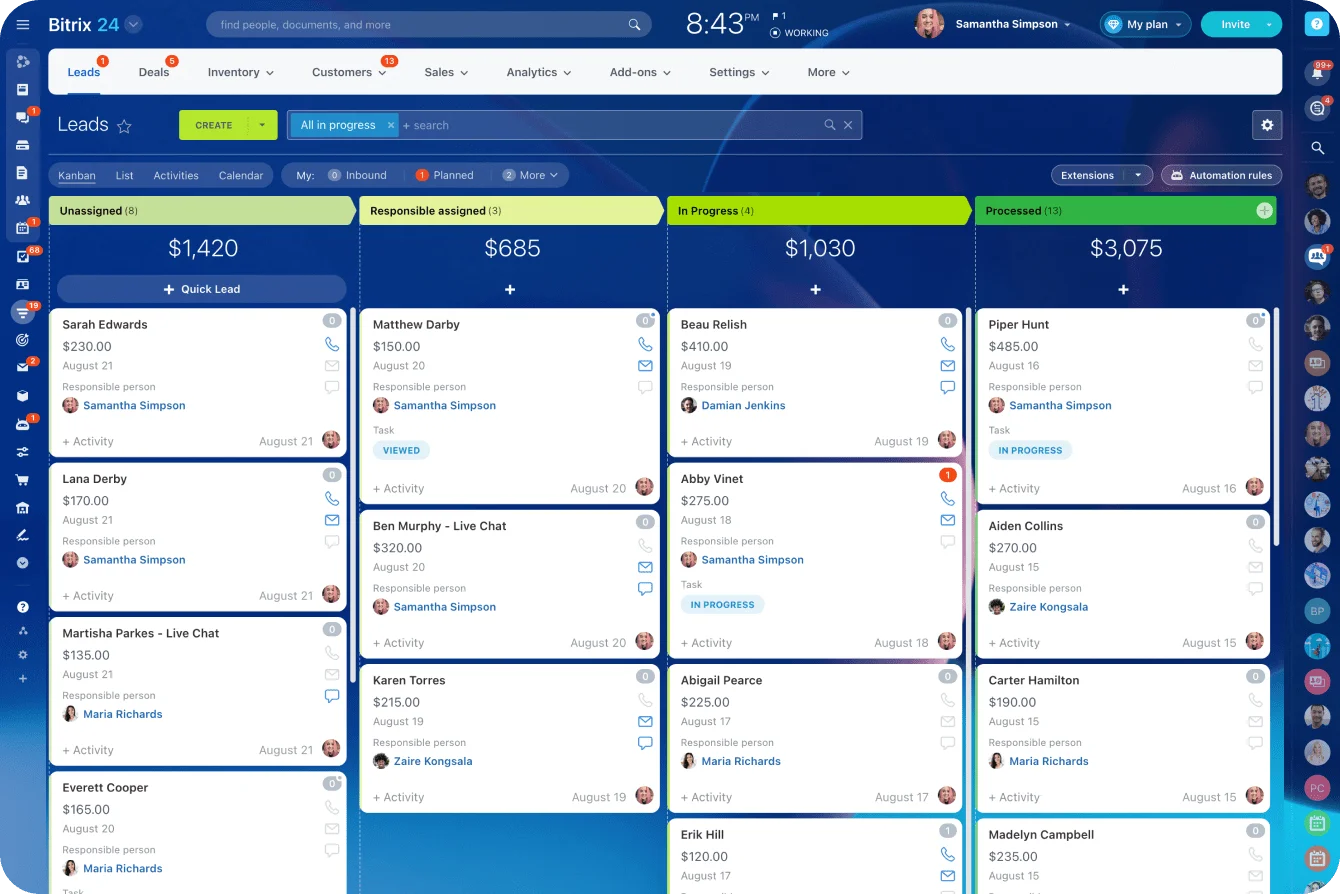
Photo from Bitrix24
2. Time Tracking and Performance Monitoring
Bitrix24 includes a built-in time tracking feature for tasks so managers get a clear view of how work is progressing.
You can set planned durations and track actual time with a timer, which then connects to reports and performance scores.
There’s also a Worktime tracking feature, which works more like a digital time clock. Employees can clock in and out, take breaks, and record the start and end of their workday using a small widget on the web or mobile app. These records automatically feed into basic reports that show total hours worked.
Employees can submit daily, weekly, or monthly reports summarizing their completed work, and managers can review, approve, or comment on them directly in the system.
For more flexibility, Bitrix24 also lets you create custom reports focused on specific KPIs, departments, or individuals. Reporting can even be automated, so performance summaries are generated on a regular schedule without you having to do anything.
Task and Worktime tracking is only available on the paid plans though, so the free plan won’t work if time tracking is a core part of your workflow.
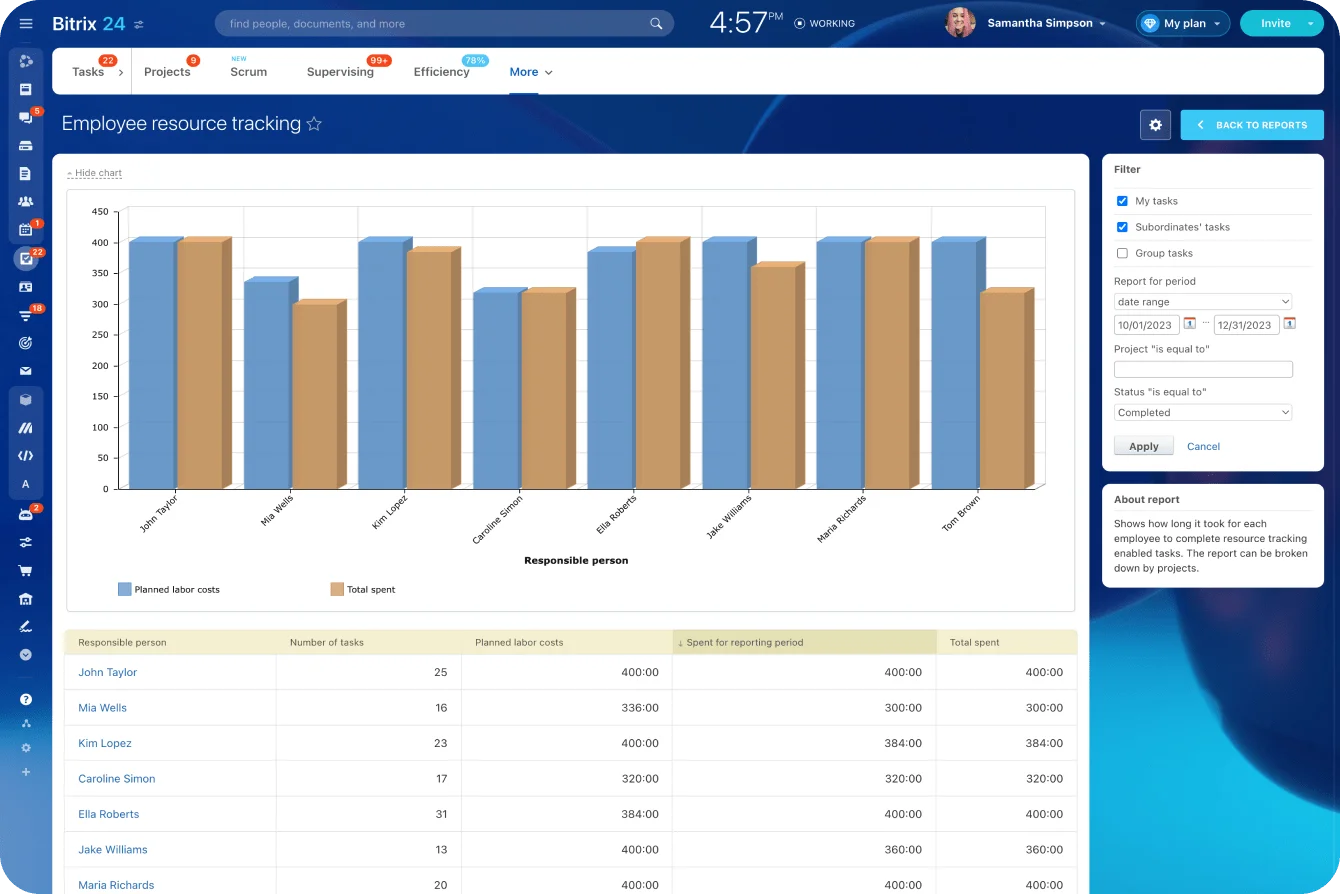
Photo from Bitrix24
3. Task Management and Automation
Bitrix24 offers basic task management with some helpful automation features to cut down repetitive work. You can organise tasks in lists or Kanban boards, assign them manually or through queues, and set recurring tasks for routine things like reports or follow-ups. The setup is simple enough once you get used to the interface.
The automation tools can be set up with simple rules and triggers, like to reassign overdue tasks, you can automatically send reminders, or create new tasks whenever a project stage changes. It is a no-code setup, which makes it easy to configure, though it still takes a bit of trial and error to get right.
It’s also useful how this automation links with Bitrix24’s CRM. For example, when a deal moves stages, it can automatically create a related task or send an update to the right person. This keeps projects connected and reduces the need for manual follow-ups.
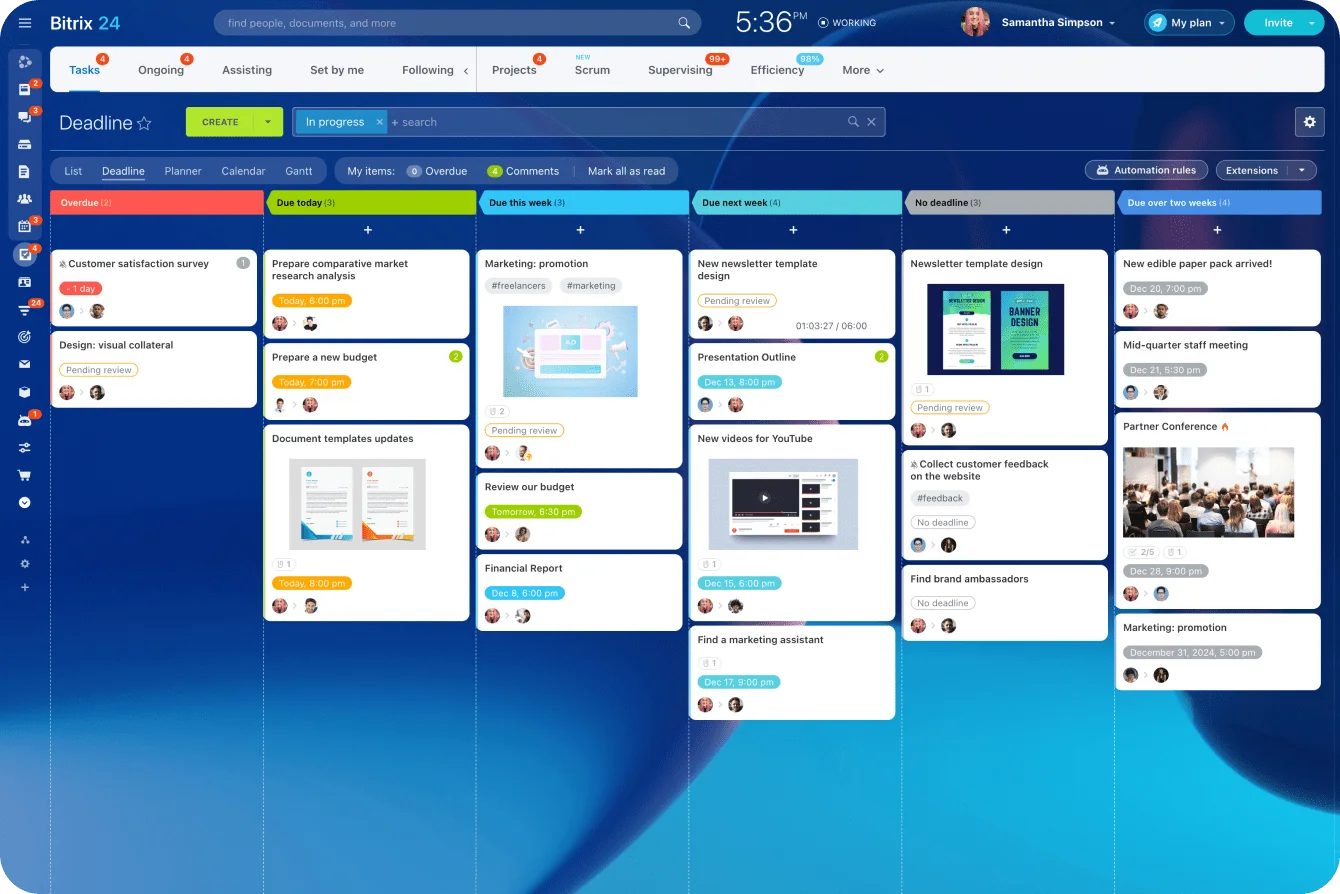
Photo from Bitrix24
4. CoPilot – AI Assistant
CoPilot is a built-in AI assistant that helps automate everyday tasks across Bitrix24. It’s one of their newer features, and I’d say they’ve done a pretty good job with it.
In CoPilot’s Feed section, you can write and edit posts or comments, summarize text, change a message’s tone, or translate messages. CoPilot can also expand short task descriptions into detailed checklists and summarize long comment threads so you can catch up on discussions.
For CRM, CoPilot transcribes and summarizes customer calls, fills in deal details automatically, and uses AI Speech Analytics to evaluate agent performance and suggest improvements.
You can also use CoPilot in meetings with CoPilot Follow-Up to record and summarize discussions.
Overall, it’s a practical tool for reducing small admin tasks, but the free plan only offers a limited version of it. To use most of its features, you’ll need a paid plan.
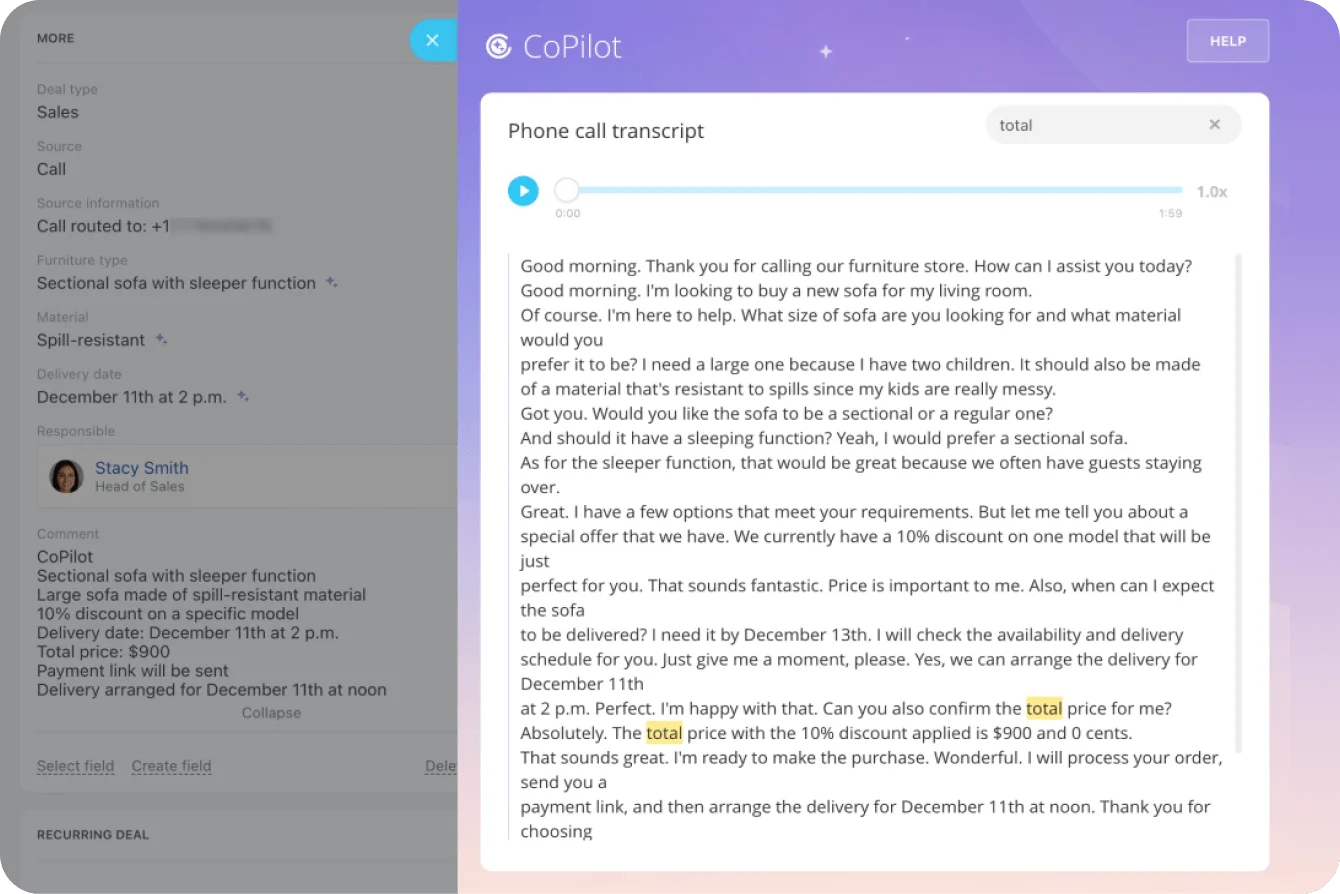
Photo from Bitrix24
Selected Positive User Feedback
- “I like its layout; it’s very customizable, and it’s easy to set goals or organize my tasks. It is interactive and enjoyable to use.” – Rebeca P. (Source: Capterra)
- “Bitrix24 has a good and easy to engage with dashboards which help us to have a unified view over our projects in order to know what has been done and what’s pending” – Ali Z. (Source: Capterra)
- “I like that Bitrix24 is a multipurpose tool yet easy to easy. It makes handling sales and marketing easy and also comes equipped with great CRM features.” – Miguel L. (Source: G2)
- “Its interface is quite nice, in addition to having good customization.” – Herberth S. (Source: G2)
- “Functions are numerous like a tasks management or a full crm. I appreciate because it avoid use of several solutions and more fees.” – Rajesh C. (Source: Capterra)
Selected Negative User Feedback
- “Not a value for the money. not very easy to use. can be complicated in organizing tasks to get efficiency going.” – Frank C. (Source: Capterra)
- “It’s a complex platform, with many functionalities that can seem overwhelming, and the sometimes cumbersome interface and lack of fine-grained customization can slow down work instead of simplifying it.” – Adrian U. (Source: Capterra)
- “There are so many features that it can feel cluttered, and finding the right tool often takes too many clicks.” – Elias S. (Source: Capterra)
- “The support from the AI bot has actually been very poor and unhelpful so far. Unfortunately, the same can be said about the real support: up to now, not a single request regarding the functionality has been adjusted or resolved.” – Sven K. (Source: Capterra)
- “Support has been taking days, if not weeks, to respond. We’re experiencing an error with card merging that’s been open for over a month. Changes are made out of the blue, without warning, and we have to constantly find new ways to do things. It seems to create more problems than solutions.” – Larissa R. (Source: Capterra)
What are Bitrix24's Ratings from Review Sites?
As of November 2025
- Capterra: 4.2/5
- G2: 4.1/5
- TrustRadius: 7/10
- GetApp: 4.2/5
- Google Play Store: 4.2/5
- App Store: 4.2/5
What's My Final Verdict on Bitrix24?
Bitrix24 is a very comprehensive software that tries to do everything — CRM, project management, HR, automation, and even AI — and mostly succeeds.
Once you get comfortable with the software, Bitrix24 becomes a serious productivity hub. It can replace multiple apps, centralize workflows, and help teams stay aligned without constant context-switching.
It’s best suited for mid-sized or growing businesses that want an all-in-one solution, but not necessarily for those who prefer something lightweight and plug-and-play.
The CRM and task management features are great but the time tracking feature is just okay. There’s no overtime tracking, facial recognition clock-ins, or detailed productivity breakdowns like you’d get from dedicated time tracking tools. You also can’t track tasks and work time on the free plan.
That said, the sheer number of tools can make it feel overwhelming at first. The interface isn’t the most intuitive, and getting comfortable with it takes time.
Need more focused time tracking tools? Check out our round up of the 15 Best Time Tracking Software in 2025.