
There’s an old saying: a chain is only as strong as its weakest link. In business, that weak link is often not your people; it’s the systems managing them.
Great teams still fall apart without the right structure behind them. Missed shifts go unnoticed, hours get miscounted, and managers spend more time firefighting than leading.
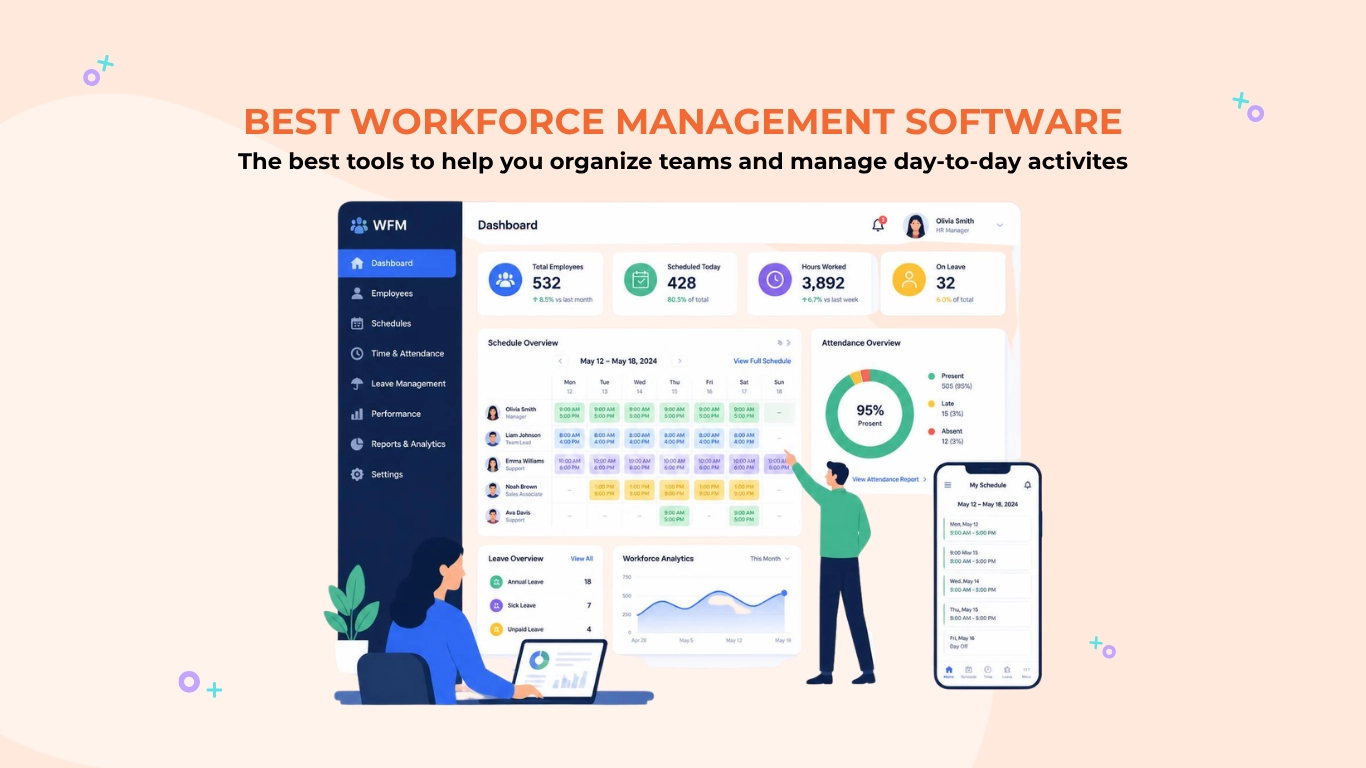
That’s where workforce management software comes in. It’s a tool that helps businesses schedule employees, track time and attendance, manage leave, and monitor productivity, all in one place.
I’ve tested the most popular platforms out there, from lightweight tools for small teams to enterprise systems built for scale, including strengths, limitations, and pricing, so you can find the right fit.
|
7 Best Workforce Management Software of 2026 Compared! |
|||
| Category |
Software |
Pricing |
Highlights |
| Free Forever |
Jibble |
$0.00 |
|
Affordable |
Parim | £2.29 per user/month |
|
| Deputy | $5.00 per user/month |
|
|
| TimeTrex | $50/month for 1–10 employees; $5/user/month for 11+ |
|
|
| Mid-Range |
Rippling | $8.00 per user/month |
|
| ADP Workforce Now | Pricing on request |
|
|
| Enterprise | UKG Pro | Pricing on request |
|
|
Note: The table shows entry-level rates and may not accurately reflect the overall value of the software. To gauge real value, consider each platform’s features, base fees, and any limits on the number of users. |
|||
Jibble – Best Workforce Management Software for All Teams
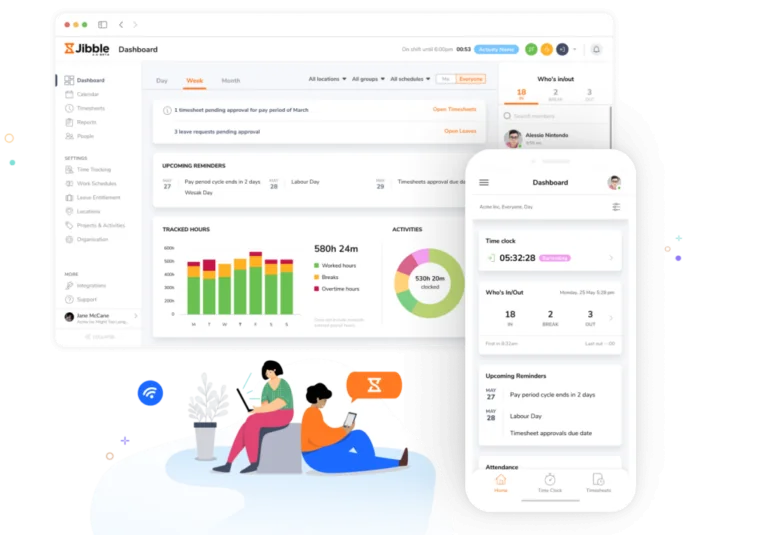
Jibble is a leading workforce management software designed for organizations of all sizes that provides on-site, remote, and mobile team management with employee attendance tracking, automated timesheets, integrated payroll, and detailed productivity analytics.
With Jibble, employees can easily track time across multiple platforms, including web, browser extensions, mobile, app, desktop, tablet, or a shared kiosk. Tracked hours in timesheets are tagged with specific projects and activity categories to provide greater visibility into how time is spent across the workforce.
Managers can view real-time insights into workforce productivity with Jibble’s intuitive dashboard. Employee performance can be viewed with daily, weekly, or monthly timesheets using filters to identify trends and monitor time spent on tasks or projects to optimize time utilization across teams
Jibble’s payroll-ready timesheets further simplify administrative processes by automatically calculating total hours worked, overtime, and breaks, even with customizable rules for overtime and breaks set for different workforce types.
Workforce attendance can be made secure with Jibble’s AI-powered face recognition, which ensures only the right person clocks in with liveness detection technology. For large workforces, Jibble’s speed mode allows employees to clock in quickly on a shared kiosk by simply showing their face to a mobile or tablet device.
Jibble also incorporates powerful GPS and live location tracking features with geofencing capabilities to ensure employees are in the correct location during work hours.
Furthermore, Jibble offers time and location-based reminders, along with automatic clock-outs to help ensure workforce compliance with business policies.
It also offers a robust leave management system that allows businesses to create custom leave policies, assign those policies to team members, and monitor their time off efficiently.
Jibble supports group-based management, allowing administrators to assign employees to different groups with specific authorization levels, permissions, and managerial hierarchies, making it equally suitable for SMEs and large enterprises.
And, with extensive integration capabilities, Jibble connects seamlessly with popular tools such as Xero, QuickBooks, Deel, Slack, Microsoft Teams and Zapier, enabling smooth alignment with existing workflows.
Moreover, it is free for unlimited users, making it an excellent choice for small and medium-sized businesses seeking flexibility, scalability, and precision in workforce management.
While Jibble supports essential invoicing needs, businesses looking for highly specialized invoicing workflows may prefer to pair it with dedicated invoicing software.
Pricing:
- Free Forever for an unlimited number of users
Available on:
Desktop, Mobile, Kiosk, Chrome Extension, and Web
Ratings:
- Capterra: 4.8/5
- G2: 4.8/5
- Play Store: 4.7/5
- App Store: 4.8/5
Pros:
- Smooth, modern, and intuitive platform
- Quick to set up
- Weekly timesheet summaries for productivity analysis
- Geofencing and face recognition attendance
- Easy to interpret reporting
Cons:
- Mobile app can take longer to sync data
- Lacks flexibility in filter customization for reports
“Jibble is easy to use for both HR and employees, especially for attendance and tracking work hours. The mobile app is convenient, the facial recognition works well, and the reports are clear and helpful for payroll processing.” – Sega Elektrik Sdn Bhd H.
(Source: G2)
“There is a small learning curve when starting, especially with reports.” – Bernardo M.
(Source: G2)
Deputy – Best Workforce Management Software For Retail, Hospitality, and Healthcare Workers
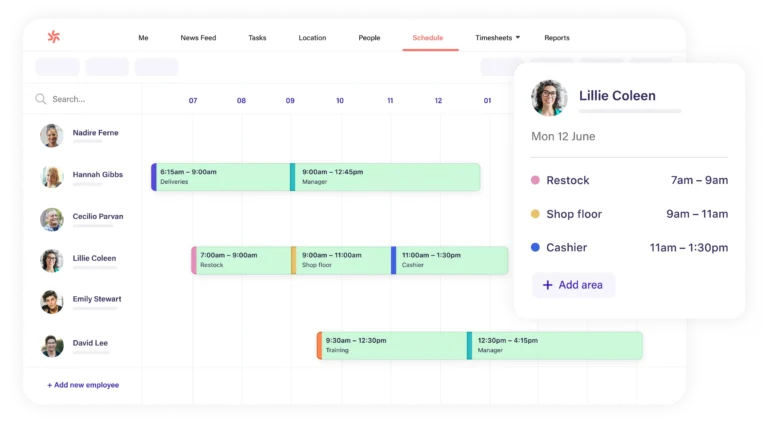
Photo from Deputy
Deputy is a scheduling and workforce management software tailored for shift-based teams in industries like retail, hospitality, and healthcare.
The software automatically records employee work hours through on-site tablets, computers, or mobile phones. For a hygienic and convenient experience, Deputy’s Kiosk app also supports touchless clock-ins using facial recognition or voice commands.
Deputy features an intuitive, AI-powered scheduling system with a drag-and-drop interface that simplifies roster creation.
Managers can automatically fill shifts with the most suitable employees based on availability, skills, and cost, while automated shift swapping and time-off management ensure compliance with labor laws. Users can also set scheduling priorities, such as minimizing labor costs or evenly distributing hours when making schedules.
This feature makes Deputy effective for managing hourly workforces with dynamic shift requirements across multiple locations.
The software also supports paid and unpaid breaks, multiple break types within a single shift, and features dedicated to break compliance.
Beyond scheduling, Deputy allows managers to assign tasks or checklists to employees, ensuring that critical deadlines are completed on time. With dynamic reporting, managers can compare labor hours, wage costs, and profitability to track performance against budget.
Deputy also enhances internal communication through its built-in messaging and central noticeboard features. These features replace fragmented and confusing team communication with a single platform to ensure everyone in the workforce is on the same page.
Finally, Deputy integrates seamlessly with leading payroll and workflow systems, ensuring smooth synchronization between scheduling, time tracking, and payroll operations.
However, some Deputy users report lag in the mobile app. Additionally, Deputy’s price tag can be a bit on the costly side for organizations managing smaller workforces with unpredictable schedules.
Pricing:
- Free Plan: No
- Paid Plan: Starts at $5.00 per user per month, billed annually
Available on:
Web, Mobile, Kiosk
Ratings:
- Capterra: 4.6/5
- G2: 4.6/5
- Play Store: 4.8/5
- App Store: 4.7/5
Pros:
- Scheduling is easy to navigate
- Easy timesheet approvals
- Informative news feed feature
Cons:
- Safety features can be overwhelming
- Can be costly
- Not flexible for wider industrial use
“I like how simple the interface is for not only the admin/managers but also for the users, the employees. Not only are the employees able to put their time-off requests in Deputy, but they’re also able to view their weekly timecards as well.” – Verified User
(Source: G2)
“No direct integration with payroll or HR systems, since Deputy doesn’t sync with Paycom. It would be ideal if time, scheduling, and payroll were all integrated in one place.” – Chad J.
(Source: G2)
Parim – Best Workforce Management Software for Complex Scheduling
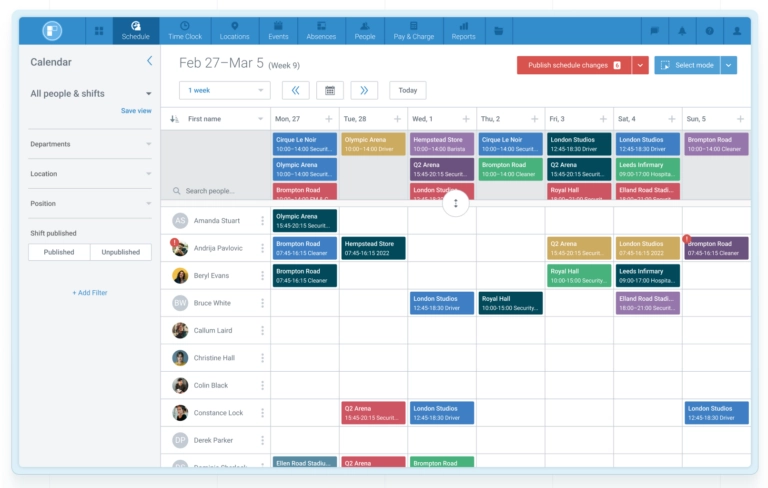
Photo from Parim
Parim is a workforce management software designed for shift-based workers in industries with complex scheduling needs, such as security services, event venues, sports arenas, warehousing, logistics, and healthcare.
Parim’s all-in-one solution provides an unlimited employee database, scheduling, time-tracking, payroll tracking, absence management, and a client portal that lets customers request shifts as needed.
The software’s strongest feature is its comprehensive scheduling tool that lets you create complex shift patterns and rotas to provide 24-hour coverage at all job sites. You can enter requirements for position, qualifications, and proximity to schedule the most suitable staff member for a shift.
Another way to schedule shifts with Parim is via its Event Module, which lets you see shift coverage for each position and quickly fill open slots in a shift automatically or through self-scheduling.
Parim self-scheduling works by publishing employees’ open shifts. Staff members with matching requirements receive instant notifications on their phones and can apply to open positions on a first-come-first-serve basis.
This is especially useful for those working on a project-based schedule instead of a weekly calendar, such as in concert halls, theaters, stadiums, and at festivals.
Payroll tracking is another key feature that makes Parim stand out as a great shift work management system. Each shift can have hourly or fixed pay rules attached, with additional rates and multipliers for overtime hours, bank holidays, and much more. For staffing agencies, the same can be done for billing rates, which makes exporting payroll and invoicing data a one-click job.
Parim also lets employers set up customizable working time rules based on location, age and other variables. Its absence management system is equally customizable with rules for time off, holiday accruals, sick days, bank holidays, and much more.
Along with staff scheduling and payroll management, Parim offers industry-specific features, such as NFC checkpoints for guard tour patrol routes, lone worker safety monitoring, incident reporting, and asset management.
But, while the platform offers extensive flexibility and powerful capabilities, its high level of customizability can feel overwhelming for new users. Additionally, many of Parim’s advanced features are restricted to higher pricing tiers.
Pricing:
- Free Plan: No
- Paid Plan: Starts from an average of £2.29 per user/month (varies by use)
Available on:
Mobile, Tablet, Desktop, SMS/Voice Call
Ratings:
- Capterra: 4.8/5
- G2: 4.6/5
- Play Store: 4.3/5
- App Store: 4.7/5
Pros:
- Quick position-matching and simple self-scheduling
- Ability to fill a large number of shifts very quickly
- Time-saving payroll tracking that reduces admin work
Cons:
- Customizability can be overwhelming at first
- Advanced features are only available in higher pricing plans
“PARiM is a very helpful and reliable system for managing work schedules and time tracking. It is easy to use and makes communication between employees and management much smoother. I would definitely recommend it to other employers.” – Aaron D.
(Source: Play Store)
“Would be better for greater integration with other systems.” – Aaron D.
(Source: G2)
Rippling – Best Workforce Management Software with HRM
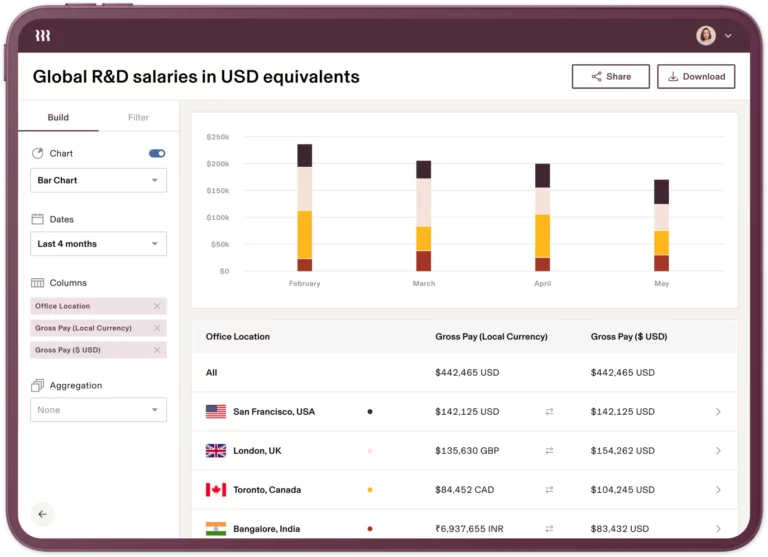
Photo from Rippling
Rippling is an all-in-one workforce management platform that automates the entire employee lifecycle from onboarding to offboarding with a suite of time tracking, payroll, HR, IT, finance, and benefit features in one system.
The platform offers flexible clock-in options, allowing teams to choose the method that works best for them, whether via mobile, web, or a physical time-tracking device. Users can implement custom time tracking policies that automatically enforce role-specific requirements, hour limits, and compliance rules.
Rippling’s labor planning tools further help identify staffing gaps or surpluses in the workforce in real time. Employees can easily swap shifts with eligible teammates, while managers can review availability and preferences to create efficient, balanced schedules.
Rippling also provides flexibility for mobile workforces to clock in, view schedules, swap shifts, and request time off directly from their mobile app.
With Rippling’s integrated HR module, manual HR requests can be offloaded with an intuitive, self-service interface that allows employees to manage routine actions on their own. This makes the software beneficial for multi-location or fast-scaling organizations that want to reduce administrative burdens.
Along with HR, Rippling provides an integrated suite of solutions for IT, finance, and global workforce management. It helps increase organizational security with control over user identity, device management, streamlined financial operations, and global employee and contractor management.
However, Rippling’s flaw lies in its pricing and complexity. It can be overkill for smaller teams that only need simple time tracking or shift scheduling.
Pricing:
- Free Plan: No
- Paid Plan: Starts at $8 per user per month
Available on:
Mobile, Web, Physical Time Tracking Device
Ratings:
- Capterra: 4.9/5
- G2: 4.8/5
- Play Store: 4.5/5
- App Store: 4.7/5
Pros:
- Intuitive to use
- Onboarding automations for new employees
- All-in-one HR, payroll and time management platform
Cons:
- Some integrations and advanced features can be more customizable
- Customer support could be more responsive
- Reporting feature can be limited
“It helps streamline key processes like onboarding, payroll, benefits, and device management, which makes it easier to support employees and stay organized.” – Kevin D.
(Source: G2)
“While Rippling offers a powerful all-in-one platform, some downsides include higher costs as additional modules are added, a potentially longer setup process, and occasional delays in customer support.” – Carmina O.
(Source: G2)
ADP Workforce Now – Best Workforce Management Software for Mid to Large-Sized Businesses
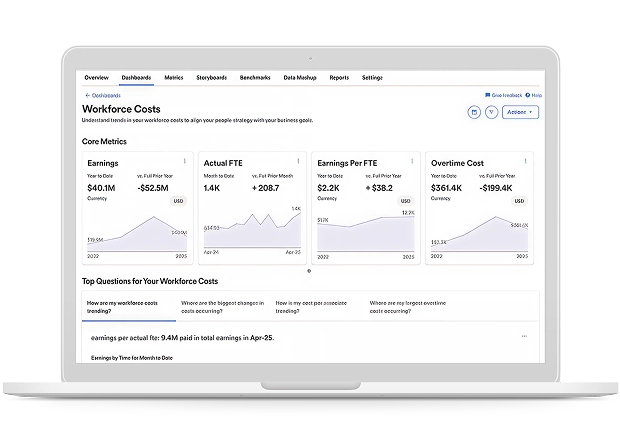
Image from ADP Workforce Now
ADP Workforce Now is an all-in-one workforce management software for mid to large-sized businesses, that helps companies manage HR, payroll, time and attendance, employee benefits, and talent in one system.
Employees can track time using ADP’s web app, a physical time clock, a tablet kiosk, any point-of-sale (POS) device, or with a mobile phone, making it easy to implement and accurately track time across different workplaces.
Businesses managing distributed and frontline teams can use ADP’s geofencing feature to ensure employees can only clock in from approved job locations.
ADP also offers biometric attendance verification tools like fingerprint or facial recognition to prevent buddy punching, as well as IP restrictions to limit clock-ins to trusted internet networks only.
For shift-based teams, ADP allows managers to quickly build schedules using pre-set templates or by copying previous schedules. The system automatically notifies employees about schedule changes and upcoming shifts.
Employees can also swap shifts, request coverage, and update their availability when needed through the software’s self-service functionality.
Within these schedules, managers can also view labor costs, helping keep business expenses under control.
ADP also provides reports and dashboards that help managers track overtime, missed coverage, and unexpected work hours.
Recorded time data is then automatically updated into ADP’s built-in payroll system, which includes automated tax calculations to help businesses stay compliant.
Beyond workforce operations, ADP Workforce Now includes HR tools to hire employees, keep them engaged with assessments, and support their growth with training and development courses.
Despite its broad workforce management feature set spanning scheduling, time tracking, payroll, HR management, and reporting, new users note that the platform can feel complex to navigate.
Pricing:
- Free Plan: No
- Paid Plan: Custom pricing available on request
Available on:
Mobile, Web, Physical Time Clock, Tablet Kiosk, Point-of-Sale Device
Ratings:
- Capterra: 4.4/5
- G2: 4.2/5
- Play Store: 4.6/5
- App Store: 4.5/5
Pros:
- Comprehensive platform that combines HR, payroll, benefit management, and reporting
- Organized dashboard
- Easily accessible payslips and downloadable tax documents
Cons:
- Advanced settings can be complex to learn
- Schedules don’t automatically sync with mobile calendar apps
- Occasional system glitches may temporarily restrict access
“What I like most about ADP Workforce Now is how streamlined and user-friendly the platform is for managing payroll and HR in one place. It makes processing payroll efficient and accurate, and the reporting tools are extremely helpful for tracking employee data, benefits, and time off. I also appreciate how organized the dashboard is—it’s easy to find what you need without feeling overwhelmed.” – Rebecca R.
(Source: Capterra)
“Sometimes it’s hard to remember where to find certain things in the app, especially a few specific items.” – Christy H.
(Source: G2)
TimeTrex – Best Workforce Management Software for Small Businesses
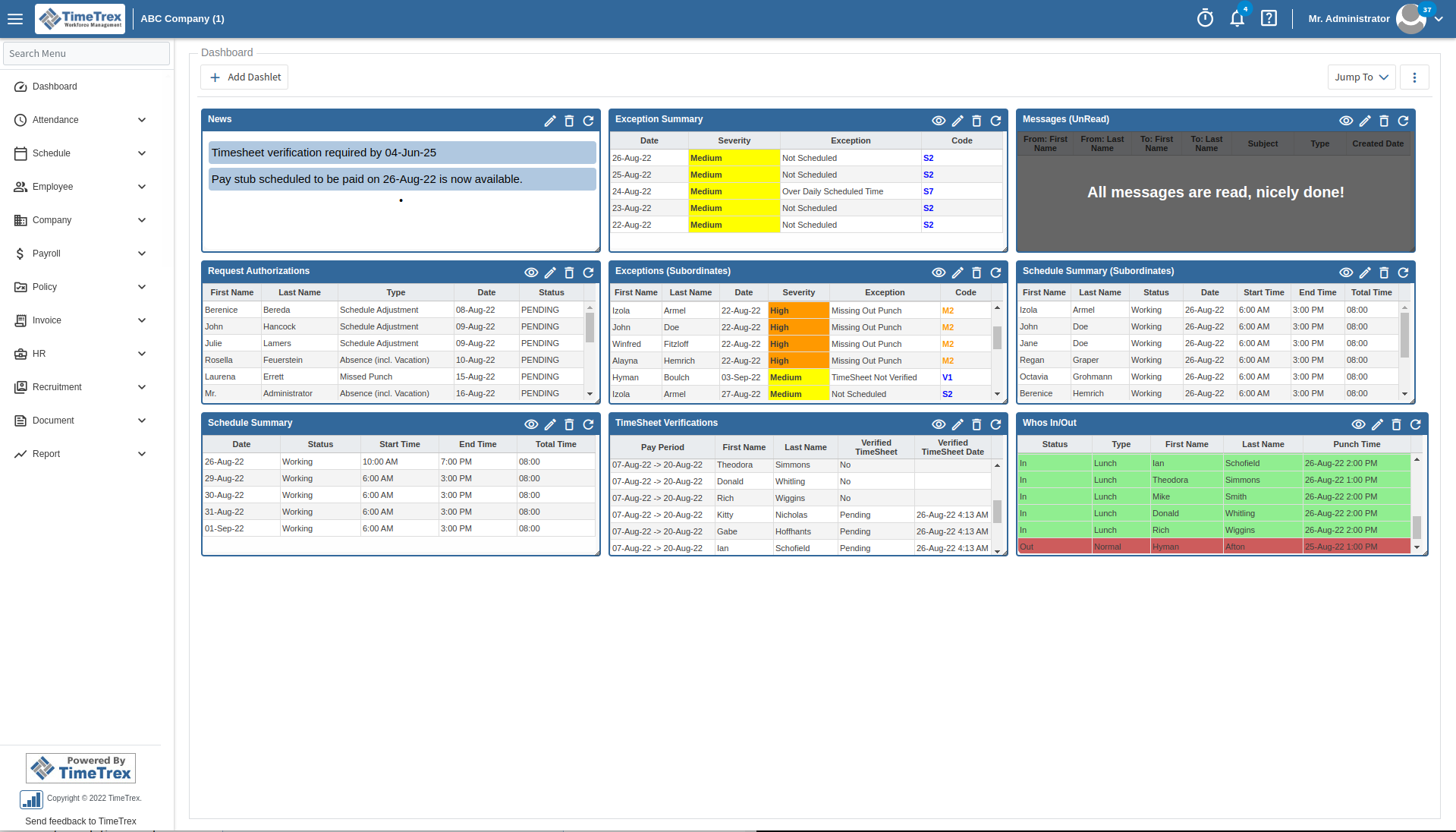
Image from TimeTrex
TimeTrex is an all-in-one workforce management software designed for small businesses, bringing time tracking, job costing, expense management, scheduling and payroll together within one platform.
Employees can record their work hours through the web or mobile app, as well as using a facial recognition time clock or tablet kiosk.
To help small businesses gain visibility into labor costs and manage budgets, the platform’s job costing feature allocates tracked hours across different cost centres. This makes it possible to accurately break down labour costs by employee, department, branch, task type, or volume produced.
TimeTrex also simplifies expense management by allowing employees to take a photograph of a receipt or an invoice from the app, which automatically extracts the information, completes expense forms, and categorizes expenses to simplify reporting.
Scheduling is handled through a drag-and-drop interface with shift templates. TimeTrex also includes an integrated payroll system that automates direct deposits, remittances, and year-end tax forms.
While TimeTrex provides small businesses with a broad range of workforce management tools in one platform, configuring its more advanced features may require additional time and effort.
Pricing:
- Free Plan: Yes, with its cloud-hosted Community Edition
- Paid Plan: Starts at $50/month for 1–10 employees; $5/user/month for 11+
Available on:
Web, Mobile, Facial Recognition Time Clock, Tablet Kiosk
Ratings:
- Capterra: 4.7/5
- G2: 4.2/5
- Play Store: 4.9/5
- App Store: 3.9/5
Pros:
- Easy to use
- Great support team
- Intuitive payroll system
Cons:
- Setting up advanced features can be complex
- Some features on the community version require coding edits
“We are a PEO that works with SMBs. TimeTrex has always worked for our clients. Really like the support staff at TimeTrex, great to work with.” – Arin
(Source: Capterra)
“The interface needs to be a little upgraded to be more user-friendly. I do use it as a user and as admin for a group, lots of things need to be tweaked by code and i don’t like that in the community version.” – Amaury
(Source: Capterra)
UKG – Best Workforce Management Software for Enterprises
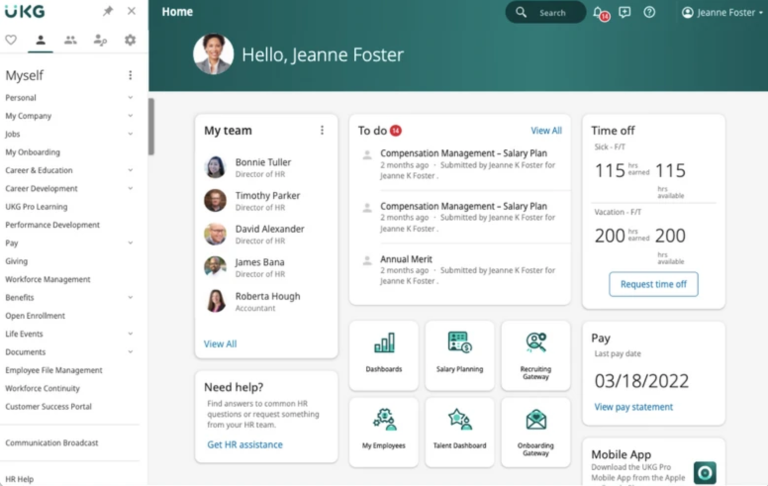
Photo from UKG Pro
UKG Pro is an enterprise-level workforce management solution designed to unify HR, payroll, scheduling, and compliance in one intelligent system.
Ideal for large workforces, the software offers multiple tracking methods including biometric time clocks, mobile apps, and web-based systems, ensuring seamless time tracking for remote, mobile, and frontline workers. Employees can clock in, view schedules, request time off, and respond to notifications from any device.
With built-in geofencing and role-based access, UKG Pro allows organizations to personalize workforce management while maintaining compliance and accountability.
The platform’s configurable dashboards provide live insights into hours worked, attendance exceptions, overtime, and labor allocation, helping managers make informed, strategic decisions in real time.
Moreover, with the power of people-first AI, UKG Pro displays hidden performance and productivity trends across the workforce. Its intelligent analytics help identify bottlenecks, reduce lost time, and optimize shift coverage by aligning staffing levels with actual demand.
By connecting attendance data to employee performance, it enables organizations to make smarter decisions and drive continuous improvement across all teams.
The software also offers comprehensive leave management capabilities that allow businesses to keep track of all types of leave while ensuring that company policies are consistently followed.
UKG Pro also supports precise labor forecasting, AI-driven scheduling, and multi-jurisdiction compliance. Its advanced capacity planning tools enable organizations to build labor models informed by key business factors such as sales volume, customer traffic, or seasonal trends.
The software adds significant value by aligning workforce operations with business outcomes through predictive analytics, real-time data dashboards, and employee self-service tools.
However, its complexity and high cost make it less suitable for smaller businesses, and users often find custom reporting cumbersome.
Pricing:
- Free Plan: No
- Paid Plan: Available on request
Available on:
Web, Mobile
Ratings:
- Capterra: 4.3/5
- G2: 4.3/5
- Play Store: 4.0/5
- App Store: 4.7/5
Pros:
- Scales with organization growth
- Improved PTO and workforce schedule management
- Accurate payroll management
Cons:
- Service and support model lacks
- Interface can be clunky
- App logs out too frequently
“I find UKG Pro very convenient because it houses all our HR functions within one program, which is great. Everything is readily accessible at our fingertips, as long as the correct role assignments are set within the system.” – Stacy B.
(Source: G2)
“It’s not very intuitive, especially for new users. There’s definitely a learning curve, and some tasks feel like they take more steps than they should.” – Betsy K.
(Source: G2)
How I Selected the Best Workforce Management Software
To identify the best workforce management software, I evaluated each platform based on how well it handles the day-to-day challenges businesses face when managing employees, schedules, attendance, payroll, and productivity.
I looked at how these tools perform in real-world workforce environments, including remote teams, frontline staff, shift-based operations, and growing businesses.
Here are the main criteria I used during testing:
- Ease of use: Workforce management software should simplify operations, not add more complexity. I prioritized platforms with intuitive dashboards, clean navigation, and simple setup processes that managers and employees could quickly adapt to.
- Workforce management features: I focused heavily on the core workforce management features each platform offered. This included scheduling and shift management, time tracking and attendance monitoring, payroll and HR integrations, workforce reporting, mobile accessibility, GPS tracking, geofencing, overtime tracking, and workforce analytics to see how well each software handled day-to-day operations.
- Scalability: Some workforce management tools work best for small teams, while others are built for enterprise-level organizations. I considered how well each platform scales across multiple locations, departments, and workforce sizes.
- Pricing and overall value: Pricing matters, especially for growing businesses. I compared free plans, starting prices, included features, and overall value for money to identify which platforms deliver the strongest return on investment.
- Customer feedback and reliability: Finally, I reviewed user feedback across platforms like G2, Capterra, Google Play, and the App Store to understand real-world strengths, frustrations, and long-term reliability.
So, What is the Best Workforce Management Software in 2026?
The best workforce management software on this don’t just track hours or build schedules. They reduce the admin burden, surface the right data, and give managers more time to actually lead.
After thorough testing, Jibble stood out as the best workforce management software overall. It strikes a rare balance between depth and simplicity, covering time tracking, attendance, leave, and payroll prep without the learning curve that plagues most enterprise tools. It’s also free forever for unlimited users, making it even harder to overlook.
Along with Jibble, Deputy and Parim excelled in shift-heavy environments, while Rippling and UKG Pro offered broader HR and compliance capabilities for larger organizations with more complex needs.
But if you want a tool that works on day one, scales as you grow, and doesn’t charge you for features you’ll never use, start with Jibble.
Want a smarter way to manage projects? Check out our full breakdown of the best project tracking software available in 2026.
FAQs
Some frequently asked questions...
Workforce management software are systems that help businesses plan, track, and optimize employee performance, schedules, and productivity.
They typically include tools for time tracking, scheduling, payroll, HR, and reporting, allowing managers to streamline operations and reduce administrative work.
When selecting a tool for workforce management, look for tools that can streamline daily operations with features like:
- Time and attendance tracking
- Payroll integrations
- Smart scheduling
- Performance analytics
- Mobile access
- GPS tracking
- Biometric attendance
- AI-powered automations
Ultimately, the best workforce management software’s features will be based on your business’s unique operational needs.
For small businesses and startups, Jibble is a great option. It is free for unlimited users, while still providing powerful features like AI-powered facial recognition, GPS tracking, geofencing, and payroll-ready timesheets.
Jibble’s intuitive dashboard gives managers real-time insights into productivity, with employees tracking time across web, mobile, and kiosk devices.
It also offers unlimited integrations with payroll and workforce management tools like Xero, QuickBooks, Deel, Slack, Microsoft Teams and Zapier, ensuring seamless workflow alignment.