
The definitive list:

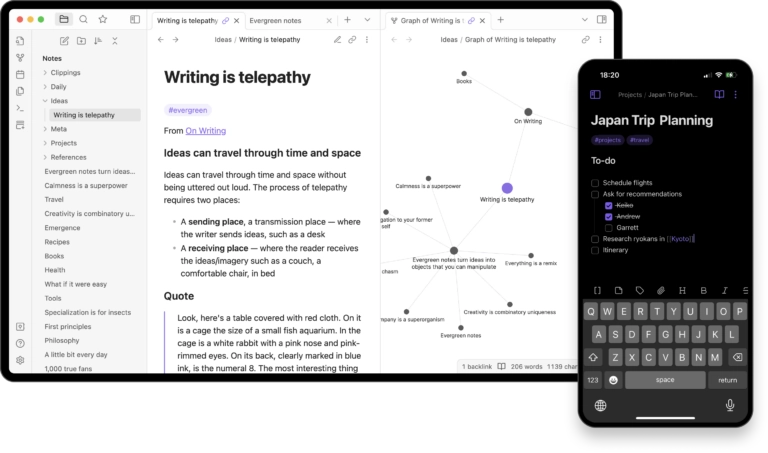
- Interactive graphs
- Canvas for visual organization
- Plugins and customization
- Secure sync and collaboration
- Aesthetically pleasing design and layout
- Easy to construct complex information articles
- Files are saved locally
- Steep learning curve
- Sync across multiple devices is a subscription feature
Obsidian is a note-taking app that offers users a way to visualize and organize their notes by creating links between ideas. The software’s interactive graph feature helps uncover connections and patterns in their ideas, making it easier to see relationships across their work.
Obsidian also has a Canvas feature that provides an infinite visual workspace for brainstorming, diagramming, and organizing research.
This can be used to add notes alongside images, PDFs, videos, audio, and interactive web pages, creating a flexible and dynamic environment for plotting down ideas.
With plenty of plugins and an open API, Obsidian is highly customizable. It’s easy to tailor the app to fit personal workflows, making it adaptable for both casual note-taking and complex projects.
Syncing data between multiple devices is also secure and flexible, with end-to-end encryption, selective file syncing, version history, and team collaboration.
What I found really interesting is Obsidian Publish, which allows users to turn their notes into online wikis, knowledge bases, or digital gardens.
It’s basically built-in publishing, complete with themes and domain customization for creating mobile-friendly, SEO-optimized sites.
Although Obsidian’s features are great, I can definitely see a learning curve for users; it can be overwhelming for someone just looking for a simple note app. Also, syncing across multiple devices is only available for users on the paid plan.

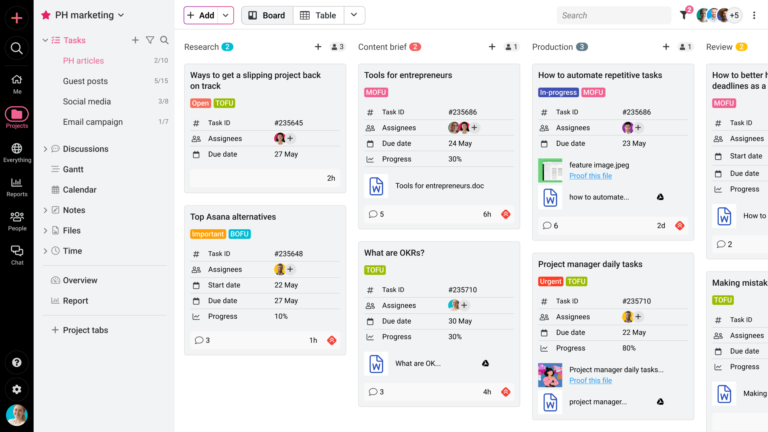
- Centralized task, project, and team collaboration
- Built-in chat, discussions, and announcements
- Proofing & version control
- Project, workload, and progress reports
- Time tracking and timesheets
- Custom workflows, roles, and granular access controls
- Flat-fee pricing with unlimited users
- Simple learning curve with intuitive interface
- Combines multiple tools into a single platform
- Does not offer a free plan, but does offer a 14-day free trial
- Not suitable for individual usage and solopreneurs
ProofHub is an all-in-one project management and team collaboration software designed to help businesses centralize work, reduce tool overload, and streamline operations to improve overall productivity.
It combines for project planning, task management, time tracking, built-in chat and discussions, notes, file sharing, proofing, and reporting in one centralized place. This makes it especially valuable for teams that want a unified space to manage day-to-day work and collaboration.
Moreover, its custom workflows, role-based permissions, and granular access controls give teams greater flexibility and control over their entire workflow. This makes it valuable across all levels, giving managers complete visibility into workloads, progress, and bottlenecks, and providing teams clarity in workflows without unnecessary back and forth.
What sets ProofHub apart is its flat-fee and no-per-user pricing structure, making it a scalable and predictable choice for teams looking to expand at no extra cost.
Furthermore, with its multi-language and timezone support, businesses can maintain clarity, structure, and consistent communication across their remote or hybrid teams without complex setups or additional tools.
However, ProofHub does not offer a free plan; it only offers a 14-day free trial. Also, the software is not ideal for individual users and solopreneurs as it’s clearly designed for team-based collaboration.

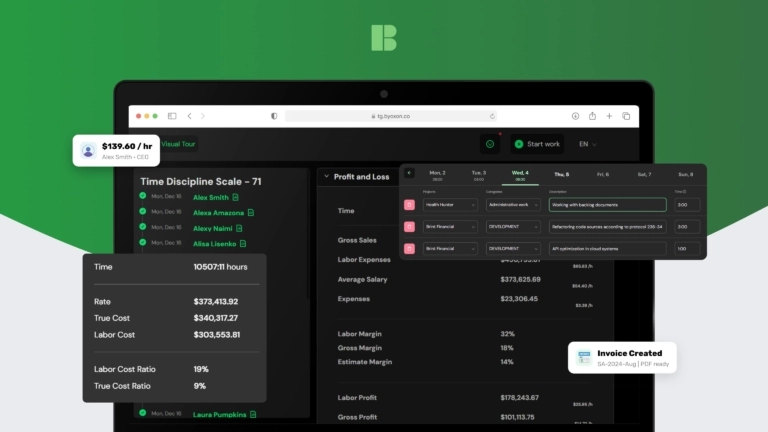
- Timesheets with custom categories and billing rates
- Automated invoicing and custom invoice templates
- Profit & Loss reporting
- Resource forecasting
- Built-in CRM modules
- Custom web contact forms
- Combines time tracking, billing, CRM, and profitability reporting
- Useful for distributed, multi-project and rate teams
- Clear margins and utilization visibility without heavy manual reporting
- Setting up rates, templates, and fields can take time
- Task management may require external tools
- Limited number of integrations
BoB (BeOnBoard) is an all-in-one business management platform designed for service teams that need time tracking and billing to connect directly to profitability and delivery planning.
It supports daily time logs and structured timesheets with flexible time categories and rates for employees and subcontractors. From those records, teams can generate invoices and financial documents using custom templates, helping standardize billing across projects and locations.
BoB also includes operational reporting features such as Profit & Loss dashboards and resource forecasting. This allows managers to track resource utilization, monitor margins by project or person, and identify revenue risk when capacity gaps appear.
In addition, the platform provides built-in CRM functions for managing companies, contacts, deals, and pipeline stages. Website contact forms can be embedded to capture inbound inquiries and automatically create CRM records, giving teams a simple workflow from lead intake to billing and reporting in one system.
For teams trying to reduce tool sprawl, BoB brings financial and operational data into the same place as time tracking. Instead of exporting hours to spreadsheets for margin checks or staffing reviews, teams can see utilization, costs, and project profitability directly in the workspace where time and billing are managed.

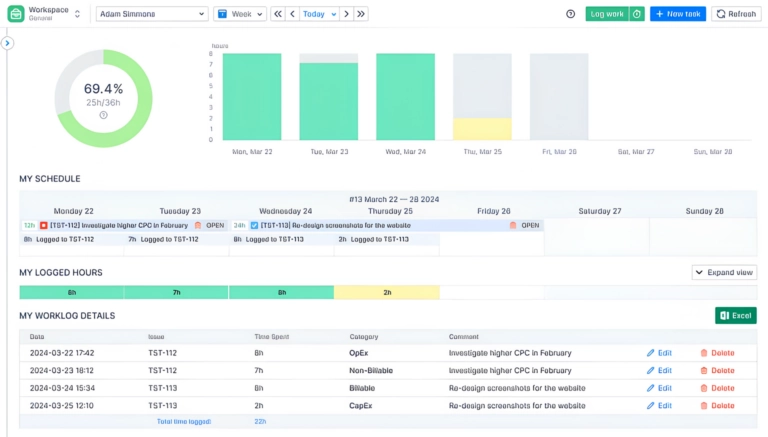
- Jira issue time tracking
- Progress timesheets
- Planned vs Actual timesheets
- Workload visualization
- Holiday schemes
- Work time analytics in Jira dashboards
- Strong planning and resource management
- Rich feature set with good Jira integration
- Responsive customer support
- Configuration can feel complex initially
- Interface has a slight learning curve
ActivityTimeline is a powerful Jira app that helps hybrid teams plan capacity and track work hours by visualizing workloads, availability, and future demand in a clear timeline view.
It shows real-time availability of individuals and teams, accounting for flexible working hours, remote and office work, region-specific holidays, time off, and partial availability.
By embedding capacity planning directly into Jira dashboards, it eliminates the need for spreadsheets and manual coordination.
In addition to planning, ActivityTimeline includes time tracking, timesheets, and reporting, making it easy to align planned capacity with actual work performed. Its drag-and-drop interface allows for quick adjustments, even for teams new to formal resource planning.

- Comprehensive supply chain management
- Scalable, industry-specific modules for ERP
- Workforce management
- Payroll and analytics
- AI-powered automations
- Self-service portal for information updates and PTO tracking
- Organizes data for easy access
- The app can glitch while logging in
- Lacks ways to share information
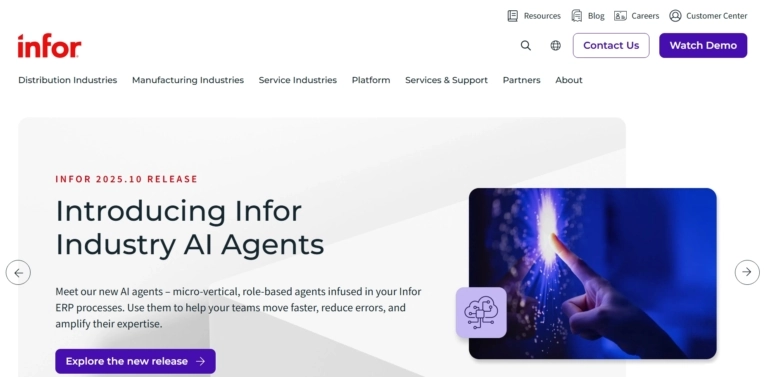
Infor CloudSuite is an all-in-one platform that provides a suite of cloud-based solutions for enterprise resource planning (ERP), supply chain management (SCM), human capital management (HCM), financial management, and sustainability and environmental, social, and governmental (ESG) initiatives.
Each module has its own set of features for its specific niche, allowing companies to choose the solutions that best fit their needs.
The software is cloud-based, which allows for easy scalability and accessibility for businesses of all sizes.
All modules include AI-based features to optimize workflows, predict demand, and improve resource allocation across enterprises, while certain industry-specific features provide tailored functionality for sectors such as manufacturing, healthcare, retail, and distribution.
The platform’s analytics and reporting tools also offer useful performance insights to support informed decisions, while organized data makes key information easy to find and access.
In addition to industry-specific modules, Infor CloudSuite includes tools for workforce management, payroll, and supply chain operations. The software’s self-service portal makes it easy for employees to update their information and track PTO, which is great for reducing administrative overhead.
However, file-sharing between users is limited, likely because the software prioritizes planning and workflow oversight over in-app content management. Also, users report an occasional bug or two when signing in on Infor’s mobile app.


- Automatic time categorization by project, client and task
- AI-powered automatic time tracking
- Integrations with accounting and invoicing tools
- Project profitability tracking
- Daily focus score
- Team utilization reports
- Helps identify peak productivity hours
- Task categorization by project or client
- Clean and intuitive interface
- Reports cannot be split into organized sections for export
- AI-generated descriptions are not always accurate
Rize is a desktop-based, AI-powered automatic time tracking software suitable for users and agencies that need to accurately record billable hours.
Instead of a manual timer, Rize automatically records time spent across applications, websites, and documents in the background of your work session. Then the software’s AI tags these auto-generated time entries with clients, projects, and tasks based on the patterns of your work habits.
It can also detect context switching between different apps and label your activity accordingly.
Tracked time can be categorized as deep focus sessions, meetings, and shallow work, which is used to give you a daily focus score, helping you understand how well your work hours are spent.
For project profitability tracking, Rize can connect tracked hours with project costs and contract values to provide you a real-time view of project losses and profits.
You can also mark entries as billable or non-billable on the platform, apply billing rates to employees, clients, or projects, and export detailed client and project reports to accounting and invoicing tools such as FreshBooks, QuickBooks, and Xero.
By comparing billable and non-billable hours across the team, Rize can help managers identify underutilized employees, monitor workload distribution, and make informed staffing decisions.
While Rize brings together automatic time tracking, project profitability, utilization, and client billing in one platform, users note that its reports could be split into organized sections instead of a single, combined export. Moreover, some users add that its AI-generated time descriptions don’t always work reliably.

- Date-centric planning for daily and weekly task management
- Real-time collaboration features
- 10 built-in AI automations
- Comments, file uploads, and time tracking
- Weekly, monthly, and quarterly reports
- Date-based task planning
- Weekly task review with AI
- Intuitive to use
- Cost-effective
- No free plan
- Does not have a dedicated mobile app
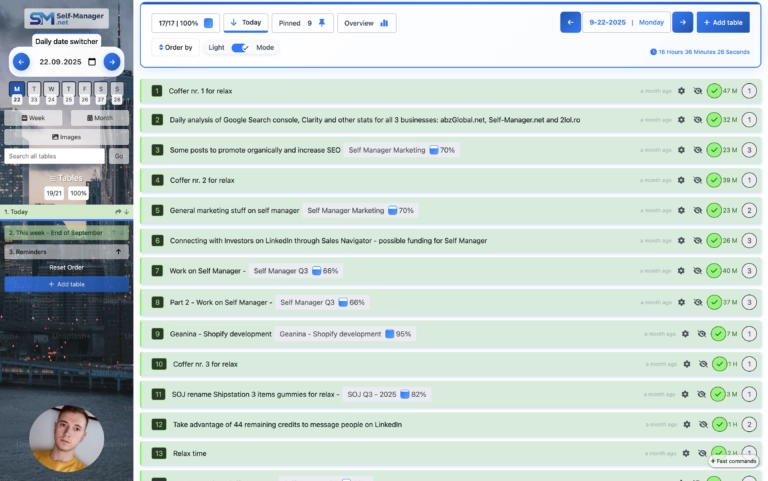
SelfManager.ai is an AI-powered productivity and project management tool for individuals and teams that want a simpler, faster way to plan work by date.
Rather than forcing users into a heavy traditional project management structure, it gives them a more flexible workspace where daily planning, execution, and review feel closely connected.
The platform combines task management, notes, comments, time tracking, images, and AI-generated weekly, monthly, and quarterly reviews in one place. Because everything is organized around actual working dates, users can plan what matters on a day, keep context visible, and look back at progress in a more natural way than in many standard list-based tools.
This date-centric structure is one of the main reasons the software feels practical for both personal productivity and collaborative team use.
What also helps SelfManager.ai stand out is its real-time collaboration and its 10 built-in AI features, which go beyond basic automation.
Instead of treating AI as a separate add-on, the platform brings it directly into the workflow so it can help with planning, reflection, and decision-making where it is actually useful. Users can generate tasks from text, summarize work, chat with AI about their real data, and review progress more intelligently over time.
However, SelfManager.ai does not have a free plan. Also, you can use it through a browser on your mobile device, but it does not offer a dedicated mobile app for a seamless experience.

- Email response time tracking
- Daily email volume metrics
- Automated daily and weekly reports
- Sentiment analysis of emails
- Real-time alerts for unanswered emails
- Simple and effective
- Visibility into email response times
- Clear and easy-to-access insights
- Email data may sync incorrectly
- Can be pricey for small businesses
EmailAnalytics is a lightweight email tracking and analytics tool that tracks and visualizes a team’s email activity, helping them measure and improve email response time.
Users can log in directly with their Gmail, Google Workspace, or Outlook accounts. The software then tracks email activity automatically in the background while users continue working.
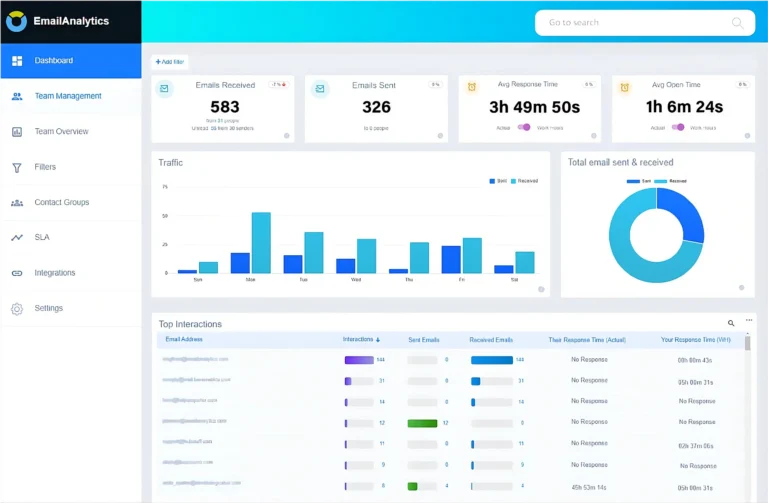
EmailAnalytics’ dashboard uses charts, tables, and graphs to highlight metrics such as emails sent and received, average email response times, and employee activity patterns based on email traffic.
It also shows who teams communicate with most often and how quickly conversations are handled, helping managers understand workload distribution and response behavior across the team.
Along with the dashboard, EmailAnalytics sends daily or weekly email summary reports to managers.
This level of visibility is useful for sales teams, support departments, or agencies that need actionable employee productivity data based on email activity.
Additionally, the software’s AI-powered sentiment analysis scores each email’s sentiment on a scale of one to ten. It can also send real-time SLA (Service Level Agreement) alerts to ensure important emails are not left unanswered.
That said, some users report that email activity data may not always sync accurately, leading to incorrect reporting. Also, EmailAnalytics pricing can be heavy for smaller businesses if they grow the number of inboxes they use.

- Branded client portal
- Real-time project and task visibility
- File and document sharing
- Client feedback and approvals
- Contracts and e-signatures
- Invoices and online payments
- Client requests and communication
- Custom portal access controls
- Branded client portal
- All-in-one client management
- Easy project and payment tracking
- Less back-and-forth communication
- No free plan
- No dedicated mobile app
- Initial setup may take time
OneSuite is a client portal and management platform built for agencies, freelancers, and service businesses to manage every stage of client work in one connected place.
Rather than relying on separate tools for leads, projects, contracts, communication, and billing, OneSuite brings the entire client journey together.
Teams can manage prospects, organize client information, plan projects, send documents for signature, create invoices, collect payments, all tied to the client record.
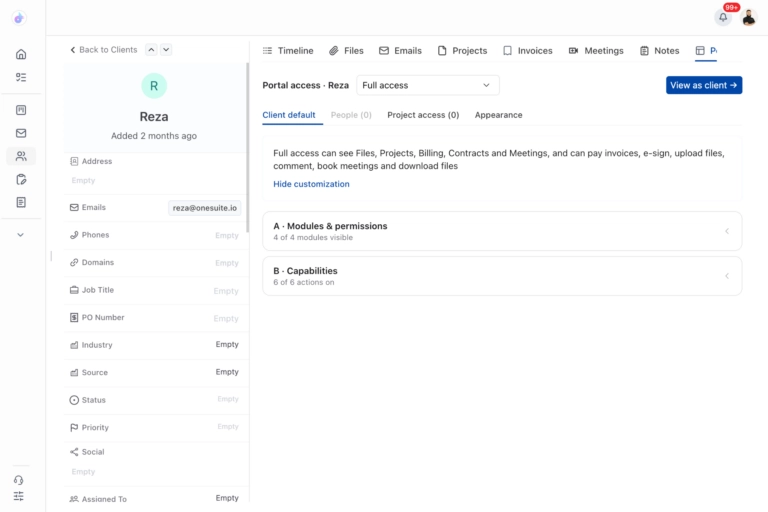
The client portal is one of the platform’s most useful features. It gives every client a dedicated space where they can follow project progress, access files and documents, review invoices, make payments, submit requests, and communicate with the team, cutting out the scattered email threads and repeat follow-ups.
What also helps OneSuite stand out is how closely the portal connects with its wider client management system.
Teams can manage everything from onboarding and project delivery to billing and offboarding without losing context or moving between disconnected platforms.
Businesses can also customize the portal with their own branding, creating a more professional and consistent experience. Clients always know where to find information, what requires their attention, and what happens next.
However, OneSuite does not offer a permanent free plan. It also does not currently have a dedicated mobile app, so users who want to manage work from their phones need to access the platform through a mobile browser.

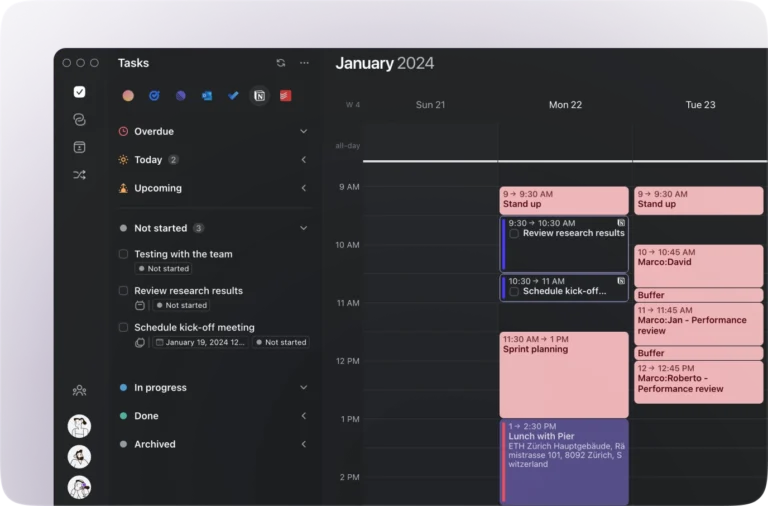
- Combine multiple calendars into one view
- Adjustable daily task and schedule planner with AI
- Calendar automations for travel time and meeting buffers
- Scheduling links and booking pages built on real-time availability
- Sync tasks with Notion, Todoist, ClickUp, and Linear
- Time blocking with drag-and-drop scheduling
- Work and personal calendars in one place
- AI only suggests changes, which require approval
- Runs on Windows, macOS, Linux, web, and mobile
- No free plan
- Not ideal for building a system from scratch
Morgen is an AI-assisted daily planner that pulls your calendars and tasks into one app, then uses AI to turn your to-do list into an actual plan for the day.
Most AI schedulers have an autopilot problem: you wake up, and the tool has moved your deep work block to 4 pm on a Friday.
But with Morgen, you can use a drag-and-drop scheduler to edit your tasks or reject them outright. Morgen then replans your schedule around your approved edits, which sync automatically with your calendars. Edits made by the AI planner to your schedule are suggestions and only land on your calendar once you’ve approved them.
The platform can also combine multiple calendar tools like Google, Outlook, Apple iCloud, and Fastmail into one view, which helps you get a bird’s-eye view of work and personal schedules to prevent overbooking.
There’s also a small detail I liked: it pads time estimates by default, since most of us are terrible at guessing how long tasks take.
Task sync is two-way, so checking something off in Morgen also checks it off in Notion or Todoist.
However, Morgen is an ideal scheduling assistant for users who already have work systems in place instead of needing to build a productivity schedule from scratch. Also, the software does not offer a free plan.

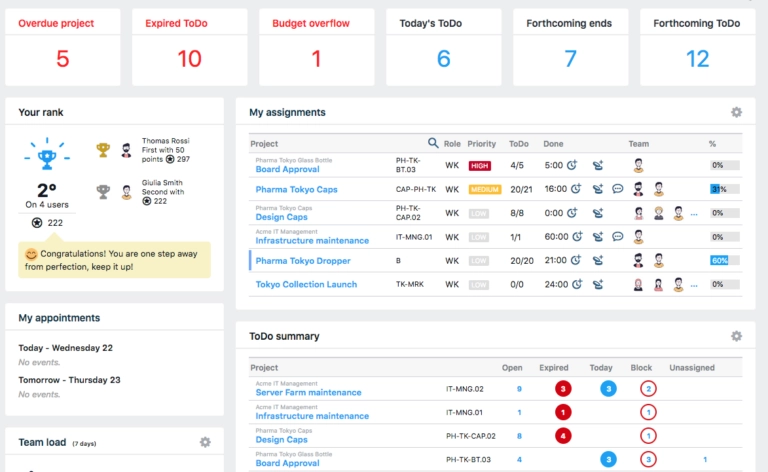
- Gantt chart planning and scheduling
- Time tracking and timesheets
- Task and subtask management
- Resource and workload management
- Budget tracking and reporting
- Highly flexible and customizable
- Strong Gantt chart functionality
- Suitable for complex, multi-level projects
- The interface can feel dated compared to newer tools
- Steeper learning curve for new users
Twproject is a full-featured project management platform designed for teams that need detailed planning and control over complex projects.
Built around a robust Gantt chart engine, it allows managers to structure work into tasks and subtasks, assign resources, and track progress in real time.
The platform includes integrated time tracking and timesheets, making it easy to monitor hours spent on individual tasks and generate reports for billing or performance analysis.
Budget management features allow teams to keep financial oversight directly within the project workspace, reducing the need for external spreadsheet tools.
Twproject is particularly well-suited for organizations running multiple simultaneous projects that require clear visibility into workloads and deadlines. Its flexibility makes it adaptable across industries, from software development to construction and professional services.
However, while some users note that the software’s interface is functional, others report that it does not feel as modern as some newer competitors. Moreover, the platform’s depth of features can require teams new to structured project management to spend time learning.

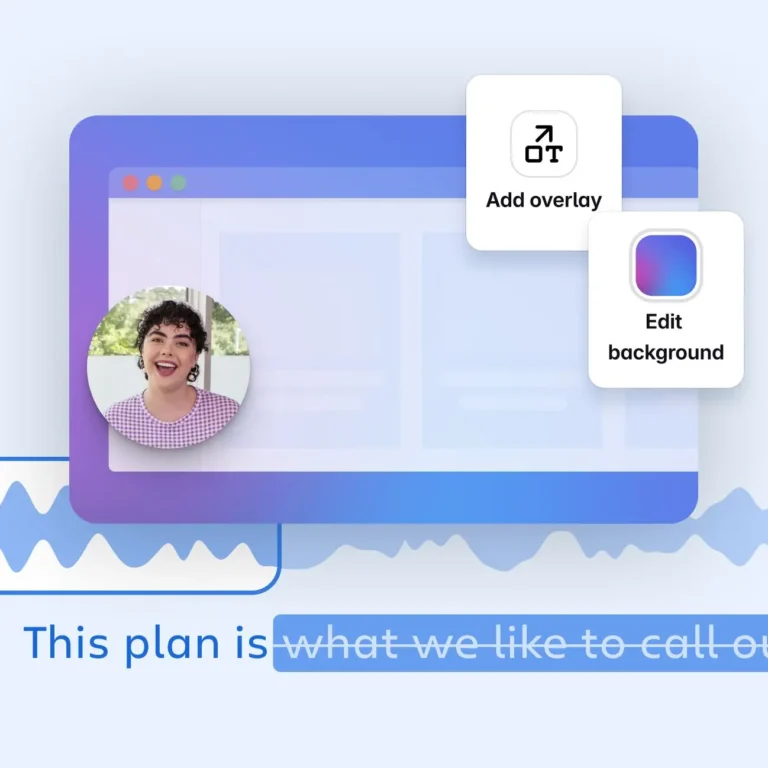
- Screen and camera recording
- Video editing
- Closed captions and transcriptions
- Auto meeting notes
- Customizable privacy options
- Easy to use
- Saves data without any time limit
- Integrations with other workflow software
- Desktop version lacks features present in the Chrome extension
- Limited customizations for videos
Loom is a video messaging and screen recording platform designed to help teams communicate and collaborate more effectively.
It allows users to record their screen and camera, create AI-enhanced videos, and share them instantly across devices. It also offers collaboration tools such as automated meeting notes, comments, emojis, and viewer insights.
Alongside video recording, Loom can be used for trimming and stitching videos, adding custom backgrounds, embedding videos in tools like Google Workspace, Slack, Figma, and Jira, and creating transcriptions and closed captions.
Loom also supports enterprise-grade security with SSO, SCIM, and customizable privacy controls.
It’s a good team communication platform suitable for sales, engineering, customer support, design, and general team communication, where fast information sharing is crucial for team operations.
However, I found the desktop version of the app to be missing certain features as compared to the Chrome extension. The platform also offers limited options for video customizations.