
The best time tracking software are the ones that teams can use every day without thinking about it or pushing back. Because, at the end of the day, a time tracking tool is only effective if people actually use it. However, most look great on a landing page, then quietly fall out of daily use a few weeks later.
So, to see what really sticks, I looked at real conversations on Reddit.
Not reviews written for clicks, but ongoing threads and discussions where people casually mention what they use, complain about what they quit, and recommend what’s survived months or years of real use.
Here are the 4 best time tracking software Redditors are actually using and recommending:
Best Time Tracking Software According to Reddit |
|||
| Software | Best For | How Reddit Describes It | Why Reddit Recommends It |
| Jibble | Teams of all sizes, including larger teams and organizations | “We forgot we’re even time tracking.” |
|
| Toggl Track | Freelancers & solo workers | “Tracks time without breathing down my neck.” |
|
| Clockify | Growing teams and startups | “Does the job, doesn’t get in the way.” |
|
| Homebase | Small businesses that need scheduling | “It’s not super expensive and works well.” |
|
TL;DR: Jibble is the Best Time Tracking Software on Reddit
|
Jibble – The Most Recommended Time Tracking Software on Reddit

Best For: Teams of all sizes, including larger teams and organizations
If you read enough time-tracking threads on Reddit, Jibble shows up as one of the most recommended time tracking software. It pops up again and again in r/Productivity, r/TimeTrackingSoftware, r/remotework, and even niche threads about clinics, factories, and consulting teams.
And, it’s often mentioned casually. Not as a pitch, but more like “we tried a bunch of time trackers, landed on Jibble, no regrets.”
Also, a recurring pattern across these threads is that Jibble is rarely the first software people try. Many Redditors say they tested Toggl, Clockify, or Homebase first. Jibble shows up later as the one that finally stuck.
What Redditors Actually Like About Jibble
What makes Jibble stand out as the best time tracking software on Reddit threads like r/Productivity Apps, r/TimeTrackingSoftware, and r/remotework is not its fancy features; it was how easy it is to use day to day.
Clock-in/out is basically one click, the UI is clean, and Redditors share their teams picked it up immediately without experiencing a learning curve.
Here’s why Jibble keeps getting recommended across Reddit threads:
1. It doesn’t create friction.
One of the most repeated points is how easy it is to clock in and out with Jibble. Several Reddit comments mention tracking time on Jibble with “one click,” with “no complaints from the team,” and “people actually using it every day.”
In several threads, managers talk about not having to chase people for timesheets anymore after starting time tracking with Jibble, which is a real win.
u/dawsonKKO –
“Jibble hit the sweet spot between simplicity and functionality, just wanted something our team would actually use every day without complaints.” (Source: r/ProductivityApps)
2. It works well for real-world setups, not just desks.
Jibble gets a lot of praise in threads involving:
- Clinics with kiosks
- Factories using tablets
- Renovation crews and cleaners
- Consulting teams switching between on-site and remote work
The software’s GPS and geofencing features are repeatedly described as “helpful,” “accurate,” or “hard to abuse,” especially for preventing buddy punching or accidental clock-ins from the wrong location.
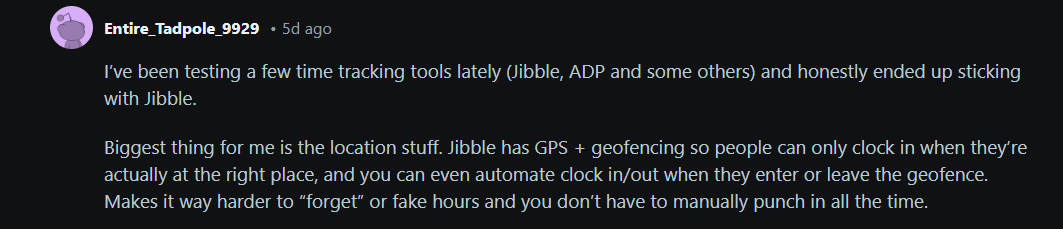
Photo from Reddit (r/TimeTrackingSoftware)
3. Its Slack integration is a game-changer.
In threads with tech teams or remote companies, Jibble’s Slack integration is often called out as a “killer feature.” People like that they don’t have to open another app just to track time, which helps adoption.
u/Choice_Win4093 –
“The Slack integration has been the strongest part for us. Slack is our main communication hub, and being able to clock in and out with simple commands keeps everything smooth for the team. No confusion, no messy workflows — it just works the way it should.” (Source: r/TimeTrackingSoftware)
4. Free forever isn’t a tease.
Redditors are usually skeptical of “free” software, but Jibble being free forever for unlimited users comes up constantly as a legit reason people choose it. Multiple comments point out that the core features people rely on daily stay free even as the team grows, unlike some competitors like Clockify and Toggl, where team growth quickly triggers a paywall.
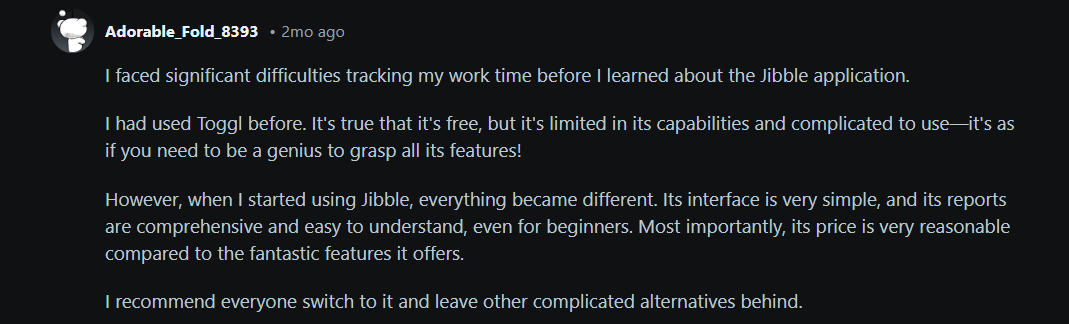
Photo from Reddit (r/TimeTrackingSoftware)
Watch Out:
|
Toggl Track – For People Who Hate Being Micromanaged
Best For: Freelancers and solo workers
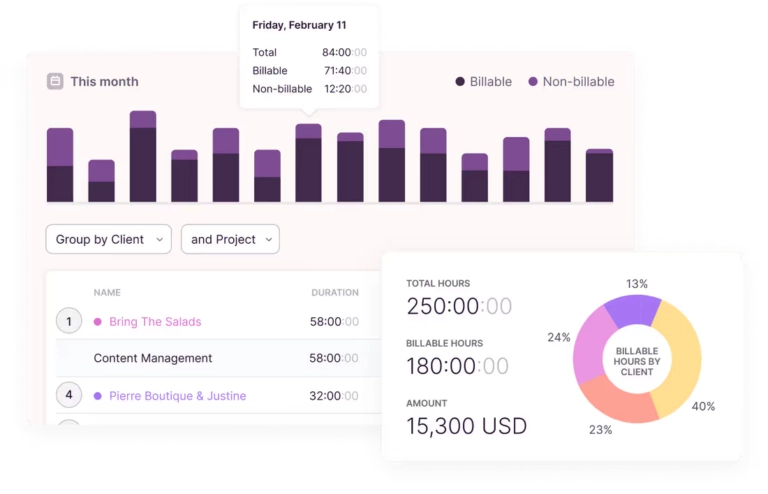
Photo from Toggl Track
In Reddit threads where people ask for a “lightweight” or “non-invasive” time tracker, Toggl Track comes up constantly. It’s usually recommended by freelancers or solo operators who just want to track hours without feeling watched.
Across multiple threads, Redditors mention the clean UI and fast start/stop timers as the main reason they’ve stuck with it. It’s easy to tag time by client or project, which makes it a go-to suggestion whenever someone asks about invoicing or billable hours.

Photo from Reddit (r/apps)
Integrations with tools like Asana, Trello, Jira, and Slack are often name-dropped, but not in a flashy way, more like “it just fits into whatever you’re already using.”
Toggl also gets points in Reddit discussions for not doing too much. People explicitly say they like that it doesn’t track screenshots or activity levels, and that it feels respectful rather than controlling.
Watch Out:
|
Clockify – The Tool That Doesn’t Overpromise
Best For: Growing teams and start-ups
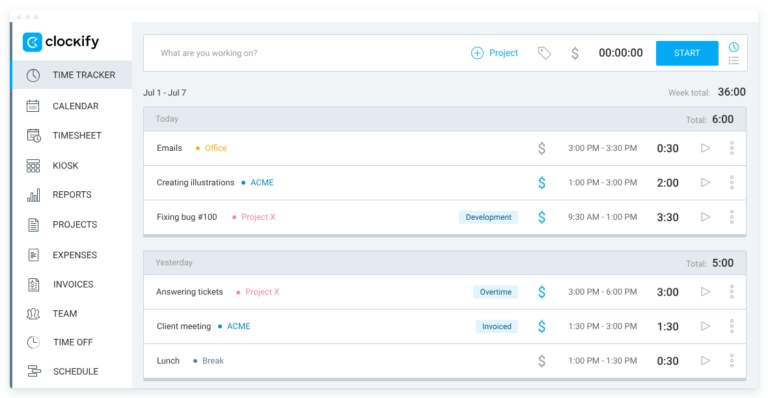
Photo from Clockify
Clockify shows up in Reddit threads as the dependable fallback. Whenever someone asks for a time tracker for a small team or startup, Clockify is almost always mentioned within the first few replies.
Redditors consistently talk about its project and task organization, especially for teams juggling multiple clients. The vibe in most threads is that Clockify does what it says on the tin, nothing flashy, but reliable. Several users point out that the desktop and web apps are stable, even if the mobile app gets occasional complaints about speed or syncing.

Photo from Reddit (r/webdev)
Another recurring theme is that Clockify doesn’t feel intrusive. In threads comparing tools, it’s often positioned as the opposite of “monitoring software,” which earns it points with teams that just want basic tracking.
Watch Out:
|
Homebase – When Employee Scheduling Is the Priority
Best For: Small businesses, retail stores, cafés, restaurants
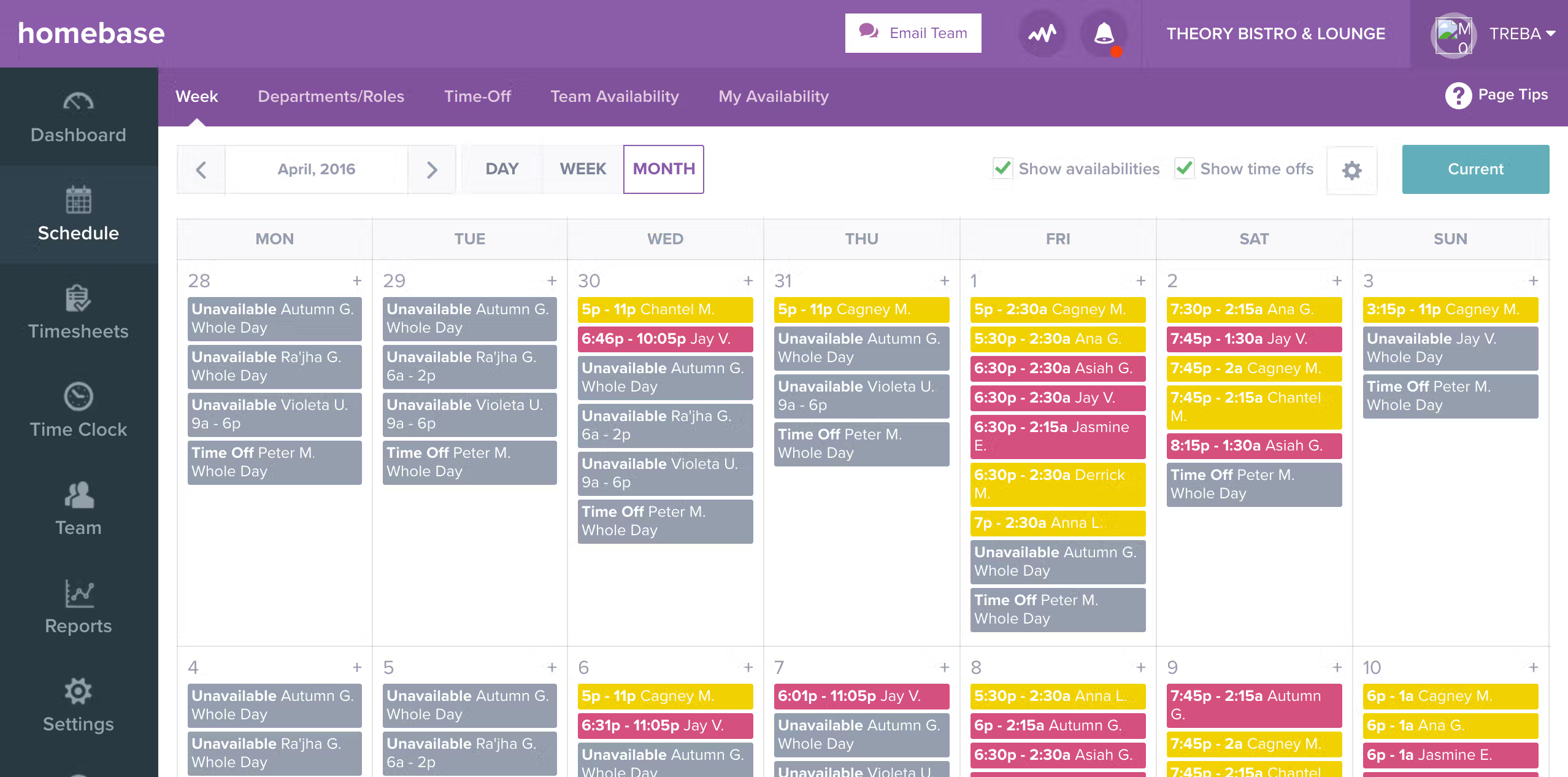
Photo from Homebase
Homebase comes up repeatedly in Reddit discussions among restaurant owners and other small business operators looking for an easy way to manage employee scheduling.
Beyond scheduling, Redditors often mention using Homebase for time tracking, workplace messaging, payroll and GPS-restricted clock-ins, making it easier to handle day-to-day operations from one platform.
Staff convenience is another recurring theme. Users mention that employees can set their availability, swap shifts, and clock in from the app instead of relying on manual coordination.

Photo from Reddit (r/entrepreneurs)
Homebase also earns praise for its pricing. Redditors describe it as reasonably priced for small teams, especially given the features included in the free and entry-level plans.
Watch Out:
|
Honorable Mentions: Other Time Tracking Software Redditors Talk About
Not every time tracking tool is going to be a perfect fit for every workflow, but Reddit threads are full of folks sharing alternatives that you can explore.
These software may not have the widespread adoption or all-in-one features of something like Jibble, but they’re worth a look if you want gamification or visual insights into your day.
| Software | Best For | Why Reddit Recommends It |
| TimeTagger | Simple, straightforward tracking |
|
| ActivityWatch | Passive tracking & personal insights |
|
| Orakemu | Gamified productivity for enthusiasts |
|
| Work Tracker (Timeløgn) | Visual time insights, personal projects |
|
So, What is the Best Time Tracking Software on Reddit?
There’s no shortage of time-tracking software out there. If you search long enough on Reddit, you’ll find many tools that promise better productivity, clearer billing, happier teams, and fewer late nights.
However, Jibble stands out as the best time tracking software in the Reddit community because it’s easy to use, reliable, and fits naturally into day-to-day workflows.
Other honorable mentions like Toggl Track, Clockify, and more niche options like TimeTagger or ActivityWatch, can be useful depending on your team’s needs or personal workflow.
The key lesson is simple. Choose a software your team will actually use. Even a “good enough” tool that gets used consistently will deliver better results than a “perfect” software that sits idle.
Stick with something that works, make it part of your routine, and you’ll see the benefits in productivity, accountability, and clarity without adding more problems to your day.
Want to see more real-world discussions about productivity and time tracking? Join Jibble’s Reddit community and jump into the conversation!
FAQs
Some frequently asked questions...
Reddit is an online discussion platform where people can have real conversations in topic-based communities called subreddits.
On Reddit, people can ask questions, share experiences, vent out and recommend products and services they actually use.
The most helpful posts and responses get upvoted, making insightful comments rise to the top.
Reddit rankings matter because they’re driven by real users, not marketing.
When a tool consistently shows up in Reddit threads, gets upvoted, and is recommended across different subreddits, it usually means people are actually using it and finding value in it.
Based on repeated mentions and recommendations across Reddit threads, Jibble is most often cited as the best time tracking software. Redditors consistently highlight its ease of use, low-friction daily time tracking, and free forever access for unlimited users.
Redditors often point out that many time tracking software fail because they create friction. Even highly rated software can fall out of use if it’s too complex, too invasive, or requires constant manual effort. For users on Reddit, ease of adoption matters more than feature depth.