
The Best Free Time Doctor Alternative
Time Doctor focuses on productivity tracking. Jibble goes further with attendance verification, GPS and geofencing, facial recognition, scheduling, and unlimited users — free.
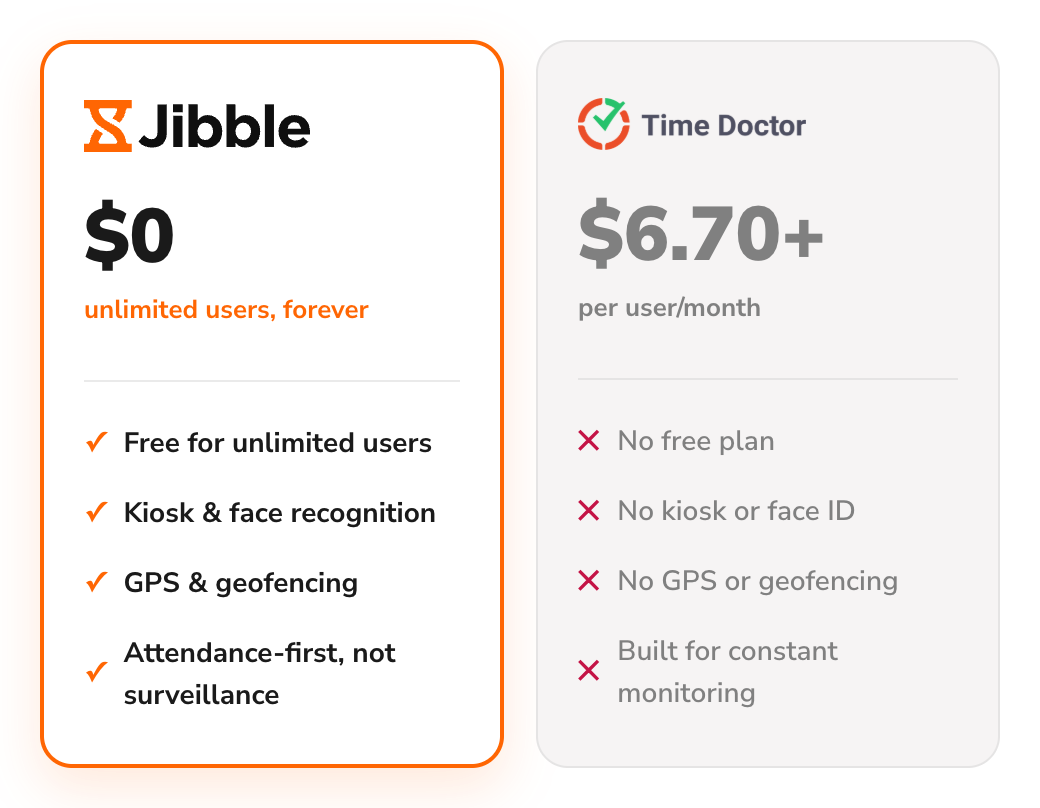






What are the main differences between Jibble and Time Doctor?
Compare the features side by side and see what you get with Jibble, for free.
| Feature | Jibble | Time Doctor |
|---|---|---|
| Free forever | Unlimited users | No free plan |
| Time tracking (web, desktop, mobile) | ||
| Automated timesheets | ||
| Time clock kiosk | ||
| Facial recognition | ||
| GPS tracking & geofencing | ||
| Work schedules | Paid feature | |
| Leave & time off management | Paid feature | |
| Screenshot monitoring | ||
| Integrations | Paid feature | |
| Capterra rating | 4.8 / 5 | 4.5 / 5 |
| Real cost for a full setup | $0, always | $6.70–$16.67/user/mo + add-ons |
Looking for more than time tracking?
Time tracking is just the start — scheduling, leave, invoicing, and reporting are all built into Jibble, with no user cap as your team grows.
Explore more of Jibble's featuresWhy choose Jibble as a Time Doctor alternative?
More than time tracking, with none of the surveillance baggage.
No trial clock, free forever
Time Doctor gives you 14 days to try it, then starts at $6.70 per user/month on annual billing. Jibble gives you free, unlimited time tracking forever, with core features available from day one — no trial clock and no per-user bill.
See our full Time Doctor review →
Verifies where you clocked in, not just what you did
Time Doctor puts a strong emphasis on screenshots and employee activity, while Jibble goes further with shared time clock kiosks, facial recognition, GPS tracking, and geofencing. This gives teams a more complete way to verify attendance without heavily relying on surveillance.
Face recognition attendance system → More included, without separate add-on charges
On Time Doctor, Benchmarks AI, Unusual Activity, and video recording each cost $3/user/month extra. Add just two to Standard and you’re at $17.70/user/month — more than Premium at $16.70, for less. With Jibble, you get a broad range of time and attendance features completely free, no add-on charges.
Explore Jibble's features → One platform for every kind of team
Time Doctor is built around desk-based work, tracking activity through devices. Jibble covers office, remote, and field teams alike, with mobile clock-ins, GPS tracking, geofencing, and shared kiosks for the people who never sit at a screen.
Mobile time tracking → More than a time clock
Jibble gives you more than time tracking. Scheduling, leave, overtime, project tracking, and invoicing are built into the platform, so you can manage the day-to-day workforce from one place instead of piecing together separate tools.
Time and attendance software → Is Jibble the right Time Doctor alternative for you?
Still weighing options? See how Jibble ranks against every time tracker.
- You don't want a 14-day trial to end in a forced upgrade
- You'd rather not stack $3 add-ons just to match a higher plan
- You need to verify where a shift actually started, not just what happened on-screen
- You manage a mix of office, remote, and field staff, not just people at desks
Still weighing your options?
See how Jibble ranks against every other time tracker.
See the best time tracking software →Ready to leave Time Doctor behind?
Export your data
Download your time tracking data from Time Doctor.
Import into Jibble
Create your free Jibble account and import your data.
Invite your team
Add your team by email or a sharable link.
Start tracking
Jibble picks up where Time Doctor left off, free forever.
Hear it from the teams using Jibble
★★★★★
4.9 out of 5
★★★★★
5.0 out of 5
★★★★★
4.9 out of 5
★★★★★
4.8 out of 5
★★★★★
4.8 out of 5
★★★★★
4.7 out of 5
Fabulous app for tracking time for legal services
Fabulous app for tracking time for legal services... we don't end up missing out on income due to lack of detail in timesheets. It's simple to use, easy to learn, and quick and painless to implement in our office. Everyone got on board quickly! The management loves the detailed notes about time spent.
Jibble Rocks!
Jibble Rocks! So far, I've tried multiple platforms but I've stuck with Jibble as it is easy to use. Also, it sends me daily, weekly updates on the team's timesheet.
Great tool for remote employees
Great tool for remote employees. I love the automated reports that show who on my team is logged in, the reminders when you have been logged in for a certain number of hours each day, and the weekly team recap. After trying several others, Jibble turned out to be the ideal fit for our needs. My team is in Slack all day and it makes it very easy to clock in and out each day by going to the Jibble Channel in Slack. It's super convenient.
Simply no other competitor that is close
Easy and awesome customer support. Fantastic, and a big problem solver for my small team. This is the type of company that will be successful. We've used Jibble since we were on Slack and then moved to MS Teams. The ease of use makes it an amazing tool.. and there is simply no other competitor that is close!
Super efficient and easy to use time billing software
The easier way to log in hours for different clients and track improvement of workflows. Jibble allows you to create a team and create clients, which for our business, being able to log in hours for each specific client is crucial and a huge help for time billing, estimating workflow success and improving and optimizing workflow strategies. Being able to know how many hours we've spent in a certain project is essential for our improvement as a tech team. We use Slack a lot and I love that you can log in and out from slack directly, you don't even need to open Jibble. Super efficient and easy to use.
Frankly, no other software got even close
Wonderful time management software. This has been a lovely experience right from the start. Simple-to-understand set-up, lots of personal support on hand, a useful 'onboarding' session to explore features and help me with exports. We needed a system for tracking consultants' time in contracts broken down by tasks. Jibble is the solution and frankly, no other software that I looked at got even close in terms of ease of use and price.
Exceeded my expectations
Honestly, I wasn't super excited about my company having this type of software to keep track of time. Oh, how my opinion has changed. Jibble is one of the best time tracking software I have ever seen... it has exceeded my expectations.
Functional and practical
Jibble makes it very easy to track your time spent on different projects. There is also an app that can be used on your phone if you are on the move. It is extremely easy to add projects and activities.
Your questions about Time Doctor, answered
Everything people ask before switching from Time Doctor to Jibble.