

Most PTO tracking problems don’t start with company policies; they start with poor tracking.
A missed vacation request, an outdated spreadsheet, or an incorrect leave balance can create unnecessary friction for employees and extra work for HR. It can also become increasingly difficult to manage as headcount grows.
That’s why more organizations are now adopting PTO tracking software. Paid Time Off (PTO) tracking software are tools that help organizations manage employee leave, including vacation, sick days, personal days, parental leave, and other time-off policies, through a centralized system.
The result is a smoother experience for employees and less administrative overhead for managers and HR teams.
To help you find the right solution, I’ve tested a range of options across different team sizes and use cases. The eight tools below are the ones worth your time, covering everything from lean Slack-native apps to full-featured platforms built for teams that need real policy control and payroll accuracy.
Best PTO Tracking Software Pricing Compared in 2026
|
||
|---|---|---|
| Software | Free Plan | Pricing |
| Jibble | ✅ FREE FOREVER for unlimited users |
$0.00 |
| actiPLANS | ✅ For up to 3 users only |
$1.50 per user per month* |
| Buddy Punch |
❌ | $4.99 per user per month* |
| TMetric |
✅ |
$5.83 per user per month* |
| Time Off Manager 365 | ✅ | $1.60 per user per month* |
| Calamari | ❌ | $20.00 per month |
| Flamingo | ❌ | ~$3.00 per user per month (minimum $30.00 spend required) |
| Vacation Tracker | ❌ | $ 2.00 per user per month (minimum $50.00 spend required) |
| *billed annually Note: The table shows entry-level rates and may not accurately reflect the overall value of the software. To gauge real value, consider each platform’s features, available monitoring capabilities, reporting tools, user limits, and any additional fees for advanced functionality. |
||
Jibble – Best PTO Tracking Software for Scalable Leave Management
Free Forever for an unlimited number of users
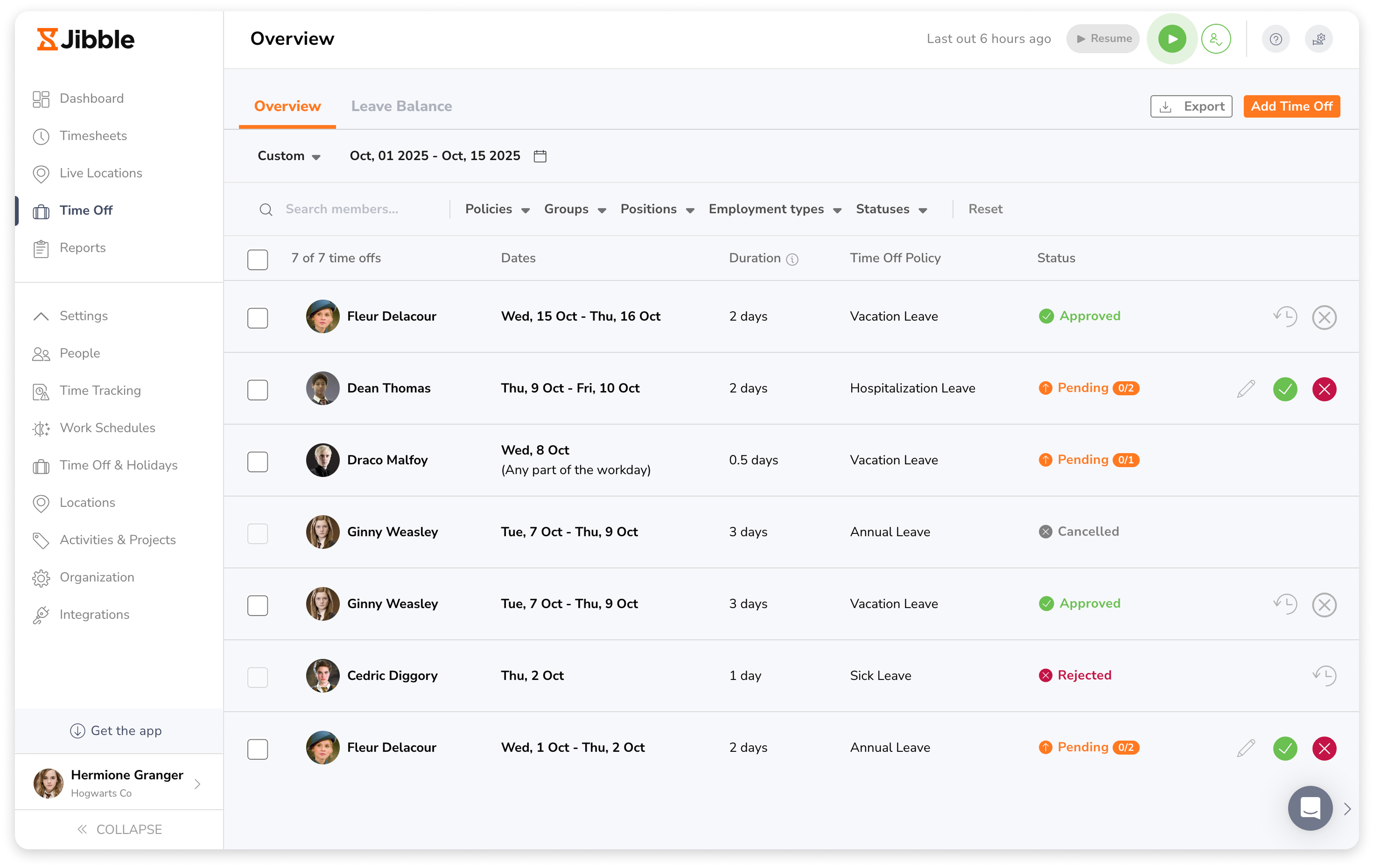
Jibble is the best PTO tracking software designed to simplify workforce time tracking and leave management.
It supports multi-level approval workflows, allowing organizations to set up structured, sequential approval chains for leave requests.
With customized accrual schedules, businesses can automate PTO earning based on hire date, monthly or annual cycles, along with flexible carry-over rules.
Employees can also attach supporting documents such as medical certificates directly to their leave requests.
Once a leave is approved, an employee’s leave data automatically syncs with their timesheets to accurately separate paid time off from regular work hours.
Jibble also offers flexible leave policies that can be configured in days or hours with tailored rules for different teams or departments.
Managers can generate exportable leave reports in XLS, providing clear insights into balances, history, and approvals. However, some users report that Jibble’s advanced reporting customizations can be limited.
Jibble also integrates with popular payroll systems like QuickBooks, Xero, Gusto, and Deel, ensuring seamless payroll processing without manual data entry.
Key Features:
- Real-time leave balances and team availability calendar
- Automated leave tracking with customizable leave types
- Multi-approval workflows for leave requests
- Leave analytics and reporting
- Multi-device compatibility including, mobile, desktop, and kiosk
- Face recognition attendance, GPS tracking and geofencing
Ratings:
- Capterra: 4.8/5
- G2: 4.8/5
- Play Store: 4.7/5
- App Store: 4.8/5
Pros:
- Easy attendance and timesheet management
- Quick and simple leave/holiday request system
- Clear and user-friendly interface
- Flexible across different devices
- Intuitive for teams to adopt quickly
- Accurate and organized work hour reports
- Free to use for unlimited users
Cons:
- Occasional issues with mobile app performance
- Reporting formats can be basic for complex analysis
“What I like most about Jibble is how easy it is to use for both employees and management. One of the best features is the holiday and leave management system. Employees can submit leave requests quickly, and managers can review and approve them without any complicated process. The interface is clear, user-friendly, and requires very little training to get started.” – Erica W.
(Source: G2)
Vacation Tracker – Best PTO Tracking Software for Remote Teams
Free Plan: No
Paid Plan: Starts at $2.00 per user per month, billed annually. $50.00 minimum spend required.
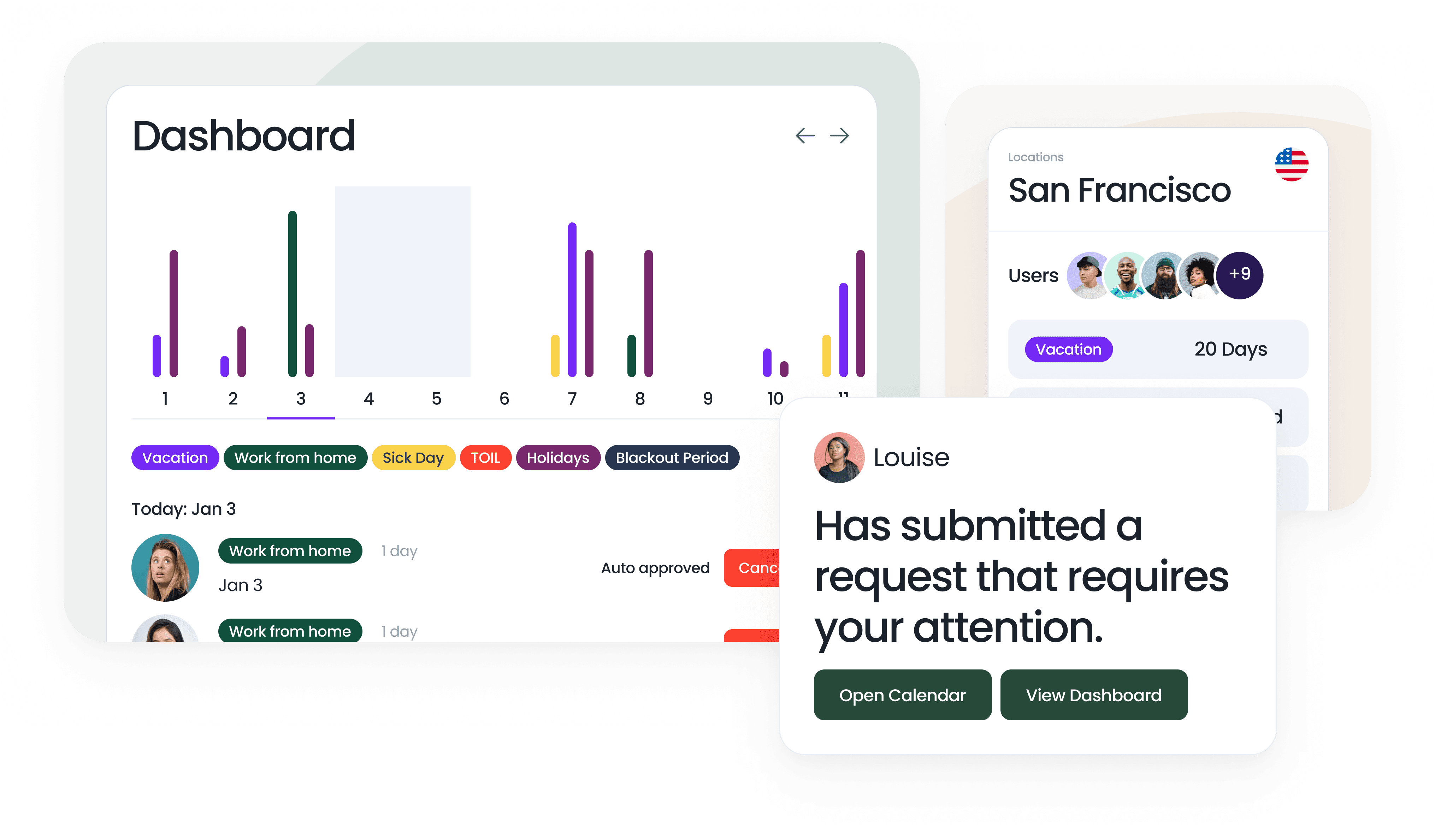
Photo from Vacation Tracker
Vacation Tracker is a leave management system built for today’s distributed and remote teams. Employees can request time off directly from Slack, Microsoft Teams, Google Workspace, or email, making it easy to stay connected regardless of where they are working.
The system supports unlimited locations and departments, holiday calendars across regions, and a multilingual interface, so global teams can manage leave without confusion.
Setup is quick, and policies are fully customizable with accruals, carryovers, TOIL, probation rules, and blackout periods to match the needs of any organization.
Managers and HR gain real-time visibility into who is away and when with shared calendars, wall charts, and daily or weekly notifications. Detailed reports help with payroll and planning, while automated approvals reduce manual work.
Employees always know their leave balances, managers avoid scheduling conflicts, and everyone stays aligned. Vacation Tracker makes leave management clear and simple, whether your team is in one office or spread across the world.
Key Features:
- Streamlined leave approval workflows
- Unlimited locations and departments
- Automatic accruals, carryovers, and TOIL tracking
- Calendar synchronization and integrations
- Customizable daily and weekly notifications
- Shared team calendars with real-time availability
Ratings:
- Capterra: 4.7/5
- G2: 4.4/5
- GetApp: 4.7/5
Pros:
- Simple and intuitive to use
- Outstanding customer support
- Flexible and highly customizable leave policies
- Mobile apps for on-the-go access
Cons:
- Doesn’t have deeper HR/payroll system integrations
- Doesn’t offer a free plan
“Vacation Tracker was easy to set up with customized leave policies, regional holiday imports and departmental approval structure. The Microsoft Teams integration is very useful for notifications. It’s also easy to add and remove users.” – Verified User
(Source: G2)
Buddy Punch – Best PTO Tracking Software for Small Businesses
Free Plan: No
Paid Plan: Starts at $4.99 per user per month + $19 base fee per month, billed annually
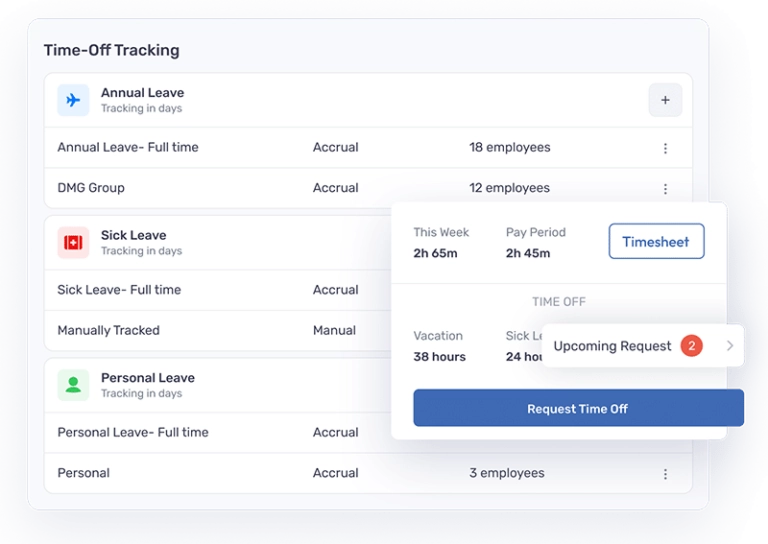
Photo from Buddy Punch
Buddy Punch is a PTO tracking software best suited for small businesses. It combines leave management, time tracking, and drag-and-drop scheduling with built-in payroll features.
Managers can easily set up different PTO types like vacation, sick leave, holidays, and personal time. They can also prevent employees from requesting leave on busy days to ensure adequate staffing, set maximum PTO accrual limits, and decide whether unused leave carries over or resets each year.
Buddy Punch supports hourly, weekly, and annual accruals and automatically calculates earned leave, making it a practical choice for small businesses without a dedicated HR team.
It also automatically deducts approved leave and keeps PTO balances up to date, while administrators can access detailed leave reports at any time.
While Buddy Punch is a strong choice for automating PTO management, user reviews suggest that editing submitted PTO requests is less flexible than some competitors.
Key Features:
- Custom leave types and policies
- Automatic PTO accrual calculations
- Shared team calendar
- Leave policy controls
- PTO balance tracking and reporting
Ratings:
- Capterra: 4.8/5
- G2: 4.8/5
- Play Store:4.4/5
- App Store:4.4/5
Pros:
- Easy to use
- Flexible accessiblity on both desktop and mobile
- Flexible and highly customizable leave policies
- Customizable features, including PTO tracking and overtime rules
Cons:
- No option for bereavement leave
- PTO requests cannot be edited after submission
- Entering PTO can be difficult to figure out initially
“Buddy Punch is user-friendly and extremely easy to use. I was a bit skeptical at first; however, it gives people with a strong work ethic a clear way to prove themselves.” – Joe D.
(Source: G2)
TMetric – Best PTO Tracking Software for Simple Leave Management
Free Plan: Yes
Paid Plan: Starts at $5.83 per user per month, billed annually
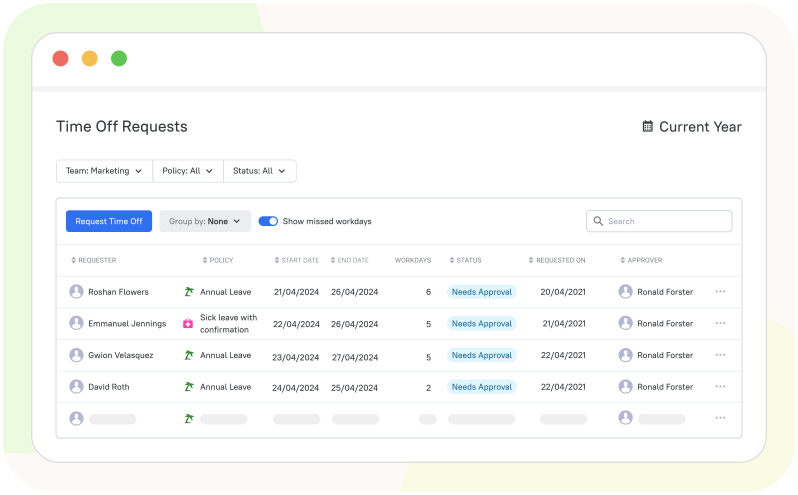
Photo from TMetric
TMetric is a PTO tracking software that simplifies leave management with customizable policies, approval workflows, and automatic balance tracking.
Employees can request leave in a few clicks, and managers receive instant notifications to approve or deny requests. Every request is logged with a full approval history for easy auditing.
The platform supports custom leave types like vacation, sick, and unpaid leave. Managers can also tailor policies around accruals, carryovers, team eligibility, and blackout days.
A shared team calendar displays upcoming and past time off, with filters for team, location, or leave type to help with planning. PTO balances update automatically after approvals, and detailed reports can be generated by employee, team, policy, or date range.
Overall, TMetric is a strong choice for straightforward PTO tracking, though user reviews suggest the mobile app and dashboard customization could be improved.
Key Features:
- Custom leave types and policies
- Configurable accruals, carryovers, and blackout days
- Leave request and approval workflows
- Shared team calendar
- Automatic balance updates and reporting
Ratings:
- Capterra: 4.5/5
- G2: 4.6/5
- Play Store: 3.7/5
- App Store: 3.5/5
Pros:
- Easy to use
- Fair pricing
- Detailed reports that are integral to workflows
Cons:
- Mobile app could be improved
- Limited dashboard customization options
“It’s easy to use, I don’t think about it much but it runs throughout the day and gives me visibility on what tasks eat my days most.” – Elías A.
(Source: G2)
Flamingo – Best PTO Tracking Software for Slack-Based PTO Tracking
Free Plan: No
Paid Plan: Starts at $3.00 per user per month, billed monthly. $30.00 minimum spend required.
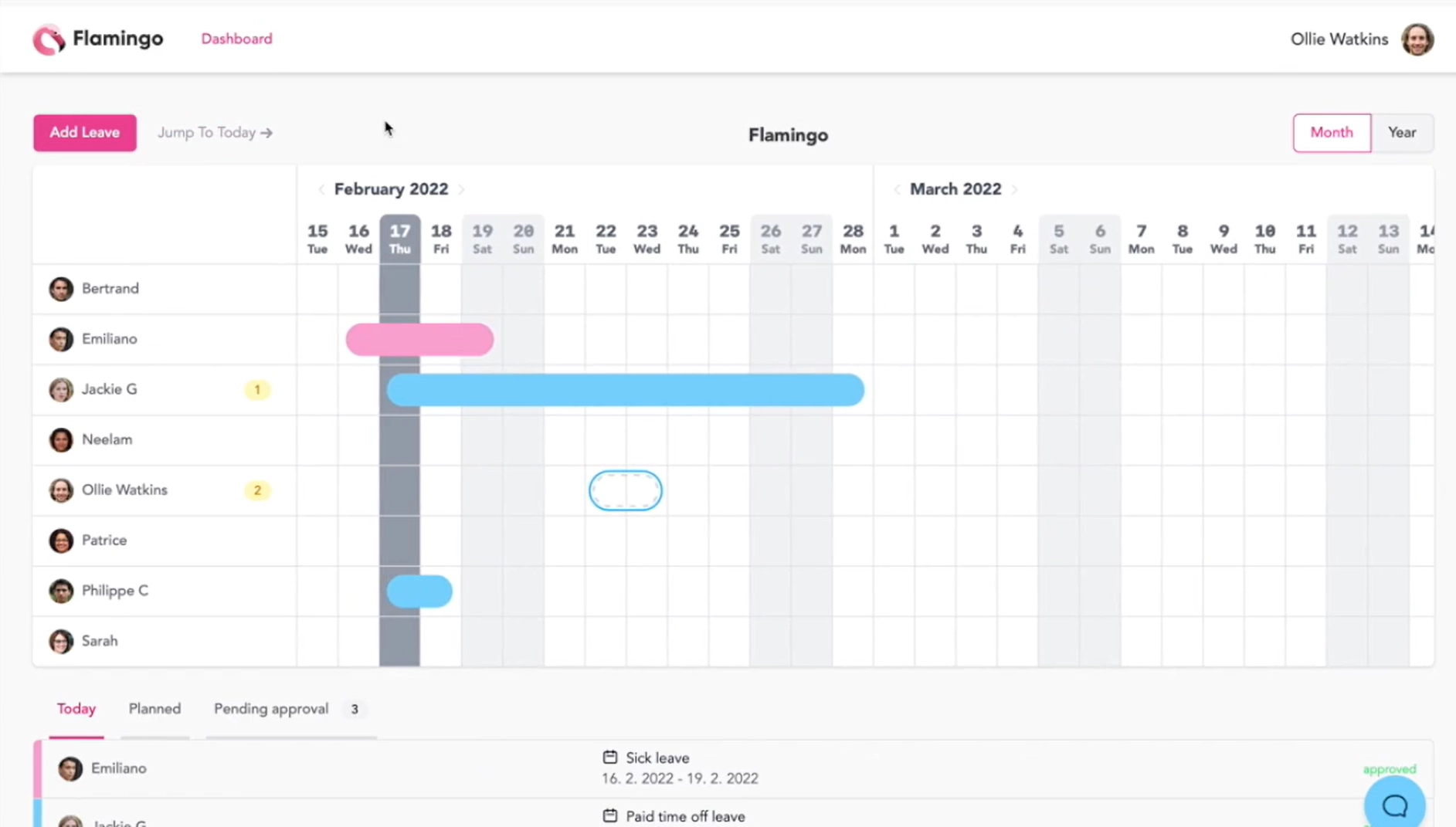
Photo from Flamingo
Flamingo is a Slack-first PTO tracking tool that employees can use to request leave directly within Slack or through Flamingo’s web app, where managers can also approve or reject leave requests easily.
Once approved, Flamingo automatically updates an employee’s Slack status to “on leave,” keeping teams informed in real time.
Flamingo also integrates with Google and Apple Calendar as well as Outlook to ensure employee leave and public holiday information is automatically updated.
With customizable leave policies and accruals, you can set leave types as per individual contract requirements and how employees earn time off on a weekly, biweekly, monthly, or quarterly basis.
In addition, detailed leave reports can be exported by month or year, making payroll processing and audits easier and more accurate.
However, Flamingo is best suited for teams that use Slack regularly. Teams that rely on another communication tool may find dedicated PTO tracking software more useful.
Key Features:
- Automated daily and weekly leave summaries
- Google Calendar, Outlook, and Apple Calendar integrations
- Automatic leave accruals
- Leave requests and approvals directly in Slack channels
- Customizable leave policies per employee
Ratings:
- Capterra: 5.0/5
- Software Advice: 5.0/5
Pros:
- Visually appealing interface
- Customizable leave policies
- Good support
- Reasonable pricing
Cons:
- Only works from Slack, not a dedicated PTO tracking tool
“Flamingo is visually beautiful and makes seeing who has what leave when a breeze. That means I don’t have to spend a lot of time trying to figure it out from a tool like a traditional online calendar where it would be unintelligible.” – Hor D.
(Source: Software Advice)
Calamari – Best PTO Tracking Software for Global Leave Management
Free Plan: No
Paid Plan: Starts at $20.00 per month
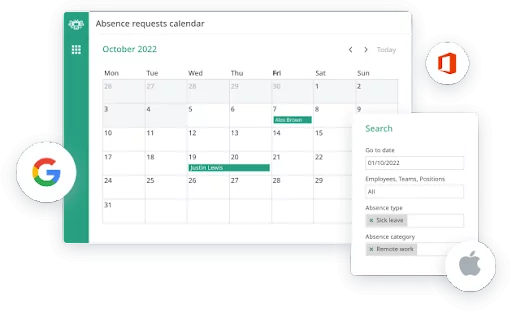
Photo from Calamari
Calamari is a comprehensive online PTO tracking system that simplifies paid time off (PTO) calculations with shared absence calendars to easily track employee vacations, days off, and remote work.
Calamari’s leave management software can effectively handle all types of absences, including PTO, sick leave, maternity leave, vacations, personal days, and more.
Seamless integration with various calendars, including Google Workspace Calendar, Office 365, iOS, Apple, and others, ensures accurate and real-time updates for time-off requests.
Calamari’s automations can handle different entitlement calculations based on your PTO policy, considering factors such as hire date and employee attributes.
Managing vacations for globally distributed teams is also easy with Calamari, as you can set up separate time-off policies and absence types for each location, which ensures centralized management of employee and time-off data within a single system.
Key Features:
- Shared absence calendar to track PTO
- Different leave types
- Integrations with various calendar software
- Automatic leave entitlement calculations
- Settings for global public holidays and leave types for compliance
Ratings:
- Capterra: 4.7/5
- G2: 4.6/5
- Play Store: 4.3/5
- Software Advice: 4.7/5
Pros:
- Helpful support staff during setup
- Works well for distributed teams across countries
- Allows employees to manage and apply for leave directly
- Flexible customizations for reporting
- Role and permission assignment in teams
Cons:
- Certain leave management functions require separate paid add-ons
- Setup can involve many rules and configurations
“We have gained terrific and attentive service from their team. The product does what it needs to do and they have it applied the personal service we need to have success with all the different variables for which we need to account.” – Felix Brandon L.
(Source: Capterra)
actiPLANS – Best PTO Tracking Software with Simple Team Scheduling
Free Plan: Yes, for up to 3 users only
Paid Plan: Starts at $1.50 per user per month, billed annually
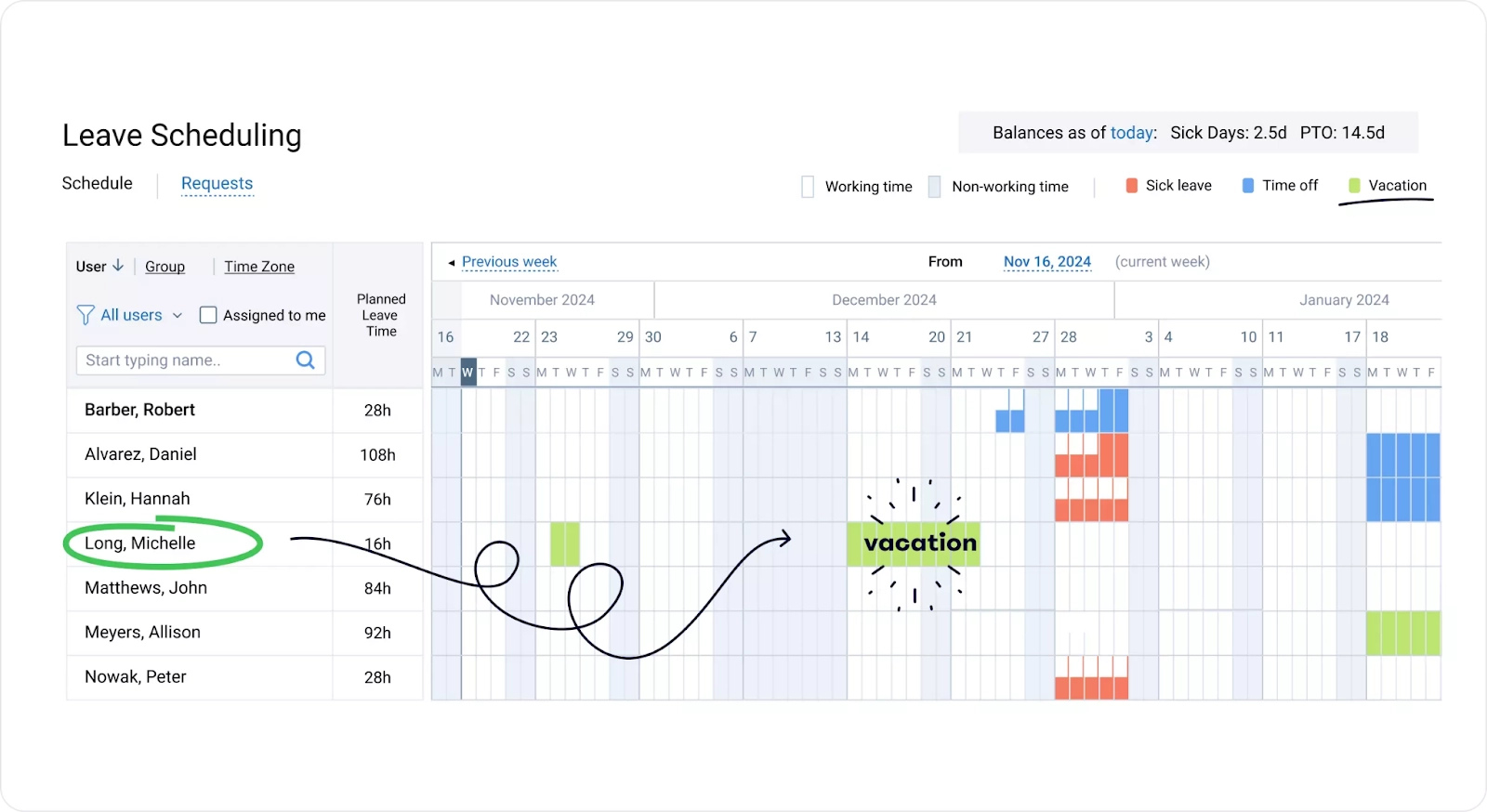
Photo from actiPLANS
actiPLANS is a streamlined leave management tool designed to make absence tracking and resource planning effortless for managers and teams.
Its shared team calendar gives a clear view of who’s in and out, helping avoid scheduling conflicts and ensuring smooth project execution.
With flexible leave types, customizable accrual rules, and automatic balance tracking, actiPLANS adapts to different policies without the need for complex setup.
Employees can easily request time off online, while managers approve or decline with just a click, all with instant notifications.
actiPLANS operates entirely online, making it accessible from anywhere, and its user-friendly design ensures a smooth experience for both employees and managers.
Key Features:
- Intuitive leave and absence management
- Customizable leave types and accrual rules
- Real-time notifications for requests and approvals
- Easy leave request and approval workflow
- Automatic leave balance calculations
Ratings:
- Capterra: 4.6/5
- GetApp: 4.6/5
Pros:
- Simple and clean interface
- Flexible settings for different company policies
- Quick onboarding and minimal learning curve
- Affordable for small and mid-sized teams
Cons:
- Limited integrations in the current version
- No multiple leaves per day
- Available in English only
“I’ve enjoyed being able to easily access staff’s planned PTO. The set up of the calendar is really clear and makes it easy to view months at a time.” – Susan G.
(Source: Capterra)
Time off Manager 365 – Best PTO Tracking Software for Teams Using Microsoft 365
Free Plan: Yes
Paid Plan: Starts at $1.60 per user per month, billed annually
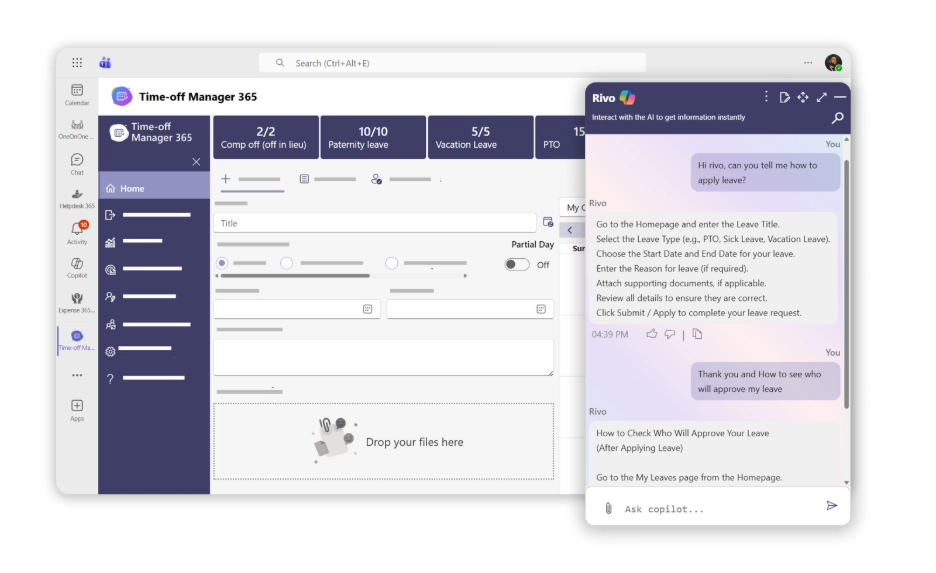
Photo from Time off Manager 365
Time off Manager 365 is a reliable cloud-based leave management solution that helps organizations track employee absences with accuracy and transparency. Built to work within Microsoft 365, it allows HR teams to manage leave requests, approvals, and balances from one centralized platform.
With Microsoft Copilot integrated, users can quickly access leave insights, summaries, and updates through AI-powered assistance. Real-time notifications keep employees and managers informed about request updates and leave availability.
Managers can plan team availability using shared calendars and simple dashboards that display upcoming leave and absence trends.
The platform also supports configurable leave policies, approval workflows, and detailed reporting. These insights help HR teams monitor employee leave patterns and maintain better workforce planning.
Employees can easily submit leave requests and check their leave balances through a user-friendly web and mobile interface. Managers receive instant alerts to review and approve requests quickly. With everything organized in one system, teams can keep leave management structured and easy to manage.
Key Features:
- Calendar view
- Multi-level approvals
- Custom leave types and policies
- Flexible reporting
- Real-time leave balance & tracking
- Integrations with Microsoft 365 & SharePoint
Ratings:
- Capterra: 4.8/5
- Microsoft Marketplace: 5.0/5
Pros:
- Microsoft 365 and Teams integration
- Easy leave request and approval process
- Clear dashboards and shared calendars
- Real-time notifications and alerts
- Copilot-powered insights and reporting
Cons:
- Limited report customization options
- Fewer localization options for global teams
- Dashboard personalization could be improved
“HR365 have been very helpful and responsive to my questions and requests. There are many good features which we have set up which have been very useful across the business.” – Verified User.
(Source: G2)
What to Look for in PTO Tracking Software
Automated PTO Tracking
Good PTO tracking software should automatically calculate leave balances, accruals, and usage without requiring manual updates. This helps eliminate human error and keeps records consistently accurate. It also reduces the administrative workload for HR teams.
Simple Approval Workflows
A strong system should make it easy for employees to submit time-off requests and for managers to review them quickly. The approval process should be structured but not complicated, ensuring requests move through without delays. All activity should be tracked in one place for full transparency.
Shared Team Calendars
Shared calendars give teams visibility into who is off and when, which helps prevent scheduling conflicts. This is especially useful for distributed or hybrid teams working across different schedules. It also allows managers to plan resources more effectively.
Integrations
PTO software should integrate with payroll, HR, and workforce management systems. This ensures data stays consistent across platforms and reduces duplicate entry. It also makes it easier to scale operations as the business grows.
Ease of Use
The platform should be intuitive enough that employees can use it without training or support. If the system is difficult to navigate, adoption will suffer, and processes will break down. A simple interface ensures consistent usage across the organization.
What are the Benefits of PTO Tracking Software?
- Reduced administrative work: PTO tracking software reduces manual effort by automating leave requests, approvals, and balance calculations across the organization.
- Improved employee experience: It improves the employee experience by making it easy to view balances, submit requests, and track approval status in real time.
- Better team planning: It improves workforce planning by giving managers visibility into who is off and helping them avoid scheduling conflicts.
- Greater accuracy: It ensures more accurate record-keeping by eliminating spreadsheet errors and keeping all leave data centralized and up to date.
- Increased visibility: It provides HR teams and managers with clear insights into leave patterns and team availability for better decision-making.
What is the Best PTO Tracking Software in 2026?
The PTO tracking software reviewed in this list ranges from lightweight leave management tools to more complex workforce systems that provide visibility into employee availability.
Each product reviewed offers value depending on team structure and workflow needs. However, Jibble is the best PTO tracking software due to its strong combination of flexibility, automation, and ease of use, making it suitable for both growing teams and established businesses.
The most effective approach is to test a few tools and evaluate which one aligns best with your operational needs.
Looking for the best time tracking software for your team’s daily operations? Explore the best tools in 2026 with our detailed guide.
FAQs
Some frequently asked questions...
PTO tracking software is a system that helps organizations manage employee paid time off in a structured and automated way.
It centralizes leave requests, approvals, and balances in one place, replacing manual spreadsheets or email-based tracking.
Companies use PTO tracking software to reduce manual HR work and improve accuracy in leave management.
It helps:
- Avoid scheduling conflicts
- Maintain accurate leave balances
- Improve visibility across teams
- Reduce administrative errors
Employees submit time-off requests through the system, which are then routed to managers for approval.
Once approved, the system automatically updates balances and logs the leave in shared calendars or dashboards.
This ensures all PTO data stays updated without manual tracking.
Yes, it is especially useful for small teams that want to avoid spreadsheet-based tracking.
It helps small businesses stay organized, reduce HR workload, and scale their leave management process as they grow.
Jibble offers automated PTO tracking with flexible policies and structured approval workflows.
It also includes:
- Real-time leave balances
- Multi-level approvals
- Custom accrual rules
- Reporting and exports
- Integration with payroll systems