

Clockify earned its following by being simple and reliable, with a solid free plan. But the free plan isn’t as generous as it once was. In mid-2026, Clockify sharply changed its free plan, and teams that had used it for years suddenly had to choose between adjusting expectations, paying up or moving on.
While still available, the free plan is now capped at five users, and billable tracking, CSV and Excel exports, as well as kiosk access all need a paid plan starting at $3.99 per user per month, billed annually.
But price isn’t the only reason teams look elsewhere. If you’re considering a Clockify alternative, you may still find it useful for tracking hours but need more from it.
We’ve picked seven alternatives across different needs. Each section explains when the tool is a good fit and what to consider before making the switch.
What to Look for in a Clockify Alternative?
Start with the reason you’re considering a switch. Depending on your team’s needs, look for:
- More free seats if you’ve outgrown Clockify’s five-user limit.
- Free billable tracking and other features that now require a paid Clockify tier.
- Better value on a paid tier for the project and billing tools you use.
- Attendance verification for field teams through facial recognition or geofencing.
7 Best Clockify Alternatives at a Glance
Software |
Free option |
Starting price |
Why consider it? |
Rating |
|---|---|---|---|---|
| Jibble | Free forever for unlimited users | Free time and project tracking for unlimited users, plus a kiosk and attendance verification | ⭐ 4.8/5 | |
| TimeCamp | Yes, unlimited users | $3.99/user/month (billed annually) | Unlimited users on free plan with automatic time tracking | ⭐ 4.7/5 |
| TrackingTime | Yes, unlimited users | $4.50/user/month (billed annually) | Unlimited users on free plan with additional task management functionality (on paid plans) | ⭐ 4.7/5 |
| Apploye | Yes, up to 10 users | $4.50/user/month (billed annually) | Ten free seats with billable hour tracking included in free plan | ⭐ 4.8/5 |
| Desklog | Yes, up to 3 users | $3.15/user/month (billed annually) | Sprint planning and Kanban tools help teams organize project work and track task progress | ⭐ 4.8/5 |
| My Hours |
Yes, up to 5 users | $4/user/month (billed annually) | Same free-user limit as Clockify but setting billable rate for projects is included in free plan | ⭐ 4.8/5 |
| Truein |
No, free trial only | $2.25/user/month (billed annually) | For field teams that need face recognition, geofenced clock-ins, and attendance tracking at very low starting rates | ⭐ 4.8/5 |
How Much More Do You Get for Free with Jibble?
Here’s what Jibble offers for free compared with Clockify’s free plan, including features available on Jibble that aren’t offered by Clockify even on paid plans.
| Feature | Clockify Free Plan | Jibble Free Forever |
|---|---|---|
| Users | Up to 5 | Unlimited |
| Time and project tracking | Included | Included |
| Billable rates | Paid plan required | Included |
| Data exports | PDF only | Excel and CSV |
| Shared time clock kiosk | Paid plan required | Included |
| GPS tracking | Paid plan required | Included |
| Facial recognition | Not offered | Included |
| Geofencing |
Not offered | Included |
Selfie clock-in, GPS, geofencing and the kiosk app are free forever.
7 Best Clockify Alternatives: Full Breakdown
1. Jibble – Best overall free Clockify alternative for teams of all sizes
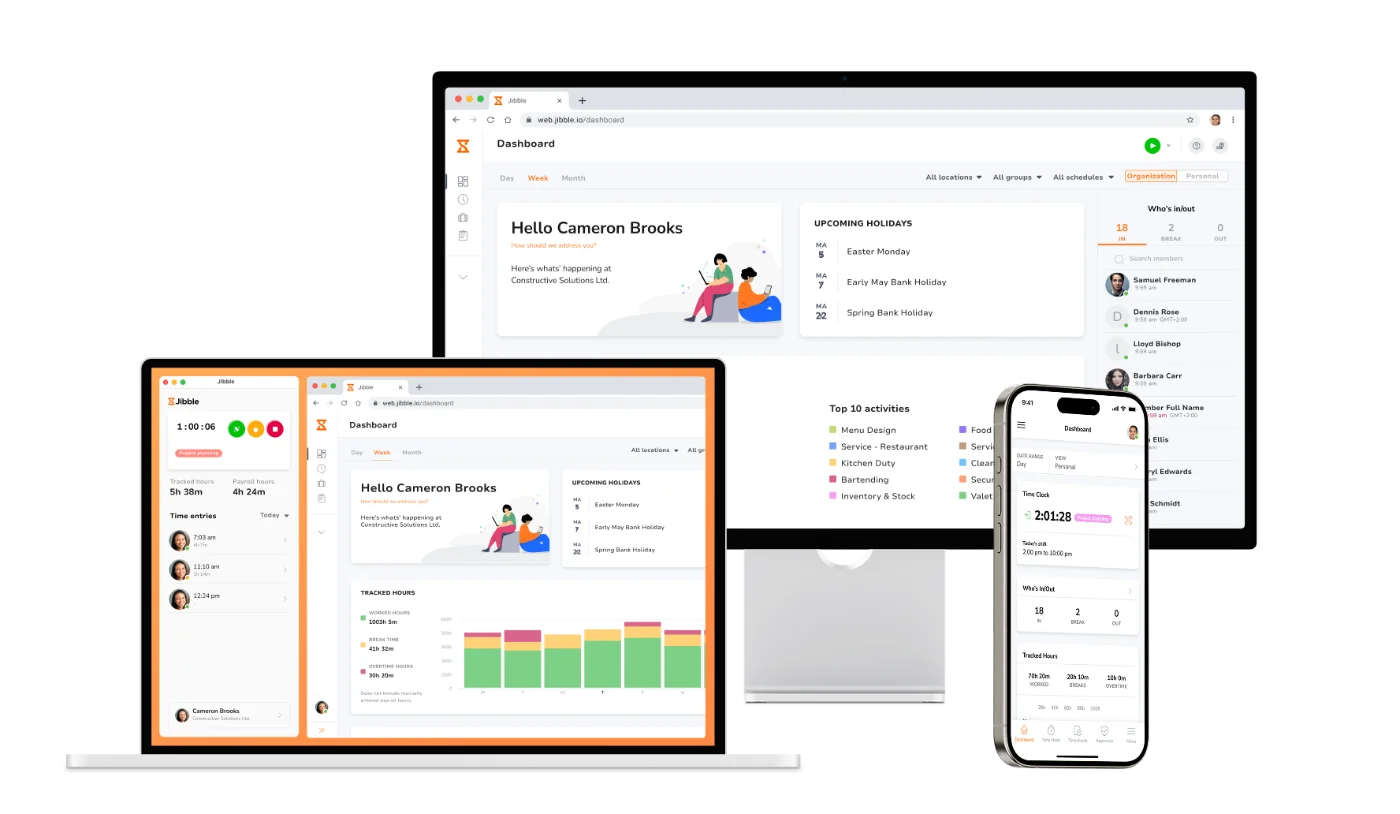
Jibble is the best Clockify alternative that offers free forever time tracking, attendance management, and project tracking for unlimited users. Jibble lets you set billable rates, create invoices, use a shared kiosk, and export Excel and CSV reports for free, while Clockify now requires a paid plan for each of these features.
For teams that need to verify employee attendance across work sites, Jibble also offers advanced features like facial recognition, GPS tracking, geofencing, and more.
Why choose Jibble over Clockify?
| Jibble stands out for | Why it matters |
|---|---|
| Free time tracking for unlimited users | Clockify’s free plan stops at five active users. Jibble is free forever for unlimited users. |
| Project-based tracking | Track time by project or activity on the web, desktop, mobile, a shared kiosk, Slack, or Microsoft Teams. You can also record time offline and sync it later. |
| Billable rates and invoicing | Set employee-wise billable rates and create branded invoices from tracked time, all for free. |
| Attendance verification |
Verify who clocked in and where with AI-powered facial recognition, GPS location tracking and geofencing. |
| NFC and RFID attendance tracking | Employees can clock in and out by tapping linked NFC or RFID cards onto a reader, saving time at clock-in points. |
| A free shared kiosk | Turn a phone or tablet into a shared time clock for free, so employees can clock in and out from one device. Clockify charges for kiosk access. |
| Excel and CSV exports | Download time reports in formats you can use for billing or further analysis. Clockify limits free report exports to PDF. |
Things to consider before choosing Jibble:
- Good fit for growing teams: You can keep tracking project time as you add users without paying for your team.
- Advanced features at no cost: Facial recognition, GPS, offline tracking, and QR code, NFC, and RFID clock-ins are free for unlimited users.
- Check your reporting needs: Teams should consider the exact reports they need before switching since some reviewers find the available reporting features limiting for more complex reporting needs.
Pricing:
| PRICING | COST |
|---|---|
| Free | $0 forever for unlimited users |
2. TimeCamp – Best Clockify alternative for automated project time tracking
TimeCamp is a strong Clockify alternative for teams that move between projects throughout the day. Its desktop app can detect activity and automatically assign tracked time to projects using predefined keywords. It also offers a free forever plan for unlimited users and projects.
Beyond tracking hours, it offers features like detailed reporting, capacity planning, and invoicing integrations which help teams review project progress, plan workloads, and manage billing.
Why choose TimeCamp over Clockify?
| TimeCamp stands out for | Why it matters |
|---|---|
| Automatic project-based tracking | Desktop app detects predefined keywords in websites and apps, then assigns tracked time to the matching project. |
| Free plan for unlimited users | Free plan supports teams of any size and unlimited projects, while Clockify limits free workspaces to five users. |
| Detailed project reporting | More than 20 report types break down activity by day, week, or month, with an option to create custom reports. |
| Team capacity planning | Resource planner shows employee availability in one view, with color-coded statuses and filters by person or project. |
| Invoicing and payment integrations | Connects with Xero, QuickBooks, and PayPal to simplify client invoicing. |

Photo from TimeCamp
Things to consider before choosing TimeCamp:
- Useful for complex workloads: TimeCamp’s resource planning tools help managers distribute work based on team availability and identify staffing needs.
- Check which billing feature you need: TimeCamp offers invoicing at a lower tier on its Starter plan ($3.99), while Clockify requires the Standard plan ($5.49). For billable time and rates, Clockify is cheaper: both are included in its Basic plan ($3.99), whereas TimeCamp requires the Premium plan ($6.99) for billable time and the Ultimate plan ($9.99) for billable rates. All prices are per user per month, billed annually.
- Excel report exports require an upgrade: TimeCamp’s free plan includes PDF report exports only; Excel exports are available on the Starter plan onwards at $3.99 per user per month, billed annually.
Pricing plans:
| PLAN | PRICE |
|---|---|
| Free | $0 |
| Starter | $3.99/user/month, billed annually |
| Premium | $6.99/user/month, billed annually |
| Ultimate | $9.99/user/month, billed annually |
| Enterprise | Price on request |
3. TrackingTime – Best Clockify alternative for task management
TrackingTime combines task management with automatic time tracking and offers a free forever plan for unlimited users. Teams can manage projects, track and collaborate on tasks, monitor budgets and expenses, and handle client billing. The software has a dedicated retainer tracking feature, making it useful for teams working with clients who pay for a set number of hours each month.
Why choose TrackingTime over Clockify?
| TrackingTime stands out for | Why it matters |
|---|---|
| Free plan for unlimited users | Free plan lets unlimited users track time as compared to Clockify’s five-user free limit. |
| AI time-entry suggestions |
Records work activity (detects apps, sites, calendar events, and idle time) in a private timeline and analyzes daily activity to suggest ready-to-log time entries that users can review, confirm, edit, or discard before adding them to their timesheets. |
| Collaborative task management | Includes boards that show task progress, comments for discussing work, and file attachments to the relevant tasks. |
| Client retainer tracking | Tracks hours against each client’s agreed retainer (a pre-agreed block of hours or budget), showing how much of the block has been used before the billing period ends. |
| Flexible reporting | Filters and groups billable hours by period, project, client, approval status, or custom fields to build the exact report you need. Reports can be scheduled for automatic periodic email delivery or shared with external stakeholders via a link. |
Photo from TrackingTime
Things to consider before choosing TrackingTime:
- Paid plans start at a higher rate than Clockify: If you need to upgrade from the free plan for additional features, TrackingTime’s paid plans start at $4.50 per user per month, billed annually, compared with $3.99 for Clockify’s Basic plan.
- The task collaboration tools are great but paid: TrackingTime’s free version supports unlimited users, projects, and tasks, but the option to comment on tasks and upload files (which Clockify does not have) requires an upgrade to paid plans.
- Financial tools require Pro plan: TrackingTime’s retainer tracking, expenses, billing rates, and project cost tools require the Pro plan at $6.50 per user per month, billed annually. Clockify offers billable rates for less on its Basic plan ($3.99), but its expense tracking, labor cost and profit features require the Pro plan ($7.99).
Pricing plans:
| PLAN | PRICE |
|---|---|
| Free | $0 for unlimited users |
| Starter | $4.50/user/month, billed annually |
| Pro | $6.50/user/month, billed annually |
| Business | $10/user/month, billed annually |
4. Apploye – Best Clockify alternative for small teams
Apploye is a good Clockify alternative combining project time tracking with employee activity monitoring features. It offers a free plan for up to 10 users, making it a great fit for small teams that have outgrown the 5-user limit on Clockify’s free offering.
Its monitoring tools give managers greater visibility into remote work through screenshots and video recording, app usage tracking, visited-URL monitoring and a Live Feed of information on who is currently working. Alongside this, Apploye handles attendance, leaves, project budgets, and invoicing, helping small businesses oversee employees and client work in one place.
Why choose Apploye over Clockify?
| Apploye stands out for | Why it matters |
|---|---|
| Free for up to ten users | Lets teams of up to ten track time without paying for seats, compared with Clockify’s five-user free limit. |
| Project and task tracking | Tracks time separately for projects and tasks, helping teams estimate how long future projects may take. |
| Billable time and invoicing | Includes or excludes certain projects from the billable amount and creates client invoices using billing methods that include fixed budgets, project hourly rates, and employee hourly rates, with the option to add a tax rate if applicable. |
| Project budgets | Shows tracked hours, spending, and total or remaining budget for each project in one place. Budget alerts notify teams when costs reach a chosen percentage of the project budget. |
| Productivity monitoring | Captures screenshots, tracks app usage, monitors visited URLs, and shows who is working currently in its Live Feed. Screen recording is also available. |
Photo from Apploye
Things to consider before choosing Apploye:
- The free plan limits projects and attendance history: Apploye allows up to three projects and three clients for invoicing, with one month of timesheet and attendance history. These limits may not suit teams managing many clients or reviewing longer-term work trends.
- Useful for managing remote teams: Reviewers say Apploye’s clear dashboards, app usage reports, and optional screenshots help managers follow work across client projects and spot delays without constant follow-ups. They also highlight the easy-to-learn interface and quick switching between projects.
- Paid plans cost more: Apploye is free for up to 10 users, but its paid plans start at $4.50 per user per month when billed annually, compared with $3.99 for the Clockify Basic plan. Its strongest price advantage is for teams that can stay within its free limits.
- Monitoring add-ons raise the price: Apploye’s free plan includes limited screenshot frequency and limited app and URL tracking. More extensive monitoring requires a paid plan, with separate add-on fees for higher screenshot-capture frequency and screen recording.
Pricing plans:
| PLAN | PRICE* |
|---|---|
| Starter | Free for up to 10 users |
| Elite | $4.50/user/month, billed annually |
| Power | $8/user/month, billed annually |
| Enterprise | Custom pricing |
| *Optional add-ons are charged on top of the paid tiers. | |
5. Desklog – Best Clockify alternative for structured project planning
Desklog helps teams plan project work, assign tasks, track progress through sprint planning and a Kanban view, and bill clients based on flexible rates. The software also tracks work activity automatically in the background, giving managers insight into employees’ idle time and time spent on productive tasks. Desklog includes an employee wellness module with customizable break activities, making it ideal for teams that spend long hours at their desks.
Why choose Desklog over Clockify?
| Desklog stands out for | Why it matters |
|---|---|
| Automated time tracking with productivity insights | Records work activity in the background and identifies idle time and hours spent on productive, job-related activities. It also lets employees pause tracking for personal tasks using its Private Time feature. |
| Sprint planning | Lets managers divide large projects into smaller sprints with defined objectives and timelines. |
| Kanban view | Provides a visual overview of tasks and projects, with tasks organized by stage. Teams can drag and drop tasks between stages as work progresses. |
| Employee wellness module | Allows scheduling of short and long wellness breaks offering activities such as a Mindful Minute and looking away from the screen. Admins can enable or disable the module, customize activities, and set whether employees must complete activities or can skip them. |
| Flexible billing rates |
Supports client billing based on either a fixed project rate, task-based hourly rate, or individual users’ hourly rates. |
Photo from Desklog
Things to consider before choosing Desklog:
- Employee control over personal time: Desklog’s Private Time feature lets employees pause tracking for personal activities, giving them some privacy while using an automatic work tracker.
- Kanban view requires Enterprise plan: While the Business plan ($3.15/user/month, billed annually) includes billing and invoicing, Kanban view sits on Desklog’s higher tier starting at $4.32/user/month (billed annually).
- Sprint planning and payroll cost extra: Desklog offers project sprint planning and payroll as separate add-ons to its paid plans. The total cost will depend on the selected plan and which additional features the team needs.
Pricing plans:
| PLAN | PRICE* |
|---|---|
| Free | $0 for up to 3 users |
| Business | $3.15/user/month, billed annually |
| Enterprise | $4.32/user/month, billed annually |
| *Optional add-ons are charged on top of the paid tiers. | |
6. My Hours – Best Clockify alternative for tracking billable client work for free
My Hours helps freelancers and small teams track time spent on client projects and calculate billable amounts. Its free plan supports up to five users with unlimited projects, tasks, and clients. Users can also set billable rates for projects for free, a feature that requires a paid plan in Clockify.
Additionally, My Hours lets teams track project costs, monitor budgets and generate invoices for client billing.
Why choose My Hours over Clockify?
| My Hours stands out for | Why it matters |
|---|---|
| Task & project organization | Time can be recorded against projects and clients or tasks. Users can be assigned to projects & tasks, and task lists can be organized and marked as complete. |
| Expense tracking | Expenses can be logged on projects and tasks, with descriptions, custom tags, and receipt attachments. Submitted expenses can also be reviewed for approval by managers. |
| Project cost tracking & budget monitoring |
Tracks labor costs and logged expenses to help teams understand project costs. Teams can also set project or task budgets and receive alerts as budget limits approach. |
| Flexible billing rates | Allows users to set billing rates by user, project, or task. Projects or tasks can also be marked as non-billable. |
| Detailed dashboard & reporting | Groups tracked time by client, project, task, or user and visualizes time data in bar and pie charts. These reports can be exported in PDF or XLS formats or scheduled for sharing via email. |
Photo from My Hours
Things to consider before choosing My Hours:
- Straightforward project management: Reviewers say they can set up projects, assign tasks, and track work through different phases. This helps them plan staffing and estimate future projects more accurately.
- It does not solve the five-user limit: Both My Hours and Clockify cap their free plans at five active users. My Hours’ advantage is it offers users the option to set a billable rate per project for free, which requires a paid plan on Clockify.
- It isn’t a cheaper paid upgrade: The Basic plan starts at $4/user/month billed annually, compared with Clockify’s Basic plan at $3.99/user/month billed annually. Compare the features you need before choosing either plan.
- Invoicing requires Pro: My Hours’ free plan helps categorize and calculate billable work, but creating invoices from that time is a paid feature under the Pro plan which starts at $8 per user per month, billed annually.
Pricing plans:
| PLAN | PRICE |
|---|---|
| Free | $0 for up to 5 users |
| Basic | $4/user/month, billed annually |
| Pro | $8/user/month, billed annually |
| Enterprise | Custom pricing |
7. Truein – Best Clockify alternative for field team attendance
Truein is worth considering as a Clockify alternative for field teams that need extensive attendance verification features.
Face-verified, geofenced clock-ins help prevent buddy punching, while offline tracking keeps records complete at sites with poor connectivity. Managers can also create shifts and enforce attendance policies. However, Truein does not offer project tracking or client billing functionality.
Why choose Truein over Clockify?
| Truein stands out for | Why it matters |
|---|---|
| Facial recognition clock-ins | Uses AI-powered facial recognition to confirm who is clocking in. Works on mobile devices or shared kiosks, and supports offline use. |
| GPS geofencing | Restricts clock-ins and clock-outs to approved locations across job sites and records the time and location of each entry to support accurate payroll. |
| Attendance policy enforcement | Automatically enforces preset attendance policies for shifts, late arrivals, and overtime, with compliance alerts to support adherence to company policies and labor laws. |
| Job-based time tagging | Allows clock-ins to be tagged to the correct jobs and activities for accurate job-based time tracking. |
| Shift scheduling | Lets managers create shifts and assign them to employees. Employees receive shift updates in real time via mobile. |
Photo from Truein
Things to consider before choosing Truein:
- Affordable attendance verification: Features like facial recognition and geofencing are available on Truein’s Time Capture plan which starts at $2.25 per user per month, billed annually, making it a cost-effective option for teams needing reliable attendance tracking.
- There is no free plan: Truein offers a 14-day trial only.
- Shift scheduling requires Advanced plan: While Truein’s lowest price tier starts at $2.25 per user per month, shift scheduling requires the Advanced plan, starting at $3.50 per user per month, when billed annually.
- No project tracking: Truein does not offer project tracking or client billing, so choose it only if you need attendance verification rather than project functionality.
Pricing plans:
| PLAN | PRICE* |
|---|---|
| Time Capture | From $2.25/user/month, billed annually |
| Advanced | From $3.50/user/month, billed annually |
| Enterprise | Price on request |
| *Optional add-ons are charged on top of the paid tiers. | |
Clockify Alternatives: Which Should You Choose?
The right choice depends on what you need most:
- If you want free time tracking, project tracking, billing, and advanced attendance verification features for unlimited users → Jibble.
- If you want time automatically assigned to projects and a free plan for unlimited users → TimeCamp.
- If you want boards, comments, and files to manage tasks alongside tracked time → TrackingTime.
- If you want free billable time tracking for small teams up to ten → Apploye.
- If you want a software with project planning tools like sprint planning and Kanban views → Desklog.
- If you want to track billable client work for free with a team of five or fewer → My Hours.
- If you need to verify clock-ins and manage shifts across job sites → Truein.
You can test every Clockify alternative on this list before committing. TimeCamp, TrackingTime, Apploye, Desklog, and My Hours offer free plans and trials, while Jibble is free forever for unlimited users. Truein offers a free trial only.
Final Thoughts
While Clockify remains useful for straightforward time and project tracking, its five-user free limit may make alternatives more appealing, especially since billable rates, CSV and Excel exports, and kiosk mode are now features accessible only on paid plans.
If you need more free seats, start with Jibble, TimeCamp, TrackingTime, or Apploye. If you’re paying either way, compare which features each tool includes for the price. And if your work happens in the field, Jibble and Truein offer attendance tools built around verifying where and when people clock in.
For teams that want to keep tracking project time without paying as they grow, Jibble is the strongest choice: It is free forever for unlimited users and includes project-based features such as setting billable rates, invoicing, and reporting along with advanced attendance verification features like facial recognition, geofencing, NFC and RFID clock-ins, and more.
FAQs
Some frequently asked questions...
Which Clockify alternative lets you track billable hours for free?
Jibble lets unlimited users track time by project or activity, set custom billable rates, and create invoices from tracked hours for free. Teams can also export time reports in Excel and CSV formats.
If employees work across different sites, Jibble adds attendance verification through facial recognition, GPS, and geofencing.
Is there a free alternative to Clockify?
Yes, Jibble is the best free alternative to Clockify.
It is free forever for unlimited users, so a team can keep tracking time and projects even after it grows beyond the five-user limit on Clockify’s free plan.
Jibble also includes billable rates, invoicing, report exports, and a shared kiosk for clock-ins.
For teams that need to verify who clocked in and where, Jibble offers facial recognition, GPS tracking, and geofencing.
Can you export data on Clockify for free?
Clockify’s free plan lets you export data as PDFs only, with a maximum date range of 31 days or one month per report. CSV and Excel exports require a paid upgrade.