This Review Covers:
- Overview
- What Do Users Like About Beebole?
- What Don’t Users Like About Beebole?
- What Pricing Plans Does Beebole Offer?
- What are the Standout Features of Beebole?
- Selected Positive User Feedback
- Selected Negative User Feedback
- What are Beebole’s Ratings from Review Sites?
- What’s My Final Verdict on Beebole?
Overview
Beebole is a project time tracking and planning software that combines time tracking, resource planning, project financial management, absence management, and multi-stage approval workflows in a single, customizable platform that can be accessed with desktop and mobile devices.
Beebole’s time tracking functionality allows users to accurately capture the hours they spend on clients, projects, and tasks using manual entry or timers. It also tracks breaks and helps keep businesses on top of billable and non-billable hours. Plus, employers can set automated tracking reminders for teams so they don’t forget to submit timesheets on time.
Aside from time tracking, Beebole can streamline PTO tracking and absence management, allowing businesses to set time-off policies and quotas while giving clear visibility into employee leave balances. Employees can request full days, half days, or specific hours off, and managers can approve or deny requests, all in one place.
To expand its functionality and usability, Beebole offers a range of integrations that streamline workflows and improve productivity, including Asana, QuickBooks, and BambooHR.
Additionally, Beebole integrates with Google Workspace for team collaboration through Google Sheets, supports custom reporting and analytics with Excel, and offers secure logins through single sign-on tools like Okta and OneLogin, so employees can access the platform safely without managing separate passwords.
Now, all of those things are truly impressive, but I promised you a fair and honest review, so we have to discuss where Beebole falls short.
Beebole lacks any kind of location or identity verification features, making it less suitable for teams that require real-time employee visibility and secure attendance data.
Moreover, it does not offer a native invoicing feature, and its pricing structure can be unfavorable for small teams that need a basic project time tracking solution, as costs can compound rather quickly.
It’s a lot to consider. But before we make any judgments on Beebole, it’s only fair that we should examine in detail what it has to offer first. So, without further ado, let’s dive into it!
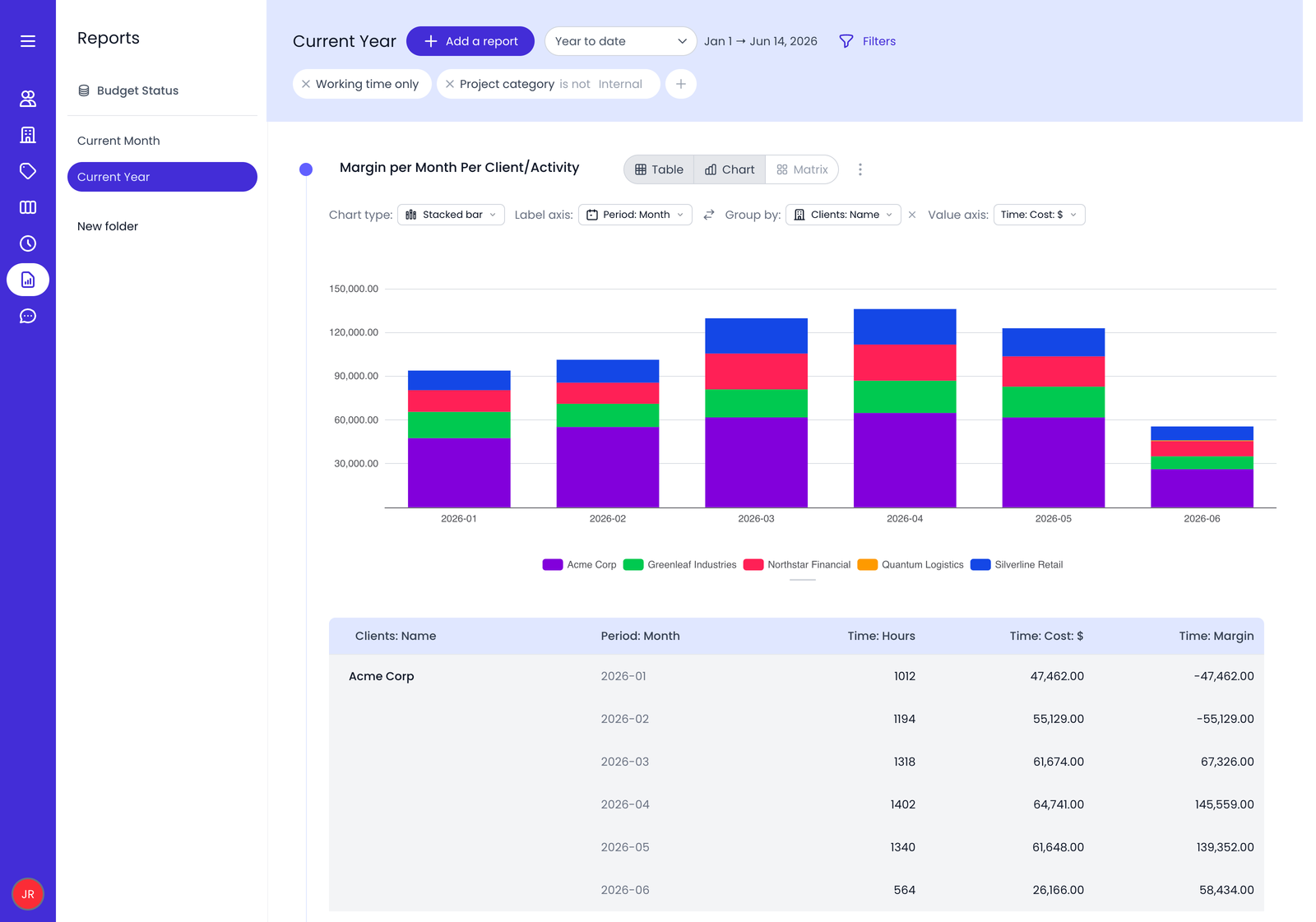
Photo from Beebole
What Do Users Like About Beebole?
- Provides clear visibility into time spent on projects
- Robust customization options
- Detailed reporting dashboards
- Smooth integrations with other software
What Don't Users Like About Beebole?
- Pricing can compound quickly as teams grow
- Missing native invoicing features to support billing
- No GPS tracking and geofencing capabilities
What Pricing Plans Does Beebole Offer?
Beebole offers three pricing tiers: a free plan for up to five users, an Essential plan starting at $9.00 per user per month, and an Advanced plan starting at $18.00 per user per month.
The free plan includes core features such as time tracking, resource planning, task management, time-off tracking, custom reporting, and automated reminders. It also provides limited API access to integrate with software already in use.
For teams of up to five users, this plan provides enough functionality to get started with project tracking and build initial workflows without any costs.

Photo from Beebole
But once you exceed five users, you will need to subscribe to a paid plan, meaning a team of six would already be paying around $54.00 per month (billed annually) on the Essential tier, even if all they need is basic project tracking.
Beebole’s Essential plan, billed at $9.00 per user per month annually or $10.00 monthly, includes billing rates, time-off allowances, multi-level approvals, integrations, and multi-currency support. This plan is beneficial for teams that need billing support integrated with project time tracking.
Lastly, Beebole’s Advanced plan, priced at $18.00 per user per month annually or $20.00 monthly, expands into cost and profitability tracking, expense management, project budgets, custom fields, and more granular control over roles and permissions. At this level, Beebole shifts toward full financial and operational management along with project and resource planning, making it a good option for larger teams that need this level of oversight.
Overall, Beebole’s pricing is reasonable for the depth of features offered, but the gap between the free plan and paid tiers is quite abrupt, which can make it expensive for growing teams that want to control costs.
Beebole integrates with various productivity tools, including Asana, QuickBooks, BambooHR, Google Workspace, Google Sheets, Excel, QuickBooks exports, Okta, and OneLogin, streamlining workflows and reducing the need for manual data entry. Additionally, Beebole supports 10 languages, making it accessible to teams across different regions.
What are the Standout Features of Beebole?
1. Project Time Tracking
Beebole makes time tracking simple, letting users track time on desktop through its web app or on mobile through its Progressive Web App (PWA), which runs in a mobile browser and works just like an app without needing to be downloaded from an app store. You can also enter manual time entries and add comments to time entries for better communication with managers.
To support billing, Beebole allows users to track time and cost rates at person, project, task, and tag levels, with real-time margin and profitability tracking.
Aside from regular work hours, users can also record breaks, time off, and absences on the Beebole timesheet module. Once completed, timesheets can be submitted with a single click, and managers can review, approve, or reject them through Beebole’s multi-level approval functionality.
They can also lock/unlock hours, send reminders, mark hours as billable or non-billable, update billing, and submit timesheets on behalf of employees.
While Beebole’s time tracking is efficient, it lacks certain accountability features like facial recognition attendance tracking, GPS tracking, and geofencing, which may be a drawback for businesses needing stricter time entry verification.

Photo from Beebole
2. Time Off Tracking
With Beebole, businesses can set up PTO policies and assign absence quotas for individuals, teams, or the entire company. Absences automatically sync between the timesheet and time off modules, ensuring accurate records. Managers can create and customize absence types like leave, PTO, and sick days, tracking them in full days, half days, or hours with flexible quotas.
Beebole offers a flexible approach to time-off requests, allowing employees to select dates, choose an absence type, and set the duration. For multiple days, they can simply drag across the calendar. Absences can also be recorded directly in the timesheet module by adding an absence row in place of a project, with the option to specify the type and duration.
Once submitted, managers receive an email notification and can approve or reject requests through the approval module. Employees are notified of the decision, and the request status updates automatically.
To streamline multi-level approvals, managers can also review requests in bulk, lock time-off entries, and track absence balances.

Photo from Beebole
3. Resource Planning
Beebole helps teams plan resources more effectively by combining workload management with time tracking.
Managers can assign planned work to employees in advance, and those assignments automatically appear as pre-filled entries in timesheets, reducing manual input and making it easier for employees to log time against scheduled work.
With visibility into planned and actual hours, managers can identify workload imbalances before they impact project timelines. Absences and time off are also reflected in resource plans automatically, so teams can make scheduling decisions with a more accurate view of employee availability.
To support different planning styles, Beebole offers both Kanban and Gantt views, allowing managers to monitor workloads, project priorities, dependencies, and overlapping assignments from a single workspace.
Tasks can be assigned based on availability, utilization, or specific skill sets, while custom fields and tags provide additional flexibility for organizing work.
Resource planning data also feeds into Beebole’s project management and reporting capabilities. Managers can compare planned and actual hours, monitor labor costs, track billable time, and generate custom reports to evaluate project performance, budget usage, and overall profitability.
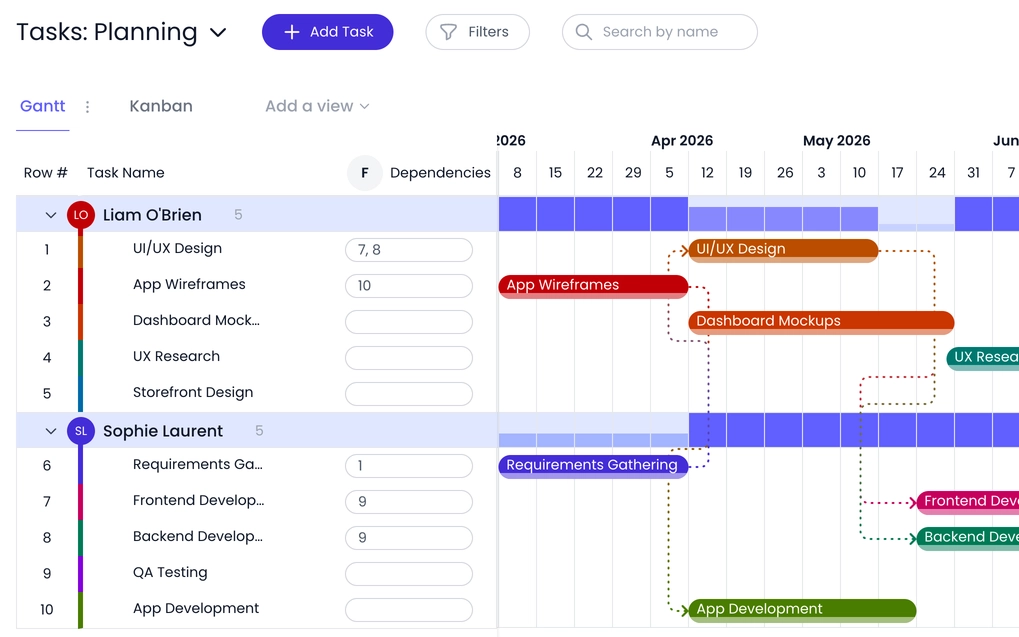
Photo from Beebole
4. Employee Time Reports
Beebole lets users generate unlimited reports using the reports module or the chart and table module, covering 45 data types like absences, budgets, costs, profits, and projects. Access depends on user roles. Admins see all data, managers view team and project details, and employees can only see their own.
Users can customize reports by selecting data types, adding or removing columns, applying filters, and adjusting currency settings. The chart and table module offers a visual approach, making it easier to interpret data. Reports, tables, and charts can be exported as PDF, XLSX, or CSV files and shared via Google Drive or OneDrive. Beebole also supports QuickBooks exports.
Despite its flexibility, Beebole lacks a dedicated overtime tracking module. To track overtime, users must manually set daily and weekly work hours in the timesheet settings and add overtime columns to reports, which can be time-consuming.
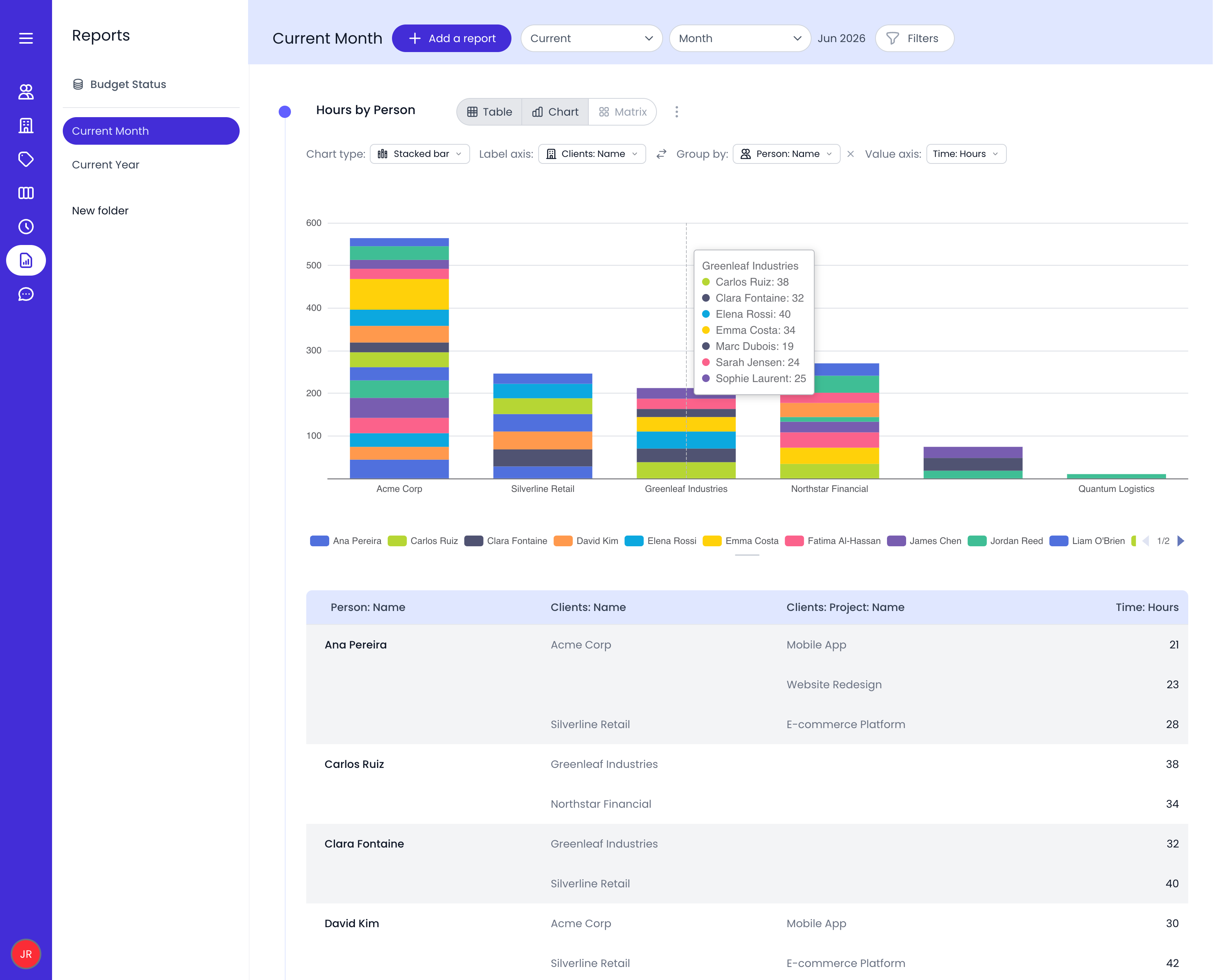
Photo from Beebole
5. Beebole Integrations
Along with its QuickBooks integration, Beebole connects with a range of accounting, HR, and productivity tools to streamline workflows.
Users can integrate their accounts with Asana, BambooHR, Google Workspace, Microsoft Azure, and Microsoft 365, extending collaboration, project management, and administrative capabilities across their existing software stack.
Beebole also integrates with single sign-on (SSO) solutions like Okta and OneLogin, letting employees log in with one existing account instead of managing separate passwords for each tool.
To enhance Google spreadsheets and for the ability to retrieve real-time data from their Beebole accounts, users can get the Google Sheets add-on. It allows greater customizability in reports with pivot tables, charts, and more complex calculations. It can also be used to send updated reports through automated emails to specific stakeholders.
The Excel add-in for Beebole also allows users to enhance their spreadsheet experience by allowing users to build custom tables and retrieving real-time data from their Beebole accounts.
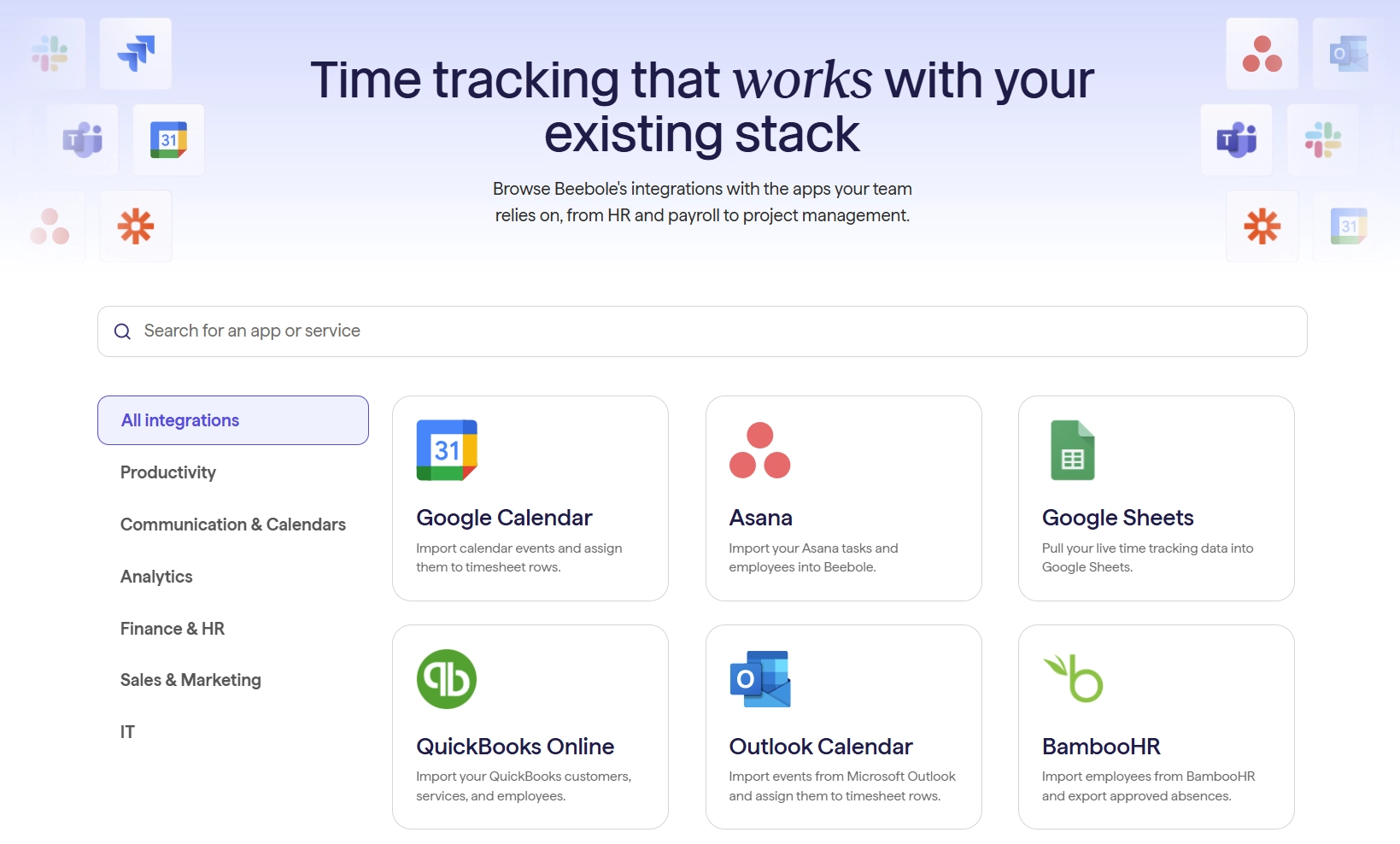
Photo from Beebole
Selected Positive User Feedback
- “Excellent experience. I can extract quickly a report quickly, and I can personalise the report to meet my specific requirements.” – Alice D. (Source: Capterra)
- “Prevents Time Entry Errors, Incredibly Useful.” – Thérèse G. (Source: G2)
- “My overall experience with Beebole Project Time Tracking has been excellent. It has greatly improved efficiency, provided strong controls, and maintained ease of use for both users and administrators. It’s a reliable solution that simplifies time tracking and project management.” – Christian M. (Source: Capterra)
- “Beebole helps me to see how many hours I spend in different types of work and where time is wasted. It has made project planning and forecasting so much easier and accurate and I have been able to explain my workload needs and resources to my manager more effectively.” – Evgen S. (Source: Capterra)
Selected Negative User Feedback
- “The app has fewer project management capabilities and this calls for advancements of features. The app has a poor mobile functionality and it needs updating.” – Isaac T. (Source: Capterra)
- “The reporting is adequate, but I’d like to see more ability to slice the data differently.” – Marina K. (Source: Capterra)
- “I occasionally have small issues with Beebole. Sometimes, when adding a new item to my time card, Beebole will bug out and double my time entry into two separate entries. Then, I have to refresh the page and fine the duplicate to fiix it. It is not a huge issue, but Beebole is not free of bugs.” – Henry F. (Source: Capterra)
What are Beebole's Review Ratings from Review Sites?
As of June 2026
- Capterra: 4.6/5
- G2: 4.5/5
- GetApp: 4.6/5
What's My Final Verdict on Beebole?
Beebole is a flexible time tracking tool that helps teams stay on top of project progress and manage work hours with a high degree of customization.
At its core, it does time tracking well, letting users log hours on projects and tasks and submit timesheets through a clear approval process. In practice, it feels reliable for day-to-day project tracking, even if it takes a little getting used to at first.
Time off management is also built in, making it straightforward to handle PTO policies, absence types, and leave requests, which sync automatically with timesheets for more consistent records.
Beebole’s reporting feature also stands out as one of its stronger capabilities, offering customizable insights into time, costs, and project performance.
That said, there are a few things I think could make the platform even better. For starters, it doesn’t offer location-based or face recognition attendance tracking, so it may not be the best fit for businesses that need stronger time data verification.
I’d also have liked to see a built-in invoicing feature. Beebole already does a great job with billing and financial tracking, so being able to create invoices without relying on another tool would have been a nice addition.
Even so, if your priorities are project tracking, resource planning, reporting, and understanding where your team’s time is going, Beebole gets a lot right and offers enough flexibility to work for a wide range of businesses.