
The Best Free Hubstaff Alternative
Jibble gives you the time tracking Hubstaff is built on, then throws in GPS, geofencing and Kiosk mode for free, no add-ons or seat minimums required to unlock them.
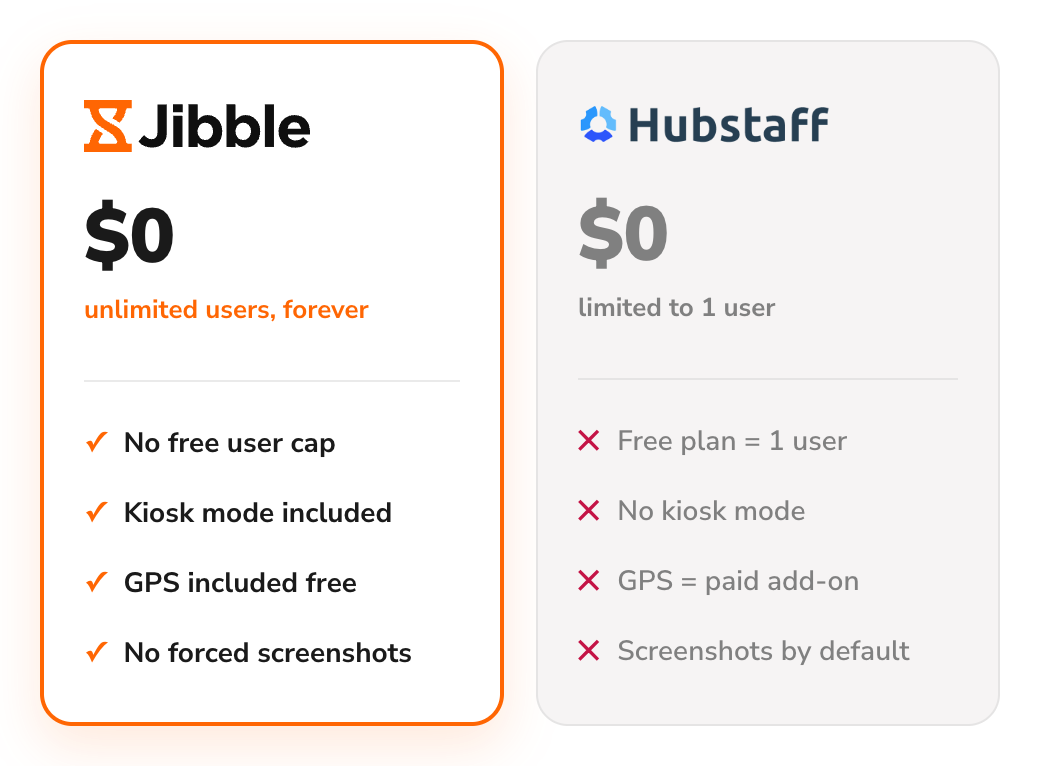






What are the main differences between Jibble and Hubstaff?
A feature-by-feature comparison of where Jibble gives you more, for free.
| Feature | Jibble | Hubstaff |
|---|---|---|
| Free forever | Unlimited users | 1 user only |
| Time tracking (web, desktop, mobile) | ||
| Automated timesheets | ||
| Time kiosk | ||
| Facial recognition | ||
| GPS tracking | Paid feature | |
| Geofencing | Paid feature | |
| Timesheet approvals | ||
| Screenshot monitoring | Optional, off by default | Enabled by default |
| Leave & time off management | Paid feature | |
| Payroll-ready exports | Paid feature | |
| Integrations | Paid feature | |
| Capterra rating | 4.8 / 5 | 4.5 / 5 |
| Real cost for a full setup | $0, always | $4.99–$25/seat/mo + add-ons |
See everything else Jibble can do
Facial recognition, geofencing, leave management, and an AI assistant — built in, ready whenever your team needs them.
Explore more of Jibble's featuresWhy choose Jibble as a Hubstaff alternative?
The real limitations teams hit on Hubstaff, and exactly how Jibble solves each one.
Free forever, without any user cap
Hubstaff's free plan supports exactly one user, so any real team is pushed straight to a paid plan starting at $4.99/seat/month with a two-seat minimum. Jibble is free forever for unlimited users, no per-seat pricing to plan around.
See our full Hubstaff review →
One tablet, an entire team clocked in
Hubstaff has no kiosk mode at all — every clock-in needs its own logged-in device. Jibble's online time clock kiosk turns any shared tablet or terminal into a facial-recognition clock-in station, ideal for retail counters, warehouses and job sites where staff share hardware.
Online kiosk → GPS tracking included, not an add-on seat charge
Hubstaff locks GPS tracking and geofencing behind its Team plan ($10/seat/month) and above, then charges $3.33 per seat per month more for the Locations add-on just to turn it on. Jibble includes GPS tracking and geofenced job sites for every user, free.
Employee GPS tracking → Tracking your team actually trusts
Hubstaff relies heavily on screenshots and activity tracking, which reviewers often find intrusive, and a full setup can cost $15–20 per user/month. Jibble takes a more attendance-focused approach, using facial recognition and GPS to verify attendance without making employee monitoring central to the experience.
Time and attendance software → Integrations without the limits
Hubstaff’s Grow plan ($7.50/seat/month) limits you to 1 integration, with unlimited integrations only on the Team plan ($10/seat/month). Jibble offers unlimited integrations for free, connecting with your favorite payroll, HR, and productivity tools.
Time tracking integrations → Is Jibble the right Hubstaff alternative for you?
Still weighing options? See how Jibble ranks against every time tracker.
- You need more than one person tracking time for free
- You want to verify who's clocking in without buying a monitoring suite
- You don't want GPS tracking to cost extra per seat
- Your team doesn't want mandatory screenshots or keystroke logging
Still weighing your options?
See how Jibble ranks against every other time tracker.
See the best time tracking software →Ready to make the switch to Jibble?
Export from Hubstaff
Download your team's time entries and reports from Hubstaff.
Import into Jibble
Migrate your data to Jibble in minutes — no manual re-entry needed.
Invite your team
Add everyone by email or link; roles and groups carry straight over.
Start tracking
Jibble picks up right where Hubstaff left off, free forever.
See why teams choose Jibble
★★★★★
4.9 out of 5
★★★★★
5.0 out of 5
★★★★★
4.9 out of 5
★★★★★
4.8 out of 5
★★★★★
4.8 out of 5
★★★★★
4.7 out of 5
Works perfectly!
Jibble is a useful time and attendance management system for construction with the best price. The features are so easy to use, and it works perfectly with on-site or remote work.
Easy to use and transparent
Easy features and dashboard and the best feature is the chrome extension which all of us loved. Happy Jibbling!
Very simple to set up
It's a very easy to use tool which gives you peace of mind that your employees are on-site and it logs employee hours for payroll.
Perfect for payroll
This is exactly what I needed to automatically track employee hours and enter them in our payroll processing system! It's great for multiple employees, easy to manage, and has a straightforward interface. Employees seem to like the mobile app for check in/check out.
Hassle-free work hour tracking!
I am very happy with Jibble because of its functionality and ease-of-use. My employees can record their work hours hassle-free with accurate timesheets. I will definitely recommend Jibble to my friends and colleagues as it is very helpful and easy to use.
Simply no other competitor that is close
Easy and awesome customer support. Fantastic, and a big problem solver for my small team. This is the type of company that will be successful. We've used Jibble since we were on Slack and then moved to MS Teams. The ease of use makes it an amazing tool.. and there is simply no other competitor that is close!
Your questions about Hubstaff, answered
Everything people ask before switching from Hubstaff to Jibble.