Built for construction teams & contractors

Free Construction Time Tracking Software

Track construction work hours across every jobsite with GPS-verified clock-ins and digital timesheets. Jibble helps contractors manage crew attendance and project hours, all free forever for unlimited users.

Free forever Unlimited users Set up in minutes
Construction worker on site using Jibble mobile time tracking with GPS

Trusted by construction and industrial teams worldwide

BoschHyundaiDarchem EngineeringNEOMTeslaPepsi
Step-by-step workflow

How construction time tracking works from clock-in to payroll

Clock in on site

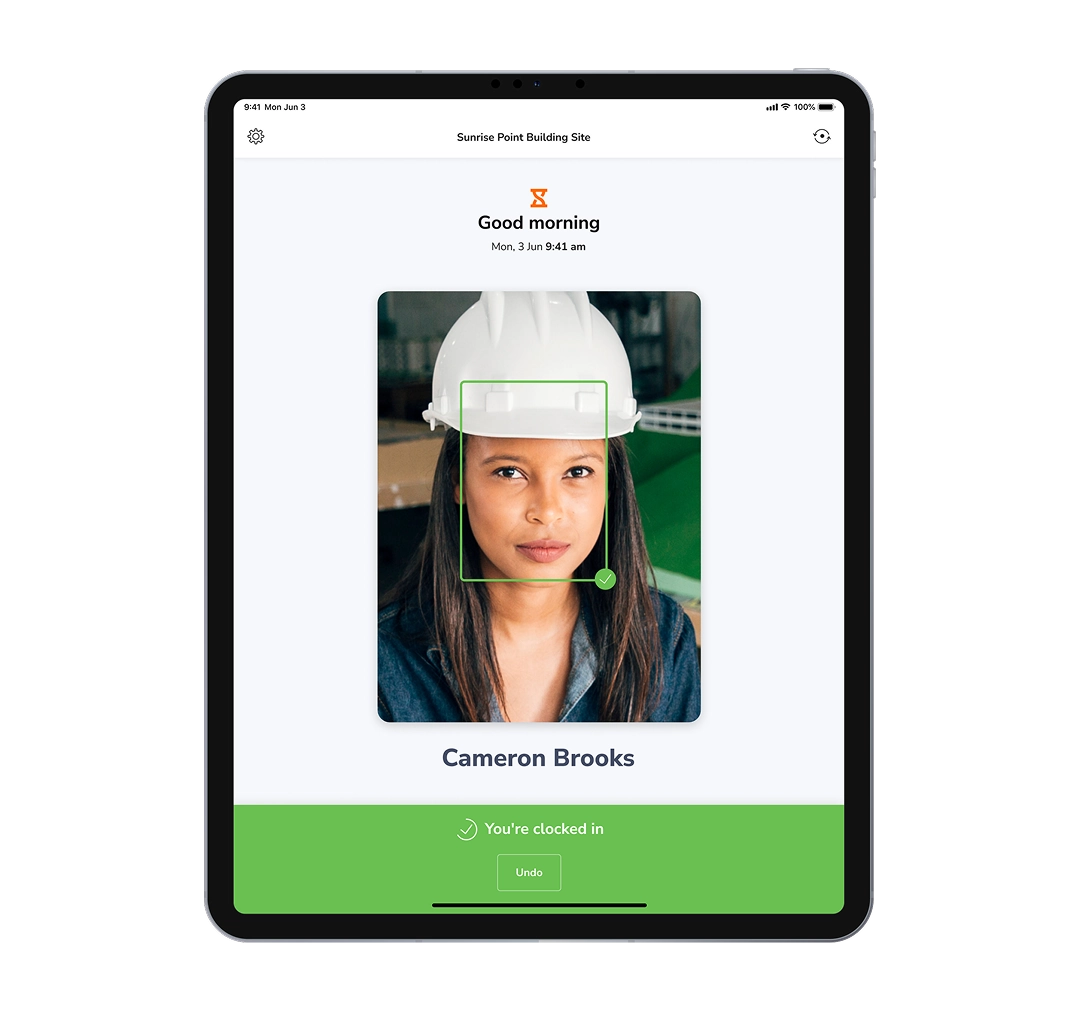
One-tap kiosk clock-in

Set up a shared construction time clock kiosk at your jobsite and let crews clock in and out from a phone or tablet. You can choose from a range of secure clock-in options including NFC tags, PINs, QR codes, or facial recognition.

Construction time clock
time clock kiosk

Flexible clock-in methods

Mobile, desktop, web or browser extension clock-ins

When not at fixed jobsites, workers can also clock in from the Jibble mobile app, desktop app, web, or Chrome extension. On mobile, Jibble can record live locations while workers are clocked in, with notifications to clock in or out based on schedules or geofenced locations.

Flexible clock-in methods
Multiple ways to clock-in

Verify attendance

GPS tracking and geofencing

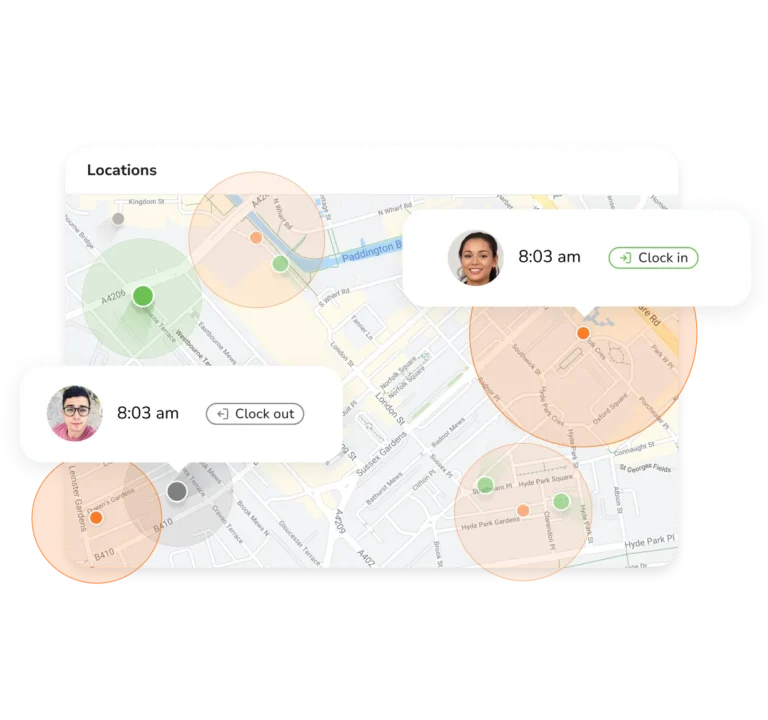
Set a virtual boundary around each construction site with our geofencing feature, so workers can only clock in or out when they're within the designated area. Meanwhile, GPS tracking verifies their location at the time of the punch, ensuring attendance is recorded from the right jobsite.

GPS & geofencing
Geofenced jobsites on a map with GPS-verified clock-ins and live worker locations

Track time at remote sites

Offline time tracking

Keep tracking crew hours even when construction sites have limited or no internet. Clock-ins, GPS tracking, geofencing, and facial recognition continue working offline, with data automatically synced when connectivity returns.

Offline time tracking
Track time offline anywhere

Know where every hour goes

Project-based time tracking

Assign hours to specific projects or activities as crews work, so you can see exactly where their time is being spent. Use these insights to allocate resources more effectively and make smarter planning decisions.

Project time tracking
Assign hours to projects

Stay on top of compliance

Breaks and overtime tracking

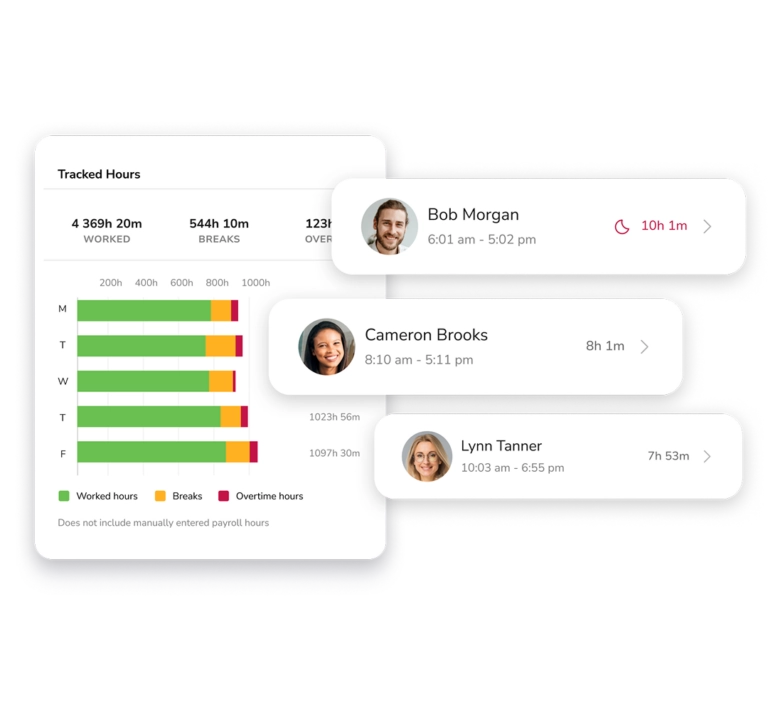
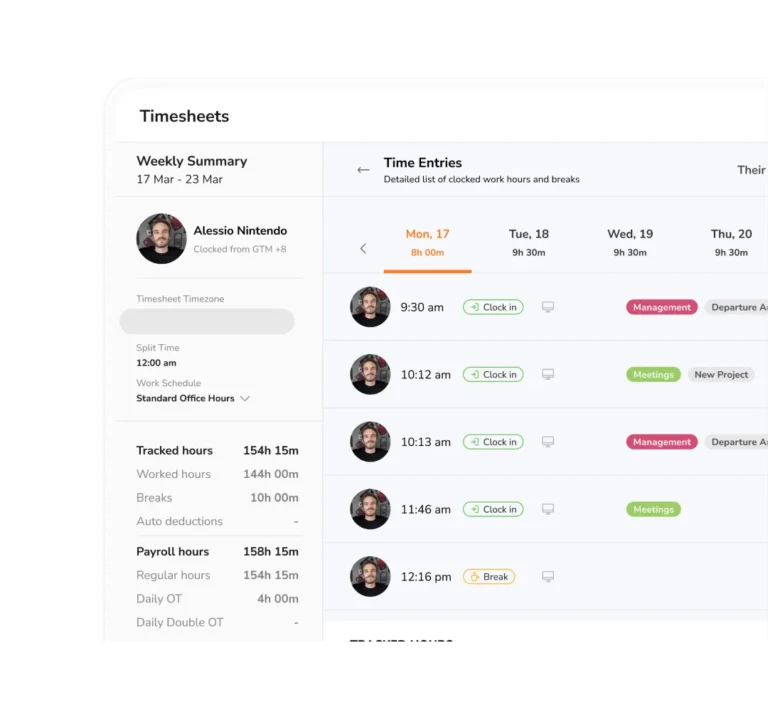
Jibble automatically tracks breaks and calculates overtime based on the rules you set. Configure break policies, overtime tiers, and pay multipliers to apply your policies consistently and keep accurate payroll records.

Overtime tracking

Review the numbers

Real-time dashboards and reports

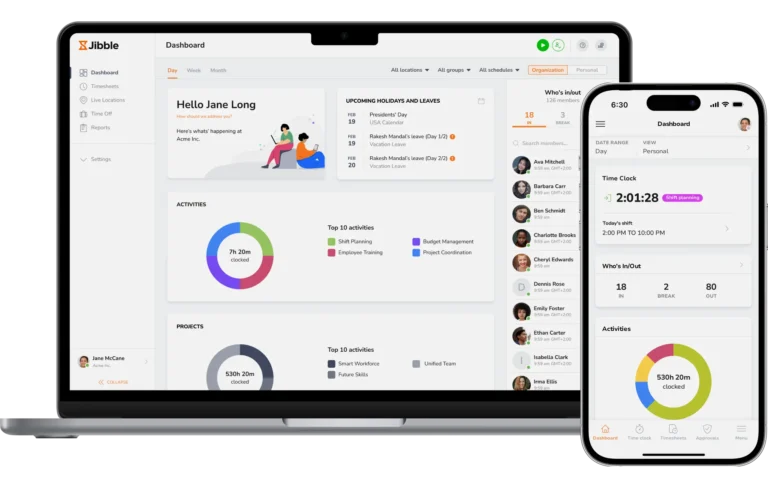
Get a live view of who's in, who's out, and which projects your team is working on. Drill down into hours by worker, project, activity, or location, then filter and export detailed reports as needed.

Reporting & analytics
Get a live overview of all that's happening in your team on the dashboard

Run payroll

Payroll-ready exports

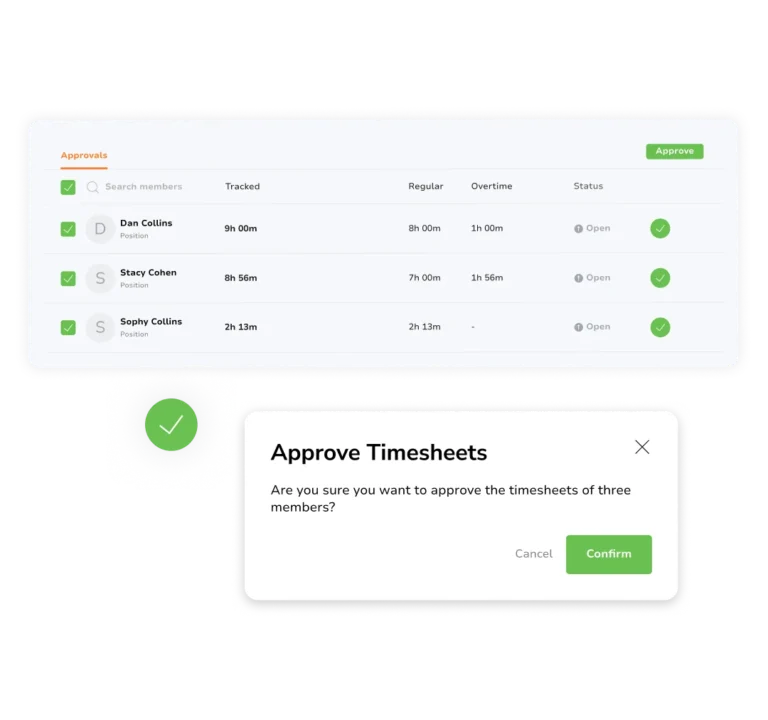
Approve accurate construction timesheets and filter hours by crew, employee, project, or pay period before payroll. Export reports in XLS or CSV, or send timesheet data directly to tools like QuickBooks, Xero, and Deel for a smoother payroll process.

Payroll-ready timesheets
Built for deskless teams

One time tracker for every construction job

Construction work happens across jobsites, crews, and projects, not behind a desk. Jibble gives contractors one place to keep track of field teams, working hours, and job progress, helping everyone stay connected from the jobsite to the office.

Live dashboard of every crew across all job sites
For general contractors

Keep every jobsite under control

Manage crews across multiple construction sites with GPS tracking, geofencing, and live location visibility. Monitor attendance, regular hours, breaks, overtime, and project time from one place to spot labor issues and keep every job moving.

Explore Jibble's dashboard
One-click timesheet approvals with edit history
For subcontractors

Keep project hours and billing accurate

Assign time to specific projects and activities as work happens. Get detailed timesheets and reports to see exactly how many hours each job takes and make client billing easier.

Timesheet approvals
Payroll-ready reports exported at period close
Field & mobile crews

Keep working, even without a signal

Give crews an easy way to clock in from remote jobsites using a mobile device or shared kiosk. Offline tracking keeps recording attendance, GPS, geofencing, and location data when connectivity drops, then syncs everything automatically later.

Onboard your crew

Start tracking your construction crew today.

Add a project, invite your crew, and start tracking time in minutes.

  • Free forever
  • Unlimited users and projects
  • iOS, Android and web
Why Jibble for construction

Replace paperwork and guesswork with construction time tracking

See how Jibble helps construction teams track crews, verify jobsite attendance, manage project hours, and get payroll-ready time without the manual work.

Construction task Without dedicated software With Jibble
Track crew hours Manual timesheets Mobile, tablet & kiosk clock-ins
Verify workers are on site Manual sign-ins GPS & geofencing
Track multiple jobsites Scattered records One dashboard
Allocate hours to projects Manual sorting Assign as work happens
Calculate overtime Manual calculations Automatic overtime
Approve timesheets Back-and-forth One-place approval
Prevent time theft Hard to verify clock-ins Face recognition
What construction teams say

From the office, the trailer, and the slab

A few of the thousands of 5-star reviews left by construction teams.

Ideal for tracking time on-site

A very helpful time tracking tool for construction. Features such as face recognition and manual entries in timesheets are ideal for secure employee attendance.

Alejandro OIT · Construction

Useful for off-site tracking

Since we are in the construction business and mostly work in different site locations, Jibble's mobile time clock is very useful for tracking employees during off-site work.

Kirsten Gail SCEO · Construction

Great service, great functions

Jibble's a construction site must-have. We will continue to use it as it is cost-effective for our construction company and fits in the budget of a family-owned business.

Jennifer DOffice Manager · Construction

Seamless activity tracking for construction projects

Jibble makes it very easy to track your time spent on different projects. It is also extremely easy to add new projects and activities. I like that there is also an app that can be used on your phone if you are on the move.

Aoife MSenior Document Controller · Construction

Great for tracking work hours, overtime and PTO

I can easily monitor daily activities with Jibble's time tracking. I can track remote workers' hours as well as overtime, and also set the calendar according to my region to assign holidays and weekends accordingly.

Apparao RProject Manager · Mechanical Engineering

Wonderful construction timesheet software

We had a new employee who we knew was fiddling with their timesheet, we just had paper copies previously. Jibble has eradicated that and is fair for all our employees, and also helps us to instantly see if anyone had forgotten to log in or out. Easy to use, simple for our employees.

Sally DOffice Manager · Construction

Capterra — Best Ease of Use, Time Tracking 2025G2 — High Performer Spring 2025Crozdesk — Happiest Users 2025G2 — Momentum Leader Spring 2025Software Advice — Most Recommended 2025G2 — High Performer, Workforce Management Spring 2025Crozdesk — Trusted Vendor 2025Software Suggest — Feedback Champion 2025
FAQ

Your construction time tracking questions, answered

If you don't see what you're looking for, our team replies in minutes.

What is construction time tracking software?

A construction time tracking software is a tool that captures when crews start and stop work by site, by project, or by activity. The software turns those punches into accurate payroll and client billing data. The good ones, like Jibble, are built for the way construction actually works: multiple sites, mobile teams, patchy connectivity.

What is the best software for tracking construction projects?

The best software for tracking construction projects depends on your needs. For construction companies that need better visibility into who is working on each job, Jibble is a construction time tracking software with attendance verification features such as facial recognition, GPS tracking, geofencing, and live location tracking. Jibble is free forever for unlimited users, making it a practical option for contractors managing growing teams.

How does GPS time tracking work for construction workers?

GPS time tracking records a worker’s location when they clock in or out, helping managers verify that attendance was recorded from the correct jobsite. Jibble combines GPS with geofencing to create designated work areas, while live location tracking provides visibility into field crews across multiple sites.

Can construction time tracking software work offline?

Yes, construction sites can have unreliable connectivity, particularly in remote areas, basements, and tunnels. Jibble can continue recording attendance while offline and sync the data once a connection is restored, helping maintain accurate records even when workers cannot connect to the internet.

Can construction time tracking software help with payroll?

Yes, verified attendance can give contractors more confidence in the hours that flow into payroll and project records. Jibble turns clock-ins into timesheets and lets managers review hours by worker, project, activity, or pay period before exporting them in XLS or CSV or sending them to tools such as QuickBooks, Xero, and Deel.

How can construction companies manage overtime and break tracking?

Construction time tracking software can automatically record breaks and calculate regular and overtime hours according to configured policies. Jibble lets contractors set break rules, overtime tiers, and pay multipliers, helping ensure that the hours recorded from verified employee attendance are accurately reflected in timesheets and payroll.

What is the best free construction time tracking software?

Jibble is the best free construction time tracking software that supports unlimited users, making it a practical option for construction teams of all sizes. Workers can clock in from mobile devices or shared kiosks, while attendance verification, project-based tracking, breaks, and overtime calculations help keep timesheets accurate and ready for payroll. 

Stop chasing timesheets. Start running the build.

Crews clock in from the jobsite, your office closes payroll, and you get your evenings back.

  • Free forever
  • Unlimited users
  • No credit card