

AI Is Changing the Way We Think and Work
The workplace has always evolved alongside technology. From the typewriter to the microprocessor, the internet to the cloud, each leap has made us faster, more connected, and more efficient.
But now, we’re witnessing a shift unlike any before — the rise of artificial intelligence (AI). While previous innovations enhanced what we could do, AI is beginning to change how we think, plan, and work altogether.
At the heart of this transformation lies software innovation, and nowhere is this more visible than in the way we manage our time, collaborate, and make decisions.
The Evolution of Workplace Software
Early workplace software focused on digitizing manual tasks, such as writing documents, managing accounts, and keeping records. Cloud-based tools later made it easier for employees to share information and collaborate from different locations. These tools already supported calculations, reporting, and automation.
AI-powered software now builds on those capabilities by analyzing data, generating content, making recommendations, and automating more complex tasks that previously required human judgment.
Instead of simply helping employees complete predefined tasks, AI can interpret information, identify patterns, predict outcomes, and assist with decision-making—making workplace software more proactive and adaptive.
The following areas show how these capabilities are changing everyday work.
Key Areas Where AI-Powered Software Is Transforming the Workplace
1. Automating Everyday Admin Work
Traditional office software gave employees a place to type emails, build reports, store files, and organize data. The software provided the tools, but employees still did the reading, writing, and analysis.
AI-powered software can now assist with the reading, writing, and analysis. It can find information across emails and files, summarize documents, and use what it finds to draft a response, report, or presentation for the user to review.
For example, Gmail, using Google’s AI assistant Gemini, extracts data from emails and Google Drive files to draft a response. Notion, an AI-powered workspace software, used for note-taking, project management, data organization, and team collaboration can use its Research Mode to investigate a topic across your Notion workspace, connected apps, and the web, then produce a report with source citations. In the same light, Adobe Acrobat AI Assistant can answer questions about a document and summarize its content.
AI has turned everyday admin software from a tool employees operate into an assistant that can perform the work itself.
2. Supporting Human Resources
Before AI, HR software already helped teams keep employee records and manage recruitment, leave, payroll, and benefits.
Now, AI-powered software helps with interpreting that information: it can compare an applicant’s qualifications with a role, answer an employee’s question using company policies, or flag a potential project risk for a manager to review.
For example, Workday, an HR and finance software provider, offers an AI-powered recruiting solution called HiredScore AI which shows recruiters how an applicant’s qualifications compare with a job’s requirements. Additionally, Leena AI, an AI-powered HR assistant, can answer routine questions about policies or leave.
3. Transforming Collaboration and Communication
AI-powered software is changing how workplaces handle conversations, both among colleagues and with customers.
Meetings and team communication
Meeting participants previously had to take notes or revisit a recording to find what was decided during the call. Now, AI can capture key points, identify action items, answer questions about current or past meetings, and draft follow-up emails.
For example, Microsoft Teams with Copilot can answer questions about a meeting in real time, and Otter, an AI-powered meeting assistant, can generate follow-up emails, notes and action items. Meanwhile, AskFred, Fireflies’ AI meeting assistant, can find insights, updates and decisions taken across past meetings.
Customer communication
Support software already brought customer conversations into one place, where employees sorted requests based on priority, assigned them, and replied to customers.
AI can now classify incoming customer support requests automatically and answer some questions directly, while escalating others to a person when needed.
Zendesk, a customer service platform, uses AI to classify tickets by topic, sentiment, and language, while Intercom’s Fin can respond to customer questions and escalate conversations to a human agent when needed.
4. Improving Productivity
AI is changing how employees record their time and how managers understand work activity.
Time tracking and attendance
Time tracking software already let employees clock in, record project hours, and review timesheets. Now, they can ask AI to log hours in the app, retrieve time records, and answer questions about their tracked time.
Jibble time tracking software, for example, offers an in-app AI assistant that can answer questions, provide insights from your organization’s data, clarify error messages, and assist with simple actions like creating or editing time entries from a prompt — all without leaving the app.
Through its MCP integration, Jibble also connects with AI assistants such as Claude and ChatGPT, so employees can find information or take actions in Jibble using natural-language prompts, without leaving the assistant. For example, managers can ask Claude or ChatGPT to compare their Jibble overtime hours across employees, spot unusual time tracking patterns, or see which projects are taking the most hours, helping them identify inefficiencies and improve productivity.
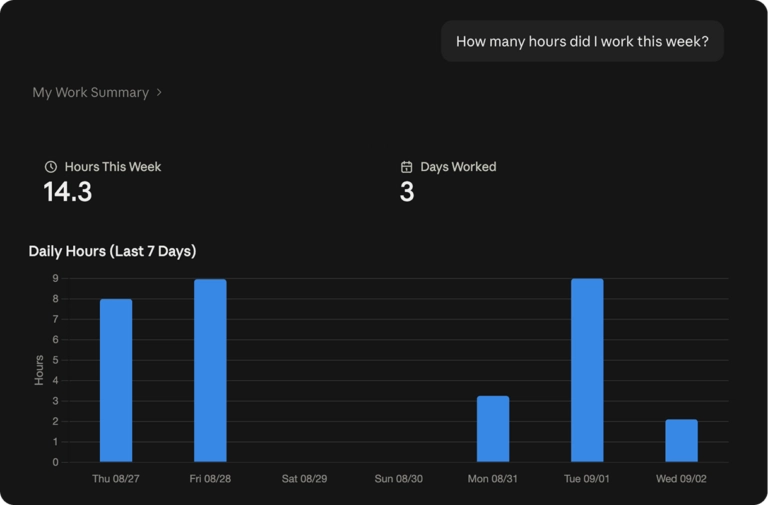
Connecting Jibble to Claude is as easy as finding it in Claude’s Connectors Directory, clicking Connect, and signing in. Not every compatible time tracking tool offers this simple setup; some require additional configuration.
Employee monitoring
Employee monitoring software already recorded data such as activity levels, app usage, and screenshots. AI, within monitoring tools, can analyze that data and draw attention to patterns that might otherwise require checking several reports.
For example, WebWork, a time tracking and employee monitoring platform, uses AI in its Smart Monitoring feature to analyze employee data and categorize performance as Positive, Neutral, Attention Needed, Negative, or Irregular Activity Risk, helping managers identify areas to review.
Time Champ, another employee monitoring software, uses AI to predict attrition from activity patterns, work-life balance signals, and burnout indicators.
5. Enhancing Business Intelligence
Business intelligence already helped teams turn company data into useful information for decision-making. Business intelligence features in workplace software let employees create dashboards and charts to compare sales figures, track costs, and monitor performance.
AI builds on these capabilities by using historical data to make predictions, automatically detecting unusual changes, and identifying which parts of the data contributed to those changes.
For example, Salesforce, a customer relationship management (CRM) platform, includes Einstein Forecasting, an AI-powered feature, which analyzes sales opportunity data and predicts how much a team is likely to sell by the end of a forecasting period.
Google Analytics, a software for analyzing website and app performance, uses its AI-powered Analytics Intelligence features to detect unusual changes and emerging trends automatically. These insights can help teams decide what to investigate or adjust.
Challenges and Ethical Considerations of AI
While the benefits are clear, AI in the workplace comes with important questions.
1. Privacy Concerns
Is AI time tracking too invasive? Not if done right. The key is transparency and consent.
Companies should:
- Clearly explain what’s being tracked and why
- Allow employees access to their own data
- Choose tools with strong privacy controls and encryption
2. Job Displacement vs. Job Augmentation
In the World Economic Forum Future of Jobs Report 2025, big changes in the job market between 2025 and 2030 are expected to affect about 22% of all jobs that exist today. About 92 million jobs may disappear but at the same time, around 170 million new jobs are likely to be created.
This significant shift is caused by a handful of factors, including AI. Around 86% of respondents in the report expect AI to transform their business by 2030.
Given all this data, it’s apparent that the focus must shift from fearing AI to learning how to work with it — which includes upskilling teams for this new reality.
3. Bias and Data Ethics
AI systems are only as fair and accurate as the data they’re trained on. If the underlying data is incomplete or skewed, the outputs can reinforce existing biases, leading to unfair performance evaluations, discriminatory practices, or inaccurate productivity metrics.
To mitigate these risks, organizations need to:
- Use diverse data sets
- Test AI data for bias
- Align with ethical standards and regulations (like GDPR or ISO 27001)
Final Thoughts
AI-powered software are becoming part of everyday work, but their value depends on how well they address the needs of the people using it. A feature that looks impressive in a demonstration is only useful if it works reliably with the information and tasks employees handle each day.
For businesses, this means looking beyond the AI label and considering where these capabilities can make a practical difference. Employees also need to understand what the software can do, what information it can access, and when its output needs checking.
As workplace software continues to evolve, human judgment will remain essential. The goal is to give people useful support while keeping them involved in the decisions that affect their work.
FAQs
Some frequently asked questions...
Which industries use Artificial Intelligence?
AI is used in several industries including finance, marketing, sales, healthcare, retail, manufacturing, time tracking, and professional services. Businesses use AI-powered software to forecast sales, analyze work patterns, automate workflows, and support everyday tasks.
Can AI make work easier?
Yes, AI can help research topics, draft content, identify meeting action items, and analyze data. Connected AI assistants can also perform supported actions in workplace software. For example, users can ask Claude to log hours, check attendance or compare team overtime in connected time tracking software like Jibble.
What AI-powered software can I use for work?
There’s a wide range of AI-powered software that you can use for work.
You can use Gmail with Gemini for drafting emails, Notion for sourced research reports, and Adobe Acrobat AI Assistant for questions about documents. Microsoft Teams with Copilot helps with meetings, Salesforce’s Einstein Forecasting predicts sales, and Jibble’s AI features help you manage and analyze time records.
