
Software Absensi Siswa dan Guru Gratis
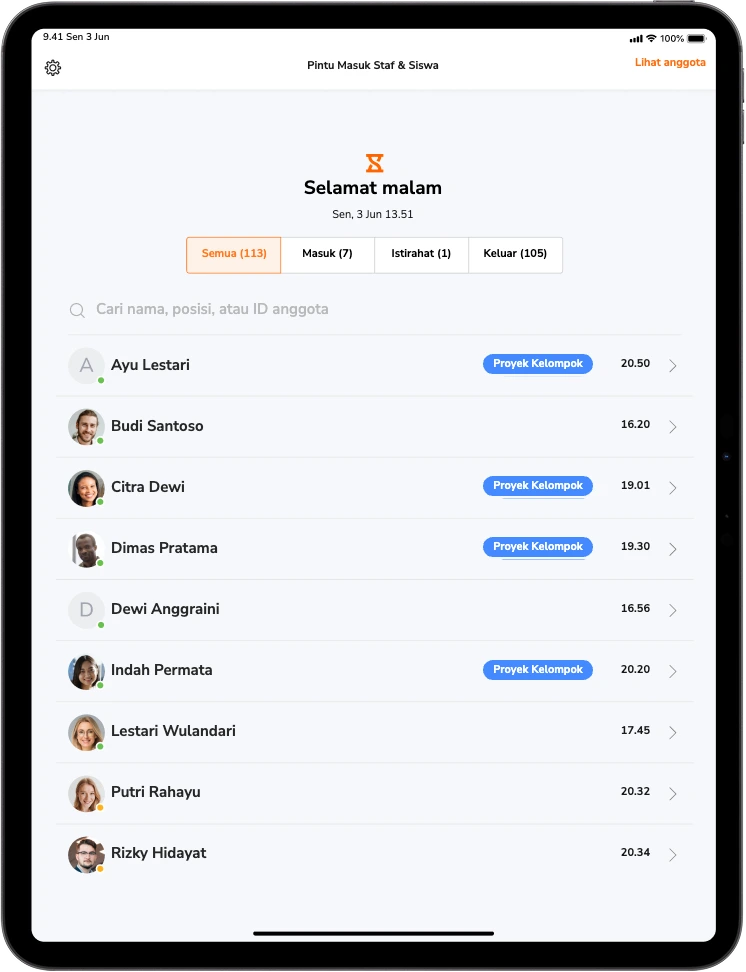
Siswa dan guru bisa absen secara mandiri menggunakan face recognition, tablet yang tersedia di dekat pintu, atau ponsel masing-masing. Semua proses absensi selesai sebelum kelas dimulai.
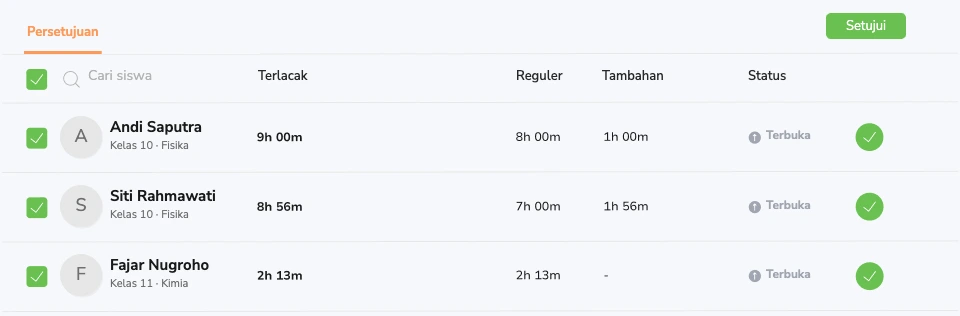

Data absensi yang sama juga berlaku untuk guru.
Data absensi siswa dan jam kerja staf tercatat dalam satu sistem, jadi tidak perlu lagi mengumpulkan ulang data setiap bulan berdasarkan ingatan saat menyiapkan penggajian.
Timesheet yang terisi otomatis
Guru dan staf pendukung mencatat kehadiran dengan cara yang sama seperti siswa. Jam kerja, waktu istirahat, jam pengganti, dan lembur tercatat otomatis sepanjang minggu berdasarkan jadwal yang Anda tetapkan, tanpa perlu memasukkan semuanya secara manual setiap Jumat sore.
Aplikasi timesheet →Pengganti, cuti, dan ketidakhadiran dalam satu tempat
Permintaan cuti tercatat, saldo cuti diperbarui, dan setiap persetujuan dilengkapi dengan informasi siapa yang menyetujuinya. Saat seorang guru tidak hadir, Anda bisa langsung melihat siapa yang menggantikannya dan berapa lama penggantian berlangsung. Detail seperti inilah yang sering terlewat.
Manajemen cuti → Laporan siap digunakan oleh bagian administrasi dan penggajian
Filter laporan berdasarkan guru, departemen, kampus, atau periode penggajian. Ekspor data ke CSV atau XLS untuk keperluan penggajian. Anda juga bisa memantau data absensi, seperti keterlambatan, ketidakhadiran berulang, dan jam mengajar per kelas, dalam satu rangkaian laporan tanpa perlu menggunakan spreadsheet terpisah.
Pelaporan dan analitik →Waktu berdasarkan proyek, mata pelajaran, dan aktivitas
Siswa mencatat waktu yang dihabiskan untuk proyek tugas, kegiatan lab, atau penempatan kerja, sementara staf mencatat jam kerja untuk departemen, klub, atau aktivitas lainnya. Cukup buat daftar aktivitas satu kali, lalu semua orang bisa memilih aktivitas yang sesuai saat mencatat waktu. Dengan begitu, aktivitas selama satu semester bisa direkap dengan mudah tanpa perlu membuat spreadsheet terpisah.
Time tracker proyek → Enam cara mencatat kehadiran. Pilih yang paling sesuai untuk sekolah Anda.
Gunakan tablet bersama yang ditempatkan di dekat pintu atau ponsel masing-masing siswa. Anda bisa menerapkan metode yang berbeda untuk setiap kelas, kampus, atau tingkat. Apa pun cara yang digunakan siswa untuk mencatat kehadiran, semua datanya akan tersimpan dalam satu sistem yang sama.
Face recognition
Siswa mengarahkan wajah ke perangkat untuk mencocokkan wajahnya dengan data yang terdaftar. Setelah terverifikasi, kehadiran tercatat dan foto tersimpan sebagai bukti.
GPS & geofencing
Tentukan batas area di sekitar kampus. Saat siswa tiba dan mencatat kehadiran, lokasi mereka akan tercatat bersama data absensi.
Tag NFC
Tempelkan tag NFC pada ponsel atau tablet yang ditempatkan di dekat pintu kelas. Siswa cukup menempelkan ponsel mereka ke tag untuk mencatat kehadiran, tanpa perlu membuka aplikasi atau mengantre di meja depan.
Kartu RFID
Kartu identitas siswa tetap bisa digunakan seperti biasa. Cukup tempelkan kartu ke alat pembaca untuk mencatat kehadiran.
Kode PIN
Masukkan PIN empat digit pada kios absensi bersama, cocok untuk area yang tidak mengizinkan penggunaan kamera. Tidak perlu membawa kartu atau perangkat tambahan yang berisiko hilang.
Kode QR
Setiap siswa dan guru memiliki kode QR masing-masing. Cukup pindai kode QR di kios absensi, lalu data kehadiran akan diperbarui secara otomatis.
Semua siswa dan guru tercakup, tanpa biaya per pengguna
Mulai dari kelas dengan 30 siswa hingga kampus dengan 12.000 siswa, harganya tetap sama. Kelompokkan pengguna berdasarkan tingkat, mata pelajaran, atau kampus, lalu atur hak akses admin dan guru sesuai peran masing-masing.
Apa saja perubahan yang dirasakan staf administrasi sekolah dengan Jibble.
Data absensi tetap tercatat, tanpa perlu menghabiskan waktu sore untuk merekapnya secara manual.
Ada empat hal yang biasanya ditanyakan sekolah sebelum beralih ke Jibble.
“Apakah siswa benar-benar akan mau menggunakannya?”
Siswa mencatat kehadiran sendiri melalui tablet di dekat pintu saat masuk kelas. Prosesnya cepat, tanpa kartu, kode, atau antrean. Dalam mode cepat, kehadiran satu kelas penuh bisa tercatat dalam waktu kurang dari satu menit, sehingga pelajaran bisa dimulai tanpa banyak waktu terbuang.
Timesheet Jibble sangat membantu untuk mencatat kehadiran. Saya suka karena saya bisa dengan mudah mengubah tablet apa pun menjadi kios absensi menggunakan aplikasi ini. Sangat praktis dan berfungsi dengan baik, baik saat online maupun offline.
“Bisakah kami memercayai data yang dihasilkan?”
Face recognition memverifikasi identitas siswa sebelum kehadiran tercatat, sementara geofence memastikan absensi dilakukan di area kampus. Guru tetap bisa mengoreksi catatan absensi, dan setiap perubahan mencatat siapa yang melakukannya serta kapan.
Alat ini membantu kami memantau kehadiran, termasuk saat guru tidak berada di gedung sekolah. Dengan alat ini, semua staf bisa mencatat kehadiran setiap pagi. Administrator juga dapat memeriksa timesheet harian untuk mengetahui siapa yang masuk kerja dan siapa yang tidak.
“Apakah staf juga tercakup?”
Sistem yang sama juga mencatat kehadiran guru dan staf pendukung. Jam pengganti, lembur, dan cuti tercatat saat terjadi dan bisa diekspor untuk keperluan penggajian, sehingga tidak perlu lagi mengumpulkan ulang data setiap bulan secara manual.
Timesheet Jibble memudahkan kami memantau jam kerja guru. Ini sangat membantu meningkatkan produktivitas tim kami!
“Berapa biaya yang perlu kami keluarkan sesuai skala sekolah kami?”
Tidak ada biaya, berapa pun skala sekolah Anda. Gratis selamanya untuk siswa dan staf tanpa batas. Anda juga bisa mengelompokkan mereka berdasarkan tingkat, mata kuliah, atau kampus, serta mengatur hak akses admin dan guru sesuai peran masing-masing. Bahkan, universitas seperti Harvard pun menggunakannya.
Saya menyukai Jibble karena beberapa alasan. Salah satunya tentu saja harganya. Selain itu, Jibble juga tersedia dalam bentuk aplikasi mobile. Aplikasi ini membantu siswa saya mencatat waktu yang digunakan untuk mengerjakan proyek sekaligus mempersiapkan mereka untuk memasuki dunia kerja.
Tak perlu lagi menyebut nama satu per satu. Langsung mulai pelajaran.
- Gratis selamanya
- Jumlah siswa dan staf tanpa batas
- Tanpa kartu kredit
Pertanyaan Umum
Beberapa pertanyaan yang sering diajukan...